

Overview of Backups
What Are Database Backups?
RDS for MySQL automatically creates backups for DB instances during the backup time window. The system retains the backups based on your specified retention period (1 to 732 days).
A backup file is generated each time a backup is complete. If the instance fails or data is damaged, you can use the backup to restore the instance, ensuring data availability.
Video
Backup Types
RDS for MySQL supports multiple backup types. For details, see Backup Types.
Backup Triggering
- Single-node instance
A single-node architecture, which is more cost-effective than mainstream primary/standby DB instances. After a backup is triggered, data is backed up from the primary instance and stored as a package on OBS. The backup does not take up storage space of the instance.
- Primary/standby instance
An HA architecture. In a primary/standby pair, each instance has the same instance class. After a backup task is triggered, data is backed up from the standby instance (or from the primary instance only when there is a long primary/standby replication delay) and stored as a package on OBS. The backup does not take up storage space of the instance.
If a database or table in the primary instance is maliciously or mistakenly deleted, the database or table in the standby instance will also be deleted. In this case, you can only use backups to restore the deleted data.
If the standby instance is abnormal or the primary/standby replication latency exceeds 24 hours, automated full backup will be performed on the primary instance. This will consume disk I/O and other resources on the primary instance, potentially causing a significant performance impact. You can rebuild the standby instance to fix the fault. For details, see Table 2.
How Data Is Backed Up
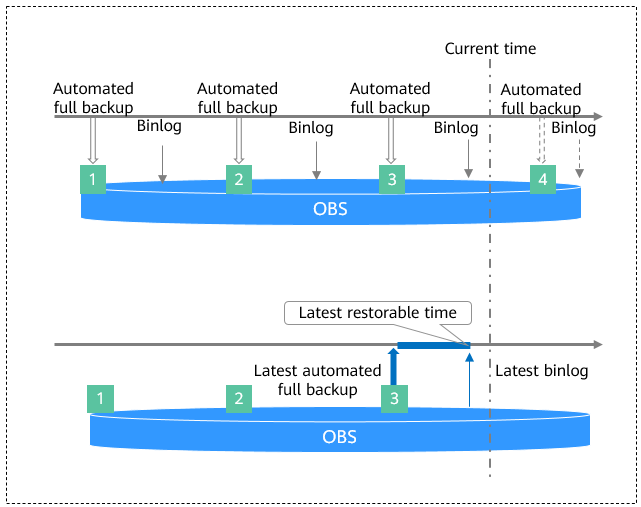
RDS for MySQL automated backups are enabled by default and cannot be disabled. RDS for MySQL performs automated full backups based on the time window and cycle specified in the backup policy. It also backs up data changes made after the most recent automated full or binlog backup every 5 minutes or when a certain amount of incremental data is generated.
- Restoration from backups: The system restores instance data to the state at the end of the full backup you choose. This action restores the data for the entire instance.
- Point-in-time recovery (PITR): When you restore an instance to a point in time, the system downloads the most recent full backup from OBS and uses it for restoration. After the restoration is complete, the system replays binlogs to the specified point in time.
Backup Compression Ratio
RDS uses sysbench to import data models and a certain amount of data. After data is backed up, the compression ratio is about 80%. The more duplicate data there is, the higher the compression ratio is.
Compression ratio = Space occupied by backup files/Space occupied by data files x 100%
Backup Storage Location and Billing
All backups are stored as compressed packages in OBS.
Billing rules without snapshot backups enabled: Backups are uploaded to OBS to occupy backup space. When the used backup space exceeds the free quota provided, you are billed for the excess space based on usage. For billing details, see How Are RDS Backups Billed?
- For snapshots created before September 2025: No backup space is provided for free. You are billed for database server backup vaults in CBR on a pay-per-use basis. For details, see How Is CBR Billed?
- For snapshots created in September 2025 and later: RDS provides free snapshot backup space equal to the size of your purchased storage space. After the free space is used up, you are billed for CBR snapshots in RDS on a pay-per-use basis. For details, see RDS Pricing Details.
For example, if you purchase an instance with 40 GB of storage, you receive 80 GB of free backup space, which includes 40 GB for log backups and 40 GB for snapshot backups.
Figure 2 Storage and backup

- You can configure backup billing alerts on the Overview page to receive a notification before the free backup space is used up.
Viewing Backup Storage Usage
On the RDS instance list page, choose Backups in the left navigation pane to view the backup storage usage of undeleted MySQL instances on the Backup Summary tab page.
You can configure backup billing alerts on the Overview page to receive a notification before the free backup space is used up.

| Backup Usage Type | Description |
|---|---|
| Total Free Log Backup Storage | You are provided with free log backup storage equal to the instance's storage capacity. This storage is used to store full physical backups, incremental backups, and audit logs of the instance. Any usage exceeding the free quota is billed on a pay-per-use basis. For details, see the "Physical backup" description under Backup Storage Pricing. |
| Total Free Snapshot Backup Storage | Only the free snapshot backup storage provided by RDS is included. After snapshot backup is enabled, you are provided with free snapshot backup storage equal to the instance's storage capacity. Any usage exceeding the free quota is billed on a pay-per-use basis. For details, see the "Snapshot backup" description under Backup Storage Pricing. |
| Total | The total usage of log backups, snapshot backups, and cross-region backups for RDS for MySQL instances under the current region and account. |
| Log Backup Usage | The usage of full physical backups, incremental backups, and audit logs for RDS for MySQL instances under the current region and account. |
| Snapshot Backup Usage | The usage of snapshot backups generated for RDS for MySQL instances under the current region and account in September 2025 or later. |
| Cross-Region Backup Usage | The usage of full physical backups and incremental backups for RDS for MySQL instances whose destination region is the current region. |
Backup Cleanup
- Manual backups and automated backups are cleaned up in different ways:
- A manual backup is a full backup triggered by the user. It is retained until the user manually deletes it while the instance still exists.
- Automated backups cannot be manually deleted. To delete them, you can adjust the retention period specified in your automated backup policy. When the retention period expires, automated backups will be deleted.
- When a DB instance is deleted, you can configure the retention policies for its automated and manual backups. For details, see Deleting Pay-per-Use DB Instances or Read Replicas and Unsubscribing from a Yearly/Monthly Instance.
- Local binlog cleanup
If the retention period is set to 0, the binlogs of your DB instance will be deleted once they are synchronized to the standby instance and read replicas and successfully backed up to OBS.
If the retention period is set to a value greater than 0, for example, 1 day, the local binlogs will be retained for one day after they are synchronized to the standby instance and read replicas from the primary instance and successfully backed up to OBS. After the retention period expires, the local binlogs will be automatically deleted.
What is your overall rating for this page?
Thank you very much for your feedback. We will continue working to improve the documentation.See the reply and handling status in My Cloud VOC.
For any further questions, feel free to contact us through the chatbot.
Chatbot


