

Deleting Pay-per-Use DB Instances or Read Replicas
Scenarios
To release resources, you can delete RDS primary instances or read replicas billed on the pay-per-use basis as required on the Instances page. To delete a primary instance billed on a yearly/monthly basis, you must unsubscribe from the order first. For details, see Unsubscribing from a Yearly/Monthly Instance.
Before deleting an instance, check whether there are any manual backups. If you do not need to retain manual backups, delete them when deleting the DB instance. If you have purchased an EIP, release or unsubscribe from it before deleting the DB instance to reduce expenses.
If an RDS for MySQL instance has an EIP bound, you can unbind and delete the pay-per-use EIP when deleting the instance to reduce costs. If you do not select the option for deleting the EIP or if the EIP bound to the instance is billed on a yearly/monthly basis, the EIP will only be unbound from the instance after the instance is deleted but the EIP will not be deleted. You can manually release or unsubscribe from the EIP later.
Billing
- You will not be billed for the instances that were not successfully created.
- If you delete a pay-per-use DB instance, its automated backups will also be deleted and you will no longer be billed for them. Manual backups, however, will be retained and generate additional costs.
Constraints
- DB instances cannot be deleted when operations are being performed on them. They can be deleted only after the operations are complete.
- If a backup of a DB instance is being restored, the instance cannot be deleted.
- A maximum of 50 pay-per-use DB instances can be deleted at a time.
- If you delete a primary DB instance, its standby DB instance and read replicas (if any) are also deleted automatically. Exercise caution when performing this operation.
- Deleted DB instances cannot be recovered and resources are released. Exercise caution when performing this operation. If you want to retain data, create a manual backup first before deleting a DB instance.
- You can rebuild a DB instance that was deleted up to 7 days ago from the recycle bin.
- You can use the retained manual backup to restore a DB instance. For details, see Restoring an Instance from Backups.
- After a DB instance is deleted, retained automated backups cannot be exported, restored, or replicated. They can only be downloaded.
Procedure
- Log in to the RDS console.
- Click
 in the upper left corner and select a region.
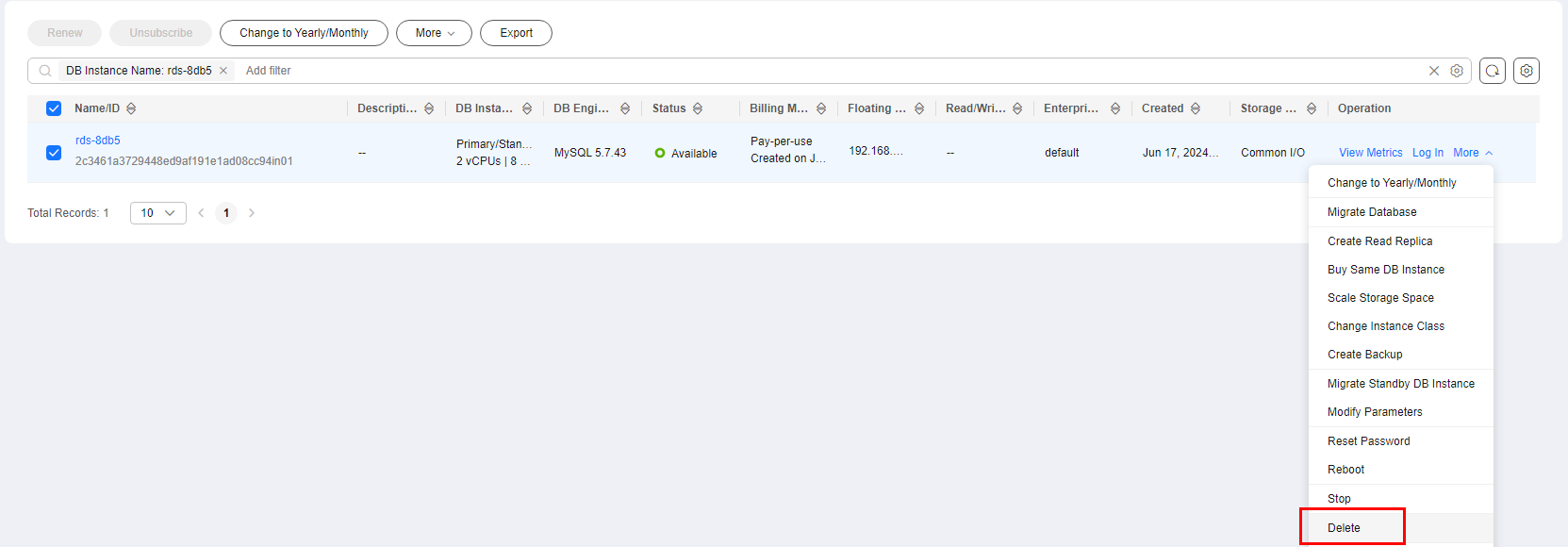
- On the Instances page, locate the primary DB instance to be deleted and choose More > Delete in the Operation column. Figure 1 Primary instance list
- In the displayed Delete DB Instance dialog box, configure the related parameters, enter DELETE, and click OK to submit the request. Figure 2 Deleting the instance (with no EIP bound)
 Figure 3 Deleting the instance (with an EIP bound)

Table 1 Parameter description Parameter
Description
Reset the Backup Retention Policy After Instance Deletion
The Backup Retention Policy After Instance Deletion column displays the backup retention policy configured for the instance when it is released.
Existing backups of the instance are retained according to the configured policy when the instance is deleted. Retained backups will continue to be billed. For details, see Backup Space Pricing.
You can select Reset the Backup Retention Policy After Instance Deletion to reconfigure the policy.- Automated Backup
- Do not keep them: All automated backups of the instance are deleted when the instance is deleted.
- Keep the last backup: Only the latest automated backup of the instance is retained after the instance is deleted.
- Keep all: All existing automated backups of the instance are retained after the instance is deleted.
- Manual Backup
- Do not keep them: All manual backups of the instance are deleted when the instance is deleted.
- Keep the last backup: Only the latest manual backup of the instance is retained after the instance is deleted.
- Keep all: All manual backups of the instance are retained after the instance is deleted.
Associated Resources
When deleting an RDS for MySQL instance, you can unbind and delete the pay-per-use EIP bound to the instance.
- Automated Backup
- If you have enabled operation protection, click Send Code in the displayed Identity Verification dialog box and enter the obtained verification code. Then, click OK.
Two-factor authentication improves the security of your account. For details about how to enable operation protection, see Identity and Access Management User Guide.
- Refresh the Instances page later. The instance is deleted.
- In the navigation pane, choose Backups and click the Backups of Deleted Instances tab to view the backups retained for the instance. Figure 4 Backups retained for released instances

- Log in to the RDS console.
- Click in the upper left corner and select a region.
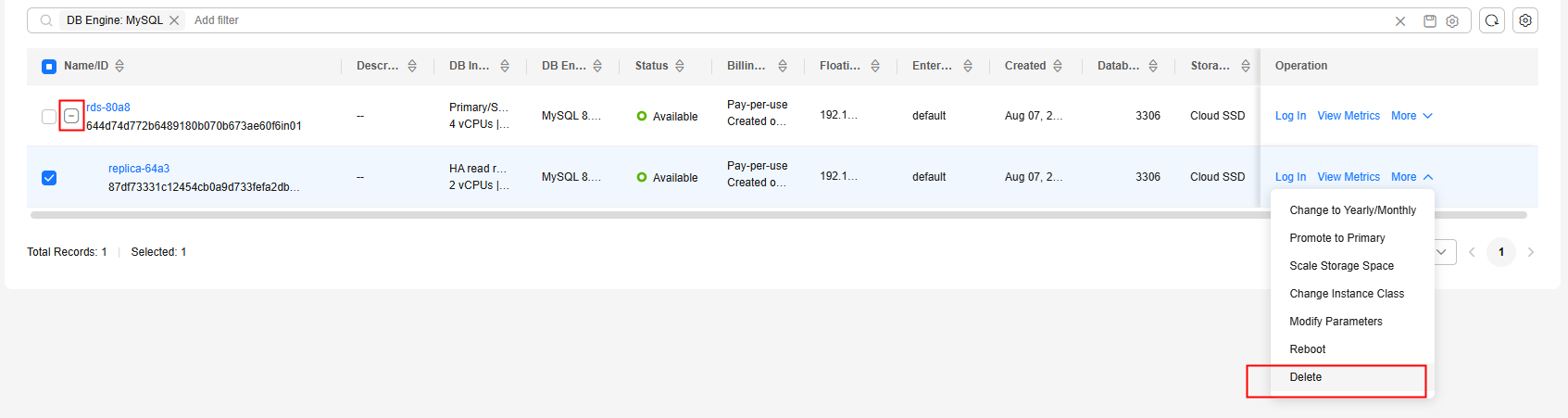
- On the Instances page, locate the target DB instance and click
 . All the read replicas created for the DB instance are displayed.
- Locate the read replica to be deleted and click More > Delete in the Operation column. Figure 5 Read replica list
- In the displayed dialog box, enter DELETE and click OK.
- If you have enabled operation protection, click Send Code in the displayed Identity Verification dialog box and enter the obtained verification code. Then, click OK.
Two-factor authentication improves the security of your account. For details about how to enable operation protection, see Identity and Access Management User Guide.
- Refresh the DB instance list later to check that the deletion is successful.
- Log in to the RDS console.
- Click in the upper left corner and select a region.
- On the Instances page, select the pay-per-use DB instances to be deleted and choose above the DB instance list.
- In the displayed dialog box, enter DELETE and click OK.
When deleting an RDS for MySQL instance, you can unbind and delete the pay-per-use EIP bound to the instance.
- If you have enabled operation protection, click Send Code in the displayed Identity Verification dialog box and enter the obtained verification code. Then, click OK.
Two-factor authentication improves the security of your account. For details about how to enable operation protection, see Identity and Access Management User Guide.
- Refresh the DB instance list later to check that the deletion is successful.
Related APIs
What is your overall rating for this page?
Thank you very much for your feedback. We will continue working to improve the documentation.See the reply and handling status in My Cloud VOC.
For any further questions, feel free to contact us through the chatbot.
Chatbot


