


通过ElasticsearchClient接入集群
CSS服务的Elasticsearch集群支持通过Java API Client进行数据查询和管理操作。Java API Client作为Elasticsearch 8.x版本提供的官方Java客户端,对Elasticsearch的原生API进行了封装,用户只需构造相应的请求结构,即可实现对Elasticsearch集群的访问。Elasticsearch Java API Client的详细使用指导请参见Java API Client。

Elasticsearch 7.x版本推荐使用High Level REST Client作为连接方式,而8.x版本后统一使用Java API Client。CSS服务的7.10.2版本的Elasticsearch集群虽然兼容Java API Client连接方式,但需注意高版本客户端的某些特性可能不受支持。为确保功能兼容性,建议在使用前确认目标接口已在CSS集群中实现并验证通过。
前提条件
- Elasticsearch集群处于可用状态,且集群版本号是7.10.2、镜像版本号不低于7.10.2_25.3.0_xxx。
- 运行Java代码的服务器与Elasticsearch集群之间网络互通。
- 根据集群的网络配置方式,获取集群的访问地址,操作指导请参见获取集群访问地址。
- 确认服务器已安装Java,要求JDK版本为1.8及以上,JDK1.8官网下载地址:Java Downloads。
引入依赖
在运行Java代码的服务器中引入Java API Client依赖,有如下两种方式:
- Maven方式:
<dependencies>
	<dependency>
		<groupId>co.elastic.clients</groupId>
		<artifactId>elasticsearch-java</artifactId>
		<version>8.19.0</version>
	</dependency>
	<dependency>
		<groupId>com.fasterxml.jackson.core</groupId>
		<artifactId>jackson-databind</artifactId>
		<version>2.17.0</version>
	</dependency>
</dependencies>
- Gradle方式:
dependencies {
    implementation 'co.elastic.clients:elasticsearch-java:8.19.0'
    implementation 'com.fasterxml.jackson.core:jackson-databind:2.17.0'
}
接入集群
当使用Java API Client访问不同安全类型的Elasticsearch集群时,示例代码会有差异,请根据实际业务场景选择参考文档。
| Elasticsearch集群安全类型 | 是否加载安全证书 | 参考文档 |
|---|---|---|
| 非安全模式 | - | |
| 安全模式+HTTP协议 安全模式+HTTPS协议 | 否 | |
| 安全模式+HTTPS协议 | 是 |
ElasticsearchClient连接非安全集群
使用Elasticsearch Java API Client连接非安全模式的Elasticsearch集群,并查询索引“test”是否存在。代码示例如下:
import co.elastic.clients.elasticsearch.ElasticsearchClient;
import co.elastic.clients.elasticsearch.indices.CreateIndexResponse;
import co.elastic.clients.elasticsearch.indices.DeleteIndexResponse;
import co.elastic.clients.elasticsearch.indices.GetIndexResponse;
import co.elastic.clients.json.jackson.JacksonJsonpMapper;
import co.elastic.clients.transport.ElasticsearchTransport;
import co.elastic.clients.transport.rest_client.RestClientTransport;

import org.apache.http.HttpHost;
import org.apache.http.auth.AuthScope;
import org.apache.http.auth.UsernamePasswordCredentials;
import org.apache.http.client.CredentialsProvider;
import org.apache.http.conn.ssl.NoopHostnameVerifier;
import org.apache.http.impl.client.BasicCredentialsProvider;
import org.apache.http.nio.conn.ssl.SSLIOSessionStrategy;
import org.elasticsearch.client.RestClient;

import java.io.File;
import java.io.FileInputStream;
import java.io.IOException;
import java.io.InputStream;
import java.security.KeyManagementException;
import java.security.KeyStore;
import java.security.NoSuchAlgorithmException;
import java.security.SecureRandom;
import java.security.cert.CertificateException;
import java.security.cert.X509Certificate;
import java.util.Arrays;
import java.util.List;
import java.util.concurrent.TimeUnit;

import javax.net.ssl.SSLContext;
import javax.net.ssl.TrustManager;
import javax.net.ssl.TrustManagerFactory;
import javax.net.ssl.X509TrustManager;

public class Main {

    /**
     * constructHttpHosts函数转换host集群节点IP列表。
     */
    public static HttpHost[] constructHttpHosts(List<String> host, int port, String protocol) {
        return host.stream().map(p -> new HttpHost(p, port, protocol)).toArray(HttpHost[]::new);
    }

    private static ElasticsearchClient create(List<String> host, int port, String protocol, int connectTimeout,
        int connectionRequestTimeout, int socketTimeout, String username, String password, String certFilePath,
        String certPassword) throws IOException {
        // Create the low-level client
        RestClient restClient = RestClient.builder(constructHttpHosts(host, port, protocol))
            .setRequestConfigCallback(requestConfig -> requestConfig.setConnectTimeout(connectTimeout)
                .setConnectionRequestTimeout(connectionRequestTimeout)
                .setSocketTimeout(socketTimeout))
            .setHttpClientConfigCallback(httpClientBuilder -> {
                // enable user authentication
                if (username != null && password != null) {
                    final CredentialsProvider credentialsProvider = new BasicCredentialsProvider();
                    credentialsProvider.setCredentials(AuthScope.ANY,
                        new UsernamePasswordCredentials(username, password));
                    httpClientBuilder.setDefaultCredentialsProvider(credentialsProvider);
                }
                // set keepalive
                httpClientBuilder.setKeepAliveStrategy(((httpResponse, httpContext) -> TimeUnit.MINUTES.toMinutes(10)));
                // enable SSL / TLS
                SSLContext sc = (certFilePath != null && certPassword != null) ?
                    createContextFromCaCert(certFilePath, certPassword) : createTrustAllCertsContext();

                SSLIOSessionStrategy sslStrategy = new SSLIOSessionStrategy(sc, new NoopHostnameVerifier());
                httpClientBuilder.setSSLStrategy(sslStrategy);

                httpClientBuilder.setMaxConnTotal(500);
                httpClientBuilder.setMaxConnPerRoute(300);
                return httpClientBuilder;
            })
            .build();

        // Create the transport with a Jackson mapper
        ElasticsearchTransport transport = new RestClientTransport(restClient, new JacksonJsonpMapper());

        // And create the API client
        return new ElasticsearchClient(transport);
    }

    private static SSLContext createTrustAllCertsContext() {
        try {
            SSLContext sslContext = SSLContext.getInstance("SSL");
            sslContext.init(null, trustAllCerts, new SecureRandom());
            return sslContext;
        } catch (NoSuchAlgorithmException | KeyManagementException e) {
            throw new RuntimeException("Can not create the SSLContext", e);
        }
    }

    private static SSLContext createContextFromCaCert(String certFilePath, String certPassword) {
        try {
            // enable SSL / TLS
            TrustManager[] tm = {new MyX509TrustManager(certFilePath, certPassword)};
            SSLContext sc = SSLContext.getInstance("SSL", "SunJSSE");
            //也可以使用SSLContext sslContext = SSLContext.getInstance("TLSv1.2");
            sc.init(null, tm, new SecureRandom());
            return sc;
        } catch (Exception e) {
            throw new RuntimeException(e);
        }
    }

    /**
     * trustAllCerts忽略证书配置
     */
    private static TrustManager[] trustAllCerts = new TrustManager[] {
        new X509TrustManager() {
            @Override
            public void checkClientTrusted(X509Certificate[] chain, String authType) throws CertificateException {
            }

            @Override
            public void checkServerTrusted(X509Certificate[] chain, String authType) throws CertificateException {
            }

            @Override
            public X509Certificate[] getAcceptedIssuers() {
                return null;
            }
        }
    };

    /**
     * 证书配置认证
     */
    private static class MyX509TrustManager implements X509TrustManager {
        X509TrustManager sunJSSEX509TrustManager;

        MyX509TrustManager(String certFilePath, String certPassword) throws Exception {
            File file = new File(certFilePath);
            if (!file.isFile()) {
                throw new Exception("Wrong Certification Path");
            }
            System.out.println("Loading KeyStore " + file + "...");
            InputStream in = new FileInputStream(file);
            KeyStore ks = KeyStore.getInstance("JKS");
            ks.load(in, certPassword.toCharArray());
            TrustManagerFactory tmf = TrustManagerFactory.getInstance("SunX509", "SunJSSE");
            tmf.init(ks);
            TrustManager[] tms = tmf.getTrustManagers();
            for (TrustManager tm : tms) {
                if (tm instanceof X509TrustManager) {
                    sunJSSEX509TrustManager = (X509TrustManager) tm;
                    return;
                }
            }
            throw new Exception("Couldn't initialize");
        }

        @Override
        public void checkClientTrusted(X509Certificate[] chain, String authType) {

        }

        @Override
        public void checkServerTrusted(X509Certificate[] chain, String authType) {

        }

        @Override
        public X509Certificate[] getAcceptedIssuers() {
            return new X509Certificate[0];
        }
    }

    /**
     * main函数参考如下,调用上面的create函数创建客户端,查询“test”索引是否存在。
     */
    public static void main(String[] args) throws IOException {
        ElasticsearchClient esClient = create(Arrays.asList("{访问集群的IP地址}"), 9200, "http", 1000, 1000, 1000, null, null, null, null);

        CreateIndexResponse indexRequest = esClient.indices()
            .create(createIndexBuilder -> createIndexBuilder.index("test"));
        boolean acknowledged = indexRequest.acknowledged();
        System.out.println("Create index successfully! " + acknowledged);

        GetIndexResponse getIndexResponse = esClient.indices().get(getIndexRequest -> getIndexRequest.index("test"));
        System.out.println("Query index successfully! \n" + getIndexResponse.toString());

        DeleteIndexResponse deleteResponse = esClient.indices()
            .delete(createIndexBuilder -> createIndexBuilder.index("test"));
        System.out.println("Delete index successfully! \n" + deleteResponse.toString());
    }
} 该示例代码为判断集群是否存在test索引,当返回“true”(索引存在)或“false”(索引不存在)时,表示正常返回查询结果,集群连接成功。
ElasticsearchClient连接安全集群(无证书)
使用Elasticsearch Java API Client在不加载安全证书的情况下连接安全模式的Elasticsearch集群(支持HTTP协议或HTTPS协议),查询索引“test”是否存在。代码示例如下:
import co.elastic.clients.elasticsearch.ElasticsearchClient;
import co.elastic.clients.elasticsearch.indices.CreateIndexResponse;
import co.elastic.clients.elasticsearch.indices.DeleteIndexResponse;
import co.elastic.clients.elasticsearch.indices.GetIndexResponse;
import co.elastic.clients.json.jackson.JacksonJsonpMapper;
import co.elastic.clients.transport.ElasticsearchTransport;
import co.elastic.clients.transport.rest_client.RestClientTransport;

import org.apache.http.HttpHost;
import org.apache.http.auth.AuthScope;
import org.apache.http.auth.UsernamePasswordCredentials;
import org.apache.http.client.CredentialsProvider;
import org.apache.http.conn.ssl.NoopHostnameVerifier;
import org.apache.http.impl.client.BasicCredentialsProvider;
import org.apache.http.nio.conn.ssl.SSLIOSessionStrategy;
import org.elasticsearch.client.RestClient;

import java.io.File;
import java.io.FileInputStream;
import java.io.IOException;
import java.io.InputStream;
import java.security.KeyManagementException;
import java.security.KeyStore;
import java.security.NoSuchAlgorithmException;
import java.security.SecureRandom;
import java.security.cert.CertificateException;
import java.security.cert.X509Certificate;
import java.util.Arrays;
import java.util.List;
import java.util.concurrent.TimeUnit;

import javax.net.ssl.SSLContext;
import javax.net.ssl.TrustManager;
import javax.net.ssl.TrustManagerFactory;
import javax.net.ssl.X509TrustManager;

public class Main {

    /**
     * constructHttpHosts函数转换host集群节点IP列表。
     */
    public static HttpHost[] constructHttpHosts(List<String> host, int port, String protocol) {
        return host.stream().map(p -> new HttpHost(p, port, protocol)).toArray(HttpHost[]::new);
    }

    private static ElasticsearchClient create(List<String> host, int port, String protocol, int connectTimeout,
        int connectionRequestTimeout, int socketTimeout, String username, String password, String certFilePath,
        String certPassword) throws IOException {
        // Create the low-level client
        RestClient restClient = RestClient.builder(constructHttpHosts(host, port, protocol))
            .setRequestConfigCallback(requestConfig -> requestConfig.setConnectTimeout(connectTimeout)
                .setConnectionRequestTimeout(connectionRequestTimeout)
                .setSocketTimeout(socketTimeout))
            .setHttpClientConfigCallback(httpClientBuilder -> {
                // enable user authentication
                if (username != null && password != null) {
                    final CredentialsProvider credentialsProvider = new BasicCredentialsProvider();
                    credentialsProvider.setCredentials(AuthScope.ANY,
                        new UsernamePasswordCredentials(username, password));
                    httpClientBuilder.setDefaultCredentialsProvider(credentialsProvider);
                }
                // set keepalive
                httpClientBuilder.setKeepAliveStrategy(((httpResponse, httpContext) -> TimeUnit.MINUTES.toMinutes(10)));
                // enable SSL / TLS
                SSLContext sc = (certFilePath != null && certPassword != null) ?
                    createContextFromCaCert(certFilePath, certPassword) : createTrustAllCertsContext();

                SSLIOSessionStrategy sslStrategy = new SSLIOSessionStrategy(sc, new NoopHostnameVerifier());
                httpClientBuilder.setSSLStrategy(sslStrategy);

                httpClientBuilder.setMaxConnTotal(500);
                httpClientBuilder.setMaxConnPerRoute(300);
                return httpClientBuilder;
            })
            .build();

        // Create the transport with a Jackson mapper
        ElasticsearchTransport transport = new RestClientTransport(restClient, new JacksonJsonpMapper());

        // And create the API client
        return new ElasticsearchClient(transport);
    }

    private static SSLContext createTrustAllCertsContext() {
        try {
            SSLContext sslContext = SSLContext.getInstance("SSL");
            sslContext.init(null, trustAllCerts, new SecureRandom());
            return sslContext;
        } catch (NoSuchAlgorithmException | KeyManagementException e) {
            throw new RuntimeException("Can not create the SSLContext", e);
        }
    }

    private static SSLContext createContextFromCaCert(String certFilePath, String certPassword) {
        try {
            // enable SSL / TLS
            TrustManager[] tm = {new MyX509TrustManager(certFilePath, certPassword)};
            SSLContext sc = SSLContext.getInstance("SSL", "SunJSSE");
            //也可以使用SSLContext sslContext = SSLContext.getInstance("TLSv1.2");
            sc.init(null, tm, new SecureRandom());
            return sc;
        } catch (Exception e) {
            throw new RuntimeException(e);
        }
    }

    /**
     * trustAllCerts忽略证书配置
     */
    private static TrustManager[] trustAllCerts = new TrustManager[] {
        new X509TrustManager() {
            @Override
            public void checkClientTrusted(X509Certificate[] chain, String authType) throws CertificateException {
            }

            @Override
            public void checkServerTrusted(X509Certificate[] chain, String authType) throws CertificateException {
            }

            @Override
            public X509Certificate[] getAcceptedIssuers() {
                return null;
            }
        }
    };

    /**
     * 证书配置认证
     */
    private static class MyX509TrustManager implements X509TrustManager {
        X509TrustManager sunJSSEX509TrustManager;

        MyX509TrustManager(String certFilePath, String certPassword) throws Exception {
            File file = new File(certFilePath);
            if (!file.isFile()) {
                throw new Exception("Wrong Certification Path");
            }
            System.out.println("Loading KeyStore " + file + "...");
            InputStream in = new FileInputStream(file);
            KeyStore ks = KeyStore.getInstance("JKS");
            ks.load(in, certPassword.toCharArray());
            TrustManagerFactory tmf = TrustManagerFactory.getInstance("SunX509", "SunJSSE");
            tmf.init(ks);
            TrustManager[] tms = tmf.getTrustManagers();
            for (TrustManager tm : tms) {
                if (tm instanceof X509TrustManager) {
                    sunJSSEX509TrustManager = (X509TrustManager) tm;
                    return;
                }
            }
            throw new Exception("Couldn't initialize");
        }

        @Override
        public void checkClientTrusted(X509Certificate[] chain, String authType) {

        }

        @Override
        public void checkServerTrusted(X509Certificate[] chain, String authType) {

        }

        @Override
        public X509Certificate[] getAcceptedIssuers() {
            return new X509Certificate[0];
        }
    }

    /**
     * main函数参考如下,调用上面的create函数创建客户端,查询“test”索引是否存在。
     */
    public static void main(String[] args) throws IOException {
        ElasticsearchClient esClient = create(Arrays.asList("{访问集群的IP地址}"), 9200, "https", 1000, 1000, 1000, "{用户名}", "{密码}", null, null);

        CreateIndexResponse indexRequest = esClient.indices()
            .create(createIndexBuilder -> createIndexBuilder.index("test"));
        boolean acknowledged = indexRequest.acknowledged();
        System.out.println("Create index successfully! " + acknowledged);

        GetIndexResponse getIndexResponse = esClient.indices().get(getIndexRequest -> getIndexRequest.index("test"));
        System.out.println("Query index successfully! \n" + getIndexResponse.toString());

        DeleteIndexResponse deleteResponse = esClient.indices()
            .delete(createIndexBuilder -> createIndexBuilder.index("test"));
        System.out.println("Delete index successfully! \n" + deleteResponse.toString());
    }
} | 参数 | 描述 |
|---|---|
| host | 集群访问地址,当存在多个IP地址时,中间用“,”隔开。 |
| port | 集群的连接端口,默认是“9200”。 |
| protocol | 连接协议,“http”或者“https”,根据集群实际情况填写。 |
| connectTimeout | 连接超时时间(毫秒)。 |
| connectionRequestTimeout | socket连接请求超时时间(毫秒)。 |
| socketTimeout | socket请求超时时间(毫秒)。 |
| username | 访问集群的用户名。 |
| password | 用户名对应的密码。 |
该示例代码为判断集群是否存在test索引,当返回“true”(索引存在)或“false”(索引不存在)时,表示正常返回查询结果,集群连接成功。
ElasticsearchClient连接安全集群(加载证书)
使用Elasticsearch Java API Client在加载安全证书的情况下连接安全模式+HTTPS协议的Elasticsearch集群,查询索引“test”是否存在。代码示例如下:
连接安全模式+HTTPS协议的Elasticsearch集群需要先提前准备好安全证书,操作指导请参见获取并上传安全证书。
import co.elastic.clients.elasticsearch.ElasticsearchClient;
import co.elastic.clients.elasticsearch.indices.CreateIndexResponse;
import co.elastic.clients.elasticsearch.indices.DeleteIndexResponse;
import co.elastic.clients.elasticsearch.indices.GetIndexResponse;
import co.elastic.clients.json.jackson.JacksonJsonpMapper;
import co.elastic.clients.transport.ElasticsearchTransport;
import co.elastic.clients.transport.rest_client.RestClientTransport;

import org.apache.http.HttpHost;
import org.apache.http.auth.AuthScope;
import org.apache.http.auth.UsernamePasswordCredentials;
import org.apache.http.client.CredentialsProvider;
import org.apache.http.conn.ssl.NoopHostnameVerifier;
import org.apache.http.impl.client.BasicCredentialsProvider;
import org.apache.http.nio.conn.ssl.SSLIOSessionStrategy;
import org.elasticsearch.client.RestClient;

import java.io.File;
import java.io.FileInputStream;
import java.io.IOException;
import java.io.InputStream;
import java.security.KeyManagementException;
import java.security.KeyStore;
import java.security.NoSuchAlgorithmException;
import java.security.SecureRandom;
import java.security.cert.CertificateException;
import java.security.cert.X509Certificate;
import java.util.Arrays;
import java.util.List;
import java.util.concurrent.TimeUnit;

import javax.net.ssl.SSLContext;
import javax.net.ssl.TrustManager;
import javax.net.ssl.TrustManagerFactory;
import javax.net.ssl.X509TrustManager;

public class Main {

    /**
     * constructHttpHosts函数转换host集群节点IP列表
     */
    public static HttpHost[] constructHttpHosts(List<String> host, int port, String protocol) {
        return host.stream().map(p -> new HttpHost(p, port, protocol)).toArray(HttpHost[]::new);
    }

    private static ElasticsearchClient create(List<String> host, int port, String protocol, int connectTimeout,
        int connectionRequestTimeout, int socketTimeout, String username, String password, String certFilePath,
        String certPassword) throws IOException {
        // Create the low-level client
        RestClient restClient = RestClient.builder(constructHttpHosts(host, port, protocol))
            .setRequestConfigCallback(requestConfig -> requestConfig.setConnectTimeout(connectTimeout)
                .setConnectionRequestTimeout(connectionRequestTimeout)
                .setSocketTimeout(socketTimeout))
            .setHttpClientConfigCallback(httpClientBuilder -> {
                // enable user authentication
                if (username != null && password != null) {
                    final CredentialsProvider credentialsProvider = new BasicCredentialsProvider();
                    credentialsProvider.setCredentials(AuthScope.ANY,
                        new UsernamePasswordCredentials(username, password));
                    httpClientBuilder.setDefaultCredentialsProvider(credentialsProvider);
                }
                // set keepalive
                httpClientBuilder.setKeepAliveStrategy(((httpResponse, httpContext) -> TimeUnit.MINUTES.toMinutes(10)));
                // enable SSL / TLS
                SSLContext sc = (certFilePath != null && certPassword != null) ?
                    createContextFromCaCert(certFilePath, certPassword) : createTrustAllCertsContext();

                SSLIOSessionStrategy sslStrategy = new SSLIOSessionStrategy(sc, new NoopHostnameVerifier());
                httpClientBuilder.setSSLStrategy(sslStrategy);

                httpClientBuilder.setMaxConnTotal(500);
                httpClientBuilder.setMaxConnPerRoute(300);
                return httpClientBuilder;
            })
            .build();

        // Create the transport with a Jackson mapper
        ElasticsearchTransport transport = new RestClientTransport(restClient, new JacksonJsonpMapper());

        // And create the API client
        return new ElasticsearchClient(transport);
    }

    private static SSLContext createTrustAllCertsContext() {
        try {
            SSLContext sslContext = SSLContext.getInstance("SSL");
            sslContext.init(null, trustAllCerts, new SecureRandom());
            return sslContext;
        } catch (NoSuchAlgorithmException | KeyManagementException e) {
            throw new RuntimeException("Can not create the SSLContext", e);
        }
    }

    private static SSLContext createContextFromCaCert(String certFilePath, String certPassword) {
        try {
            // enable SSL / TLS
            TrustManager[] tm = {new MyX509TrustManager(certFilePath, certPassword)};
            SSLContext sc = SSLContext.getInstance("SSL", "SunJSSE");
            //也可以使用SSLContext sslContext = SSLContext.getInstance("TLSv1.2");
            sc.init(null, tm, new SecureRandom());
            return sc;
        } catch (Exception e) {
            throw new RuntimeException(e);
        }
    }

    /**
     * trustAllCerts忽略证书配置
     */
    private static TrustManager[] trustAllCerts = new TrustManager[] {
        new X509TrustManager() {
            @Override
            public void checkClientTrusted(X509Certificate[] chain, String authType) throws CertificateException {
            }

            @Override
            public void checkServerTrusted(X509Certificate[] chain, String authType) throws CertificateException {
            }

            @Override
            public X509Certificate[] getAcceptedIssuers() {
                return null;
            }
        }
    };

    /**
     * 证书配置认证
     */
    private static class MyX509TrustManager implements X509TrustManager {
        X509TrustManager sunJSSEX509TrustManager;

        MyX509TrustManager(String certFilePath, String certPassword) throws Exception {
            File file = new File(certFilePath);
            if (!file.isFile()) {
                throw new Exception("Wrong Certification Path");
            }
            System.out.println("Loading KeyStore " + file + "...");
            InputStream in = new FileInputStream(file);
            KeyStore ks = KeyStore.getInstance("JKS");
            ks.load(in, certPassword.toCharArray());
            TrustManagerFactory tmf = TrustManagerFactory.getInstance("SunX509", "SunJSSE");
            tmf.init(ks);
            TrustManager[] tms = tmf.getTrustManagers();
            for (TrustManager tm : tms) {
                if (tm instanceof X509TrustManager) {
                    sunJSSEX509TrustManager = (X509TrustManager) tm;
                    return;
                }
            }
            throw new Exception("Couldn't initialize");
        }

        @Override
        public void checkClientTrusted(X509Certificate[] chain, String authType) {

        }

        @Override
        public void checkServerTrusted(X509Certificate[] chain, String authType) {

        }

        @Override
        public X509Certificate[] getAcceptedIssuers() {
            return new X509Certificate[0];
        }
    }

    /**
     * main函数参考如下,调用上面的create函数创建客户端,查询“test”索引是否存在
     */
    public static void main(String[] args) throws IOException {
        ElasticsearchClient esClient = create(Arrays.asList("{访问集群的IP地址}"), 9200, "https", 1000, 1000, 1000, "{用户名}", "{密码}", "{证书路径}", "{证书密码}");

        CreateIndexResponse indexRequest = esClient.indices()
            .create(createIndexBuilder -> createIndexBuilder.index("test"));
        boolean acknowledged = indexRequest.acknowledged();
        System.out.println("Create index successfully! " + acknowledged);

        GetIndexResponse getIndexResponse = esClient.indices().get(getIndexRequest -> getIndexRequest.index("test"));
        System.out.println("Query index successfully! \n" + getIndexResponse.toString());

        DeleteIndexResponse deleteResponse = esClient.indices()
            .delete(createIndexBuilder -> createIndexBuilder.index("test"));
        System.out.println("Delete index successfully! \n" + deleteResponse.toString());
    }
} | 参数 | 描述 |
|---|---|
| host | 集群访问地址,当存在多个IP地址时,中间用“,”隔开。 |
| port | 集群的连接端口,默认是“9200”。 |
| protocol | 连接协议,此处填写“https”。 |
| connectTimeout | 连接超时时间(毫秒)。 |
| connectionRequestTimeout | socket连接请求超时时间(毫秒)。 |
| socketTimeout | socket请求超时时间(毫秒)。 |
| username | 访问集群的用户名。 |
| password | 用户名对应的密码。 |
| certFilePath | 安全证书路径。 |
| certPassword | 安全证书密码。 |
该示例代码为判断集群是否存在test索引,当返回“true”(索引存在)或“false”(索引不存在)时,表示正常返回查询结果,集群连接成功。
获取并上传安全证书
当接入安全模式+HTTPS协议的Elasticsearch集群时,如需加载安全证书则可以参考如下步骤获取安全证书,并上传至客户端。
- 获取安全证书(CloudSearchService.cer)。
- 登录云搜索服务管理控制台。
- 在左侧导航栏,选择“集群管理 > Elasticsearch”。
- 在集群列表,单击目标集群名称,进入集群详情页。
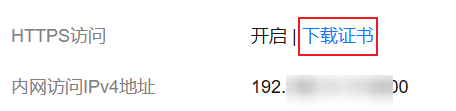
- 选择“概览”页签,在“网络信息”下方,单击“HTTPS访问”的“下载证书”获取安全证书。 图1 下载安全证书
- 转换安全证书(CloudSearchService.cer)。将下载的安全证书上传到客户端机器上,使用keytool工具将“.cer”证书转换成Java可以读取的“.jks”证书格式。
- 在Linux系统中,执行如下命令转换证书。
keytool -import -alias newname -keystore ./truststore.jks -file ./CloudSearchService.cer - 在Windows系统中,执行如下命令转换证书。
keytool -import -alias newname -keystore .\truststore.jks -file .\CloudSearchService.cer
其中,newname是由用户自定义的证书名称。
该命令执行后,会提示设置证书密码,并确认密码。请保存该密码,后续接入集群会使用。
- 在Linux系统中,执行如下命令转换证书。
FAQ:高并发场景如何增加客户端连接数?
在使用Elasticsearch Java API Client访问集群时,如果遇到高并发请求场景,可能会出现连接数不足的情况,导致请求延迟或失败。
在初始化Java API Client时,通过自定义HttpClientConfigCallback注入配置HttpClientBuilder来增加客户端的最大连接数,可以提升并发处理能力。
具体设置如下:
//设置最大总连接数为500,建议根据实际并发量评估该值
httpClientBuilder.setMaxConnTotal(500);
//设置每个路由的最大连接数为300,建议设置为总连接数的60%左右
httpClientBuilder.setMaxConnPerRoute(300);


