


通过SpringBoot接入集群
在使用Elasticsearch进行数据查询和管理时,如果直接与Elasticsearch的底层API进行交互,会增加开发复杂度,还可能导致代码维护困难。CSS服务的Elasticsearch集群支持通过Spring Data Elasticsearch(Spring Boot生态的Elasticsearch集成组件)进行数据查询和管理。该组件基于Elasticsearch官方Java API封装,开发者可通过Spring的Repository接口或原生查询DSL高效访问集群,无需直接处理底层API。Spring Boot的详细使用指导请参见Spring Boot。
前提条件
- Elasticsearch集群处于可用状态。
- 运行Java代码的服务器与Elasticsearch集群之间网络互通。
- 根据集群的网络配置方式,获取集群的访问地址,操作指导请参见获取集群访问地址。
- 确认服务器已安装Java,要求JDK版本为1.8及以上,JDK1.8官网下载地址:Java Downloads。
- 确认Elasticsearch Rest High Level Client版本:为确保更好的兼容性,建议使用与Elasticsearch集群同版本的Java客户端连接Elasticsearch集群。
本文以2.5.5版本Spring Boot为例,对应的Spring Data Elasticsearch版本是4.2.x,连接的是7.10.2版本的Elasticsearch集群。
准备工作
- 确认Spring Boot版本是否满足兼容性要求,可以参考官方兼容性列表。
本文以2.5.5版本Spring Boot为例,对应的Spring Data Elasticsearch版本是4.2.x,访问是Elasticsearch 7.10.2。
- 创建SpringBoot项目。
- 引入Java依赖。通过Maven方式引入apache版本。
<parent>
    <groupId>org.springframework.boot</groupId>
    <artifactId>spring-boot-starter-parent</artifactId>
    <version>2.5.5</version>
</parent>
<dependencies>
    <dependency>
        <groupId>org.springframework.boot</groupId>
        <artifactId>spring-boot-starter-web</artifactId>
    </dependency>
    <dependency>
        <groupId>org.springframework.boot</groupId>
        <artifactId>spring-boot-starter-data-elasticsearch</artifactId>
    </dependency>
    <dependency>
        <groupId>org.elasticsearch.client</groupId>
        <artifactId>elasticsearch-rest-high-level-client</artifactId>
        <version>7.10.2</version>
    </dependency>
</dependencies>
接入集群
当使用Spring Boot访问不同安全类型的Elasticsearch集群时,示例代码会有差异,请根据实际业务场景选择参考文档。
| Elasticsearch集群安全类型 | 是否加载安全证书 | 参考文档 |
|---|---|---|
| 非安全模式 安全模式+HTTP协议 | - | |
| 安全模式+HTTPS协议 | 否 | |
| 安全模式+HTTPS协议 | 是 |
Spring Boot连接HTTP协议的集群
使用Spring Boot连接非安全模式的Elasticsearch集群或安全模式且未启用HTTPS协议的Elasticsearch集群。
- 配置文件“application.properties”。
1
2
3
4
elasticsearch.url=host1:9200,host2:9200
//非安全集群不用配置如下两行。
elasticsearch.username=username
elasticsearch.password=password
表2 配置参数说明 参数
描述
host
集群的访问地址。
username
访问集群的用户名。
password
用户名对应的密码。
- 配置客户端代码。
 1
 2
 3
 4
 5
 6
 7
 8
 9
10
11
12
13
14
15
16
17
18
19
20
21
22
23
24
25
26
27
28
29
30
31
32
33
34
35
36
37
38
39
40
41
42
43
44
45
package com.xxx.configuration;

import org.elasticsearch.client.RestHighLevelClient;
import org.springframework.beans.factory.annotation.Value;
import org.springframework.context.annotation.Bean;
import org.springframework.context.annotation.ComponentScan;
import org.springframework.context.annotation.Configuration;
import org.springframework.data.elasticsearch.client.ClientConfiguration;
import org.springframework.data.elasticsearch.client.RestClients;
import org.springframework.data.elasticsearch.config.AbstractElasticsearchConfiguration;
import org.springframework.data.elasticsearch.repository.config.EnableElasticsearchRepositories;

@Configuration
// com.xxx.repository为仓库目录,通过extends org.springframework.data.elasticsearch.repository.ElasticsearchRepository进行具体定义
@EnableElasticsearchRepositories(basePackages = "com.xxx.repository")
// com.xxx为项目目录,例如com.company.project
@ComponentScan(basePackages = "com.xxx")
public class Config extends AbstractElasticsearchConfiguration {

    @Value("${elasticsearch.url}")
    public String elasticsearchUrl;

    // 非安全集群不用配置如下两个参数
    @Value("${elasticsearch.username}")
    public String elasticsearchUsername;

    @Value("${elasticsearch.password}")
    public String elasticsearchPassword;

    @Override
    @Bean
    public RestHighLevelClient elasticsearchClient() {
        final ClientConfiguration clientConfiguration = ClientConfiguration.builder()
            .connectedTo(StringHostParse(elasticsearchUrl))
            // 非安全集群无需配置withBasicAuth
            .withBasicAuth(elasticsearchUsername, elasticsearchPassword)
            .build();

        return RestClients.create(clientConfiguration).rest();
    }

    private String[] StringHostParse(String hostAndPorts) {
        return hostAndPorts.split(",");
    }
}
- 当SpringBoot应用正常启动,则表示集群连接成功。
Spring Boot连接HTTPS协议的集群(无证书)
使用Spring Boot在不加载安全证书的情况下连接安全模式+HTTPS协议的Elasticsearch集群。
- 配置文件“application.properties”。
1
2
3
elasticsearch.url=host1:9200,host2:9200
elasticsearch.username=username
elasticsearch.password=password
表3 配置参数说明 参数
描述
host
集群的访问地址。
username
访问集群的用户名。
password
用户名对应的密码。
- 配置客户端代码。
 1
 2
 3
 4
 5
 6
 7
 8
 9
10
11
12
13
14
15
16
17
18
19
20
21
22
23
24
25
26
27
28
29
30
31
32
33
34
35
36
37
38
39
40
41
42
43
44
45
46
47
48
49
50
51
52
53
54
55
56
57
58
59
60
61
62
63
64
65
66
67
68
69
70
71
72
73
package com.xxx.configuration;
import org.elasticsearch.client.RestHighLevelClient;
import org.springframework.beans.factory.annotation.Value;
import org.springframework.context.annotation.Bean;
import org.springframework.context.annotation.ComponentScan;
import org.springframework.context.annotation.Configuration;
import org.springframework.data.elasticsearch.client.ClientConfiguration;
import org.springframework.data.elasticsearch.client.RestClients;
import org.springframework.data.elasticsearch.config.AbstractElasticsearchConfiguration;
import org.springframework.data.elasticsearch.repository.config.EnableElasticsearchRepositories;
import java.security.KeyManagementException;
import java.security.NoSuchAlgorithmException;
import java.security.SecureRandom;
import java.security.cert.CertificateException;
import java.security.cert.X509Certificate;
import javax.net.ssl.HostnameVerifier;
import javax.net.ssl.SSLContext;
import javax.net.ssl.SSLSession;
import javax.net.ssl.TrustManager;
import javax.net.ssl.X509TrustManager;
@Configuration
// com.xxx.repository为仓库目录,通过extends org.springframework.data.elasticsearch.repository.ElasticsearchRepository进行具体定义
@EnableElasticsearchRepositories(basePackages = "com.xxx.repository")
// com.xxx为项目目录,例如com.company.project
@ComponentScan(basePackages = "com.xxx")
public class Config extends AbstractElasticsearchConfiguration {
    @Value("${elasticsearch.url}")
    public String elasticsearchUrl;
    @Value("${elasticsearch.username}")
    public String elasticsearchUsername;
    @Value("${elasticsearch.password}")
    public String elasticsearchPassword;
    @Override
    @Bean
    public RestHighLevelClient elasticsearchClient() {
        SSLContext sc = null;
        try {
            sc = SSLContext.getInstance("SSL");
            sc.init(null, trustAllCerts, new SecureRandom());
        } catch (KeyManagementException | NoSuchAlgorithmException e) {
            e.printStackTrace();
        }
        final ClientConfiguration clientConfiguration = ClientConfiguration.builder()
            .connectedTo(StringHostParse(elasticsearchUrl))
            .usingSsl(sc, new NullHostNameVerifier())
            .withBasicAuth(elasticsearchUsername, elasticsearchPassword)
            .build();
        return RestClients.create(clientConfiguration).rest();
    }
    private String[] StringHostParse(String hostAndPorts) {
        return hostAndPorts.split(",");
    }
    public static TrustManager[] trustAllCerts = new TrustManager[] {
        new X509TrustManager() {
            @Override
            public void checkClientTrusted(X509Certificate[] chain, String authType) throws CertificateException {
            }
            @Override
            public void checkServerTrusted(X509Certificate[] chain, String authType) throws CertificateException {
            }
            @Override
            public X509Certificate[] getAcceptedIssuers() {
                return null;
            }
        }
    };
    public static class NullHostNameVerifier implements HostnameVerifier {
        @Override
        public boolean verify(String arg0, SSLSession arg1) {
            return true;
        }
    }
}
- 当SpringBoot应用正常启动,则表示集群连接成功。
Spring Boot连接HTTPS协议的集群(加载证书)
使用Spring Boot在加载安全证书的情况下连接安全模式+HTTPS协议的Elasticsearch集群。
- 获取并上传安全证书。
- 配置文件“application.properties”。
1
2
3
elasticsearch.url=host1:9200,host2:9200
elasticsearch.username=username
elasticsearch.password=password
表4 配置参数说明 参数
描述
host
集群的访问地址。
username
访问集群的用户名。
password
用户名对应的密码。
- 配置客户端代码。

- com.xxx为项目目录,例如com.company.project。
- com.xxx.repository为仓库目录,通过extends org.springframework.data.elasticsearch.repository.ElasticsearchRepository进行具体定义。
 1
 2
 3
 4
 5
 6
 7
 8
 9
10
11
12
13
14
15
16
17
18
19
20
21
22
23
24
25
26
27
28
29
30
31
32
33
34
35
36
37
38
39
40
41
42
43
44
45
46
47
48
49
50
51
52
53
54
55
56
57
58
59
60
61
62
63
64
65
66
67
68
69
70
71
72
73
74
75
76
77
78
79
80
81
82
83
84
85
86
87
88
89
90
91
92
93
94
95
96
97
98
99
package com.xxx.configuration;
import org.elasticsearch.client.RestHighLevelClient;
import org.springframework.beans.factory.annotation.Value;
import org.springframework.context.annotation.Bean;
import org.springframework.context.annotation.ComponentScan;
import org.springframework.context.annotation.Configuration;
import org.springframework.data.elasticsearch.client.ClientConfiguration;
import org.springframework.data.elasticsearch.client.RestClients;
import org.springframework.data.elasticsearch.config.AbstractElasticsearchConfiguration;
import org.springframework.data.elasticsearch.repository.config.EnableElasticsearchRepositories;
import java.io.File;
import java.io.FileInputStream;
import java.io.InputStream;
import java.security.KeyStore;
import java.security.SecureRandom;
import java.security.cert.CertificateException;
import java.security.cert.X509Certificate;
import javax.net.ssl.HostnameVerifier;
import javax.net.ssl.SSLContext;
import javax.net.ssl.SSLSession;
import javax.net.ssl.TrustManager;
import javax.net.ssl.TrustManagerFactory;
import javax.net.ssl.X509TrustManager;
@Configuration
// com.xxx.repository为仓库目录,通过extends org.springframework.data.elasticsearch.repository.ElasticsearchRepository进行具体定义
@EnableElasticsearchRepositories(basePackages = "com.xxx.repository")
// com.xxx为项目目录,例如com.company.project
@ComponentScan(basePackages = "com.xxx")
public class Config extends AbstractElasticsearchConfiguration {
    @Value("${elasticsearch.url}")
    public String elasticsearchUrl;
    @Value("${elasticsearch.username}")
    public String elasticsearchUsername;
    @Value("${elasticsearch.password}")
    public String elasticsearchPassword;
    @Override
    @Bean
    public RestHighLevelClient elasticsearchClient() {
        SSLContext sc = null;
        try {
            // certFilePath和certPassword是安全证书的存放路径及其密码
            TrustManager[] tm = {new MyX509TrustManager(certFilePath, certPassword)};
            sc = SSLContext.getInstance("SSL", "SunJSSE");
            sc.init(null, tm, new SecureRandom());
        } catch (Exception e) {
            e.printStackTrace();
        }
        final ClientConfiguration clientConfiguration = ClientConfiguration.builder()
            .connectedTo(StringHostParse(elasticsearchUrl))
            .usingSsl(sc, new NullHostNameVerifier())
            .withBasicAuth(elasticsearchUsername, elasticsearchPassword)
            .build();
        return RestClients.create(clientConfiguration).rest();
    }

    private String[] StringHostParse(String hostAndPorts) {
        return hostAndPorts.split(",");
    }

    public static class MyX509TrustManager implements X509TrustManager {
        X509TrustManager sunJSSEX509TrustManager;
        MyX509TrustManager(String certFilePath, String certPassword) throws Exception {
            File file = new File(certFilePath);
            if (!file.isFile()) {
                throw new Exception("Wrong Certification Path");
            }
            System.out.println("Loading KeyStore " + file + "...");
            InputStream in = new FileInputStream(file);
            KeyStore ks = KeyStore.getInstance("JKS");
            ks.load(in, certPassword.toCharArray());
            TrustManagerFactory tmf = TrustManagerFactory.getInstance("SunX509", "SunJSSE");
            tmf.init(ks);
            TrustManager[] tms = tmf.getTrustManagers();
            for (TrustManager tm : tms) {
                if (tm instanceof X509TrustManager) {
                    sunJSSEX509TrustManager = (X509TrustManager) tm;
                    return;
                }
            }
            throw new Exception("Couldn't initialize");
        }
        @Override
        public void checkClientTrusted(X509Certificate[] chain, String authType) throws CertificateException {
        }
        @Override
        public void checkServerTrusted(X509Certificate[] chain, String authType) throws CertificateException {
        }
        @Override
        public X509Certificate[] getAcceptedIssuers() {
            return new X509Certificate[0];
        }
    }
    public static class NullHostNameVerifier implements HostnameVerifier {
        @Override
        public boolean verify(String arg0, SSLSession arg1) {
            return true;
        }
    }
}
- 当SpringBoot应用正常启动,则表示集群连接成功。
获取并上传安全证书
当接入安全模式+HTTPS协议的Elasticsearch集群时,如需加载安全证书则可以参考如下步骤获取安全证书,并上传至客户端。
- 获取安全证书(CloudSearchService.cer)。
- 登录云搜索服务管理控制台。
- 在左侧导航栏,选择“集群管理 > Elasticsearch”。
- 在集群列表,单击目标集群名称,进入集群详情页。
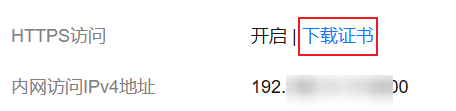
- 选择“概览”页签,在“网络信息”下方,单击“HTTPS访问”的“下载证书”获取安全证书。 图1 下载安全证书
- 转换安全证书(CloudSearchService.cer)。将下载的安全证书上传到客户端机器上,使用keytool工具将“.cer”证书转换成Java可以读取的“.jks”证书格式。
- 在Linux系统中,执行如下命令转换证书。
keytool -import -alias newname -keystore ./truststore.jks -file ./CloudSearchService.cer - 在Windows系统中,执行如下命令转换证书。
keytool -import -alias newname -keystore .\truststore.jks -file .\CloudSearchService.cer
其中,newname是由用户自定义的证书名称。
该命令执行后,会提示设置证书密码,并确认密码。请保存该密码,后续接入集群会使用。
- 在Linux系统中,执行如下命令转换证书。


