

Accessing a Bucket Using a User-Defined Domain Name
After you upload a file to a bucket, OBS generates an access address for the file that includes the bucket's default domain name. Accessing this address using a browser will automatically download the file. To avoid exposing the default domain name of a bucket or to preview files online through a browser, you can bind a user-defined domain name to the bucket and use it to access the files in the bucket.
Scenarios
- File preview: To avoid automatic file downloads, you can bind a user-defined domain name to a bucket for online file preview.
- Keeping the access address unchanged: To keep website or file access addresses unchanged after a migration or storage location change, you can upload the files to a bucket and bind a user-defined domain name to the bucket. This will establish a mapping between the website domain name and the default bucket domain name. In this way, you can still access the files using the original address.
- Improved brand image: Having a fixed and personalized domain name for accessing an enterprise website can make the enterprise appear more professional and reliable. This enhances enterprise image and improves customer experience.
- Easy access: You can use a user-defined domain name that is easy to remember to access a bucket and files in the bucket.
How It Works
The following describes the process of accessing objects in a bucket using a user-defined domain name and the process of accessing objects in a bucket using the default bucket domain name.
Figure 1 shows how to use a user-defined domain name to access objects in a bucket.
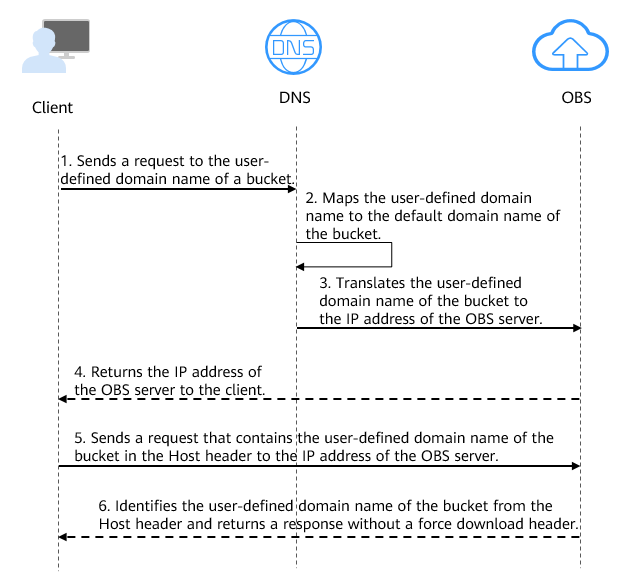
- A user enters a file access address (that includes a user-defined domain name) in a browser to initiate an access request.
- DNS maps the user-defined domain name to the default domain name of the bucket.
- DNS translates the default domain name of the bucket to the IP address of the OBS server.
- OBS returns the IP address of the server to the client.
- The client sends a request with the user-defined domain name specified in the Host header to the IP address of the OBS server.
- OBS identifies the user-defined domain name in the Host header and returns a response with Content-Disposition set to inline to the client, which indicates that the file is expected to be displayed in the browser.
Figure 2 shows how to use the bucket's default domain name (bucketName.obs.regionIDmyhuaweicloud.com) to access objects in the bucket.
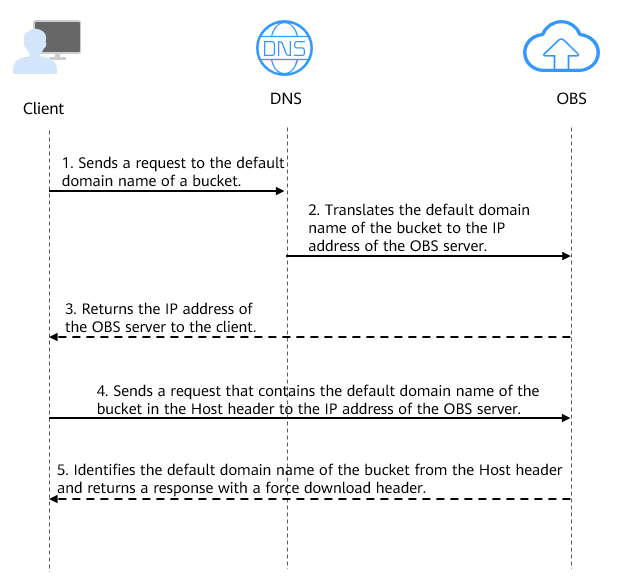
- A user enters a file access address (that includes the default domain name of the bucket) in the browser to initiate an access request.
- DNS translates the default domain name of the bucket to the IP address of the OBS server.
- OBS returns the IP address of the server to the client.
- The client sends a request with the default domain name specified in the Host header to the IP address of the OBS server.
- OBS identifies the default domain name in the Host header and returns a response with Content-Disposition set to attachment to the client, which indicates that the file is expected to be downloaded and saved locally.
Constraints
| Item | Description |
|---|---|
| Bucket version | Only buckets whose version is 3.0 or later support user-defined domain names. To check the version of a bucket, go to OBS Console, click the bucket name and go to the Overview page, and find the version in the Basic Information area. |
| Number of domain names | By default, a bucket can have up to 20 user-defined domain names bound. |
| Functions |
NOTE: If an acceleration domain name is used, to prevent objects in OBS buckets from being forcibly downloaded when accessed, configure the user-defined domain name and the acceleration domain name, and then perform the required operations described in Why Are Objects Forced to Download When CDN Acceleration Is Enabled? |
| Permissions | In cross-account scenarios, the APIs for setting, obtaining, or deleting a bucket's user-defined domain name cannot be called. Assume there are two Huawei Cloud accounts. One account cannot configure, obtain, or delete the other's user-defined domain name. In the same account, you must be the bucket owner or have the permissions to set (obs:bucket:PutBucketCustomDomainConfiguration), obtain (obs:bucket:GetBucketCustomDomainConfiguration), and delete (obs:bucket:DeleteBucketCustomDomainConfiguration) the user-defined domain name. You are advised to use IAM or bucket policies for authorization. For more information about OBS authorization methods, see Differences Between OBS Permissions Control Methods. |
Prerequisites
- There is a bucket with objects. For details, see Creating a Bucket.
- There is a second-level domain.
- Per MIIT regulations, if your bucket with a user-defined domain name is located in a Chinese mainland region, you must complete an ICP filing in advance.
Configuring a User-Defined Domain Name
You can configure user-defined domain names using OBS Console, APIs, obsutil, or SDKs, but not using OBS Browser+.
Specifically, perform the following steps:
- Bind a user-defined domain name to the bucket.
- Add a CNAME record set to map the user-defined domain name to the default domain name of the bucket.
- (Optional) Configure HTTPS to secure access through the user-defined domain name.
Using OBS Console
Step 1: Bind a user-defined domain name.
- In the navigation pane of OBS Console, choose Buckets.
- In the bucket list, click the desired bucket. The Objects page is displayed.
- In the navigation pane, choose Basic Configurations > Domain Name Mgmt. Figure 3 Domain name management page

- Click Configure User Domain Name in the upper part of the page.
If you have not bound any user-defined domain names before, you can also click Configure User Domain Name in the lower part of the page.
Figure 4 Configuring a user domain name
- Specify a user-defined domain name for User Domain Name.
The domain name:
- Must start with a letter or digit.
- Can contain uppercase and lowercase letters, digits, hyphens (-), and periods (.).
By default, a bucket can have up to 20 user-defined domain names bound.

If you want to select one of the existing Huawei Cloud domain names from the drop-down list on OBS Console, you must have the Domains:domains:getDetails permission. You can contact the administrator to use role/policy-based authorization of IAM to grant you this permission. For details, see Assigning Permissions to an IAM User.
- Click OK.
Step 2: Add a CNAME record set.
Add a CNAME record set to map the user-defined domain name to the default domain name of the bucket.
- Click Resolve to automatically add a CNAME record set.
- If you specified a Huawei Cloud domain name, click Resolve for DNS to add a CNAME record set.
- If you specified a domain name that is not registered with Huawei Cloud, skip this step and manually add a CNAME record set by referring to 2.
- Manually add a CNAME record set.
- If you are not using a Huawei Cloud domain name, follow the CNAME resolution guide provided by your DNS provider.
- If you are using a Huawei Cloud domain name, do as follows:
- Log in to the DNS console.
- In the navigation pane, choose Public Zones.
- (Optional) Create a public zone. If you have already created one, skip this step.
- On the Public Zones page, click Create Public Zone in the upper right corner.
- Configure parameters by referring to the following table. Retain the default settings for other parameters.
Table 2 Parameters for creating a public zone Parameter
Example Value
Description
Domain Name
example.com
The domain name purchased from a domain name registrar
Enter the user-defined domain name bound to the bucket here.
Enterprise Project
default
The enterprise project to be associated with the public zone. You can manage public zones by enterprise project.
This parameter is available and mandatory only when you are using an enterprise account.
Notes:
- If you do not manage zones by enterprise project, select the default enterprise project.
- If you manage zones by enterprise project, select another existing enterprise project.
To create an enterprise project, see Creating an Enterprise Project.
- Click OK.
- Locate the row that contains the domain name to which you want to add a record set and click the domain name.
- On the Record Sets tab, click Add Record Set.
- Configure parameters by referring to Table 3. Keep the default settings for the parameters that are not listed in the following table. For details, see Adding a CNAME Record Set.
Table 3 Parameters for adding a CNAME record set Parameter
Example Value
Description
Type
CNAME – Map one domain to another
Choose a record set type depending on the purpose of the domain name.
Select CNAME – Map one domain to another here.
A message may be displayed, indicating that the record set you are trying to add conflicts with an existing record set of the zone.
For details, see Why Is a Message Indicating Conflict with an Existing Record Set Displayed When I Add a Record Set?
Name
Left blank
The prefix of the domain name to be resolved
For example, if the domain name is example.com, its prefix can be:
- www: used for website resolution. The domain name to be resolved is www.example.com.
- Left blank: used for website resolution. The domain name to be resolved is example.com.
To use an at sign (@), leave this parameter blank.
- abc: The domain name to be resolved is abc.example.com, a subdomain of example.com.
- mail: The domain name to be resolved is mail.example.com.
- *: The domain name to be resolved is *.example.com, any subdomain of example.com.
Line
Default
The line type. It defines the rule used by the DNS server to return DNS resolution results based on the visitor's source.
The default value is Default.
This parameter can only be configured for public zone record sets.
- Default: returns the default resolution result irrespective of where the visitors come from.
- ISP: returns the resolution result based on visitors' carrier networks. For details, see Configuring ISP Lines.
- Region: returns the resolution result based on visitors' geographical locations. For details, see Configuring Region Lines.
- Custom line: returns a specific IP address based on the IP address range of visitors. For details, see Configuring Custom Lines.
TTL (s)
300
The length of time (in seconds) for which a local DNS server caches a record set
The default value is 300, which is 5 minutes. (value range: 1 to 2147483647).
If your service address changes frequently, set TTL to a smaller value. Otherwise, set TTL to a larger value.
For more information about TTL, see What Is TTL?
Value
example-bucket.obs.cn-north-4.myhuaweicloud.com
Domain name alias. You can enter only one domain name.
- If CDN acceleration is not used, set this parameter to the bucket domain name.
- If CDN acceleration is used, set this parameter to the CNAME domain name allocated by CDN.
- Click OK.
- Verify that the added CNAME record set is in effect.
Open the Windows command line interface and run the following command:
nslookup -type = cname example.nameIn this command, example.name indicates the user-defined domain name or CDN acceleration domain name specified for the bucket. Replace it with your actual domain name.
- Without CDN acceleration: If the output is the bucket domain name, the CNAME record set is in effect.
- With CDN acceleration: If the output is the CNAME domain name allocated by CDN, the CNAME record set is in effect.
Step 3 (Optional) Configure HTTPS.
- On OBS Console, open the Configure User Domain Name dialog box and click Next under the Resolve CNAME step.
- (Optional) On the (Recommended) Configure HTTPS page, if you do not need to configure HTTPS, click OK in the lower right corner.
- (Optional) If you need to configure HTTPS, set the parameters based on Table 4.
Table 4 Configuring HTTPS for a user-defined domain name Parameter
Description
Custom domain name
Select the custom domain name for which you want to configure an HTTPS certificate.
Certificate
Select an SCM certificate, a server digital certificate provided by Cloud Certificate & Manager (CCM).
- If you do not have a certificate, click Buy Certificate to purchase one on the CCM console. For details, see Purchasing an SSL Certificate.
- If you want to use your own certificate, upload it on the SSL Certificates page of the CCM console. For details, see Uploading an External Certificate to SCM.
Each certificate has an expiration time. Ensure that the certificate you chose has not expired.
Replace the certificate before it expires, or services may be affected.
- Click Configure in the lower right corner.
Using a User-Defined Domain Name to Access Objects
After a user-defined domain name is bound to a bucket and the domain name resolution is successful, verify that you can use the domain name to access objects. You can access objects through a user-defined domain name using APIs, SDKs, or obsutil, but not using OBS Console or OBS Browser+.
Using the CLI Tool - obsutil
obsutil allows you to configure a user-defined domain name to access OBS (currently, you can only list, upload, or download objects). The procedure is as follows:
- Configure a user-defined domain name.
- In file .obsutilconfig, set cname to true.
cname=true
- In file .obsutilconfig, set endpoint to the user-defined domain name configured in Step 1.
endpoint=https://example.com
- Check whether the configuration is correct:
obsutil ls obs://bucketname
Check the command output:
- If the command output contains Object number, the configuration is correct.
- If the command output contains Http status [403], the configuration has something wrong.
- This function is supported only in 5.5.3 and later versions.
- The .obsutilconfig file is usually stored in a system's user directory (~ in macOS/Linux and C:\Users\<username> in Windows).
- After a user-defined domain name is configured, you can only manage resources in the bucket where the domain name is associated.
Application Practices
Best Practices
- Secure Transmission: Configuring HTTPS
Configure an SSL certificate for a user-defined domain name and enforce HTTPS access. HTTPS provides end-to-end data encryption between the client and server using TLS/SSL. It also verifies server identity via certificates to ensure data confidentiality, integrity, and authenticity. The SSL certificate for a bucket's default domain name is centrally managed by Huawei Cloud and requires no additional configuration. However, you must configure a separate certificate for a user-defined domain name or CDN acceleration domain name. You are advised to prepare a backup certificate and configure an HTTP fallback policy in advance to prevent service interruptions caused by certificate expiration.
For details about how to configure HTTPS, see Certificate Hosting.
- Cross-Origin Access: Configuring CORS Rules
When a frontend application needs to access OBS resources across origins (with different protocols, domains, or ports), you must configure CORS rules to allow cross-origin requests from specified domains. You are advised to configure specific Allowed Origin instead of using the wildcard (*), to follow the principle of least privilege to narrow down Allowed Method, and to explicitly list the necessary Exposed Header. In scenarios with high security requirements, the wildcard (*) is strictly prohibited. In scenarios with high performance requirements, you can configure a longer cache duration to reduce preflight requests.
For details about how to configure CORS rules, see Configuring CORS to Allow Cross-Origin Access to OBS.
- Domain Switching: Migrating Without Service Interruption
When switching traffic from a bucket's default domain name to a bound user-defined domain name or CDN acceleration domain name, use a phased switching strategy to avoid service interruptions:
- Preparation phase: Bind a user-defined domain name or CDN acceleration domain name to your bucket, add a CNAME record set, and verify functionality and performance in a test environment.
- Gray release phase: During off-peak hours, route a fraction of your business traffic to the user-defined domain name, then gradually complete the full traffic migration.
- Verification phase: Check monitoring metrics and access logs to verify that the service is operating normally.
- Full release phase: Route all business traffic to the user-defined domain name to finalize domain migration.
- Rollback plan: If any issues arise during full release, immediately roll back traffic to the bucket's default domain name, analyze the root cause, resolve the issue, and retry the domain switching.
- Performance and Security: Isolating Business Functions with Subdomains
You can assign different subdomains to business functions, for example, txt.example.com for text resources, image.example.com for image resources, and video.example.com for video resources. Routing client requests to specific subdomains achieves domain isolation. This approach improves browser concurrency performance and allows you to configure independent caching policies and fine-grained access controls for each subdomain.
- Feature Extension: Configuring Static Website Hosting
Upload your static website files (including HTML, CSS, and JavaScript files) to a bucket and grant anonymous users read permissions for these files. Next, configure static website hosting for the bucket and specify the default homepage and 404 error page. Finally, configure a user-defined domain name for the bucket. This allows the static files in the bucket to be published as a website that is publicly accessible through your user-defined domain name.
Static website hosting is not supported through the bucket's default domain name. You must access the hosted website using a user-defined domain name.
For details about how to configure static website hosting, see Static Website Hosting.
- Access Latency: Accessing User-Defined Domain Names Involves Additional DNS Resolution
When you access a bucket through a user-defined domain name, DNS resolution requires two steps: first, resolving the user-defined domain name to the OBS domain name, and second, resolving the OBS domain name to the IP address of the OBS server. In contrast, accessing a bucket directly through its default domain name requires only a single resolution step to map the default domain name to the OBS server IP address. As a result, initial request latency may be slightly higher when accessing an OBS bucket through a user-defined domain name rather than directly using the default domain name. This delay is standard behavior of the DNS resolution mechanism, not an issue with OBS. To optimize access speed, you can configure a CDN acceleration domain name.
- Access Acceleration: Configuring a CDN Acceleration Domain Name
If you need to distribute static resources to users around the world, we recommend configuring a CDN acceleration domain name for your bucket. By caching content on globally distributed CDN edge PoPs, you can reduce access latency and enhance user experience.
Choose a CDN service type (website acceleration, file download acceleration, or VOD acceleration) based on your specific workload to achieve optimal acceleration. When configuring acceleration, specify the service area (Chinese mainland, outside the Chinese mainland, or global) and the bucket type (public or private). For private buckets, the system automatically creates a CDNAccessPrivateOBS agency to authenticate requests and allow CDN to retrieve data from the bucket.
For details about how to configure a CDN acceleration domain name, see Accessing a Bucket Using a CDN Acceleration Domain Name.
- Business Continuity: Maintaining Access URLs After Data Replication
If you need to migrate data without changing the access domain name, you can first replicate data from one bucket (for example, bucket A) to another bucket (for example, bucket B) using data replication (supporting same-account, cross-region replication, cross-account, cross-region replication, same-account, same-region replication, and cross-account, same-region replication). Then, unbind the user-defined domain from bucket A and bind it to bucket B. This ensures that even after data is migrated to a new bucket, the user access URLs remain unchanged.
For details about data replication, see Data Replication Overview.
Security Protection
- Data Theft Prevention: Configuring URL Validation
Some unauthorized websites link directly to images, videos, and other assets hosted on other sites to expand their own content at no extra cost. This increases the load on origin servers while driving up bandwidth consumption and traffic costs. To prevent this, OBS supports URL validation using referer whitelists and blacklists. Whitelists allow access from trusted sources, while blacklists block malicious ones.
Note that requests may bypass URL validation rules if they hit a CDN cache. Therefore, if you have configured a CDN acceleration domain for your bucket, you must set up corresponding URL validation rules on the CDN side as well.
For details about how to configure URL validation, see Configuring URL Validation to Prevent Unauthorized Access to Your Data.
- Fault Analysis and Troubleshooting: Configuring Bucket Log Storage and Auditing
Enable OBS bucket log storage to automatically record access details, format log files according to fixed naming rules, and upload them to a specified log storage bucket. Bucket logs capture all request details, including access timestamps, source IP addresses, request types, operation types, and response statuses, helping you perform security auditing, performance analysis, and troubleshooting. For details, see Bucket Logging Overview.
Cloud Trace Service (CTS) is a dedicated audit logging service in Huawei Cloud security solutions. It tracks and records operations performed on your cloud resources, including user identities, IP addresses, operation details, and response statuses. These operation records enable efficient security auditing, issue tracking, and resource tracing. For details, see Using CTS to Audit OBS Operations.
References
Using a Permanent, Unsigned URL to Access an Object

- To obtain a permanent, unsigned URL (http://DomainName/ObjectName) for accessing a file, you must set the file to be publicly readable. Once the file is publicly accessible, anyone can access it, which may lead to data leakage and soaring costs from frequent requests. Therefore, it is recommended to use signed URLs with an expiration time to access files.
- If you allow your file to be accessed by a permanent, unsigned URL, you should configure URL validation to prevent the file from being stolen.
You can set an object to be publicly readable in either of the following ways:
- Grant anonymous users read permission for the object and share the object URL with them. The anonymous users can then use the shared URL to access the object. For details, see Granting Anonymous Users the Public Read Permission for Objects.
- Enable acceleration for the configured user-defined domain name and keep the OBS object private. This uses CDN to provide public read access. In such cases, the object URL does not require signature authentication and does not have an expiration time. Anonymous users can access the object.
What is your overall rating for this page?
Thank you very much for your feedback. We will continue working to improve the documentation.See the reply and handling status in My Cloud VOC.
For any further questions, feel free to contact us through the chatbot.
Chatbot


