

Data Replication Overview
Scenarios
A fault in data storage can severely impact services. Therefore, backup and disaster recovery (DR) are critical to data storage. To ensure backup and DR, you can replicate data between buckets (either in the same region or across different regions).
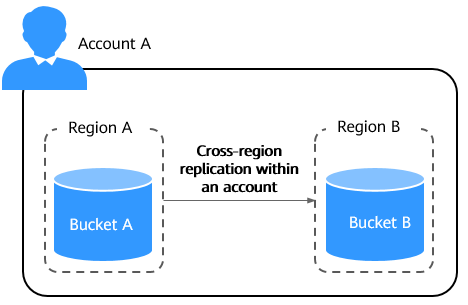
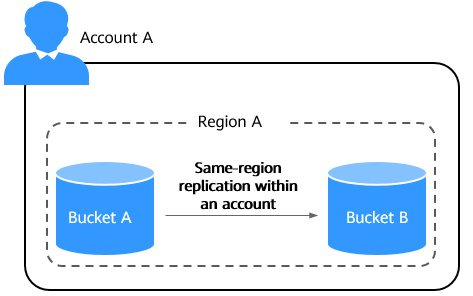
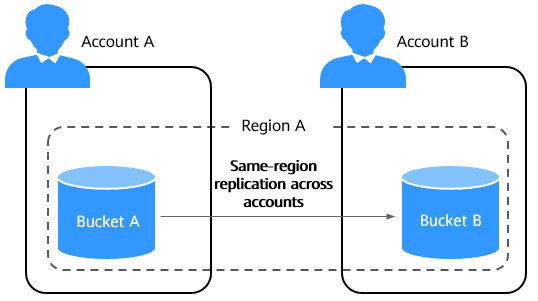
Data replication falls into the following types: cross-region replication within an account, cross-region replication across accounts, same-region replication within an account, and same-region replication across accounts.

The following source and destination buckets are Huawei Cloud OBS buckets.
- Cross-region replication within an account: Replicate data from bucket A in one region to bucket B in another region under the same account. For details, see Same-Account, Cross-Region Replication Using OBS.
- Cross-region replication across accounts: For details, see Cross-Account, Cross-Region Replication Using OBS.
- Replicate data from bucket A in region A under account A to bucket B in region B under account B.

- Replicate data uploaded by account B from bucket A in region A of account A to bucket B in region B of account A.

- Replicate data from bucket A in region A under account A to bucket B in region B under account B.
- Same-region replication within an account: Replicate data from bucket A to bucket B within the same region under the same account. For details, see Same-Region Replication Within an Account Using OMS.
- Same-region replication across accounts: Replicate data from bucket A to bucket B within the same region across accounts. For details, see Cross-Account, Same-Region Replication Using OMS.
Content Replicated
When data is replicated, it may often have features such as versioning, lifecycle rules, server-side encryption, and WORM retention policies. The following explains how these features affect replication, specifically, which data will be replicated and which will not.
The following tables describe how versioning affects data replication.
| Condition | Operation | Replication Result (Using OBS Console) | Replication Result (Using OBS APIs) | Replication Result (Using obsutil) |
|---|---|---|---|---|
| Source and destination buckets have the same versioning status (disabled, enabled, or suspended). | - | Replicated | Replicated | Replicated |
| Source and destination buckets have different versioning statuses (disabled, enabled, or suspended). | - | Not replicated | Not replicated | Not replicated |
| Cross-region replication within an account is enabled. | Change the versioning status of the source or destination bucket. | Not replicated | Not replicated | Not replicated |
| Source and destination buckets have their versioning enabled or suspended, and cross-region replication within an account is enabled. | Delete an object from the source bucket without specifying a version. | The object copy is synchronously deleted from the destination bucket. | ||
| Delete a specific version of an object from the source bucket. | The copy of the object version is synchronously deleted from the destination bucket. | |||
| Source and destination buckets have their versioning disabled, and cross-region replication within an account is enabled. | Delete an object from the source bucket. | The object copy is synchronously deleted from the destination bucket. | ||

To use cross-region replication within an account, the source and destination buckets must have the same versioning status (enabled or disabled).
| Condition | Operation | Replication Result (Using the OMS Console) | Replication Result (Using OMS APIs) | Replication Result (Using obsutil) |
|---|---|---|---|---|
| Source and destination buckets have the same versioning status (disabled, enabled, or suspended). | Upload or modify an object. | Replicated | Replicated | Replicated |
| Source and destination buckets have different versioning statuses (disabled, enabled, or suspended). | Upload or modify an object. | Replicated | Replicated | Not replicated |
| Source and destination buckets have versioning enabled or suspended. | Delete an object from the source bucket without specifying a version. | The object is not deleted from the destination bucket. | ||
| Delete a specific version of an object from the source bucket. | The object is not deleted from the destination bucket. | |||
| Source and destination buckets have versioning disabled. | Delete an object from the source bucket. | The object is not deleted from the destination bucket. | The object is not deleted from the destination bucket. | The object copy is synchronously deleted from the destination bucket. |
| Condition | Operation | Replication Result (Using the OMS Console) | Replication Result (Using OMS APIs) | Replication Result (Using OBS APIs) | Replication Result Using OBS SDKs | Replication Result (Using obsutil) |
|---|---|---|---|---|---|---|
| Source and destination buckets have the same versioning status (disabled, enabled, or suspended). | Upload or modify an object. | Replicated | Replicated | Replicated | Replicated | Replicated |
| Source and destination buckets have different versioning statuses (disabled, enabled, or suspended). | Upload or modify an object. | Replicated | Replicated | Not replicated | Not replicated | Not replicated |
| Source and destination buckets have versioning enabled or suspended. | Delete an object from the source bucket without specifying a version. | The object is not deleted from the destination bucket. | The object is not deleted from the destination bucket. | The object copy is synchronously deleted from the destination bucket. | The object copy is synchronously deleted from the destination bucket. | The object copy is synchronously deleted from the destination bucket. |
| Delete a specific version of an object from the source bucket. | The object is not deleted from the destination bucket. | The object is not deleted from the destination bucket. | The copy of the object version is synchronously deleted from the destination bucket. | The copy of the object version is synchronously deleted from the destination bucket. | The copy of the object version is synchronously deleted from the destination bucket. | |
| Source and destination buckets have versioning disabled. | Delete an object from the source bucket. | The object is not deleted from the destination bucket. | The object is not deleted from the destination bucket. | The object copy is synchronously deleted from the destination bucket. | The object copy is synchronously deleted from the destination bucket. | The object copy is synchronously deleted from the destination bucket. |
The impact of lifecycle rules on data replication is as follows:
Lifecycle rules configured in a source bucket are not replicated to the destination bucket. Instead, only the results of those rules are synchronized to the destination bucket.
The impact of server-side encryption on data replication is as follows:
- If the objects in the source bucket are not encrypted and encryption is disabled for the destination bucket, the object copies in the destination bucket will remain unencrypted.
- If the objects in the source bucket are not encrypted but SSE-OBS is enabled for the destination bucket, the object copies in the destination bucket will also be encrypted with SSE-OBS.
- If the objects in the source bucket are not encrypted but SSE-KMS (that uses the default key or a custom key) is enabled for the destination bucket, the object copies in the destination bucket will be encrypted in the same way as the destination bucket.
- If the objects in the source bucket are encrypted with SSE-OBS, the object copies in the destination bucket will be encrypted in the same way as the source objects, regardless of the encryption settings of the destination bucket.
- If the objects in the source bucket are encrypted with SSE-KMS that uses the default key or a custom key, the object copies in the destination bucket will be encrypted in the same way as the source objects, regardless of the encryption settings of the destination bucket.
- If the objects in the source bucket are encrypted with SSE-C, they cannot be replicated when you use OBS Console or OBS APIs, but they can be replicated when you use OBS SDKs, obsutil, OMS console, or OMS APIs.
During the retention period of a WORM-protected bucket, users can upload objects to or read objects from the bucket but cannot modify (overwrite) or delete objects in it. For details, see Configuring WORM for a Bucket.
The impact of WORM retention policies on data replication is as follows:
- A bucket in a WORM retention period cannot be used as a source for replication. You cannot configure new replication rules for it, and any existing rules of the bucket are disabled during the retention period.
- When the destination bucket is in a WORM retention period, objects replicated from the source bucket are protected by the bucket-level WORM policy. Objects that were uploaded to the destination bucket before the WORM policy took effect are not protected. To protect these objects, configure an object-level WORM policy for them individually.
- An object copy in the destination bucket retains the creation time of the source object, rather than the replication time.
- The impact of storage classes on data replication is as follows:
- Objects in the Archive, or Deep Archive storage class in the source bucket can be replicated to the destination bucket only when they have been restored. If source objects are not restored or are being restored, the replication will fail.
- If the region of the destination bucket does not support storage class setting or does not support a specific storage class, object copies will be stored in the Standard storage class.
- The impact of object ACLs on data replication is as follows:
- If source objects have ACLs configured, the objects and their ACLs will be replicated when you use the OBS console, APIs, SDKs, or obsutil. If you use the OMS console or APIs, only the objects will be replicated, while their ACLs will not.
- If source objects have no ACLs configured, the objects will be replicated regardless of which method is used.
Billing for Data Replication
- When you use the OMS console or APIs to migrate data, OBS APIs of both the source and destination ends are invoked to handle data upload and download. You will be billed for the API requests and data download traffic. For details, see OMS Billing. In addition, you will be billed for storing the objects in the destination bucket. For details, see Storage Costs.
- When you use the OBS console, APIs, or obsutil to replicate data across regions, you will be billed for requests, traffic, and storage. For details, see Table 4.
Table 4 Billing for cross-region replication Action
Billing Item
Description
Billing Mode
Replicate data across regions
Requests
You are billed for the number of successfully replicated objects. Successfully replicating one object creates a copy request. For details, see Copying Objects.
- For non-multipart objects, replicating an object creates a GET request to the source bucket and a PUT request to the destination bucket; deleting an object from the source bucket creates a DELETE request to the destination bucket.
- For multipart objects, replicating each part creates a GET request to the source bucket and a PUT request to the destination bucket.
- Modifying a replicated source object's ACL automatically synchronizes the change to the destination object. NOTE:
Because the source bucket initiates this ACL replication, it incurs the resulting PUT request charges.
For details about request billing, see Requests.
Pay-per-use
Data transfer
Traffic generated when you replicate data from the source bucket to the destination bucket in another region. Billing only applies to the data transferred out of the source bucket.
If objects are encrypted using server-side encryption, the cost of their cross-region replication traffic is calculated based on the length of the plaintext for SSE-KMS and SSE-OBS.
NOTE:Cross-account, cross-region replication does not support SSE-KMS-encrypted objects.
Pay-per-use
Storage space
Space occupied by the replicated objects in the destination bucket
If you have specified another storage class for object copies in the destination bucket, these copies are billed based on the new storage class.
If objects are encrypted using server-side encryption, their storage cost is calculated based on the length of the ciphertext.
Pay-per-use
Resource packages
Synchronize existing objects
Requests
You are billed for the number of existing objects that are successfully replicated to the destination bucket.
Billing applies to the number of objects that are successfully replicated. You are also billed for listing the existing objects.
Pay-per-use
Data transfer
Traffic generated when OBS replicates existing objects to the destination bucket in another region. Billing only applies to the data transferred out of the source bucket.
If historical objects are encrypted using server-side encryption, the cost of their cross-region replication traffic is calculated based on the length of the plaintext for SSE-KMS and SSE-OBS.
Pay-per-use
Storage space
Space occupied by the replicated objects in the destination bucket
If you have specified another storage class for object copies in the destination bucket, these copies are billed based on the new storage class.
If historical objects are encrypted using server-side encryption, their storage cost is calculated based on the length of the ciphertext.
Pay-per-use
Resource packages
- When you use OBS APIs, OBS SDKs, OBS Browser+, or obsutil to replicate data within the same region, you will be billed for requests and storage. For details, see Table 5.
Table 5 Billing for same-region replication Action
Billing Item
Description
Billing Mode
Replicate data in the same region
Requests
You are billed for the number of successfully replicated objects. Successfully replicating one object creates a copy request. For details, see Copying Objects.
Replicating an object generates a GET request to the source bucket and a PUT request to the destination bucket.
For details about request billing, see Requests.
Pay-per-use
Data transfer
Free, because data in the same region is replicated over an intranet.
N/A
Storage space
Storage space occupied by objects stored in the destination bucket.
If you have specified another storage class for object copies in the destination bucket, these copies are billed based on the new storage class.
Pay-per-use
Resource packages
What is your overall rating for this page?
Thank you very much for your feedback. We will continue working to improve the documentation.See the reply and handling status in My Cloud VOC.
For any further questions, feel free to contact us through the chatbot.
Chatbot


