

Registering an Individual Device
A device is a physical entity that belongs to a product. Each device has a unique ID. It can be a device directly connected to the platform, or a gateway that connects child devices to the platform. You can register a physical device with the platform, and use the device ID and secret allocated by the platform to connect your SDK-integrated device to the platform.
The platform allows an application to call an API to register an individual device (see Creating a Device). Alternatively, you can register an individual device on the IoTDA console. This topic describes the procedure on the IoTDA console.
Procedure
- Access IoT Device Access and click Access Console. Click the target instance card.
- In the navigation pane, choose Devices > All Devices. On the displayed page, click Register Device, set parameters based on the table below, and click OK. Figure 1 Device - Registering a secret device
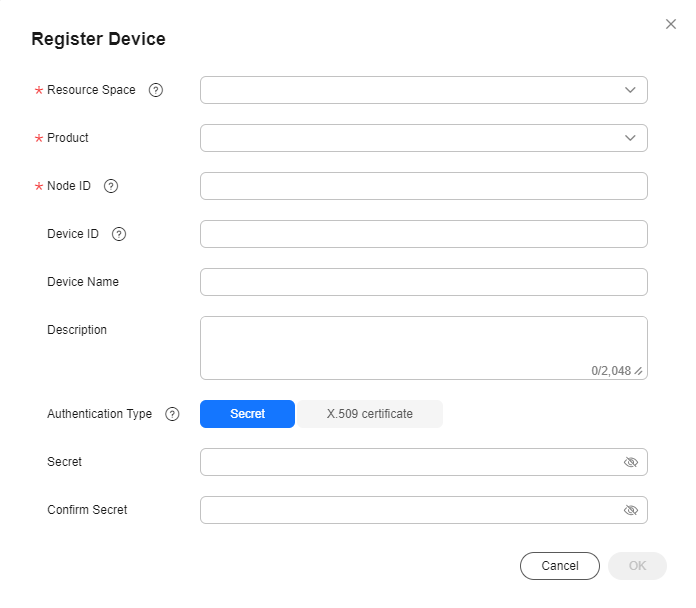
Table 1 Registering a device with secret Parameter
Description
Resource Space
Description: Select the resource space to which a device belongs.
Product
Description: Select the product to which the device belongs.
You can select a product only after it is defined. If no product is available, create a product by following the instructions provided in Product Creation.
Node ID
Description: Set this parameter to the IMEI, MAC address, or serial number of the device. If the device is not a physical one, set this parameter to a custom string that contains letters, digits, hyphens (-), and underscores (_).
Device ID
Description: Enter a unique device ID. If this parameter is carried, the platform will use the parameter value as the device ID. Otherwise, the platform will allocate a device ID, which is in the format of product_id_node_id.
Device Name
Description: Enter a custom device name.
Description
Description: Customize device description.
Authentication Type
Description:
- Secret: The device uses the secret for identity verification.
- X.509 certificate: The device uses an X.509 certificate for identity verification.
Secret
Description: Customize the secret used for device access. If the secret is left blank, the platform automatically generates one.
Fingerprint
Description: This parameter is displayed when Authentication Type is set to X.509 certificate. Import the fingerprint corresponding to the preset device certificate on the device side. You can run openssl x509 -fingerprint -sha256 -in deviceCert.pem in the OpenSSL view to query the fingerprint.

Delete the colons (:) from the obtained fingerprint when filling it.
Save the device ID and secret. They are used for authentication when the device attempts to access the platform.
Figure 2 Device - Device registered
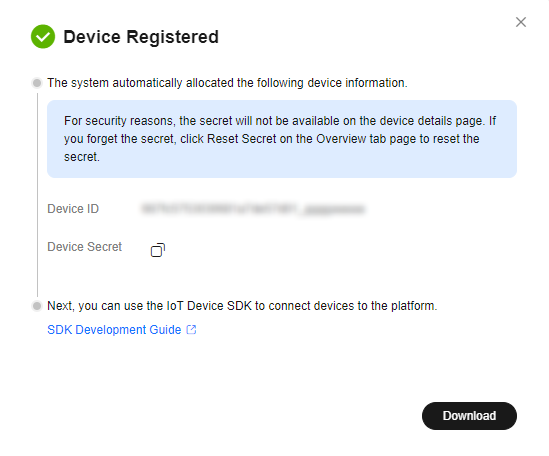

If the secret is lost, you can update the secret. The secret generated during device registration cannot be retrieved.
You can delete a device that is no longer used from the device list. Deleted devices cannot be retrieved. Exercise caution when performing this operation.
What is your overall rating for this page?
Thank you very much for your feedback. We will continue working to improve the documentation.See the reply and handling status in My Cloud VOC.
For any further questions, feel free to contact us through the chatbot.
Chatbot


