

Logging Overview
Scenarios
Bucket access generates a large number of logs, but OBS does not collect them by default. To analyze characteristics, types, or trends of requests to a bucket, you can enable log storage for the bucket. After logging is enabled, OBS names each log file using predefined rules and uploads it to a specified log storage bucket (the logged bucket or another bucket in the same region).
Constraints
- You can store logs in the logged bucket or another bucket. The log storage bucket and the logged bucket must belong to the same account and region.
Storing logs in the log storage bucket also generates new logs. If both buckets are the same, the logs generated during the storage operation will be stored again, causing an infinite loop of log generation. To avoid this loop, configure the logged bucket and the log storage bucket as different buckets.
- By default, buckets in the Infrequent Access or Archive storage class cannot be used to store log files. Stored log files occupy storage space in the bucket and are billed the same way as user-stored data.
Important Notes
- After log storage is configured for a bucket, its operation logs will appear in the log storage bucket in about 15 minutes. Log files for a given period may not include every request made during that period. Some requests may be written to the log files of the previous or next period. As a result, log files generated for a specific period cannot provide real-time, complete coverage of all requests in that period.
- After log storage is enabled, log files are generated every hour and stored in the log storage bucket. To avoid unnecessary storage costs, delete unneeded logs promptly.
You can configure lifecycle rules to periodically delete log files. For details, see Using Lifecycle Rules to Delete or Transition Objects.
- Avoid storing log files in a bucket with WORM enabled. If you use a WORM-enabled bucket, the continuously generated log files cannot be deleted during the retention period. As a result, storage costs will continue to increase.
Log File Naming Rules
| Field | Description |
|---|---|
| <log-file-name-prefix> | The specified prefix for log file names |
| YYYY-mm-DD-HH-MM-SS | The time (UTC) when a log file was created |
| <UniqueString> | A string assigned by OBS, which uniquely identifies the log file |
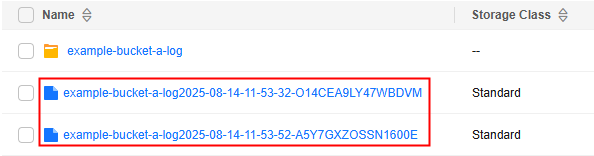
- If <log-file-name-prefix> ends with a slash (/), the log files are stored in a folder named after the prefix (without the trailing slash) in the target bucket. Each log file is named YYYY-mm-DD-HH-MM-SS-<UniqueString>. Figure 1 Log folder name
 Figure 2 Log file names

- If <log-file-name-prefix> does not end with a slash /, the log files are stored in the root directory of the target bucket. Each log file is named <log-file-name-prefix>YYYY-mm-DD-HH-MM-SS-<UniqueString>. Figure 3 Log file names
Log Fields
- Log content example
The following example shows a bucket access log file stored in the target bucket:
787f2f92b20943998a4fe2ab75eb09b8 bucket [13/Aug/2015:01:43:42 +0000] xx.xx.xx.xx
787f2f92b20943998a4fe2ab75eb09b8 281599BACAD9376ECE141B842B94535B  REST.GET.BUCKET.LOCATION
- "GET /bucket?location HTTP/1.1" 200 - 211 - 6 6 "-"  "HttpClient" - - - - "-" 089fe8c2c380f4031f6dc0197fe99d4d HPTAAFZfyW0yD80idvjw
- Log content format
Each log file contains the fields listed below.
BucketOwner BucketName Time Remote IP Requester RequestID Operation Key "Request-URI" HTTPStatus ErrorCode BytesSent ObjectSize TotalTime Turn-AroundTime "Referer" "User-Agent" VersionID STSLogUrn StorageClass TargetStorageClass "DentryName" IAMUserID AccessKeyID
Table 2 Bucket logging fields Parameter
Description
Example Value
BucketOwner
Account ID of the bucket owner
787f2f92b20943998a4fe2ab75eb09b8
BucketName
The bucket name
bucket
Time
The UTC timestamp when OBS receives the request
[13/Aug/2015:01:43:42 +0000]
Remote IP
The request's source IP address
192.168.7.132
Requester
The requester's ID. The value can be:
- Anonymous, indicating that the request was made by an anonymous user
- The ID of the account to which the requester belongs, which indicates that the request was made by an account or an IAM user
787f2f92b20943998a4fe2ab75eb09b8
RequestID
The request ID
281599BACAD9376ECE141B842B94535B
Operation
The operation type of the request
For common operations and their description, see Table 3.
REST.GET.BUCKET.LOCATION
Key
The name of the requested object
NOTE:Spaces in object names are encoded as plus signs (+).
-
Request-URI
The request URI used to access OBS resources, including the query string. For details about URIs, see Constructing a Request.
OBS ignores query-string parameters that start with x-, but these parameters are still logged. Therefore, you can use a query-string parameter that starts with x- to tag a request and then use that tag to quickly locate the corresponding log entry.
NOTE:If the signature is passed through the query string, the Request-URI includes the signature information; otherwise, it does not.
GET /bucket?location HTTP/1.1
HTTPStatus
The HTTP status code returned by OBS
200
ErrorCode
The error code returned by OBS. - indicates that no error code was returned.
-
BytesSent
The size of the HTTP response body
Unit: byte
- indicates that the HTTP response does not contain a body.
211
ObjectSize
The object size
Unit: byte
If a 4XX error code is returned, the value of ObjectSize is -, indicating that the object's size is not displayed.
-
TotalTime
The total request duration
Total request duration = Time of the last response byte – Time of the first request byte
Unit: ms
6
Turn-AroundTime
The time between when the client sends the last request byte and when the OBS server returns the first response byte
Server-side processing time = Time of the first response byte − Time of the last request byte
6
Referer
Referer header of the request
The Referrer header is part of the HTTP request header. It indicates the URL from which the user navigated, helping the server identify the source of the request.
-
User-Agent
The User-Agent header in the request
The User-Agent header an HTTP request header that identifies the client software that made the request. This header includes information about the browser, operating system, and device type. Servers can use this information to optimize response content or perform statistical analysis.
HttpClient
VersionID
The object version ID in the request. It specifies which object version the operation applies to.
In a bucket with versioning enabled, an object can have multiple versions. Each version has a unique version ID. For details, see Versioning.
-
STSLogUrn
The information about federated identity authentication and agency authorization
-
StorageClass
The current object storage class. The value can be:
- STANDARD: the Standard storage class
- STANDARD_IA (also WARM): the Infrequent Access storage class
- COLD: the Archive storage class
- DEEP_ARCHIVE: the Deep Archive storage class
- -: The object storage class is not obtained.
STANDARD_IA
TargetStorageClass
The new object storage class after a lifecycle rule triggers a transition. The value can be:
- STANDARD: the Standard storage class
- WARM: the Infrequent Access storage class
- COLD: the Archive storage class
- DEEP_ARCHIVE: the Deep Archive storage class
- -: Storage class transition is not involved.
GLACIER
DentryName
- For a parallel file system, this field indicates an internal identifier combining the parent directory inode number and the file or directory name.
- For a bucket, this field is set to -.
12456/file.txt
IAMUserID
The IAM user ID. The value can be:
- An IAM user ID, indicating that the request was made by a non-anonymous user
- Anonymous, indicating that the request was made by an anonymous user
8f3b8c53d29244a780084f2b8c106c32
AccessKeyID
The requester's access key ID. The value can be:
- -, indicating that the request was made by an anonymous user
- An access key ID, indicating that the request was made by a non-anonymous user
UDSIAMSTUBTEST002852
FsUserFields
Username for accessing OBS through MRS. This username is defined on MRS and is not a Huawei Cloud account or an IAM username.
- For a parallel file system, when you access it through MRS using OBSA or HDFS, this field indicates the MRS-side user that sends the request. For requests not delivered through OBSA or HDFS, the value of this field is -.
- For a bucket, this field is set to -.
Table 3 Common operations Operation
Description
Operation
Description
REST.GET.SERVICE
Lists buckets.
REST.GET.ENCRYPTION
Obtains the encryption configuration of a bucket.
REST.PUT.BUCKET
Creates a bucket.
REST.DELETE.ENCRYPTION
Deletes the encryption configuration of a bucket.
REST.HEAD.BUCKET
Views bucket information.
REST.PUT.OTM_DIRECT_COLD_ACCESS
Configures direct reading for Archive objects in a bucket.
REST.GET.BUCKETVERSIONS
Lists object versions in a bucket.
REST.GET.OTM_DIRECT_COLD_ACCESS
Obtains the direct reading configuration of a bucket.
REST.GET.BUCKET
Lists objects in a bucket.
REST.DELETE.OTM_DIRECT_COLD_ACCESS
Deletes the direct reading configuration of a bucket.
REST.GET.BUCKET.LOCATION
Obtains a bucket's location.
REST.PUT.BUCKET.WEBSITE
Configures static website hosting for a bucket.
REST.DELETE.BUCKET
Deletes a bucket.
REST.GET.BUCKET.WEBSITE
Obtains the static website hosting configuration of a bucket.
REST.PUT.POLICY
Configures a bucket policy.
REST.DEL.BUCKET.WEBSITE
Deletes the static website hosting configuration of a bucket.
REST.GET.POLICY
Obtains a bucket policy.
REST.PUT.BUCKET.CORS
Configures CORS for a bucket.
REST.DELETE.POLICY
Deletes a bucket policy.
REST.GET.BUCKET.CORS
Obtains the CORS configuration of a bucket.
REST.PUT.ACL
Configures the bucket ACL or object ACL.
REST.DEL.BUCKET.CORS
Deletes the CORS configuration of a bucket.
REST.GET.ACL
Obtains the bucket ACL or object ACL.
REST.OPTIONS.BUCKET
Sends an OPTIONS request to a bucket.
REST.PUT.LOGGING_STATUS
Configures logging for a bucket.
REST.OPTIONS.OBJECT
Sends an OPTIONS request to an object.
REST.GET.LOGGING_STATUS
Obtains the logging configuration of a bucket.
REST.PUT.OBJECT
Uploads an object with PUT.
REST.PUT.BUCKET.LIFECYCLE
Configures a lifecycle rule for a bucket.
REST.POST.OBJECT
Uploads an object with POST.
REST.GET.LIFECYCLE
Obtains the lifecycle configuration of a bucket.
REST.COPY.OBJECT
Copies an object.
REST.DEL.LIFECYCLE
Deletes the lifecycle configuration of a bucket.
REST.GET.OBJECT
Obtains the object content.
REST.PUT.VERSIONING
Configures versioning for a bucket.
REST.HEAD.OBJECT
Obtains the object metadata.
REST.GET.VERSIONING
Obtains the versioning status of a bucket.
REST.DELETE.OBJECT
Deletes an object.
REST.GET.BUCKET.STORAGE.POLICY
Obtains the storage class of a bucket.
REST.TRANSITION.STORAGECLASS.OBJECT
Changes the storage class of an object.
REST.PUT.BUCKET.STORAGE.POLICY
Configures a storage class for a bucket.
REST.POST.MULTI_OBJECT_DELETE
Batch deletes objects (the batch operation itself).
REST.PUT.REPLICATION
Configures cross-region replication for a bucket.
REST.POST.RESTORE
Restores an Archive object.
REST.DELETE.REPLICATION
Deletes the cross-region replication configuration of a bucket.
REST.APPEND.OBJECT
Appends data to an object.
REST.GET.REPLICATION
Obtains the cross-region replication configuration of a bucket.
REST.MODIFY.OBJECT.META
Modifies the object metadata.
REST.PUT.TAGGING
Adds tags to a bucket.
REST.TRUNCATE.OBJECT
Truncates an object.
REST.GET.TAGGING
Obtains the tags of a bucket.
REST.RENAME.OBJECT
Renames an object.
REST.DEL.TAGGING
Deletes the tags of a bucket.
REST.GET.UPLOADS
Lists the initiated multipart uploads in a bucket.
REST.PUT.BUCKET_QUOTA
Configures a storage quota for a bucket.
REST.POST.UPLOADS
Initiates a multipart upload.
REST.GET.BUCKET.QUOTA
Obtains the storage quota of a bucket.
REST.PUT.PART
Uploads parts.
REST.GET.BUCKET.STORAGEINFO
Obtains the storage usage of a bucket.
REST.COPY.PART
Copies parts.
REST.PUT.BUCKET.INVENTORY
Configures inventories for a bucket.
REST.GET.UPLOAD
Lists uploaded parts.
REST.GET.BUCKET.INVENTORY
Obtains or lists inventories of a bucket.
REST.POST.UPLOAD
Completes the multipart upload.
REST.DELETE.BUCKET.INVENTORY
Deletes inventories of a bucket.
REST.DELETE.UPLOAD
Aborts a multipart upload.
REST.PUT.CUSTOMDOMAIN
Configures a user-defined domain name for a bucket.
REST.CLEAR.EXPIRE.UPLOAD
Deletes expired parts.
REST.GET.CUSTOMDOMAIN
Obtains the user-defined domain name of a bucket.
REST.DELETE.CUSTOMDOMAIN
Deletes the user-defined domain name of a bucket.
REST.PUT.ENCRYPTION
Configures encryption for a bucket.
-
-
Billing for Bucket Logging
- Uploading and storing bucket logs will incur costs for PUT requests and storage. For details, see OBS Billing.
- If log files are stored in the logged bucket, OBS generates additional logs when writing log files to the bucket. These additional logs take up extra storage, increase costs, and make it more difficult to locate the logs you need. Therefore, you are advised to store log files in a bucket other than the logged bucket.
- You can delete unneeded log files to reduce storage costs. Configuring lifecycle rules for scheduled deletion is recommended.
Permissions Related to Bucket Logging
- After log storage is enabled, OBS automatically grants the log delivery user group the write and ACL read permissions for the log storage bucket.
If you manually remove these permissions, bucket log storage will fail.
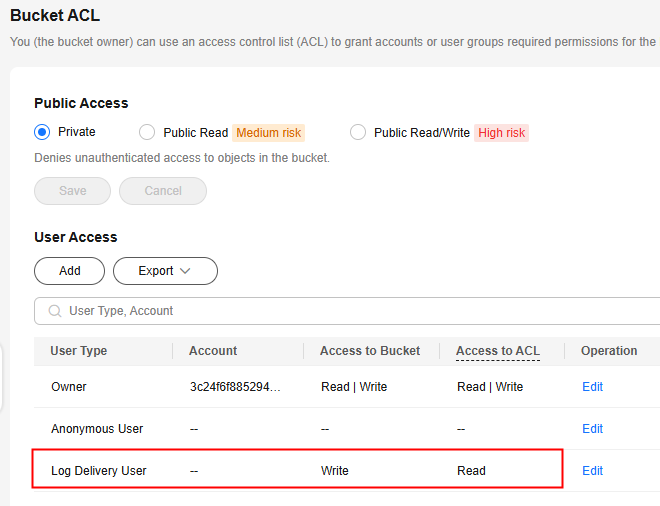
- OBS creates log files and uploads them to a specified bucket. To upload log files, OBS must have the required permissions. Therefore, before configuring log storage for a bucket, you must create an IAM agency for OBS. Then, specify this agency during log storage configuration. For details about creating an agency, see Creating an Agency for Uploading Logs.
- By default, the agency only needs the upload permission (obs:object:PutObject) for the log storage bucket. The following is an example of a custom IAM policy in JSON. mybucketlogs indicates the name of the log storage bucket.
{
    "Version": "1.1",
    "Statement": [
        {
            "Effect": "Allow",
            "Action": [
                "obs:object:PutObject"
            ],
            "Resource": [
                "OBS:*:*:object:mybucketlogs/*"
            ]
        }
    ]
}
- By default, the agency only needs the upload permission (obs:object:PutObject) for the log storage bucket. The following is an example of a custom IAM policy in JSON. mybucketlogs indicates the name of the log storage bucket.
- If the log storage bucket has server-side encryption enabled, the agency also requires the KMS Administrator permission for the region where the bucket is located.
- If you want other users to access log files stored in the log storage bucket, grant permissions to them in either of the following ways:
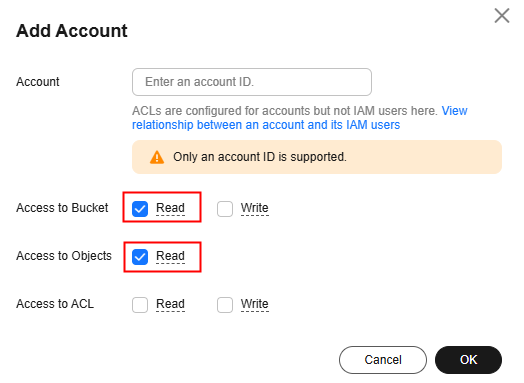
- Configuring the bucket ACL
This method is applicable to accounts, but not to IAM users. To grant permissions to IAM users, use bucket policies.
To access log files in a bucket, an account only requires the read permissions for the bucket and objects in it. For details, see Configuring a Bucket ACL.
- Configuring a bucket policy
- If you want other IAM users under the account of the log storage bucket owner to read log files, grant read permissions for the specific log files to individual IAM users.
- If you want IAM users under another account to read log files, grant read permissions for specific log files to the account.
- Configuring the bucket ACL
What is your overall rating for this page?
Thank you very much for your feedback. We will continue working to improve the documentation.See the reply and handling status in My Cloud VOC.
For any further questions, feel free to contact us through the chatbot.
Chatbot


