

Creating a Lifecycle Rule
Application Scenarios
This section describes how to create a lifecycle rule.
Constraints
- A lifecycle rule can use prefixes and object tags as filters, but it cannot use wildcards, suffixes, or regular expressions.
- A bucket can have an unlimited number of lifecycle rules, but the XML file of all its rules cannot exceed 20 KB.
- A maximum of 20 lifecycle rules can be configured for a parallel file system.
- Lifecycle configuration uses overwrite semantics. When you update a bucket's lifecycle configuration, you must include both the existing rules and any new rules in the updated configuration. For example, if a bucket has already had Rule 1, you can add Rule 2 by performing the following operations:
- Call GetBucketLifecycle to obtain Rule 1.
- Add Rule 2.
- Call PutBucketLifecycle to update the lifecycle rule to Rule 1 and Rule 2.

If you configure lifecycle rules using OBS Console, you do not need to retrieve the existing rules before adding new ones. You can directly add rules in the interface, and the system automatically retrieves the existing configuration and appends the new rules in the background. For details, see Configuring a Lifecycle Rule on OBS Console.
Lifecycle Rule Configuration
You can configure a lifecycle rule using OBS Console, APIs, or SDKs.
Using OBS Console
- In the navigation pane of OBS Console, choose Buckets.
- In the bucket list, click the bucket you want to operate. The Objects page is displayed.
- In the navigation pane, choose Data Management > Lifecycle Rules.
- Click Create. The Create Lifecycle Rule dialog box is displayed.
- Configure parameters under Basic Information.
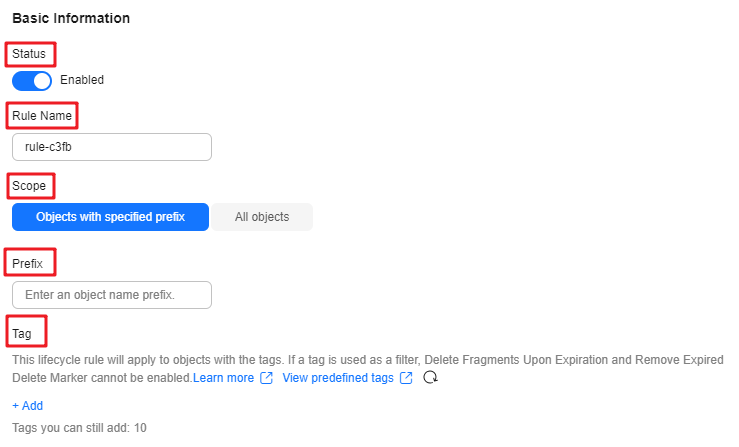
Table 1 Parameters under Basic Information Parameter
Description
Status
Whether to enable the lifecycle rule
- If Status is enabled, the lifecycle rule will be applied to affected objects as scheduled. The actions that can be triggered include storage class transitions, object deletion, fragment deletion, and removal of expired delete markers.
- If Status is disabled, the lifecycle rule will not be applied.
Rule Name
The name of the lifecycle rule
A rule name:
- Can be up to 255 characters long.
- Can contain only uppercase letters, lowercase letters, digits, periods (.), underscores (_), and hyphens (-).
Scope
The scope of objects the lifecycle rule applies to
- Objects with specified prefix: The rule applies to the objects with the specified prefix in the bucket.
- All objects: The rule applies to all objects in the bucket.
Multiple lifecycle rules may overlap. In such cases, the overlapping must comply with the defined constraints. Otherwise, conflicting rules can cause the configuration to fail.
Prefix
If you choose Objects with specified prefix as the scope, you need to specify an object name prefix. The lifecycle rule applies to the objects with the specified prefix.
An object name prefix cannot contain special characters: < >
Tag
Optional
You can add a tag to make the lifecycle rule apply to the objects with the specified tag.
- A tag key:
- Can be up to 128 characters long, including letters, digits, and spaces representable in UTF-8, and the following special characters: _ . : = + - @
- Must be case sensitive. If there are multiple tags, each tag key must be unique.
- Cannot be left blank.
- A tag value:
- Can be up to 255 characters long, including letters, digits, and spaces representable in UTF-8, and the following special characters: _ . : /= + - @
- Must be case sensitive.
- Can be left blank.
A lifecycle rule can have a maximum of 10 tags configured.
Once a tag is used as a filter, Delete Fragments Upon Expiration and Remove Expired Delete Marker cannot be enabled.
For details about how to add tags to objects, see Adding Tags to an Object.
- Configure Current Version and Historical Version to specify the number of days after which objects are deleted or transitioned to another storage class.
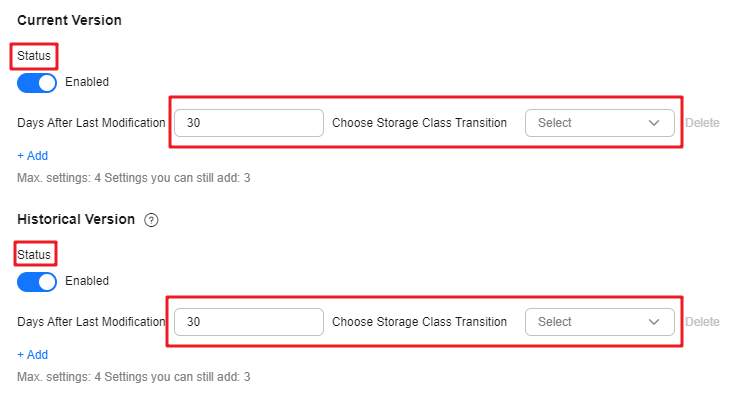
The Historical Version appears only when versioning is enabled or suspended for the bucket.
Table 2 Settings for Current Version and Historical Version Item
Description
Status
Whether to enable settings for Current Version or Historical Version
- With Status enabled, you can make settings. A maximum of four settings are allowed.
- With Status disabled, you do not need to make any settings.
Infrequent Access
Specifies the number of days after an object's last update before objects affected by the rule are transitioned to the Infrequent Access storage class.
Archive
Specifies the number of days after an object's last update before objects affected by the rule are transitioned to the Archive storage class.
- If you want to transition objects first to Infrequent Access and then to Archive, make sure that the number of days before transitioning to Archive is greater than the number of days before transitioning to Infrequent Access.
- If you only want to transition objects to Archive, there is no such restriction.
Deep Archive
Specifies the number of days after an object's last update before objects affected by the rule are transitioned to the Deep Archive storage class.
- If you want to transition objects first to Infrequent Access and then to Deep Archive, make sure that the number of days before transitioning to Deep Archive is greater than the number of days before transitioning to Infrequent Access.
- If you want to transition objects first to Archive and then to Deep Archive, make sure that the number of days before transitioning to Deep Archive is greater than the number of days before transitioning to Archive.
- If you only want to transition objects to Deep Archive, there is no such restriction.
Delete Upon Expiration
After the specified number of days since the last update, OBS will delete the objects that meet the defined conditions.
The number of days before performing this action must be an integer greater than that specified for any transition.
If versioning is not enabled for the bucket, specified objects will be permanently deleted once they expire. The deleted objects cannot be recovered.
Transitioning the storage class of objects or deleting objects may incur changes in costs. The details are as follows:
- Deleting objects frees up storage space. Prices vary depending on storage classes.
- Deep Archive, Archive or Infrequent Access objects have a minimum billable storage duration of 180, 90 or 30 days, respectively. If the objects are deleted or transitioned before this minimum duration is reached, you still need to pay for a full storage duration.
- Transitioning storage classes through lifecycle rules will incur request costs.
- For details about lifecycle rule billing, see Billing in Special Scenarios.
- Current Version and Historical Version are two concepts related to Versioning. If versioning is enabled for a bucket, uploading objects with the same name to the bucket creates different object versions. The last uploaded object is called the current version, while those previously uploaded are called historical versions. For more information, see Versioning.
- You must configure either Current Version or Historical Version. You can also configure both of them.
- Configure Delete Fragments Upon Expiration to specify the number of days after which fragments are deleted.
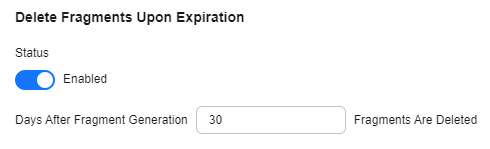
- Status: whether to enable Delete Fragments Upon Expiration
- You can specify the number of days after which fragments in the bucket will be deleted.
Incomplete data in a bucket is called fragments. Fragments are generated during failed upload attempts.
- Configure Remove Expired Delete Marker.
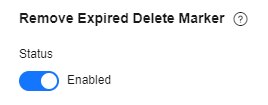
An expired delete marker is the only single delete marker that remains after all historical versions of an object are deleted. This action will remove expired delete markers to improve performance.
Status: whether to remove expired delete markers
If Delete Upon Expiration is configured for the current version, Remove Expired Delete Marker cannot be enabled.
- Select "I have confirmed these lifecycle rule configurations and understand how they may impact my costs."
- Click OK to complete the lifecycle rule configuration.
Configuring a Lifecycle Rule for a Single Object
You can set the time for deleting an object when uploading it. If versioning is enabled, you can set a deletion time for each object version when uploading it. An object lifecycle rule only affects object versions and not delete markers or fragments.
Unlike configuring a lifecycle rule for a bucket, an object lifecycle rule applies only to that specific object. You can schedule the deletion of the object, but storage class transitions are not supported for individual objects. If a bucket lifecycle rule conflicts with an object lifecycle rule, the object lifecycle rule applies.
You can configure and view object lifecycle rules using APIs or SDKs, but not using OBS Console, OBS Browser+, or obsutil.
- When uploading an object with an API, set the x-obs-expires header.
- When uploading an object with an SDK, set the expires parameter.
What is your overall rating for this page?
Thank you very much for your feedback. We will continue working to improve the documentation.See the reply and handling status in My Cloud VOC.
For any further questions, feel free to contact us through the chatbot.
Chatbot


