

Overview
The Elastic IP (EIP) service provides public IP addresses and the capability to access the Internet. After you configure an EIP and bandwidth for an ECS, the ECS can directly access the Internet.
- EIPs: provide independent public IP resources, including public IP addresses and outbound public network bandwidth. EIPs can only be bound to resources in the same region. They cannot be used across regions.
- Global elastic IPs (global EIPs) provide global Internet access for cloud instances. You can specify a global region and a global EIP pool to assign a global EIP, and bind the global EIP to a cloud instance (such as a load balancer or an ECS) from any region to enable communications between a cloud resource and the Internet.
EIP
EIPs can be bound to or unbound from ECSs, BMSs, virtual IP addresses, NAT gateways, and load balancers.
Each EIP can be bound to only one cloud resource at a time and both should be in the same region.
- Each EIP can be bound to only one ECS at a time. If an EIP is already bound to an ECS, it cannot be bound to another cloud resource. You can unbind the EIP from the ECS and then bind it to another cloud resource in the same region.
- The EIP and the ECS must be in the same region.

IP addresses include private IP addresses, EIPs, and virtual IP addresses. They are used in different scenarios. For details, see Table 1.
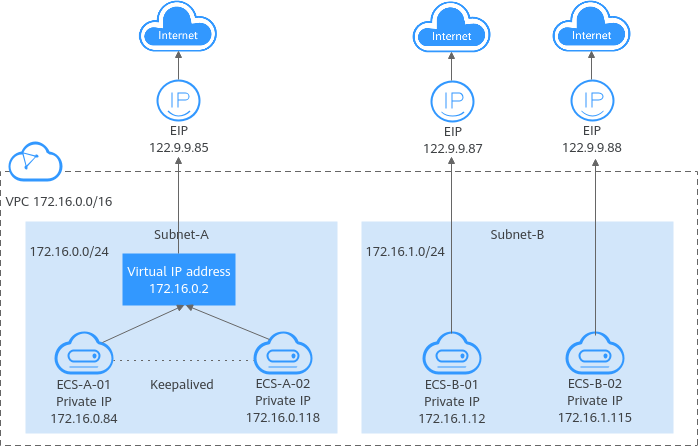
| IP Address Type | Description | Example Value |
|---|---|---|
| Private IP address | Private IP addresses come with your ECSs and belong to the VPC subnets of the ECSs. They are used for private communication on the cloud. |
|
| Virtual IP address | A virtual IP address is a private IP address independently assigned from a VPC subnet. It can be released when no longer needed. You can:
For more information about virtual IP addresses, see Virtual IP Address Overview. For details about how to set up a high availability cluster, see Using a Virtual IP Address and Keepalived to Set Up a High-Availability Web Cluster. | Bind the virtual IP address (172.16.0.2) to both ECS-A-01 and ECS-A-02. The active/standby switchover of ECS-A-01 and ECS-A-02 can be implemented by using Keepalived. |
| EIP | EIPs allow cloud resources to access the Internet. They can be flexibly bound to or unbound from instances.
For more information, see EIP Overview. |
|
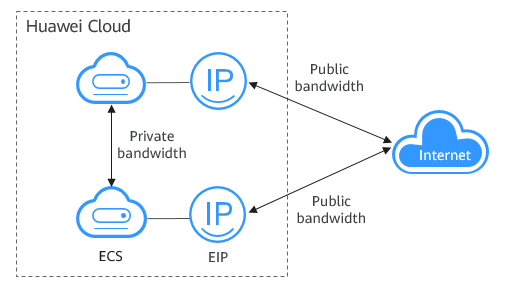
Bandwidth refers to the maximum amount of data that can be transmitted in a given amount of time (generally one second). A larger bandwidth value indicates a stronger transmission capability. Bandwidth is classified into public bandwidth and private bandwidth.
Private bandwidth is the bandwidth consumed when data is transferred between ECSs in the same region and on the same private network. ECSs can also be connected to cloud databases, load balancers, and OBS through private bandwidth. The private bandwidth size depends on the instance specifications.
For details, see ECS Types.
Public bandwidth is the bandwidth consumed when data is transferred between Huawei Cloud and the Internet. You can configure the public bandwidth when creating an ECS or bind an EIP to an ECS after the EIP is created.
- The metrics about outbound bandwidth on the Cloud Eye console are Outbound Bandwidth and Outbound Traffic.
- The metrics about inbound bandwidth on the Cloud Eye console are Inbound Bandwidth and Inbound Traffic.
| Type | Description |
|---|---|
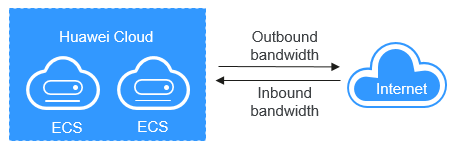
| Outbound bandwidth | Bandwidth consumed when data is transferred from Huawei Cloud to the Internet. For example, the outbound bandwidth is consumed when ECSs provide services accessible from the Internet or when FTP clients download resources from the ECSs. The metrics about outbound bandwidth on the Cloud Eye console are Outbound Bandwidth and Outbound Traffic. You are only billed for the outbound bandwidth you have used. NOTE:
|
| Inbound bandwidth | Bandwidth consumed when data is transferred from the Internet to Huawei Cloud. For example, the inbound bandwidth is consumed when downloading resources from the Internet to ECSs and when FTP clients upload resources to the ECSs. The metrics about inbound bandwidth on the Cloud Eye console are Inbound Bandwidth and Inbound Traffic. The maximum inbound bandwidth depends on the size of the outbound bandwidth.
The preceding bandwidth limit is not applicable in CN North-Beijing1 and CN East-Shanghai2. |
Global EIP
Global EIPs provide global Internet access for cloud instances. You can specify a global region and a global EIP pool to assign a global EIP, and bind the global EIP to a cloud instance (such as a load balancer or an ECS) from any region to enable communications between a cloud resource and the Internet. A global EIP needs a global connection bandwidth for cloud backbone (intranet) communications and a global internet bandwidth for Internet access. To enable an ECS to communicate with the Internet through a global EIP, you also need to bind a global internet gateway to the global EIP. Figure 5 shows the global EIP architecture.

Differences Between EIPs and Global EIPs
| Item | Scenario | Description | Feature | How to Obtain |
|---|---|---|---|---|
| EIP | EIPs and cloud resources must be in the same region. | The EIP service provides independent public IP addresses and bandwidths for Internet access. EIPs can be bound to or unbound from ECSs, BMSs, virtual IP addresses, NAT gateways, and load balancers. |
| |
| Global EIP | A global EIP with a global connection bandwidth and a global internet bandwidth associated can be bound to a cloud instance in any region. | Global EIPs provide global Internet access for cloud instances. You can specify a global region and a global EIP pool to assign a global EIP, and bind the global EIP to a cloud instance (such as an ECS or a load balancer) from any region to enable communications between a cloud resource and the Internet. |
|
Before binding a global EIP to an ECS, you need to create a global internet gateway to connect the VPC of the ECS to the global EIP so that the ECS can access the Internet through the global EIP. Global internet gateways are free of charge.
When you bind a global EIP to an ECS, the system automatically lists the global internet gateway of the VPC that the ECS belongs to, if there is one.
For details, see Global Internet Gateway Overview.
A global connection bandwidth can be bound to a central network to allow the resources to communicate with each other over the backbone network.
There are different types of global connection bandwidths that are designed for different application scenarios, including multi-city, geographic-region, and cross-geographic-region bandwidths. Geographic-region and cross-geographic-region bandwidths are often bound to Cloud Connect central networks.
Geographic-region bandwidths are used for resources in a geographic region to communicate.
Cross-geographic-region bandwidths are used for resources across geographic regions to communicate.
For details, see Global Connection Bandwidth Overview.
A global internet bandwidth can be shared by one or more global EIPs at the same time, improving bandwidth utilization.
Global internet bandwidths work together with global EIPs for Internet access. You can add one or more global EIPs to the same global internet bandwidth. A global EIP and its global internet bandwidth must use the same access point.

For details, see Global Internet Bandwidth Overview.
What is your overall rating for this page?
Thank you very much for your feedback. We will continue working to improve the documentation.See the reply and handling status in My Cloud VOC.
For any further questions, feel free to contact us through the chatbot.
Chatbot


