

Copied.
Configuring a Node Pool
If the default node configurations in a cluster do not meet service requirements, you can fine-tune parameters for core components, such as kubelet, kube-proxy, and the container runtime, within the node pool. Fine-tuning these parameters ensures efficient resource utilization and meets workload demands.
Constraints
- The configuration parameters of the default node pool (specified by DefaultPool) cannot be modified.
- This function is supported only in clusters of v1.15 or later. It is not displayed for versions earlier than v1.15.
Modifying Node Pool Configuration Parameters
You can use either of the following ways.
- Log in to the CCE console and click the cluster name to access the cluster console.
- In the navigation pane, choose Nodes and click the Node Pools tab.
- Locate the target node pool and choose More > Manage.
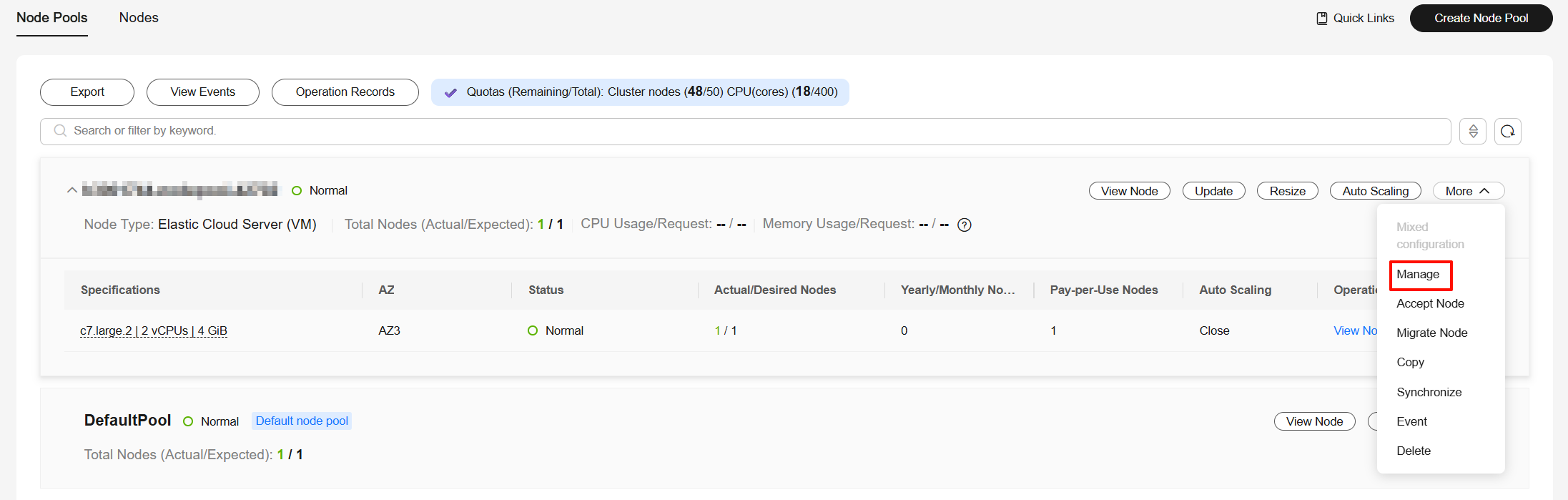
- On the Manage Configurations page on the right, modify node pool parameter settings. For more details, see Parameters for Configuring a Node Pool.
You can modify the CCE cluster parameter configurations using an API. For details, see API Reference. For details, see Making an API Request.
PUT /api/v3/projects/{project_id}/clusters/{cluster_id}/nodepools/{nodepool_id}/configuration
| Parameter | Description |
|---|---|
| project_id | Project ID. For details about how to obtain a project ID, see How to Obtain Parameters in the API URI. |
| cluster_id | Cluster ID. For details about how to obtain a cluster ID, see How to Obtain Parameters in the API URI. |
| nodepool_id | Node pool ID. For details about how to obtain a node pool ID, see How to Obtain Parameters in the API URI. |
The request body is as follows:
{
  "kind" : "Configuration",
  "apiVersion" : "v3",
  "metadata" : {
    "name" : "configuration"
  },
  "spec" : {
    "packages" : [ {
      "name" : "kubelet",
      "configurations" : [ {
        "name" : "system-reserved-mem",
        "value" : 600
      }, {
        "name" : "kube-reserved-mem",
        "value" : 800
      } ]
    } ]
  }
}
The following parameters are modified:
- system-reserved-mem: Set it to 600 MiB.
- kube-reserved-mem: Set it to 800 MiB.
Parameters for Configuring a Node Pool
The parameters listed below can be configured for a node pool.
kubelet
| Item | Parameter | Description | Value | Modification | Configuration Method |
|---|---|---|---|---|---|
| CPU Management Policy | cpu-manager-policy | CPU management policy configuration. For details, see CPU Scheduling.
| Default: none | The CPU management policy does not apply to ECS (PM) node pools in CCE Turbo clusters. | Console/API |
| QPS for Requests to kube-apiserver | kube-api-qps | Number of queries per second for communication with the API server. | Default: 100 | None | Console/API |
| Burst for Requests to kube-apiserver | kube-api-burst | Maximum number of burst requests sent to the API server per second. | Default: 100 | None | Console/API |
| Maximum Pods Managed by kubelet | max-pods | Maximum number of pods that can run on a node. |
| None | Console/API |
| Maximum Processes in Pod | pod-pids-limit | Maximum number of PIDs that can be used in each pod. | Default: -1, which indicates that the number of PIDs is not limited | None | Console/API |
| Use a Local IP Address as a Node's ClusterDNS | with-local-dns | The node's kubelet configuration will automatically use the default network interface's IP address as the preferred DNS address. | Default: false | None | Console/API |
| Event QPS | event-qps | Number of events that can be generated per second. | Default: 5 | None | Console/API |
| Upper Limit for Burst Events | event-burst | Upper limit for burst event creation. The number of burst events can be temporarily increased to the specified value. | Default: 10 | None | Console/API |
| Allowed Unsafe sysctls | allowed-unsafe-sysctls | Insecure system configuration allowed. Starting from v1.17.17, CCE enables pod security policies for kube-apiserver. Add corresponding configurations to allowedUnsafeSysctls of a pod security policy to make the policy take effect. (This configuration is not required for clusters earlier than v1.17.17.) For details, see Example of Enabling Unsafe sysctls in a PSP. | Default: [] The parameter must be specified as a JSON array. Single parameters are supported (for example, [net.ipv4.tcp_tw_reuse]), as are multiple parameters (for example, [net.ipv4.tcp_tw_reuse, net.core.somaxconn]). Wildcards (*) are permitted only as a suffix to match all parameters sharing a specified prefix. Example: [net.ipv4.tcp_tw_reuse,net.ipv4.conf.*] | System configuration parameters must belong to recognized namespaced kernel parameters (container isolation namespaces). Parameters outside these namespaces are rejected by the backend:
Configuration examples:
| Console/API |
| Topology Manager Policy | topology-manager-policy | Set the topology management policy. Valid values are as follows:
| Default: none | NOTICE: Modifying topology-manager-policy and topology-manager-scope will restart kubelet, and the resource allocation of pods will be recalculated based on the modified policy. In this case, running pods may restart or even fail to receive any resources. | Console/API |
| Topology Manager Scope | topology-manager-scope | Configure the resource alignment granularity of the topology management policy. Valid values are as follows:
| Default: container | Console/API | |
| Specified DNS Configuration File | resolv-conf | DNS resolution configuration file specified by the container | Default: null | None | Console/API |
| Timeout for All Runtime Requests Except Long-running Requests | runtime-request-timeout | Timeout interval of all runtime requests except long-running requests (pull, logs, exec, and attach). | Default: 2m0s | This parameter is available only in clusters of v1.21.10-r0, v1.23.8-r0, v1.25.3-r0, or later versions. | Console/API |
| Allow kubelet to Pull Only One Image at a Time | serialize-image-pulls | Pull an image in serial mode.
|
| This parameter is available only in clusters of v1.21.10-r0, v1.23.8-r0, v1.25.3-r0, or later versions. | Console/API |
| Image Repository Pull Limit per Second | registry-pull-qps | QPS upper limit of an image repository. | Default: 5 Value range: 1 to 50 | This parameter is available only in clusters of v1.21.10-r0, v1.23.8-r0, v1.25.3-r0, or later versions. | Console/API |
| Maximum Bursty Image Pulls | registry-burst | Maximum number of burst image pulls. | Default: 10 The value ranges from 1 to 100. Set this value to be greater than or equal to registry-pull-qps to accommodate short-term bursts (for example, concurrent pod starts) without triggering immediate rate limiting. | This parameter is available only in clusters of v1.21.10-r0, v1.23.8-r0, v1.25.3-r0, or later versions. | Console/API |
| Maximum Number of Container Log Files | container-log-max-files | Maximum number of container log files. When the number of existing log files exceeds this value, the earliest log file will be deleted to release space for new log files. | Default: 20 Value range: 2 to 100 | This parameter is available only in clusters of v1.23.14-r0, v1.25.9-r0, v1.27.6-r0, v1.28.4-r0, or later versions. | Console/API |
| Maximum Container Log File Size | container-log-max-size | Maximum size of a single container log file. When the size of a log file reaches this value, the current log file will be closed and a new log file will be created to continue logging. | Default: 50 (in MiB) Value range: 1 to 4096 (in MiB) | This parameter is available only in clusters of v1.23.14-r0, v1.25.9-r0, v1.27.6-r0, v1.28.4-r0, or later versions. | Console/API |
| Upper Limit for Image Garbage Collection | image-gc-high-threshold | When the kubelet disk usage reaches this value, kubelet starts to collect image garbage. | Default: 80 Value range: 0 to 100 | To disable image garbage collection, set this parameter to 100. This parameter is available only in clusters of v1.23.14-r0, v1.25.9-r0, v1.27.6-r0, v1.28.4-r0, or later versions. | Console/API |
| Lower Limit for Image Garbage Collection | image-gc-low-threshold | Image garbage collection stops when the disk usage drops below the specified threshold. | Default: 70 Value range: 0 to 100 | The value of this parameter cannot be greater than the upper limit for image garbage collection. This parameter is available only in clusters of v1.23.14-r0, v1.25.9-r0, v1.27.6-r0, v1.28.4-r0, or later versions. | Console/API |
| Node Agency-based Secret-free Image Pull | enable-swr-credential-provider | Whether to enable secret-free image pulls using a node agency. When enabled, the node pools must be configured with agencies that meet the requirements. For details, see Configuring Secret-Free Image Pull. | Default: false (disabled) | This parameter is available in clusters of v1.28.15-r70, v1.29.15-r30, v1.30.14-r30, v1.31.10-r30, v1.32.6-r30, v1.33.5-r20, v1.34.1-r0, or later versions. | Console/API |
| Service Account-based Secret-free Image Pull | enable-swr-credential-serviceaccount-provider | Whether to enable secret-free image pulls using a service account. When enabled, the service account must be configured with agencies that meet the requirements. For details, see Configuring Secret-Free Image Pull. | Default: false (disabled) | This parameter is available only in clusters v1.34.3-r10, v1.35.1-r0, or later. | Console/API |
| Node Memory Reservation | system-reserved-mem | Reserved system memory for OS system daemons like sshd and udev. | Default: automatically calculated, which varies depending on node flavors. For details, see Node Resource Reservation Rules. | The kube-reserved-mem and system-reserved-mem combined cannot exceed 50% of the minimum node's memory flavor in the node pool. | Console/API |
| kube-reserved-mem | Reserved Kubernetes memory for Kubernetes daemons like kubelet and container runtime. | Console/API | |||
| Node CPU Reservation | system-reserved-cpu | Reserved system CPUs for OS daemons like sshd and udev. | Default: automatically calculated, which varies depending on node flavors. For details, see Node Resource Reservation Rules. | The system-reserved-cpu and kube-reserved-cpu combined cannot exceed 50% of the minimum node's CPU flavor in the node pool. Clusters v1.28.15-r60, v1.29.15-r20, v1.30.14-r20, v1.31.10-r20, v1.32.6-r20, v1.33.5-r10, or later support this configuration. | Console/API |
| kube-reserved-cpu | Reserved Kubernetes CPUs for Kubernetes daemons like kubelet and container runtime. | Console/API | |||
| Node Ephemeral Storage Reservation | system-reserved-ephemeral-storage | Reserved system ephemeral storage for OS daemons like sshd and udev. | By default, no ephemeral storage is reserved. Kubernetes can use the disk space that container runtime components occupy. | The kube-reserved-ephemeral-storage and system-reserved-ephemeral-storage combined must be less than 50% of the disk space allocated to container components. Clusters v1.28.15-r60, v1.29.15-r20, v1.30.14-r20, v1.31.10-r20, v1.32.6-r20, v1.33.5-r10, or later support this configuration. | Console/API |
| kube-reserved-ephemeral-storage | Reserved Kubernetes ephemeral storage for Kubernetes daemons like kubelet and container runtime. | Console/API | |||
| Node PID Reservation | system-reserved-pid | Reserved system PIDs for OS daemons like sshd and udev. | By default, no PID is reserved. Kubernetes can use all kernel PIDs. | The kube-reserved-pid and system-reserved-pid combined must be less than 50% of the Linux kernel PID limit. Clusters v1.28.15-r60, v1.29.15-r20, v1.30.14-r20, v1.31.10-r20, v1.32.6-r20, v1.33.5-r10, or later support this configuration. | Console/API |
| kube-reserved-pid | Reserved Kubernetes PIDs for Kubernetes daemons like kubelet and container runtime. | Console/API | |||
| Hard Eviction | memory.available | Available memory on a node. | The value is fixed at 100 MiB. | For details, see Node-pressure Eviction. NOTICE: Exercise caution when modifying an eviction configuration item. Improper configuration may cause pods to be frequently evicted or fail to be evicted when the node is overloaded. kubelet can identify the following specific file system identifiers:
For a shared data disk, kubelet and the container runtime share the disk space. In this case, configure only the nodefs threshold or set the imagefs threshold to the same value as the nodefs threshold. The eviction grace period ranges from 1s to 86400s. | Console/API |
| nodefs.available | Percentage of the available capacity in the filesystem used by kubelet. | Default: 10% Value range: 0% to 99%. Setting this to 0% disables eviction. This may exhaust node resources and affect cluster stability. Proceed with caution. | Console/API | ||
| nodefs.inodesFree | Percentage of available inodes in the filesystem used by kubelet. | Default: 5% Value range: 0% to 99%. Setting this to 0% disables eviction. This may exhaust node resources and affect cluster stability. Proceed with caution. | Console/API | ||
| imagefs.available | Percentage of the available capacity in the filesystem used by container runtimes to store resources such as images. | Default: 10% Value range: 0% to 99%. Setting this to 0% disables eviction. This may exhaust node resources and affect cluster stability. Proceed with caution. | Console/API | ||
| imagefs.inodesFree | Percentage of available inodes in the filesystem used by container runtimes to store resources such as images. | This parameter is left blank by default. Value range: 0% to 99%. Setting this to 0% disables eviction. This may exhaust node resources and affect cluster stability. Proceed with caution. | Console/API | ||
| pid.available | Percentage of allocatable PIDs reserved for pods. | Default: 10% Value range: 0% to 99%. Setting this to 0% disables eviction. This may exhaust node resources and affect cluster stability. Proceed with caution. | Console/API | ||
| Soft Eviction | memory.available | Available memory on a node. The value must be greater than the hard eviction value of the same parameter, and the eviction grace period (evictionSoftGracePeriod) must be configured accordingly. | This parameter is left blank by default. Value range: 100 to 1000000 (in MiB) | Console/API | |
| nodefs.available | Percentage of the available capacity in the filesystem used by kubelet. The value must be greater than the hard eviction value of the same parameter, and the eviction grace period (evictionSoftGracePeriod) must be configured accordingly. | This parameter is left blank by default. Value range: 1% to 99% | Console/API | ||
| nodefs.inodesFree | Percentage of available inodes in the filesystem used by kubelet. The value must be greater than the hard eviction value of the same parameter, and the eviction grace period (evictionSoftGracePeriod) must be configured accordingly. | This parameter is left blank by default. Value range: 1% to 99% | Console/API | ||
| imagefs.available | Percentage of the available capacity in the filesystem used by container runtimes to store resources such as images. The value must be greater than the hard eviction value of the same parameter, and the eviction grace period (evictionSoftGracePeriod) must be configured accordingly. | This parameter is left blank by default. Value range: 1% to 99% | Console/API | ||
| imagefs.inodesFree | Percentage of available inodes in the filesystem used by container runtimes to store resources such as images. The value must be greater than the hard eviction value of the same parameter, and the eviction grace period (evictionSoftGracePeriod) must be configured accordingly. | This parameter is left blank by default. Value range: 1% to 99% | Console/API | ||
| pid.available | Percentage of allocatable PIDs reserved for pods. The value must be greater than the hard eviction value of the same parameter, and the eviction grace period (evictionSoftGracePeriod) must be configured accordingly. | This parameter is left blank by default. Value range: 1% to 99% | Console/API | ||
| Insecure Read-only Port | insecure-readonly-port | After this function is enabled, the kubelet read-only port 10255 is exposed, allowing workload metrics to be obtained via HTTP. If this function is disabled, only HTTPS is supported. | Default: false (disabled) | This configuration is supported in clusters v1.27.16-r60, v1.28.15-r50, v1.29.15-r10, v1.30.14-r10, v1.31.10-r10, v1.32.6-r10, v1.33.5-r0, or later. | API |
kube-proxy
| Item | Parameter | Description | Value | Modification | Configuration Method |
|---|---|---|---|---|---|
| Minimum Connection Tracking Entries | conntrack-min | The minimum number of connection tracking entries that can be reserved in a Linux conntrack table. It guarantees that the system maintains a fixed number of connection tracking entries at all times, even when the actual number of connections is low. This prevents performance overhead associated with dynamically allocating or releasing resources. To obtain the value, run the following command: sysctl net.nf_conntrack_max | Default: 131072 | None | Console/API |
| Wait Time for a Closed TCP Connection | conntrack-tcp-timeout-close-wait | Wait time of a closed TCP connection To obtain the value, run the following command: sysctl net.netfilter.nf_conntrack_tcp_timeout_close_wait | Default: 1h0m0s | None | Console/API |
| IPVS Scheduling Policy | node-ipvs-scheduler | The IPVS load-balancing algorithm for control plane nodes. If this parameter is not set, the round robin (RR) algorithm will be used by default. The options are as follows:
| Default: rr | Clusters v1.28.15-r60, v1.29.15-r20, v1.30.14-r20, v1.31.10-r20, v1.32.6-r20, v1.33.5-r10, or later support this configuration. | Console/API |
Docker (Available Only for Docker Node Pools)
| Item | Parameter | Description | Value | Modification | Configuration Method |
|---|---|---|---|---|---|
| Native Umask | native-umask | The default value normal indicates that the umask value of the started container is 0022. | Default: normal | The parameter value cannot be changed. | N/A |
| Base Size | docker-base-size | Maximum data space that can be used by each container. | Default: 0 | The parameter value cannot be changed. | N/A |
| Insecure Image Source Address | insecure-registry | Whether an insecure image source address can be used. | false | The parameter value cannot be changed. | N/A |
| Maximum Container Corefile Size | limitcore | Maximum size of a core file in a container. The unit is byte. If not specified, the value is infinity. | Default: 5368709120 | None | Console/API |
| Maximum Handles in a Container | default-ulimit-nofile | Maximum number of handles that can be used in a container. | Default: {soft}:{hard} | The value cannot exceed the value of the kernel parameter nr_open and cannot be a negative number. You can run the following command to obtain the kernel parameter nr_open: sysctl -a | grep nr_open | Console/API |
| Image Pull Timeout | image-pull-progress-timeout | If the image fails to be pulled before the timeout, the image pull will be canceled. | Default: 1m0s | This parameter is supported in v1.25.3-r0 and later. | Console/API |
| Maximum Number of Concurrent Requests for Downloading an Image at a Time | max-concurrent-downloads | This parameter specifies the maximum number of concurrent requests for downloading an image at a time. | Default: 3 Value range: 1 to 20 | If this parameter is set to a large value, the network performance of other services on the node may be affected or the disk I/O and CPU usage may increase. This parameter is available only in clusters of v1.23.14-r0, v1.25.9-r0, v1.27.6-r0, v1.28.4-r0, or later versions. | Console/API |
| Maximum Container Log File Size | max-size | Maximum size of a container log file to be dumped. When the size of a log file reaches this value, the current log file will be closed and a new log file will be created to continue logging. | Default: 50 (in MiB) Value range: 1 to 4096 (in MiB) | If this parameter is set to a small value, important logs may be lost. If this parameter is set to a large value, too much disk space may be occupied. This parameter is available only in clusters of v1.23.14-r0, v1.25.9-r0, v1.27.6-r0, v1.28.4-r0, or later versions. | Console/API |
| Maximum Number of Container Log Files | max-file | Maximum number of log files that can be retained in a container. When the number of existing log files exceeds this value, the earliest log file will be deleted to release space for new log files. | Default: 20 Value range: 2 to 100 | If this parameter is set to a small value, important logs may be lost. If this parameter is set to a large value, too much disk space may be occupied. This parameter is available only in clusters of v1.23.14-r0, v1.25.9-r0, v1.27.6-r0, v1.28.4-r0, or later versions. | Console/API |
| Substitute Image Repository | registry-mirrors | You can configure one or multiple substitute image repositories to be selected when obtaining images from the container runtime. | If this parameter is not specified, docker.io is used as the default image repository, and SWR is used as the fallback. An image repository must be specified as an IP address or domain name. A fallback repository must be specified as an IP address or domain name with the http:// or https:// prefix. |
NOTICE: If a substitute image repository is configured incorrectly, containers may not be able to pull the necessary image. This parameter is available only in clusters of v1.23.18-r10, v1.25.16-r0, v1.27.16-r0, v1.28.13-r0, v1.29.8-r0, v1.30.4-r0, or later versions. | Console/API |
containerd (Available Only for containerd Node Pools)
| Item | Parameter | Description | Value | Modification | Configuration Method |
|---|---|---|---|---|---|
| Maximum Container Corefile Size | limitcore | Maximum size of a core file in a container. The unit is byte. If not specified, the value is infinity. | Default: 5368709120 | None | Console/API |
| Maximum Handles in a Container | default-ulimit-nofile | Maximum number of handles that can be used in a container. | Default: 1048576 | The value cannot exceed the value of the kernel parameter nr_open and cannot be a negative number. You can run the following command to obtain the kernel parameter nr_open: sysctl -a | grep nr_open | Console/API |
| Image Pull Timeout | image-pull-progress-timeout | If the image fails to be pulled before the timeout, the image pull will be canceled. | Default: 1m0s | This parameter is supported in v1.25.3-r0 and later. | Console/API |
| Verification on Insecure Skips | insecure_skip_verify | Whether to skip repository certificate verification. | Default: false | The parameter value cannot be changed. | N/A |
| Maximum Number of Concurrent Requests for Downloading an Image at a Time | max-concurrent-downloads | This parameter specifies the maximum number of concurrent requests for downloading an image at a time. | Default: 3 Value range: 1 to 20 | If this parameter is set to a large value, the network performance of other services on the node may be affected or the disk I/O and CPU usage may increase. This parameter is available only in clusters of v1.23.14-r0, v1.25.9-r0, v1.27.6-r0, v1.28.4-r0, or later versions. | Console/API |
| Maximum Container Log Line Size | max-container-log-line-size | Maximum log line size of a container, in the unit of bytes. The log lines exceeding the limit will be split into multiple lines. | Default: 16384 Value range: 1 to 2097152 | A larger value will lead to more containerd memory consumption. This parameter is available only in clusters of v1.23.14-r0, v1.25.9-r0, v1.27.6-r0, v1.28.4-r0, or later versions. | Console/API |
| Base Size | container-base-size | Maximum data space that can be used by each container. | Default: 0 | The parameter value cannot be changed. | N/A |
| Substitute Image Repository | registry-mirrors | You can configure one or multiple substitute image repositories to be selected when obtaining images from the container runtime. | If this parameter is not specified, docker.io is used as the default image repository, and SWR is used as the fallback. An image repository must be specified as an IP address or domain name. A fallback repository must be specified as an IP address or domain name with the http:// or https:// prefix. |
This parameter is available only in clusters of v1.23.17-r0, v1.25.12-r0, v1.27.9-r0, v1.28.7-r0, v1.29.3-r0, or later versions. NOTICE: If the image repository or its substitute is configured incorrectly, containers may not be able to pull the necessary image. | Console/API |
| Certificate Authentication Skipped Image Repository | insecure-registries | When you specify image repositories, you can bypass security certificate-based authentication. This is typically done to connect to an insecure or self-signed image repository. | Enter an IP address or domain name. |
This parameter is available only in clusters of v1.23.17-r0, v1.25.12-r0, v1.27.9-r0, v1.28.7-r0, v1.29.3-r0, or later versions. | Console/API |
| Recycle Image Layer Files After Pull | discard-unpacked-layers | This function controls whether original image layer files are garbage-collected after being unpacked to the snapshotter. | Default: false | When enabled, the original compressed image layer files in the content store are eligible for garbage collection once the layers have been successfully unpacked to the snapshotter. This reduces disk space usage. After the original image layer files are deleted, the image can no longer be exported as an image file or pushed to another repository. This function is available in clusters v1.31.14-r50, v1.34.8-r0, and later versions. | Console/API |
Networking Components (Available Only for CCE Turbo Clusters)
| Item | Parameter | Description | Value | Modification | Configuration Method |
|---|---|---|---|---|---|
| Node pool network interface pre-binding | enable-node-nic-configuration | Whether to enable network interface pre-binding in a node pool. | Default: false | After network component configuration is disabled in a node pool, the dynamic container network interface pre-binding parameter settings of the node pool are the same as those of cluster-level parameter settings. | Console/API |
| Network interface threshold | nic-threshold | Low threshold of the number of bound network interfaces: High threshold of the number of bound network interfaces | Default: 0:0 | NOTE: This parameter is being discarded. Use the dynamic pre-binding parameters of the other four network interfaces. | Console/API |
| Minimum number of network interfaces bound to a node in a node pool | nic-minimum-target | Minimum number of network interfaces bound to a node. The value can be a number or a percentage.
Set both nic-minimum-target and nic-maximum-target to the same value or percentage. | Default: 10 | Configure this parameter based on the number of pods typically running on most nodes. | Console/API |
| Maximum number of network interfaces pre-bound to a node in a node pool | nic-maximum-target | After the number of network interfaces bound to a node exceeds the nic-maximum-target value, CCE will not proactively pre-bind network interfaces. Checking the upper limit of pre-bound pod network interfaces is enabled only when the value of this parameter is greater than or equal to the minimum number of pod network interfaces (nic-minimum-target) bound to a node. The value can be a number or a percentage.
Set both nic-minimum-target and nic-maximum-target to the same value or percentage. | Default: 0 | Configure this parameter based on the maximum number of pods running on most nodes. | Console/API |
| Number of network interfaces dynamically pre-bound to a node in a node pool | nic-warm-target | The target number of network interfaces to be pre-bound to a node before it starts. When the sum of the nic-warm-target value and the number of network interfaces already bound to the node exceeds the nic-maximum-target value, CCE will pre-bind the number of network interfaces specified by the difference between the nic-maximum-target value and the current number of network interfaces bound to the node. | Default: 2 | Set the parameter value to the number of pods that can be scaled out instantaneously within 10 seconds on most nodes. | Console/API |
| Threshold for reclaiming the network interfaces pre-bound to a node in a node pool | nic-max-above-warm-target | Pre-bound network interfaces on a node will only be unbound and reclaimed if the difference between the number of idle network interfaces and the nic-warm-target value exceeds the threshold. The value can only be a number.
| Default: 2 | Configure this parameter based on the difference between the number of pods that are frequently scaled on most nodes within minutes and the number of pods that are instantly scaled out on most nodes within 10 seconds. | Console/API |
Pod Security Groups (Available Only for CCE Turbo Clusters)
| Item | Parameter | Description | Value | Modification | Configuration Method |
|---|---|---|---|---|---|
| Default Pod Security Group | security_groups_for_nodepool | You can enter the security group ID. If this parameter is not configured, the default security group of the cluster container network will be used. Multiple security group IDs are separated by semicolons (;). The priority of the security group is lower than that of the security group configured for SecurityGroups. | None | For better network performance, select no more than five security groups. | Console/API |
Node Pool OSs
| Item | Parameter | Description | Value | Modification | Configuration Method |
|---|---|---|---|---|---|
| Container-isolated Resource View | enable-container-isolation | Enable this function to give each container an isolated resource view. Containers can access and manage only their own assigned CPUs, memory, and other resources, and cannot detect other resources on the host. After this function is enabled, the system sets the HCE kernel parameter kernel.enhance_container_enable to 1. Privileged containers do not support resource isolation. | Default: false | This configuration is available in clusters v1.27.16-r60, v1.28.15-r50, v1.29.15-r10, v1.30.14-r10, v1.31.10-r10, v1.32.6-r10, v1.33.5-r0, or later, running only some Huawei Cloud EulerOS 2.0 kernels.
If the cluster version or OS kernel version does not meet the requirements, upgrade the cluster or upgrade the OS (Upgrading an OS). | Console/API |
FAQs
Can I Log In to a Node to Modify Component Settings If the Parameter Is Not in the Supported List?
No. Directly logging in to a node to modify component settings is a high-risk operation. Changes may be lost during subsequent node reset or upgrade, affecting running services. Fully evaluate the risks before proceeding.
If you still choose this method after careful evaluation, use a pre-installation or post-installation script to modify the node parameters instead. For details, see Executing the Pre- or Post-installation Script During Node Creation.
Can I Modify Node Settings in a Default Node Pool?
No. To customize node settings, see Creating a Node Pool or Accepting Nodes in a Node Pool.
Helpful Links
- For details about node pool configuration items, see Creating a Node Pool.
- For details about how to modify some Kubernetes cluster parameters, see Modifying Cluster Configurations.
What is your overall rating for this page?
Thank you very much for your feedback. We will continue working to improve the documentation.See the reply and handling status in My Cloud VOC.
For any further questions, feel free to contact us through the chatbot.
Chatbot


