

Using CoreDNS for Custom Domain Name Resolution
Challenges
When using CCE, you may need to resolve custom internal domain names in the following scenarios:
- In the legacy code, a fixed domain name is configured for calling other internal services. If the system decides to use Kubernetes Services, the code refactoring workload could be heavy.
- A service is created outside the cluster. Data in the cluster needs to be sent to the service through a fixed domain name.
Solution
There are several CoreDNS-based solutions for custom domain name resolution:
- Configuring the Stub Domain for CoreDNS: You can configure a DNS server for a specific domain name and perform this operation on the console.
- Configuring DNS Resolution for Custom Domain Names Using CoreDNS Hosts: Add custom DNS records for specific domain names. This method is simple and intuitive. It is similar to adding resolution records to the local /etc/hosts file.
- Using CoreDNS Rewrite to Route Domain Names to ClusterIP Services: Perform CNAME resolution on a cluster domain name and redirect it to another cluster domain name. This creates an alias for the Kubernetes Service without requiring the target IP address.
- Using CoreDNS Forward for Self-Managed Upstream DNS: Use a self-managed DNS server as the external resolver. You can manage a large number of records on the on-premises DNS, without modifying the CoreDNS configuration when adding or deleting records
Precautions
Improper modification on CoreDNS configuration may cause domain name resolution failures in the cluster. Perform tests before and after the modification.
Configuring the Stub Domain for CoreDNS
Cluster administrators can modify the ConfigMap for the CoreDNS Corefile to change how service discovery works.
Assume that a cluster administrator has a Consul DNS server located at 10.150.0.1 and all Consul domain names have the suffix .consul.local.
- Log in to the CCE console and click the cluster name to access the cluster console.
- In the navigation pane, choose Add-ons. Then, click Edit under CoreDNS.
- Add a stub domain in the Parameters area. The format is a key-value pair. The key is a DNS suffix domain name, and the value is a DNS IP address or a group of DNS IP addresses, for example, consul.local -- 10.150.0.1. Figure 1 Adding a stub domain
 If you edit the configuration using the Corefile view, the Corefile content is shown below:
.:5353 { bind {$POD_IP} cache 30 { servfail 5s } errors health {$POD_IP}:8080 kubernetes cluster.local in-addr.arpa ip6.arpa { pods insecure fallthrough in-addr.arpa ip6.arpa } loadbalance round_robin prometheus {$POD_IP}:9153 forward . /etc/resolv.conf { policy random } reload ready {$POD_IP}:8081 } consul.local:5353 { bind {$POD_IP} errors cache 30 forward . 10.150.0.1 } - Click Next. After the upgrade check is complete, click OK.
- Choose ConfigMaps and Secrets in the navigation pane, select the kube-system namespace, and view the ConfigMap data of coredns to check whether the update is successful.
Configuring DNS Resolution for Custom Domain Names Using CoreDNS Hosts
After modifying the hosts file in CoreDNS, you do not need to configure the hosts file in each pod to add resolution records.
- Log in to the CCE console and click the cluster name to access the cluster console.
- In the navigation pane, choose Add-ons. Then, click Edit under CoreDNS.
- Edit extended parameters in Parameters and add the following content to the plugins field: For example, specify the IP address 192.168.1.1 for www.example.com. For more details, see hosts.
{
  "configBlock": "192.168.1.1 www.example.com\nfallthrough",
  "name": "hosts"
}
The fallthrough field must be configured. fallthrough indicates that when the domain name to be resolved cannot be found in the hosts file, the resolution task is transferred to the next add-on of CoreDNS. If fallthrough is not specified, the task ends and the domain name resolution stops. As a result, the domain name resolution in the cluster fails.
For details about how to configure the hosts file, visit https://coredns.io/plugins/hosts/.
Figure 2 Modifying the CoreDNS hosts configuration
 If you edit the configuration using the Corefile view, the Corefile content is shown below:
.:5353 { bind {$POD_IP} hosts { 192.168.1.1 www.example.com fallthrough } cache 30 errors health {$POD_IP}:8080 kubernetes cluster.local in-addr.arpa ip6.arpa { pods insecure fallthrough in-addr.arpa ip6.arpa } loadbalance round_robin prometheus {$POD_IP}:9153 forward . /etc/resolv.conf { policy random } reload ready {$POD_IP}:8081 } - Click Next. After the upgrade check is complete, click OK.
- Choose ConfigMaps and Secrets in the navigation pane, select the kube-system namespace, and view the ConfigMap data of coredns to check whether the update is successful.
Using CoreDNS Rewrite to Route Domain Names to ClusterIP Services
Use the Rewrite plug-in of CoreDNS to resolve a specified domain name to the domain name of a Service. For example, the request for accessing the example.com domain name is redirected to the example.default.svc.cluster.local domain name, that is, the example service in the default namespace.
- Log in to the CCE console and click the cluster name to access the cluster console.
- In the navigation pane, choose Add-ons. Then, click Edit under CoreDNS.
- Edit extended parameters in Parameters and add the following content to the plugins field: For example, rewrite example.com to example.default.svc.cluster.local. For more details, see rewrite.
{
   "name": "rewrite",
   "parameters": "name example.com example.default.svc.cluster.local"
}
Figure 3 Adding the CoreDNS rewrite configuration to point the domain name to ClusterIP Services
 If you edit the configuration using the Corefile view, the Corefile content is shown below:
.:5353 { bind {$POD_IP} rewrite name example.com example.default.svc.cluster.local cache 30 errors health {$POD_IP}:8080 kubernetes cluster.local in-addr.arpa ip6.arpa { pods insecure fallthrough in-addr.arpa ip6.arpa } loadbalance round_robin prometheus {$POD_IP}:9153 forward . /etc/resolv.conf { policy random } reload ready {$POD_IP}:8081 } - Click Next. After the upgrade check is complete, click OK.
- Choose ConfigMaps and Secrets in the navigation pane, select the kube-system namespace, and view the ConfigMap data of coredns to check whether the update is successful.
Using CoreDNS Forward for Self-Managed Upstream DNS
If the domain name is not in the Kubernetes domain, CoreDNS will use the /etc/resolv.conf file of the node for resolution by default. You can also change the resolution address to that of the external DNS.
- Log in to the CCE console and click the cluster name to access the cluster console.
- In the navigation pane, choose Add-ons. Then, click Edit under CoreDNS.
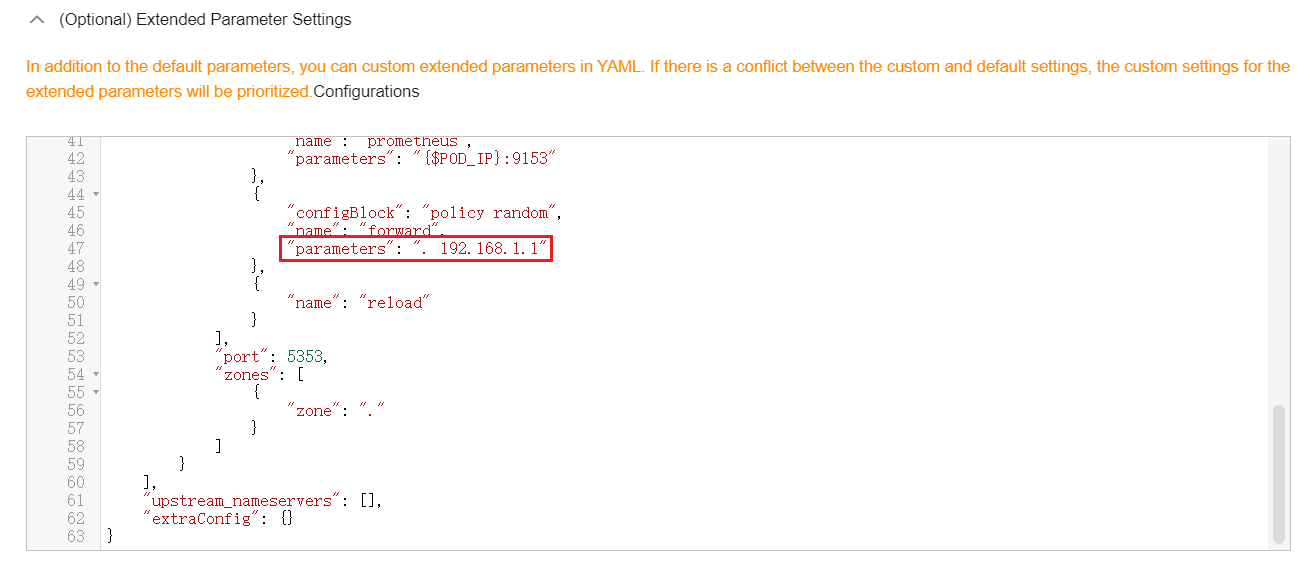
- Edit extended parameters in Parameters and modify the following content in the plugins field: For example, all domain name queries are forwarded to the upstream DNS server 192.168.1.1 using a random selection policy. For more details, see forward.
{
    "configBlock": "policy random",
    "name": "forward",
    "parameters": ". 192.168.1.1"
}
Figure 4 Using CoreDNS to cascade on-premises DNS
 If you edit the configuration using the Corefile view, the Corefile content is shown below:
.:5353 { bind {$POD_IP} cache 30 errors health {$POD_IP}:8080 kubernetes cluster.local in-addr.arpa ip6.arpa { pods insecure fallthrough in-addr.arpa ip6.arpa } loadbalance round_robin prometheus {$POD_IP}:9153 forward . 192.168.1.1 { policy random } reload ready {$POD_IP}:8081 } - Click Next. After the upgrade check is complete, click OK.
- Choose ConfigMaps and Secrets in the navigation pane, select the kube-system namespace, and view the ConfigMap data of coredns to check whether the update is successful.
What is your overall rating for this page?
Thank you very much for your feedback. We will continue working to improve the documentation.See the reply and handling status in My Cloud VOC.
For any further questions, feel free to contact us through the chatbot.
Chatbot


