

Service Overview
In Kubernetes, a Service makes an application running on a set of pods network-accessible. It provides a consistent DNS name for these pods and distributes traffic across them for load balancing. This section describes the basic concepts of Kubernetes Services and provides a comparison of various Service types.
Basic Concepts
You need to understand the following concepts about Services.
Service
After a pod is created, accessing it directly can result in certain problems:
- The pod can be deleted and recreated at any time by a controller such as a Deployment. If the pod is recreated, access to it may fail.
- An IP address cannot be assigned to a pod until the pod is started. Before the pod is started, its IP address is unknown.
- Applications usually run on multiple pods that use the same image. Accessing pods one by one is not efficient.
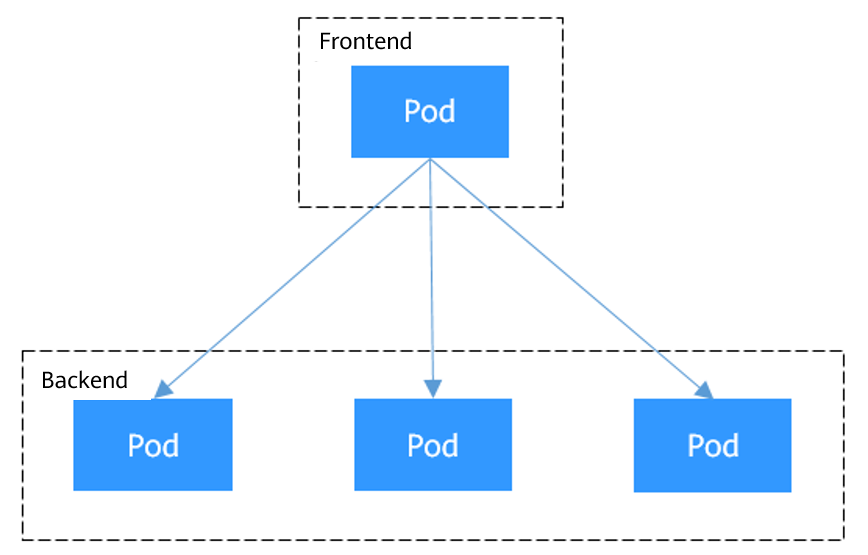
For example, a Deployment is used to deploy the frontend and backend of an application. The frontend calls the backend for computing, as shown in Figure 1. Three pods are running in the backend, and they are independent and replaceable. When a backend pod is recreated, the new pod is assigned with a new IP address, but the frontend pod is unaware of this change.
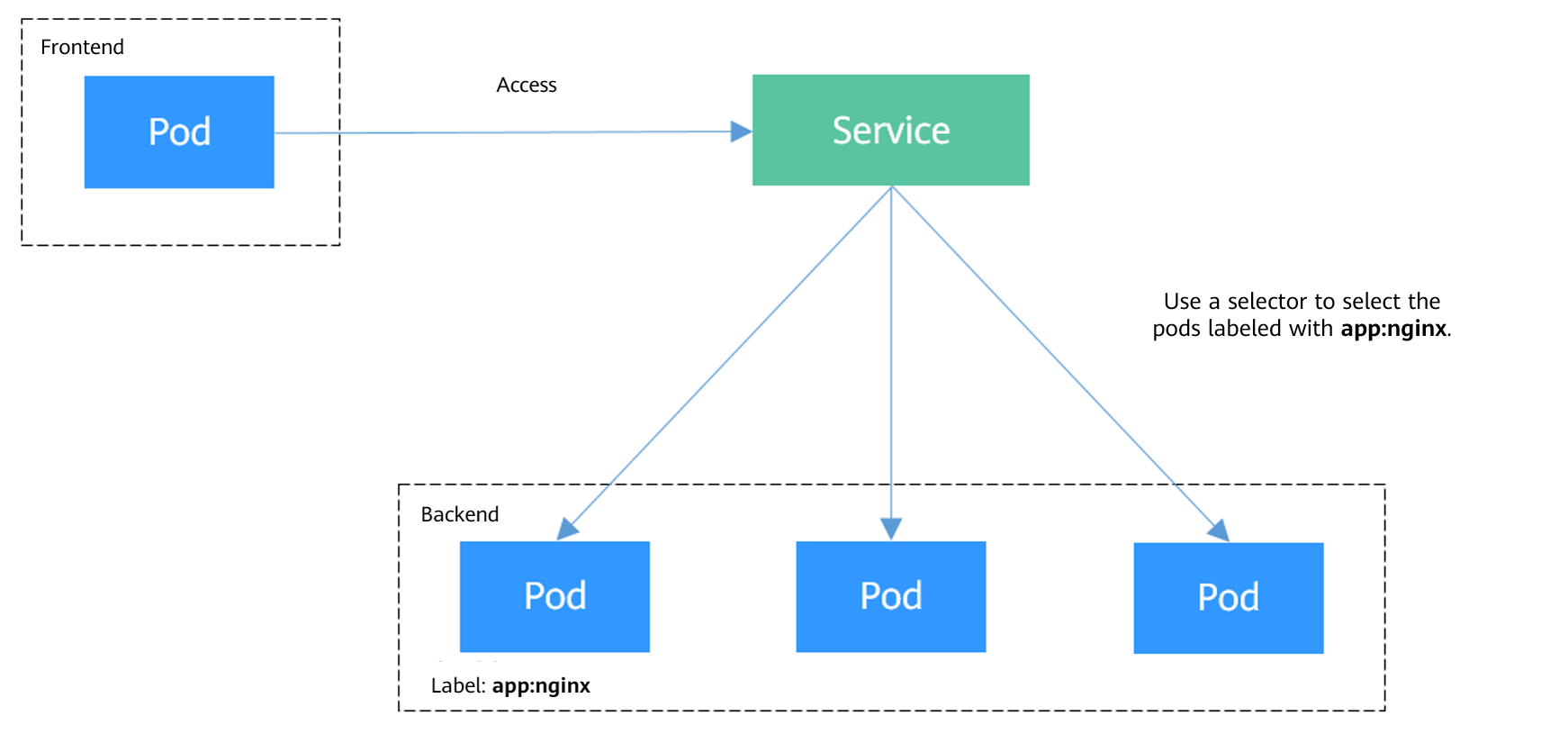
To solve these problems, Kubernetes introduces Services, which provide stable network interfaces and persistent IP addresses for pods. You can set these IP addresses using Service CIDR blocks during cluster creation. The Service CIDR blocks are used to assign IP addresses to Services. A Service uses a label selector to identify its target pods and uses load balancing to evenly distribute traffic among them. This abstraction eliminates the complexity of directly accessing individual pods and enhances both the availability and efficiency of workloads.
For the example above, a Service is created for the backend pods and used for the frontend pod to access these backend pods. In this way, the frontend pod remains unaffected by any changes to the backend pods, as shown in Figure 2.
Service Affinity (externalTrafficPolicy)
For a NodePort and LoadBalancer Service, requests are first sent to the node port, then the Service, and finally the pod backing the Service. The backing pod may not be located in the node receiving the requests. By default, the backend workload can be accessed from any node IP address and service port. If the pod is not on the node that receives the request, the request will be redirected to the node where the pod is located, which may cause performance loss.
You can configure service affinity using the console or YAML.
- Using the console: When creating the NodePort and LoadBalancer Services on the CCE console, you can configure service affinity using the Service Affinity option.

- Using YAML: The externalTrafficPolicy parameter in a Service is used to determine whether the external traffic can be routed to the local nodes or cluster-wide endpoints. The following is an example:
apiVersion: v1 kind: Service metadata: name: nginx-nodeport spec: externalTrafficPolicy: Local # Service affinity ports: - name: service nodePort: 30000 port: 80 protocol: TCP targetPort: 80 selector: app: nginx type: NodePort- If the value of externalTrafficPolicy is Local, requests sent from <node-IP-address:Service-port> will be forwarded only to the pod on the local node. If the node does not have a pod, the requests are suspended.
- If the value of externalTrafficPolicy is Cluster, requests are forwarded within the cluster and the backend workload can be accessed from any node IP address and service port.
- If externalTrafficPolicy is not set, the default value Cluster will be used.
The table below compares the two options of service affinity (externalTrafficPolicy).
| Category | Cluster-level (Cluster) | Node-level (Local) |
|---|---|---|
| Application | This mode applies to scenarios where high performance is not required and the source IP address of the client does not need to be retained. This mode brings more balanced load to each node in the cluster. | This mode applies to scenarios where high performance is required and the source IP address of the client needs to be retained. However, traffic is forwarded only to the node where the container resides, and source IP address translation is not performed. |
| Access mode | The IP addresses and access ports of all nodes in a cluster can access the workload associated with the Service. | Only the IP address and access port of the node where the workload is located can access the workload associated with the Service. |
| Obtaining client source IP address | The source IP address of the client cannot be obtained. | The source IP address of the client can be obtained. |
| Access performance | Service access will cause performance loss due to route redirection, and the next hop for a data packet may be another node. | Service access will not cause performance loss due to route redirection. |
| Load balancing | Traffic propagation has good overall load balancing. | There is a potential risk of unbalanced traffic propagation. |
| Other special case | None | In different container network models and service forwarding modes, accessing Services from within the cluster may fail. For details, see Why a Service Fails to Be Accessed from Within the Cluster. |
Service Types
You can create a specified type of Service in a cluster. The description and application scenarios of different types of Services are listed in the table below.
| Service Type | Description | Application | Billing |
|---|---|---|---|
| ClusterIP Services are the default type of Kubernetes Services. They assign a virtual IP address, accessible only within the cluster, from the cluster's Service CIDR block. | Services that only need to communicate with each other within a cluster and do not need to be exposed outside the cluster. For example, if a frontend application pod in a cluster needs to access a backend database in the same cluster, you can create a ClusterIP Service for the backend database to ensure that the backend database can be accessed only within the cluster. | Creating a Service of this type does not incur any costs. | |
| A NodePort Service opens a port on each node in a cluster to allow external traffic to access the Service through <node-IP-address>:<node-port>. | Scenarios where temporary or low-volume access is required. For example, in a testing environment, you can use a NodePort Service when deploying and debugging a web application. | Creating a Service of this type does not incur any costs. To access a NodePort Service from the Internet, bind an EIP to the node. For details about EIP billing, see EIP Billing Composition. | |
| A LoadBalancer Service adds an external load balancer on the top of a NodePort Service and distributes external traffic to multiple pods within a cluster. It automatically assigns an external IP address to allow access from the clients. LoadBalancer Services process TCP and UDP traffic at Layer 4 (transport layer) of the OSI model. They can be extended to support Layer 7 (application layer) capabilities to manage HTTP and HTTPS traffic. | Cloud applications that require a stable, easy-to-manage entry for external access. For example, in a production environment, you can use LoadBalancer Services to expose public-facing services such as web applications and API services to the Internet. These services often need to handle heavy traffic while maintaining high availability. | Load balancers are billed. For details, see ELB Billing. | |
| A DNAT Service provides Network Address Translation (NAT) for all nodes in a cluster so that multiple nodes can share an EIP. | Services that require temporary or low-volume access from the Internet. DNAT Services provide higher reliability than NodePort Services. With a DNAT Service, there is no need to bind an EIP to a single node, and requests can still be distributed to the workload even if any node fails. | NAT gateways are billed. For details, see NAT Gateway Billing. For details about EIP billing, see EIP Billing Composition. | |
| For headless Services, no cluster IP address is allocated. When a client attempts to access a backend pod and performs a DNS query for the Service, it receives a list of the IP addresses of the backend pods. This allows the client to communicate directly with individual pods. | Applications that require direct communication with specific backend pods instead of using proxies or load balancers. For example, when you deploy a stateful application (such as a ClickHouse database), you can use a headless Service. It allows application pods to directly access each ClickHouse pod and enables targeted read and write operations. This enhances overall data processing efficiency. | Creating a Service of this type does not incur any costs. |
Why a Service Fails to Be Accessed from Within the Cluster
upstream connect error or disconnect/reset before headers. reset reason: connection failure
Or
curl: (7) Failed to connect to **.**.**.** port 900: Connection refused
Or
curl: (28) Failed to connect to **.**.**.** port 1122: Connection timed out
It is common that a load balancer in a cluster cannot be accessed. The reason is as follows: When Kubernetes creates a Service, kube-proxy adds the access address of the load balancer as an external IP address (External-IP, as shown in the following command output) to iptables or IPVS. If a client inside the cluster initiates a request to access the load balancer, the address is considered as the external IP address of the Service, and the request is directly forwarded by kube-proxy without passing through the load balancer outside the cluster.
# kubectl get svc nginx
NAME    TYPE           CLUSTER-IP      EXTERNAL-IP                   PORT(S)        AGE
nginx   LoadBalancer   10.247.76.156   123.**.**.**,192.168.0.133   80:32146/TCP   37s

- For a multi-pod workload, ensure that all pods are accessible. Otherwise, there is a possibility that the access to the workload fails.
- The table lists only the scenarios where the access may fail. Other scenarios that are not listed in the table indicate that the access is normal.
- For CCE clusters using IPVS, set externalTrafficPolicy to Local for node-level Service affinity. For CCE Turbo clusters with DataPlane V2 disabled, node-level affinity is supported only when the Service backend uses hostNetwork.
- For CCE clusters using IPTABLES, set externalTrafficPolicy to Local for node-level Service affinity. For CCE Turbo clusters with DataPlane V2 disabled, node-level affinity is supported only when the Service backend uses hostNetwork.
- For clusters with DataPlane V2 enabled, set externalTrafficPolicy to Local for node-level Service affinity.
DataPlane V2 is supported only in CCE VPC-network clusters and Turbo clusters. Once enabled, it replaces kube-proxy entirely, eliminating the need to configure a service forwarding mode. For details, see DataPlane V2.
The following methods can be used to solve this problem:
- (Recommended) In the cluster, use the ClusterIP Service or service domain name for access.
- Set externalTrafficPolicy of the Service to Cluster, which means cluster-level service affinity. Note that this affects source address persistence.
Assume that the Service name is my-service and it is in the default namespace. The kubectl command example is as follows:
kubectl patch service my-service -n default --type='merge' -p '{"spec":{"externalTrafficPolicy":"Cluster"}}'
- Leveraging the pass-through feature of the Service, kube-proxy is bypassed when the ELB address is used for access. The ELB load balancer is accessed first, and then the workload. For details, see Configuring Passthrough Networking for a LoadBalancer Service.
- In a CCE standard cluster, after passthrough networking is configured using a dedicated load balancer, the private IP address of the load balancer cannot be accessed from the node where a workload pod resides or other pods on the same node as the workload.
- This function is only available in clusters v1.19 and later.
- In IPVS, the passthrough settings of Services connected to the same load balancer must be the same.
- If node-level (local) service affinity is used, kubernetes.io/elb.pass-through is automatically set to onlyLocal to enable passthrough networking.
Helpful Links
- How to create and use different types of Services:
- In containerized applications, access requests often pass through multiple proxy layers. To obtain the real client IP address, configure the Service as needed. For details, see Obtaining the Client Source IP Address for a Container.
- To ensure that requests from the same client are always forwarded to the same backend server during a session, configure sticky sessions via a load balancer. For details, see Implementing Sticky Session Through Load Balancing.
What is your overall rating for this page?
Thank you very much for your feedback. We will continue working to improve the documentation.See the reply and handling status in My Cloud VOC.
For any further questions, feel free to contact us through the chatbot.
Chatbot


