

Buying an RDS for PostgreSQL Instance and Connecting to It Through DAS
Data Admin Service (DAS) enables you to manage instances on a web-based console, simplifying database management and improving working efficiency. You can connect to and manage your instances through DAS. The permission required for connecting to DB instances through DAS has been enabled for you by default. Using DAS to connect to your DB instance is recommended, which is more secure and convenient.
This section describes how to purchase an RDS for PostgreSQL instance and how to connect to it using DAS.
Operation Process
| Process | Description |
|---|---|
| Sign up for a Huawei Cloud account, ensure that there is a valid payment method configured, and implement fine-grained permissions management on RDS. | |
| Select required basic settings and additional options and buy an RDS for PostgreSQL DB instance. | |
| Connect to the RDS for PostgreSQL instance through DAS. |
Preparations
- Sign up for a Huawei Cloud account.
- For fine-grained permissions management on Huawei Cloud resources, use Identity and Access Management (IAM) to create a user and user group and grant the user specific operation permissions. For details, see Creating a User and Granting Permissions.
Procedure
Step 1: Buy an RDS for PostgreSQL DB Instance
- Go to the Buy DB Instance page.
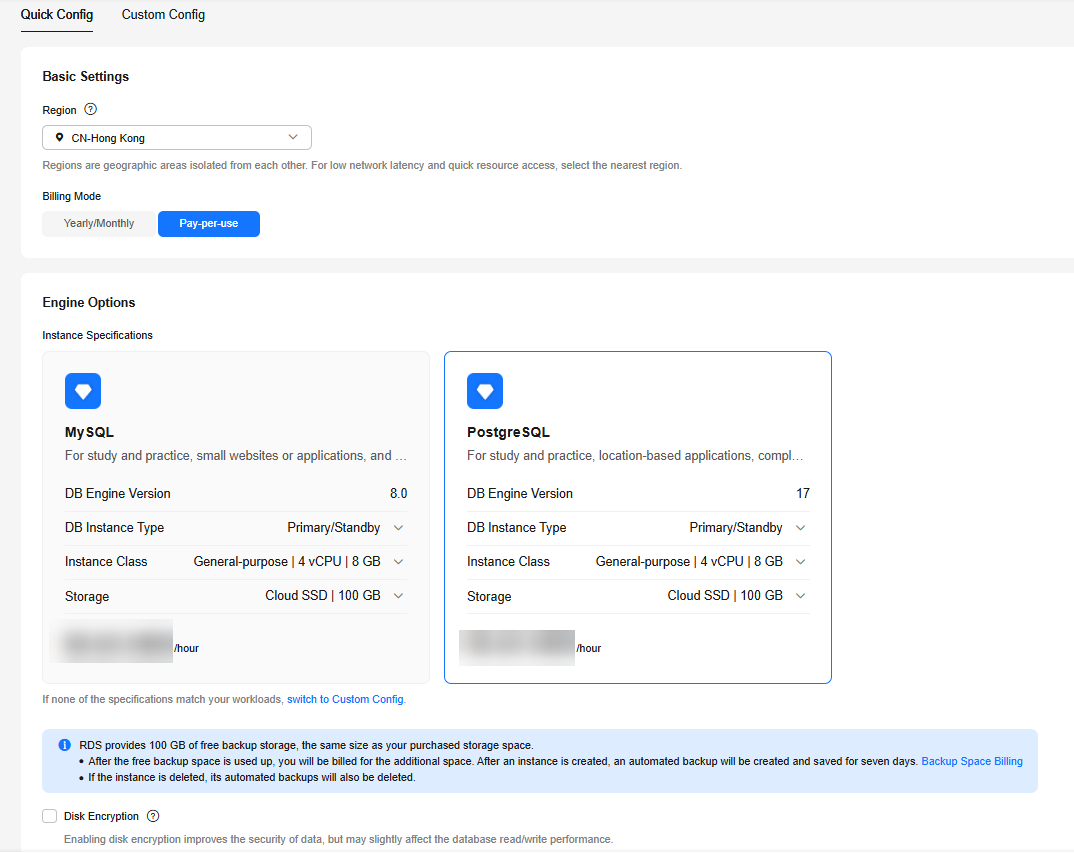
- On the Quick Config page, set basic parameters.

Only mandatory parameters are provided on the Quick Config page. If the available parameters do not match your workloads, try Custom Config.
The following parameter settings are only for reference.
Figure 1 Basic Settings
Parameter
Example Value
Description
Billing Mode
Pay-per-use
The billing mode of an instance.
- Yearly/Monthly: a prepaid billing mode in which you pay for resources before using them. Bills are settled based on the subscription period. The longer the subscription, the bigger the discount. This mode is a good option for long-term, stable services.
- Pay-per-use: a postpaid billing mode. You pay as you go and just pay for what you use. The DB instance usage is calculated by the second but billed every hour. This mode allows for flexible resource adjustment without the risk of over- or under-provisioning.
Region
CN-Hong Kong
The region where your resources are located.
NOTE:Products in different regions cannot communicate with each other through a private network. After a DB instance is created, the region cannot be changed. Therefore, exercise caution when selecting a region.
DB Engine Version
16
The database version.
DB Instance Type
Primary/Standby
The architecture type of an instance.
Primary/Standby: An HA architecture. In a primary/standby pair, each instance has the same instance class. Standby instances improve instance reliability. When you create a primary instance, a standby instance is automatically created alongside it. Once created, the standby instance is invisible on the console.
Instance Class
General-purpose | 4 vCPU | 8 GB
The vCPUs and memory of an instance.
Storage
Cloud SSD | 100 GB
The storage space of an instance.
It contains the system overhead required for inodes, reserved blocks, and database operation.
Disk Encryption
Disable
Enabling disk encryption improves data security, but slightly affects the read and write performance of the database.
If a shared KMS key is used, the corresponding CTS events are createDatakey and decryptDatakey. Only the key owner can receive the events.
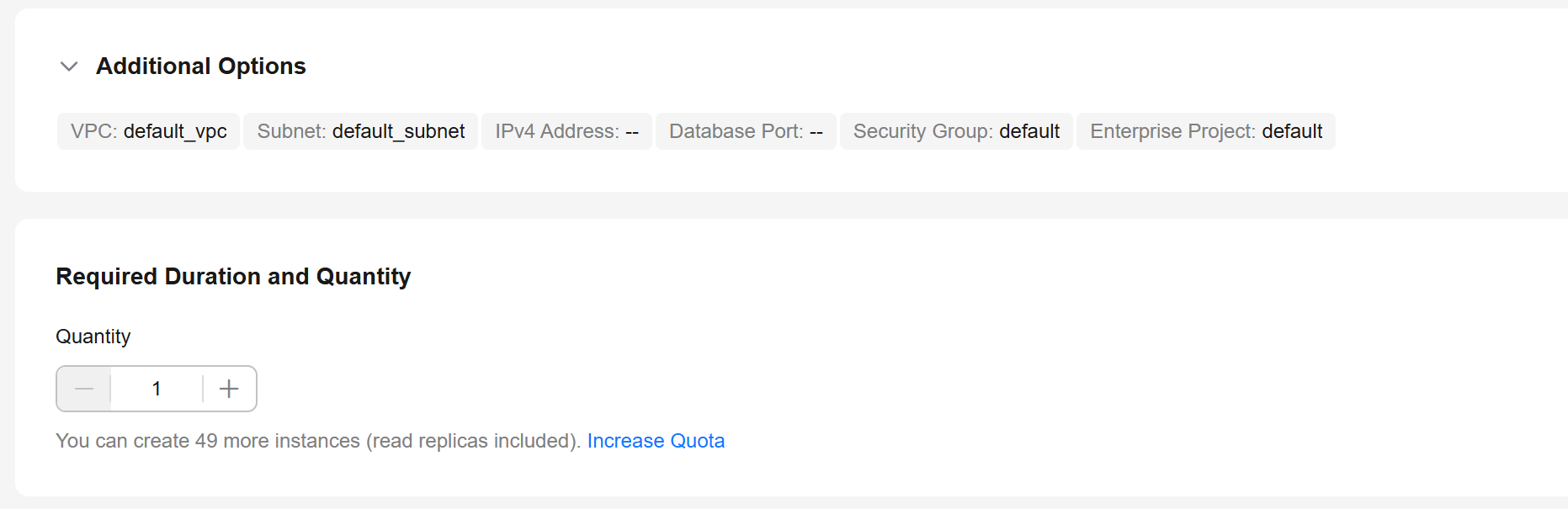
- Complete advanced configurations. Figure 2 Additional Options
Parameter
Example Value
Description
VPC
default_vpc
The virtual network in which your instance is located. VPCs can isolate networks for different workloads.
If no VPC is available, click Create VPC. After a VPC is created, click
 . For details, see Creating a VPC with a Subnet.
Subnet
default_subnet
A subnet provides dedicated network resources that are logically isolated from other networks for network security.
Management CIDR Block
172.16.0.0/16
The management CIDR block is predefined by RDS and used for database management and primary/standby data synchronization. It must be different from the CIDR block containing the client IP addresses. Otherwise, a client IP address may conflict with a management IP address, making the database inaccessible.
Security Group
default
It can enhance security by controlling access to RDS for PostgreSQL from other services.
Enterprise Project
default
If your account has been associated with an enterprise project, select the target project from the Enterprise Project drop-down list.
For more information about enterprise projects, see Enterprise Management User Guide.
Quantity
1
The number of instances to be created in a batch.
- Click Buy.
- Check the purchased DB instance. Figure 3 Instance successfully purchased

Step 2: Connect to the RDS for PostgreSQL Instance
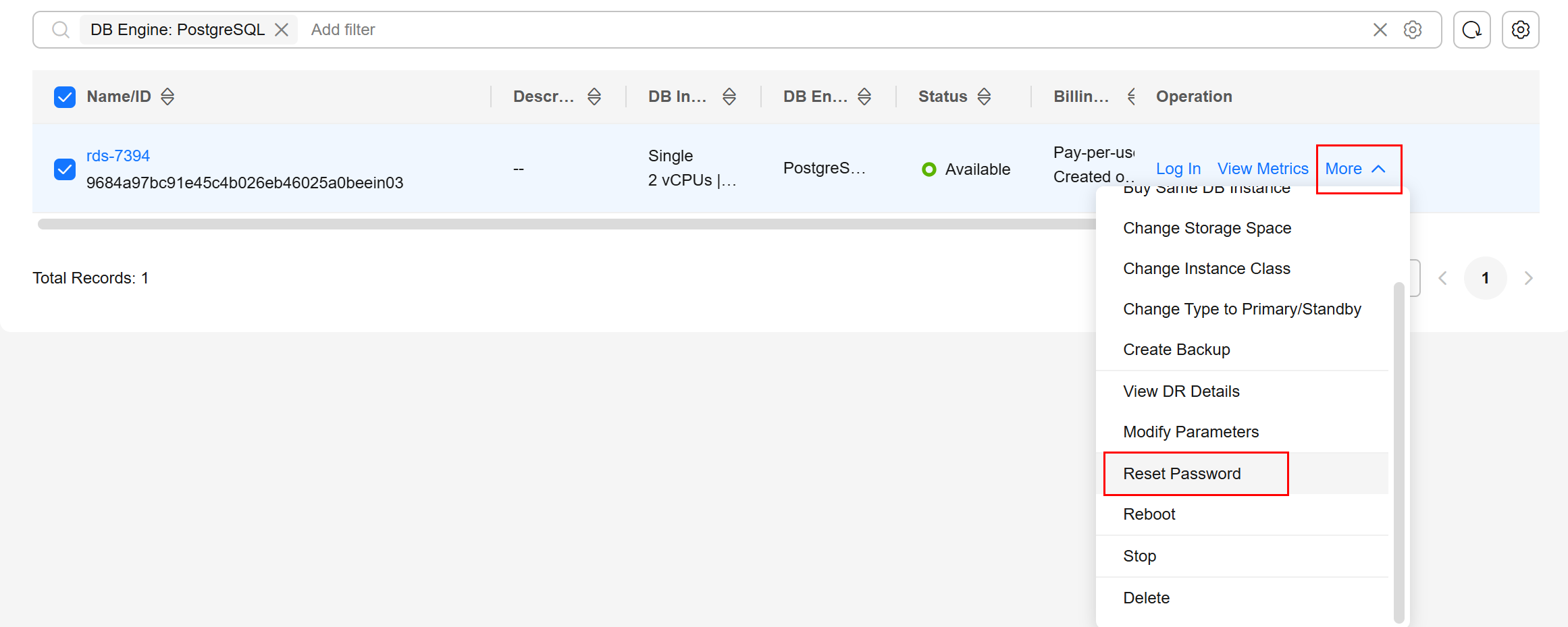
- Since no password is configured in Step 1: Buy an RDS for PostgreSQL DB Instance, you need to reset the password before connecting to the instance. In the instance list, choose More > Reset Password. Figure 4 Instance list
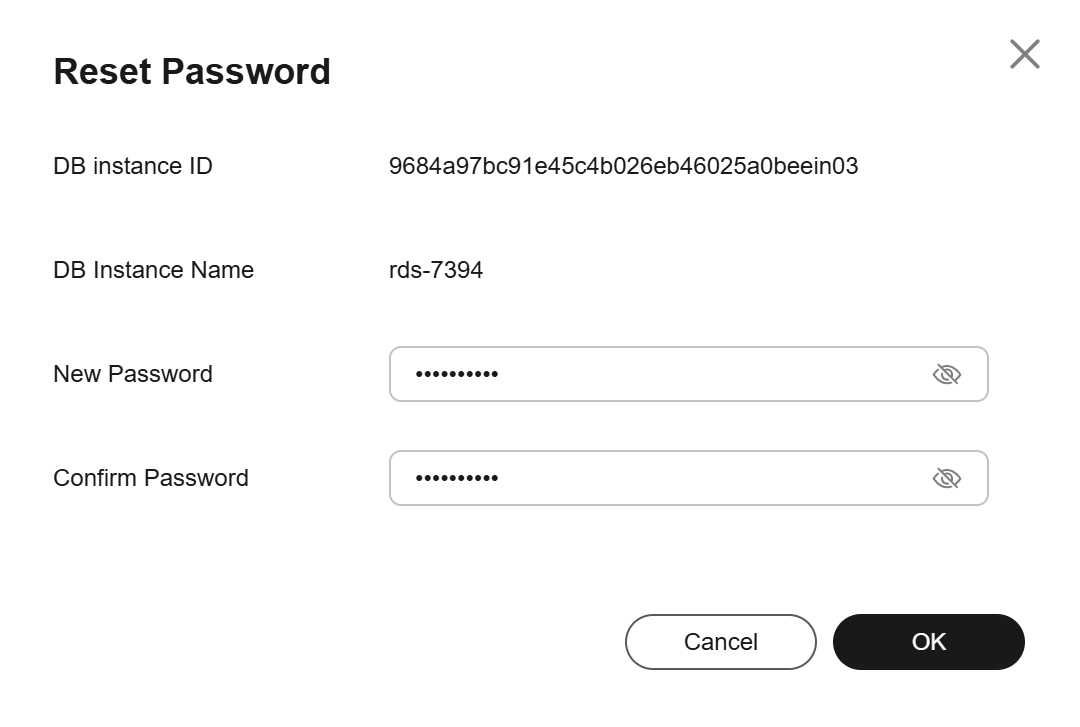
- Enter a new password, confirm the password, and click OK. Figure 5 Resetting a password
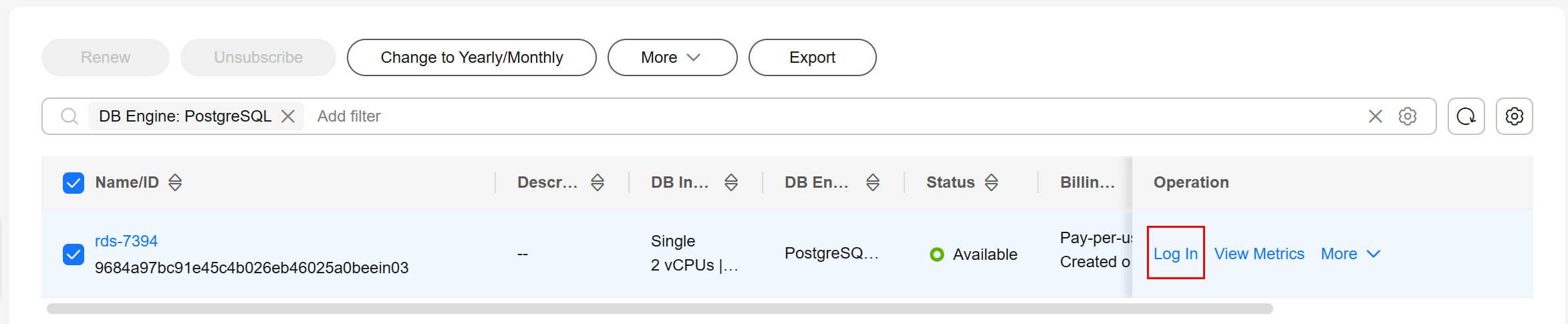
- Click Log In in the Operation column. Figure 6 Instance list
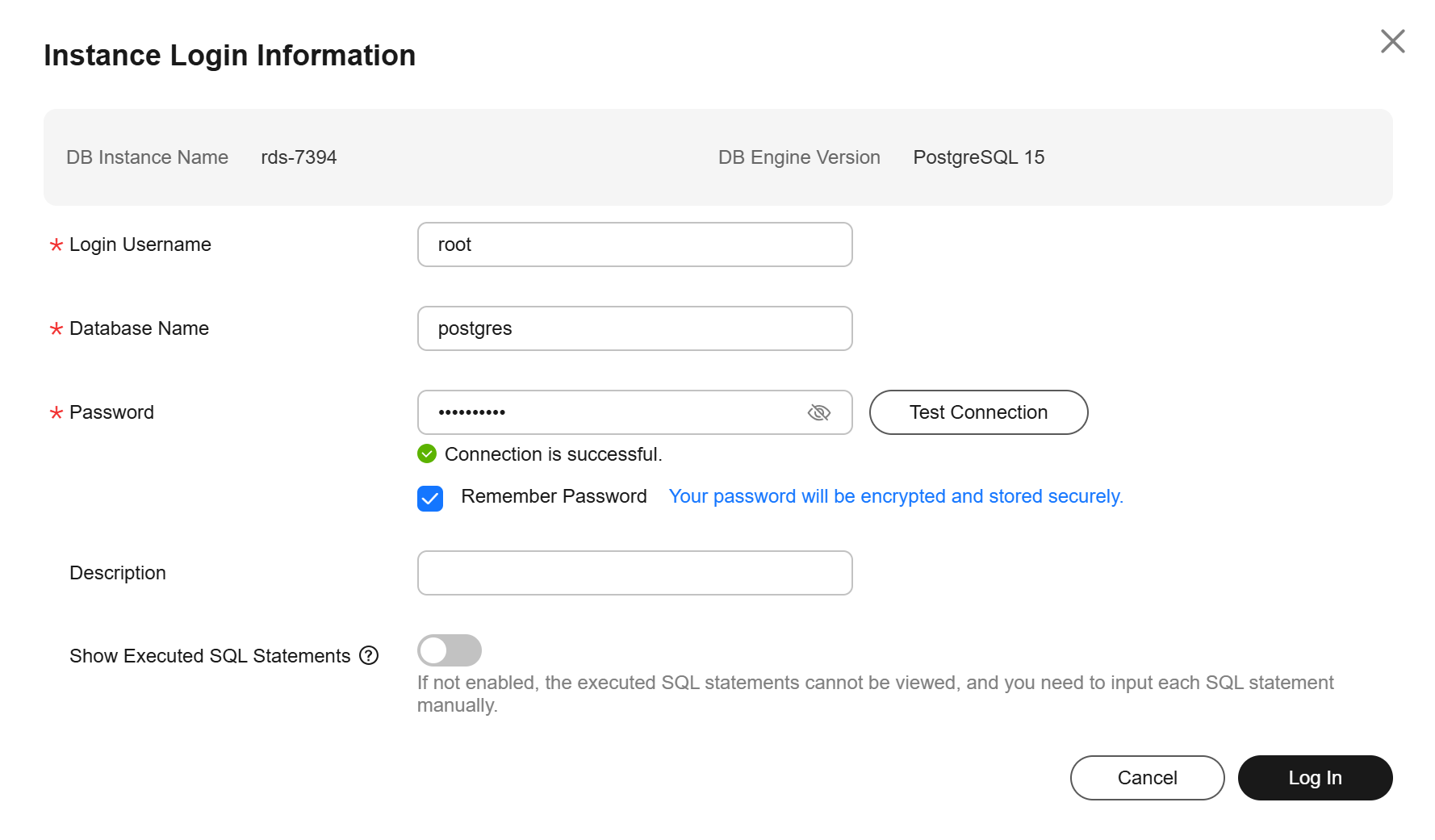
- Enter the required information and click Log In.
- Login Username: Enter root.
- Database Name: Enter postgres.
- Password: Enter the password you specified in 2.
Figure 7 Logging in to an instance
- Choose SQL Operations > SQL Window. Figure 8 SQL Window

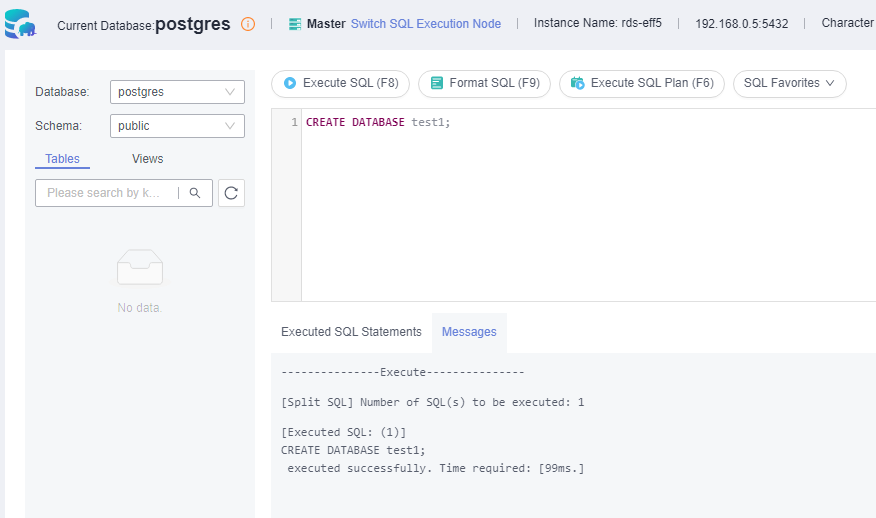
- Create a database, for example, test1.
CREATE DATABASE test1;
Figure 9 Creating a database
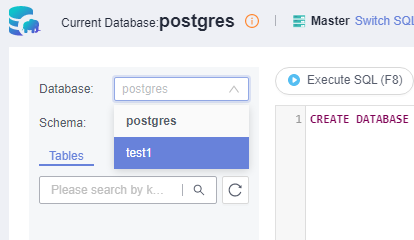
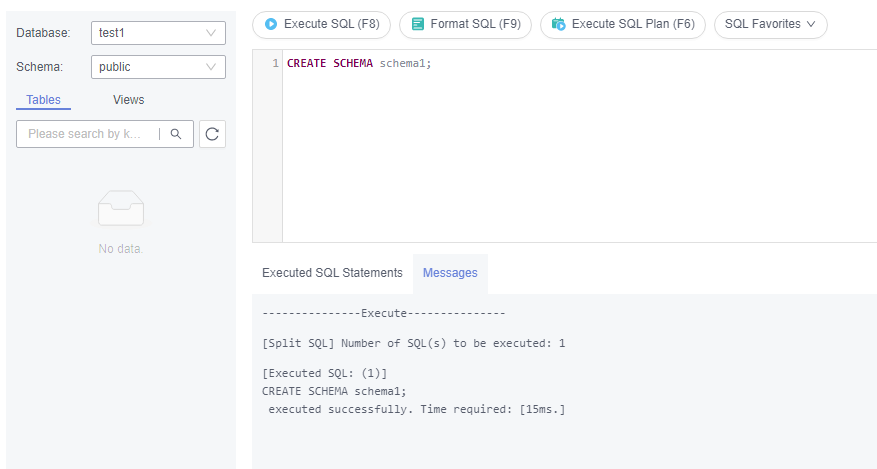
- Switch to test1 and create a schema (for example, schema1) in the database. Figure 10 Switching to the database
CREATE SCHEMA schema1;
Figure 11 Creating a schema
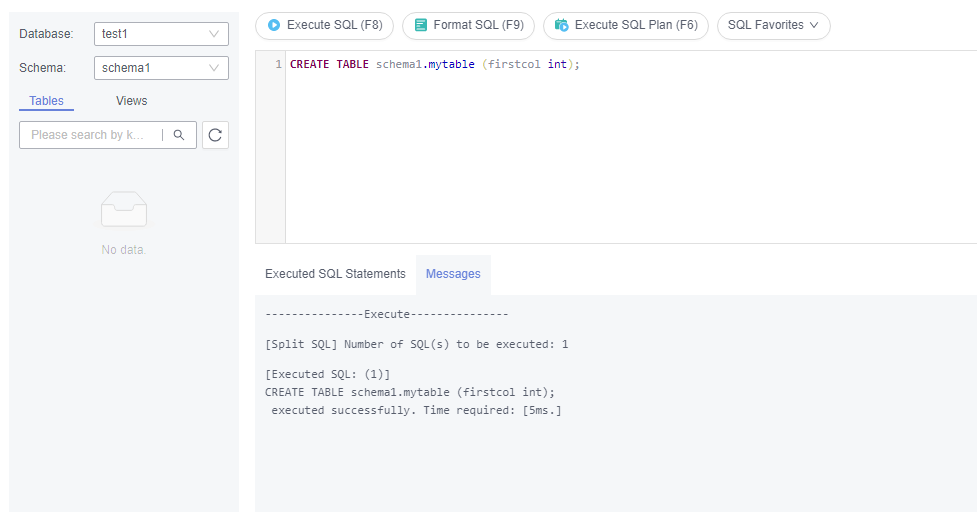
- Switch to schema1 and create a table named mytable with only one column. Specify the column name as firstcol and the column type as integer.
CREATE TABLE schema1.mytable (firstcol int);
Figure 12 Creating a table
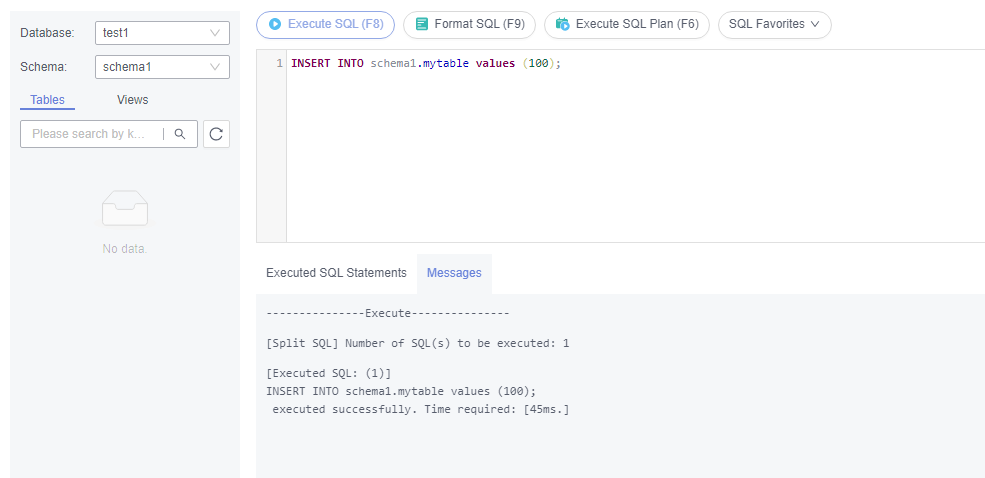
- Insert data into the table.
INSERT INTO schema1.mytable values (100);
Figure 13 Inserting data
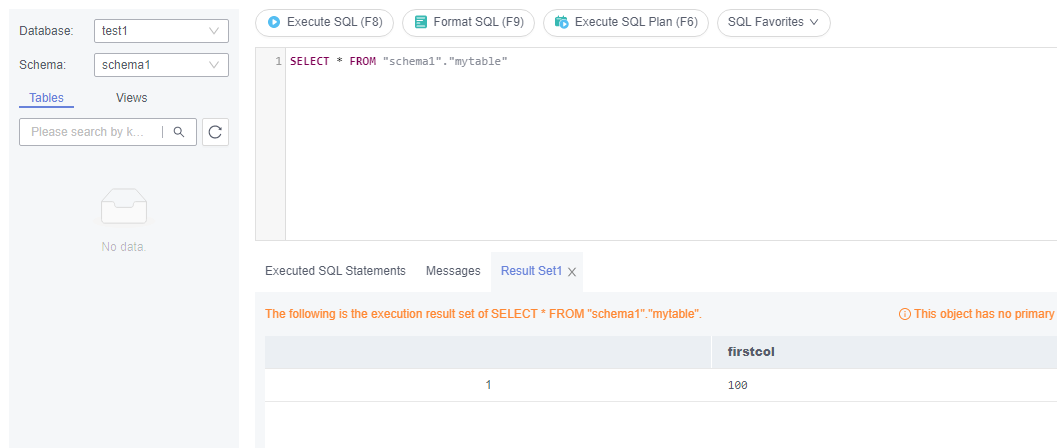
Query data in the table.
SELECT * FROM "schema1"."mytable"
Figure 14 Querying data
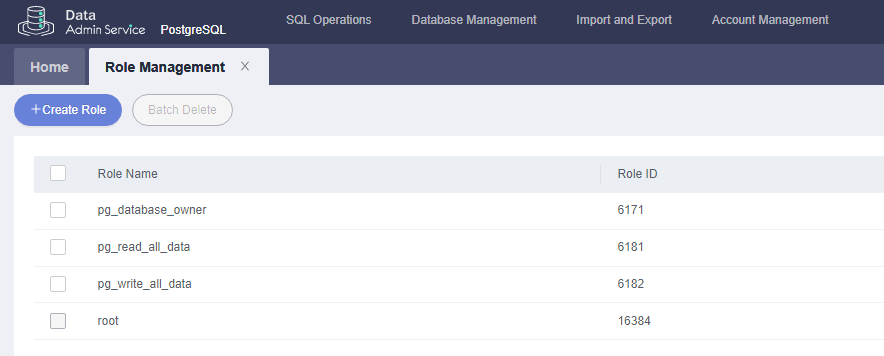
- In the upper part of the page, choose Account Management > Role Management. Figure 15 Role management
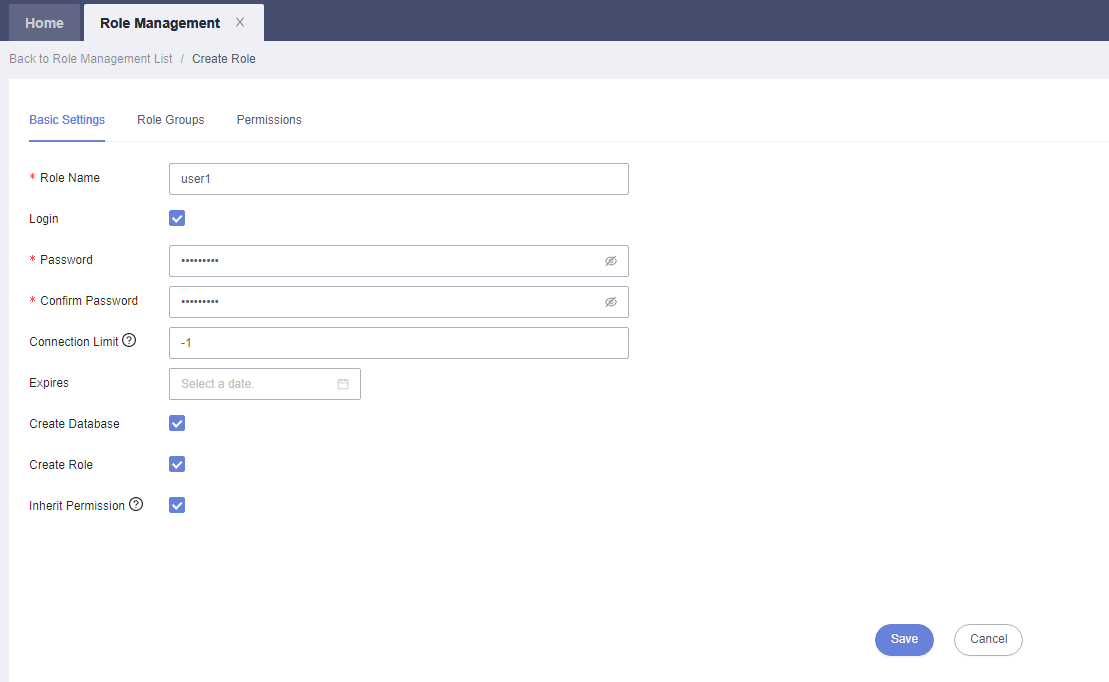
- Click Create Role and complete basic settings. user1 is used as an example. Figure 16 Creating a role
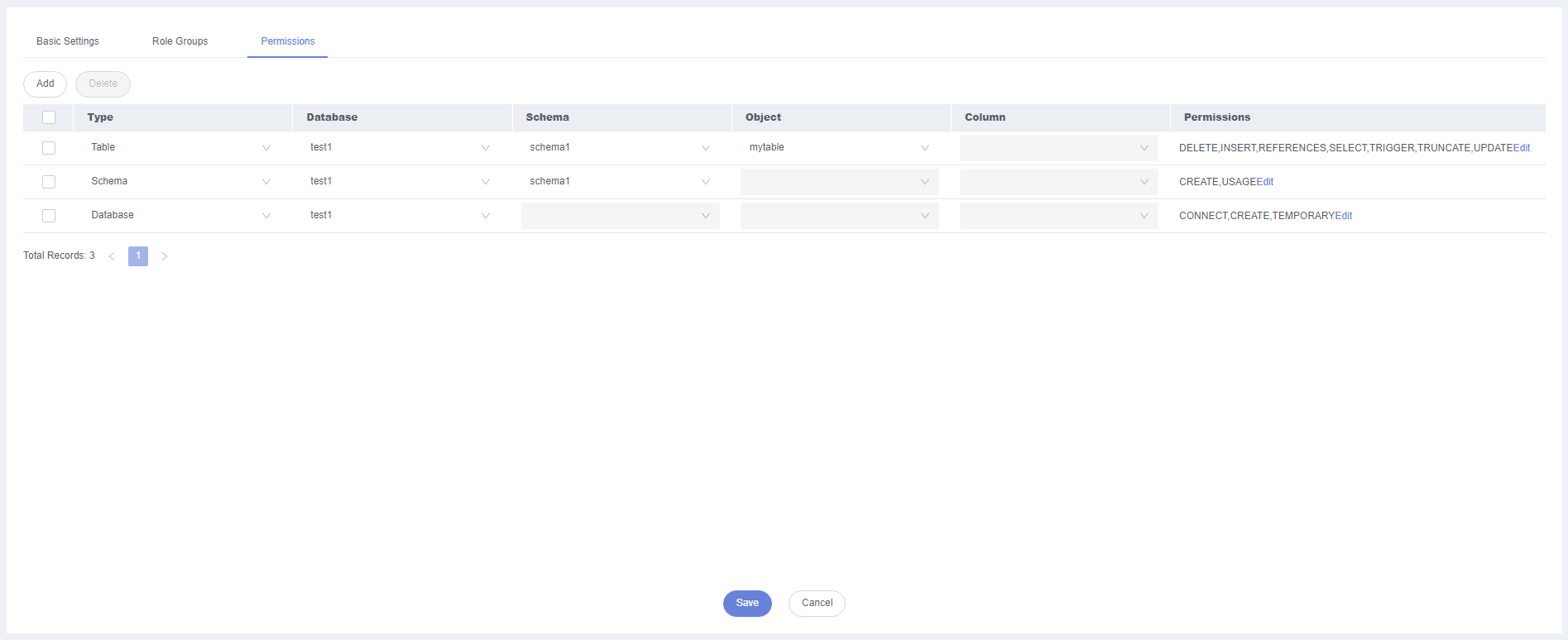
- Click the Permissions tab and grant user1 the permissions to perform operations on databases, schemas, and tables. Figure 17 Granting permissions
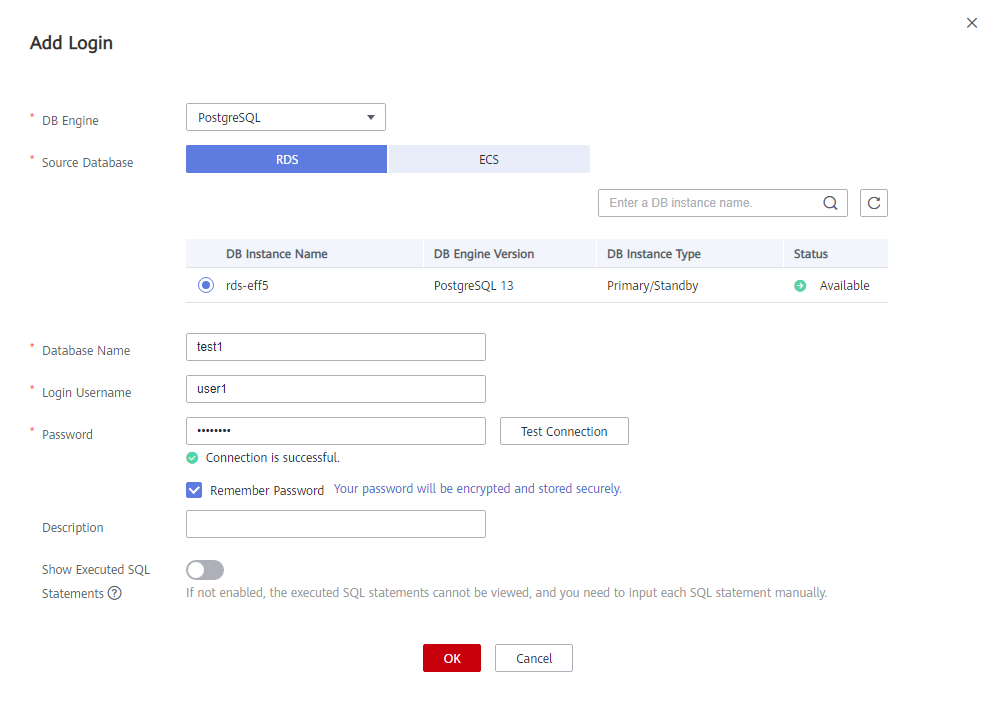
- On the Development Tool page, click Add Login and log in to the database as user1. Figure 18 Adding login
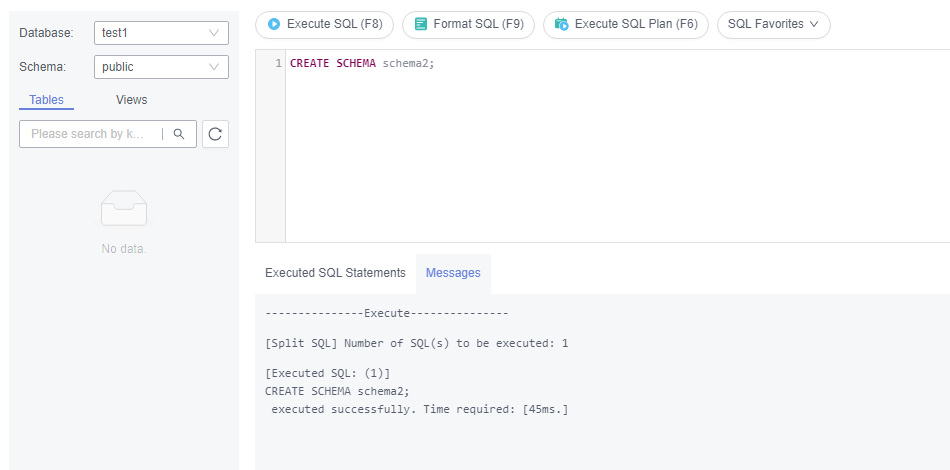
- Create schema2 in test1 to verify that user1 has the CREATE permission. CREATE SCHEMA schema2;Figure 19 Verifying permissions
FAQs
What Should I Do If I Fail to Connect to My DB Instance Using DAS?
Error message: FATAL: Invalid username/password,login denied.
Error cause: The username or password of the RDS instance is incorrect.
Solution: Ensure that the username and password are correct. If you are not sure, reset the password on the RDS console.

Changing the password may have impact on workloads.
Follow-up Operations
After logging in to the DB instance, you can create or migrate databases.
What is your overall rating for this page?
Thank you very much for your feedback. We will continue working to improve the documentation.See the reply and handling status in My Cloud VOC.
For any further questions, feel free to contact us through the chatbot.
Chatbot


