

Accessing a Bucket Using a CDN Acceleration Domain Name
Scenarios
More and more companies in various industries use OBS to store static resource files such as images, videos, and software packages, and use OBS as the storage source for websites, forums, apps, and games. These static resources can be obtained by accessing OBS through URLs. Generally, files are stored in only one region. If you access OBS far away from the region where files are stored, the response speed may be slow. In scenarios where frequent access is required, accessing OBS to obtain files consumes a large amount of traffic.
To improve the speed and stability for accessing static resource files, you can use CDN acceleration. If you have configured a user-defined domain name for a bucket, you can directly enable CDN acceleration for the domain name. If you have not configured a user-defined domain name for the bucket, you can configure a CDN acceleration domain name.
CDN acceleration applies to the following scenarios:
- Website acceleration
When static resources (such as images and files) on portals, e-commerce platforms, or user-generated content (UGC) apps are accessed by large or globally distributed user bases, CDN acceleration can make the responses faster.
- Download acceleration
CDN acceleration enables higher bandwidth and faster transmission, which reduces the time required for downloading files from websites, game clients, or app stores.
- On-demand service acceleration
In scenarios, such as online education and video sharing, that offer video on demand (VOD) and audio on demand (AOD) services, CDN acceleration can minimize playback buffering.
For details, see Application Scenarios.
Video Tutorial
This video shows how to configure a CDN acceleration domain name for an OBS bucket:
- On OBS Console, bind an acceleration domain name to the OBS bucket.
- On the DNS console, add a CNAME record set.
Billing for CDN-Accelerated Access to OBS
When you use Huawei Cloud CDN to accelerate access to the data stored in OBS, charges from both OBS and CDN apply.
Figure 1 shows how and what costs are generated.
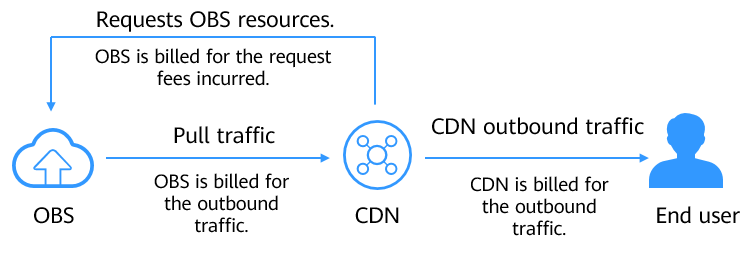
Table 1 describes the billing items in detail.
| Billing Item | Billing Party | Description | Billing Mode |
|---|---|---|---|
| Requests | OBS | When you attempt to access data the first time, a CDN edge PoP will send requests to pull data from the origin server (OBS). OBS charges based on the number of API requests. | Pay-per-Use |
| CDN pull traffic | OBS | Pull traffic generated when the origin server (OBS 3.0 bucket) returns data and caches it on the CDN edge PoP. If Direct Connect is used, the price will be different. For details, see Product Pricing Details. Such traffic is only generated for OBS 3.0 buckets. If data is pulled from OBS 2.0 buckets, the data is directly transferred out over the Internet. | Pay-per-Use |
| CDN traffic | CDN | Outbound traffic generated when you access a CDN edge PoP. For details, see Billing by Traffic. | Pay-per-Use Resource packages (prepaid CDN traffic packages) |
How It Works
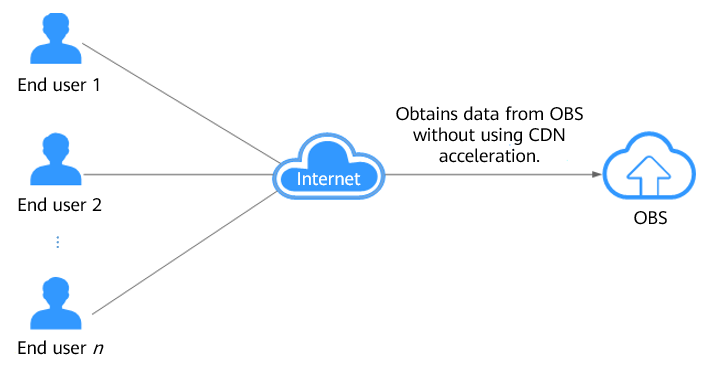
Accessing OBS without CDN acceleration: Files are stored in only one region. Therefore, when a client accesses OBS far away from the region, the response speed may be slow.
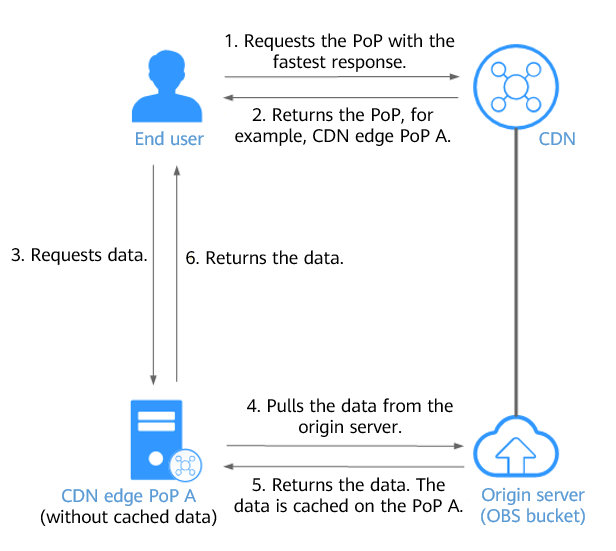
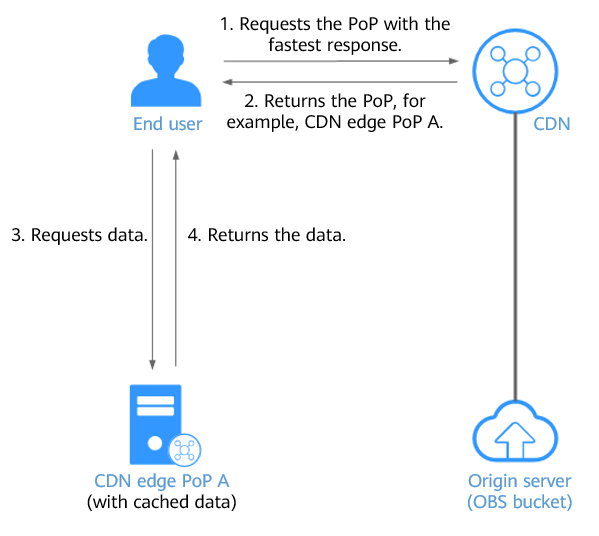
Accessing OBS with CDN acceleration: When a client initiates a request, CDN searches for the CDN PoP that responds the fastest to the domain name and checks whether the CDN PoP has already cached the data requested by the client.
- If cached, the CDN PoP returns the data to the client.
- If not, the CDN PoP pulls the data from OBS, returns the data to the client, and caches the data on itself.
Therefore, CDN-based acceleration reduces latency, lowers costs, and enhances the end-user experience.
The following explains how a client accesses OBS without and with CDN acceleration.
Figure 2 shows the process of accessing OBS directly from clients without CDN acceleration.
When a client initiates a request, CDN searches for the CDN PoP that responds the fastest to the domain name and detects that the requested data is not cached on the PoP. Then, the CDN PoP pulls the data from OBS, returns the data to the client, and caches the data on itself. Figure 3 shows the request process.
When a client initiates a request, CDN searches for the CDN PoP that responds the fastest to the domain name and detects that the requested data is cached on the PoP. Then, the CDN PoP returns the data to the client, without pulling data from OBS. Figure 4 shows the request process.
Constraints
Only buckets whose version is 3.0 or later support CDN acceleration. To check the version of a bucket, go to OBS Console, click the bucket name and go to the Overview page, and find the version in the Basic Information area.
Configuring an Acceleration Domain Name
You can use OBS Console to configure acceleration domain names. You cannot use APIs, SDKs, OBS Browser+, or obsutil to do so.
To configure an acceleration domain name on OBS Console, perform the following two steps:
- Bind an acceleration domain name to the bucket.
- Add a CNAME record set to map the acceleration domain name to the default domain name of the bucket.
Step 1: Bind an Acceleration Domain Name
- In the navigation pane of OBS Console, choose Buckets.
- In the bucket list, click the desired bucket. The Objects page is displayed.
- In the navigation pane, choose Basic Configurations > Domain Name Mgmt. Figure 5 Domain name management page

- In the upper part of the page, click Configure Acceleration Domain Name. If no user-defined domain name is bound, click Configure Acceleration Domain Name in the Configure Acceleration Domain Name card in the lower part of the page.

If CDN has not been enabled, a dialog box is displayed after you click Configure Acceleration Domain Name. Enable CDN as prompted.
Figure 6 Configuring an acceleration domain name
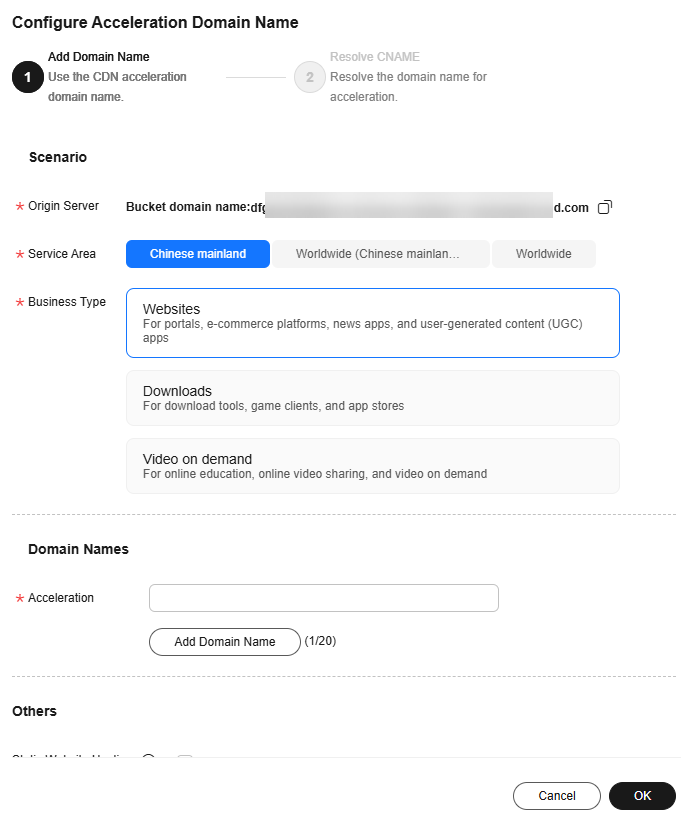
- Configure parameters by referring to Table 2.
Table 2 Parameters for adding an acceleration domain name Parameter
Value
Description
Example Value
Origin Server
-
The origin server (the default domain name of the OBS bucket that stores the requested resources) that is accessed by the client using the acceleration domain name
This parameter is displayed by default and requires no configuration.
-
Service Area
Chinese mainland
If you select only the Chinese mainland, all requests are scheduled to CDN PoPs in the Chinese mainland. In addition, the acceleration domain name must be licensed by the MIIT. For details, see ICP Filing Process.
Worldwide
Outside of Chinese mainland
If you select Outside of Chinese mainland, all requests are scheduled to CDN PoPs outside the Chinese mainland. You do not need to apply for a license for the acceleration domain name from the MIIT.
Worldwide
If you select Worldwide, worldwide requests are scheduled to the nearest, optimal CDN PoP. The acceleration domain name must be licensed by the MIIT. For details, see ICP Filing Process.
Business Type
Websites
When static resources (such as images and files) on portals, e-commerce platforms, or user-generated content (UGC) apps are accessed by large or globally distributed user bases, CDN acceleration can make the responses faster.
Websites
Downloads
CDN acceleration enables higher bandwidth and faster transmission, which reduces the time required for downloading files from websites, game clients, or app stores.
Video on demand
In scenarios, such as online education and video sharing, that offer video on demand (VOD) and audio on demand (AOD) services, CDN acceleration can minimize playback buffering.
Bucket
Public bucket
Selecting this option allows CDN to access the bucket anonymously when CDN acceleration is used.
Selecting Public bucket poses high security risks. You should avoid using medium- or high-risk OBS buckets as origin servers.
Private bucket
Private bucket
Selecting this option prevents CDN from accessing the bucket anonymously when CDN acceleration is used.
If you select Private bucket, CDN uses the built-in CDNAccessPrivateOBS agency for identity authentication to pull data from the OBS bucket.
The CDNAccessPrivateOBS agency is created by OBS to authorize CDN to access its private buckets. For more information, see OBS Authorization.
Do not delete the agency for authorizing CDN to access OBS. Otherwise, CDN will be unable to pull resources from OBS private buckets.
NOTE:If you are configuring CDN acceleration for the first time and select Private bucket (OBS private bucket retrieval) as the bucket type, OBS will automatically create the CDNAccessPrivateOBS agency.
Acceleration
-
The user-defined domain name to be accelerated
- The domain name:
- Must start with an asterisk (*), a letter, or a digit.
- Can contain uppercase and lowercase letters, digits, hyphens (-), and periods (.).
- Can have a suffix of 2 to 6 uppercase or lowercase letters, for example, .com and .cn.
- The ownership of the domain name must be verified.
To prevent domain names from being maliciously added to your CDN acceleration service, you must verify the domain name ownership when connecting a domain name to CDN for the first time. For details, see Verifying the Domain Name Ownership.
- You can add up to five domain names at a time. NOTE:
If you want to select one of the existing Huawei Cloud domain names from the drop-down list on OBS Console, you must have the Domains:domains:getDetails permission. You can contact the administrator to use role/policy-based authorization of IAM to grant you this permission. For details, see Assigning Permissions to an IAM User.
static.example.com
Static Website Hosting
-
You can upload static website files to your OBS bucket and grant anonymous users the read permission for these files, and then configure static website hosting for the bucket, so that OBS can host your static website. For details, see Static Website Hosting.
- If you have configured static website hosting for your OBS bucket, select Enable for Static Website Hosting. This way, when you access a single static file in the bucket, OBS does not list all files in the bucket.
You also need to select Static website hosting on the origin server settings page of the CDN console. For details, see Why Are All Files in the Bucket Displayed When Users Request a File from an OBS Bucket Connected to CDN?
- If static website hosting is not configured for your OBS bucket, do not enable this option. Otherwise, services will be abnormal.
-
- The domain name:
- Click OK.

- If an error is reported when you configure CDN acceleration, it may be because this is the first time you are configuring origin retrieval from an OBS private bucket for the domain name. In this case, you need to authorize CDN to access your private bucket. For details, see OBS Authorization.
- After configuring origin retrieval from an OBS private bucket, do not delete the agency between CDN and OBS. If you delete it, CDN will no longer be able to retrieve resources from the private bucket.
Step 2: Add a CNAME Record Set
Add a CNAME record set to map the user-defined domain name to the default domain name of the bucket.
- Click Resolve to automatically add a CNAME record set.
- If you specified a Huawei Cloud domain name, click Resolve for DNS to add a CNAME record set.
- If you specified a domain name that is not registered with Huawei Cloud, skip this step and manually add a CNAME record set by referring to 2.
- Manually add a CNAME record set.
- If you are not using a Huawei Cloud domain name, follow the CNAME resolution guide provided by your DNS provider.
- If you are using a Huawei Cloud domain name, do as follows:
- Log in to the DNS console.
- In the navigation pane, choose Public Zones.
- (Optional) Create a public zone. If you have already created one, skip this step.
- On the Public Zones page, click Create Public Zone in the upper right corner.
- Configure parameters by referring to the following table. Retain the default settings for other parameters.
Table 3 Parameters for creating a public zone Parameter
Example Value
Description
Domain Name
example.com
The domain name purchased from a domain name registrar
Enter the user-defined domain name bound to the bucket here.
Enterprise Project
default
The enterprise project to be associated with the public zone. You can manage public zones by enterprise project.
This parameter is available and mandatory only when you are using an enterprise account.
Notes:
- If you do not manage zones by enterprise project, select the default enterprise project.
- If you manage zones by enterprise project, select another existing enterprise project.
To create an enterprise project, see Creating an Enterprise Project.
- Click OK.
- Locate the row that contains the domain name to which you want to add a record set and click the domain name.
- On the Record Sets tab, click Add Record Set.
- Configure parameters by referring to Table 4. Keep the default settings for the parameters that are not listed in the following table. For details, see Adding a CNAME Record Set.
Table 4 Parameters for adding a CNAME record set Parameter
Example Value
Description
Type
CNAME – Map one domain to another
Choose a record set type depending on the purpose of the domain name.
Select CNAME – Map one domain to another here.
A message may be displayed, indicating that the record set you are trying to add conflicts with an existing record set of the zone.
For details, see Why Is a Message Indicating Conflict with an Existing Record Set Displayed When I Add a Record Set?
Name
Left blank
The prefix of the domain name to be resolved
For example, if the domain name is example.com, its prefix can be:
- www: used for website resolution. The domain name to be resolved is www.example.com.
- Left blank: used for website resolution. The domain name to be resolved is example.com.
To use an at sign (@), leave this parameter blank.
- abc: The domain name to be resolved is abc.example.com, a subdomain of example.com.
- mail: The domain name to be resolved is mail.example.com.
- *: The domain name to be resolved is *.example.com, any subdomain of example.com.
Line
Default
The line type. It defines the rule used by the DNS server to return DNS resolution results based on the visitor's source.
The default value is Default.
This parameter can only be configured for public zone record sets.
- Default: returns the default resolution result irrespective of where the visitors come from.
- ISP: returns the resolution result based on visitors' carrier networks. For details, see Configuring ISP Lines.
- Region: returns the resolution result based on visitors' geographical locations. For details, see Configuring Region Lines.
- Custom line: returns a specific IP address based on the IP address range of visitors. For details, see Configuring Custom Lines.
TTL (s)
300
The length of time (in seconds) for which a local DNS server caches a record set
The default value is 300, which is 5 minutes. (value range: 1 to 2147483647).
If your service address changes frequently, set TTL to a smaller value. Otherwise, set TTL to a larger value.
For more information about TTL, see What Is TTL?
Value
example-bucket.obs.cn-north-4.myhuaweicloud.com
Domain name alias. You can enter only one domain name.
- If CDN acceleration is not used, set this parameter to the bucket domain name.
- If CDN acceleration is used, set this parameter to the CNAME domain name allocated by CDN.
- Click OK.
- Verify that the added CNAME record set is in effect.
Open the Windows command line interface and run the following command:
nslookup -type = cname example.nameIn this command, example.name indicates the user-defined domain name or CDN acceleration domain name specified for the bucket. Replace it with your actual domain name.
- Without CDN acceleration: If the output is the bucket domain name, the CNAME record set is in effect.
- With CDN acceleration: If the output is the CNAME domain name allocated by CDN, the CNAME record set is in effect.
After the domain name is configured, CDN acceleration is not applied immediately. Refresh the domain name list to check the status. CDN acceleration is in effect only when the CNAME status is Enabled.
Enabling Acceleration for a User-Defined Domain Name
You can use OBS Console to enable acceleration for the user-defined domain name bound to the bucket. You cannot use APIs, SDKs, OBS Browser+, or obsutil to do so.
To enable acceleration on OBS Console, perform the following two steps:
- Enable acceleration for the bound user-defined domain name.
- Add a CNAME record set to map the acceleration domain name to the default domain name of the bucket.
Step 2: Add a CNAME Record Set
Add a CNAME record set to map the user-defined domain name to the default domain name of the bucket.
- Click Resolve to automatically add a CNAME record set.
- If you specified a Huawei Cloud domain name, click Resolve for DNS to add a CNAME record set.
- If you specified a domain name that is not registered with Huawei Cloud, skip this step and manually add a CNAME record set by referring to 2.
- Manually add a CNAME record set.
- If you are not using a Huawei Cloud domain name, follow the CNAME resolution guide provided by your DNS provider.
- If you are using a Huawei Cloud domain name, do as follows:
- Log in to the DNS console.
- In the navigation pane, choose Public Zones.
- (Optional) Create a public zone. If you have already created one, skip this step.
- On the Public Zones page, click Create Public Zone in the upper right corner.
- Configure parameters by referring to the following table. Retain the default settings for other parameters.
Table 6 Parameters for creating a public zone Parameter
Example Value
Description
Domain Name
example.com
The domain name purchased from a domain name registrar
Enter the user-defined domain name bound to the bucket here.
Enterprise Project
default
The enterprise project to be associated with the public zone. You can manage public zones by enterprise project.
This parameter is available and mandatory only when you are using an enterprise account.
Notes:
- If you do not manage zones by enterprise project, select the default enterprise project.
- If you manage zones by enterprise project, select another existing enterprise project.
To create an enterprise project, see Creating an Enterprise Project.
- Click OK.
- Locate the row that contains the domain name to which you want to add a record set and click the domain name.
- On the Record Sets tab, click Add Record Set.
- Configure parameters by referring to Table 7. Keep the default settings for the parameters that are not listed in the following table. For details, see Adding a CNAME Record Set.
Table 7 Parameters for adding a CNAME record set Parameter
Example Value
Description
Type
CNAME – Map one domain to another
Choose a record set type depending on the purpose of the domain name.
Select CNAME – Map one domain to another here.
A message may be displayed, indicating that the record set you are trying to add conflicts with an existing record set of the zone.
For details, see Why Is a Message Indicating Conflict with an Existing Record Set Displayed When I Add a Record Set?
Name
Left blank
The prefix of the domain name to be resolved
For example, if the domain name is example.com, its prefix can be:
- www: used for website resolution. The domain name to be resolved is www.example.com.
- Left blank: used for website resolution. The domain name to be resolved is example.com.
To use an at sign (@), leave this parameter blank.
- abc: The domain name to be resolved is abc.example.com, a subdomain of example.com.
- mail: The domain name to be resolved is mail.example.com.
- *: The domain name to be resolved is *.example.com, any subdomain of example.com.
Line
Default
The line type. It defines the rule used by the DNS server to return DNS resolution results based on the visitor's source.
The default value is Default.
This parameter can only be configured for public zone record sets.
- Default: returns the default resolution result irrespective of where the visitors come from.
- ISP: returns the resolution result based on visitors' carrier networks. For details, see Configuring ISP Lines.
- Region: returns the resolution result based on visitors' geographical locations. For details, see Configuring Region Lines.
- Custom line: returns a specific IP address based on the IP address range of visitors. For details, see Configuring Custom Lines.
TTL (s)
300
The length of time (in seconds) for which a local DNS server caches a record set
The default value is 300, which is 5 minutes. (value range: 1 to 2147483647).
If your service address changes frequently, set TTL to a smaller value. Otherwise, set TTL to a larger value.
For more information about TTL, see What Is TTL?
Value
example-bucket.obs.cn-north-4.myhuaweicloud.com
Domain name alias. You can enter only one domain name.
- If CDN acceleration is not used, set this parameter to the bucket domain name.
- If CDN acceleration is used, set this parameter to the CNAME domain name allocated by CDN.
- Click OK.
- Verify that the added CNAME record set is in effect.
Open the Windows command line interface and run the following command:
nslookup -type = cname example.nameIn this command, example.name indicates the user-defined domain name or CDN acceleration domain name specified for the bucket. Replace it with your actual domain name.
- Without CDN acceleration: If the output is the bucket domain name, the CNAME record set is in effect.
- With CDN acceleration: If the output is the CNAME domain name allocated by CDN, the CNAME record set is in effect.
After the domain name is configured, CDN acceleration is not applied immediately. Refresh the domain name list to check the status. CDN acceleration is in effect only when the CNAME status is Enabled.
Production Deployment and Risk Mitigation
Once the base integration between CDN and OBS is in place, you can combine both services in production environments. On top of encrypted transmission and smooth CDN domain cutover, configure cache Time to Live (TTL), resource prefetch, cache refresh, CORS rules, and large file transfer optimization to improve access performance. At the same time, use URL validation, traffic monitoring and alerts, origin access protection, and log auditing to build a strong risk-control baseline and achieve stable rollout and full observability.
Production Deployment
- Encrypted Transmission: Configure HTTPS Access
CDN supports secure HTTPS acceleration. You can configure HTTPS certificates through CDN or configure HTTPS certificates for acceleration domain names through OBS to enable HTTPS acceleration. After the certificate is configured, clients can access CDN PoPs over HTTPS. This protects data from being intercepted or tampered with during transmission and avoids browser security warnings, ensuring a secure and trusted access experience.
- Wildcard certificates only match domain names at the same level, for example, *.example.com. These certificates match www.example.com and obs.example.com, but not test.obs.example.com.
- OBS origins do not support HTTP/2. However, clients and CDN PoPs can enable HTTP/2 through CDN to improve access efficiency.
- Performance Optimization: Configure a Cache TTL
You can configure the cache TTL on CDN PoPs. When cached resources expire and users request them again, CDN retrieves the latest resources from the origin server and caches them on CDN PoPs. For frequently used features (such as OBS image processing), CDN typically ignores all URL query parameters to maximize the cache hit ratio. This causes image processing commands such as ?x-image-process to stop working. To ensure correct behavior, configure URL parameter handling when setting the CDN cache TTL.
Configuring a cache TTL by file type
- For infrequently updated static files (such as JPG and ZIP files), set a cache TTL longer than one month to reduce origin pulls.
- For frequently updated static files (such as JS and CSS files), set a cache TTL as needed.
- For dynamic files (such as PHP, JSP, ASP, and service APIs), set the cache TTL to 0 seconds (no caching) to always fetch fresh data.
Configuring URL parameters for image processing scenarios
- For pure static distribution (such as JS and CSS files), ignore parameters to maximize the cache hit ratio.
- For OBS image processing (such as resizing and watermarking), do not ignore parameters or retain specific parameters to ensure that image processing commands take effect.
- For resources with version numbers, ignore specific parameters to ensure version updates trigger cache refresh without reducing hit ratio.
- Availability Assurance: Configure Cache Prefetch and Cache Refresh
- Before a domain name goes live for the first time, an installation package is released, or an operational campaign is launched, use cache prefetch to cache required resources to CDN PoPs. Users can then fetch these resources directly from CDN PoPs.
- When new resources are released or old ones are removed, use cache refresh to force cached resources on CDN PoPs to expire. On the next request, CDN retrieves the latest resources from the origin server and caches them on CDN PoPs.
- Cross-Origin Access: Configure CORS Rules
When accessing OBS resources through CDN across origins, you must configure CORS rules for the OBS bucket and configure HTTP headers on CDN. CDN supports response headers such as Content-Language, Access-Control-Allow-Origin and Timing-Allow-Origin. For more information, see Configuring HTTP Headers.
- Performance Optimization: Improve Large-File Transfer Efficiency
- For audio, video, or other sizable files, you can configure Range-based origin pull. CDN fetches only the requested byte ranges based on the HTTP Range header. This shortens distribution time, improves origin-pull efficiency, and reduces origin load.
- For large static files, you can configure CDN smart compression to reduce file size, improve transfer efficiency, and lower bandwidth consumption.
If the origin uses MD5 checksum validation, do not enable smart compression. Compression changes the MD5 value, causing mismatches between the compressed file and the original file on the origin.
- Service Continuity: Smooth CDN Acceleration Domain Cutover
When migrating traffic from an OBS bucket domain name to a CDN acceleration domain name, you are advised to use a phased rollout strategy to reduce change risks.
- Preparations: Complete all CDN domain name configurations (HTTPS, cache policies, origin parameters, and more). Validate functionality and performance in a test environment.
- Gray release: During off-peak hours, gradually shift traffic to the CDN acceleration domain name. Adjust DNS weights or route traffic by region or client type. Control the ramp-up pace.
- Observation and verification: Continuously monitor access logs, error rates of returned status codes, and response latency to ensure that the cache hit ratio and origin-pull behavior meet expectations.
- Full cutover: After confirming stability during the gray release, shift all bucket-domain traffic to CDN. Update DNS resolution so direct access to the OBS bucket domain name receives minimal weight.
- Rollback plan: If abnormal access or degraded metrics appear, immediately revert traffic to the bucket domain name. Identify the root cause, fix the configuration, and then re-publish.
Risk Control
- Access Security: Configure URL Validation and URL Authentication
- URL validation: OBS supports URL validation based on the Referer field in HTTP requests and also allows you to configure whitelists and blacklists. By configuring URL validation, you can effectively prevent unauthorized use of your resources.
- URL authentication: For private OBS buckets that require OBS origin-pull authentication, enabling OBS agency authorization allows CDN to access all private buckets under your account. However, because CDN-distributed content is public by default, you must also configure URL authentication on the CDN side to prevent malicious downloads.
Since CDN cannot detect OBS bucket configurations, if URL validation is configured for the OBS bucket, you must also configure URL validation on the CDN side.
- Traffic Monitoring and Alerts
You can use Cloud Eye to configure alarm rules for CDN acceleration domain names to monitor their running status. When traffic or bandwidth spikes sharply, you can detect and handle the issue promptly, reducing the risks of unauthorized use and unexpected costs.
- Origin Access Assurance: Configure Origin SNI and Origin HOST
Whether the CDN-to-OBS origin-pull path is stable and reliable directly affects overall service availability. If the origin server IP address is bound to multiple domain names, you can configure origin SNI and origin HOST for HTTPS origin pull. These settings specify the domain name the CDN PoP should use when accessing the origin, ensuring that the correct site is reached based on the HOST information.
- Operations Observability: Enable Access Log Analysis
You can use CDN log management to analyze service conditions. You can also use CTS to audit CDN operations for security analysis, compliance auditing, resource tracking, and fault diagnosis.
What is your overall rating for this page?
Thank you very much for your feedback. We will continue working to improve the documentation.See the reply and handling status in My Cloud VOC.
For any further questions, feel free to contact us through the chatbot.
Chatbot


