

Resumable Upload
Scenarios
Uploading large files often fails due to poor network conditions or program breakdowns. Re-uploads not only waste resources, but may also fail again. To avoid such issues, you can use the resumable upload API, which works by dividing a file into multiple parts and then uploading them separately. This API helps save resources for re-uploads and improves efficiency by concurrent uploads.
Important Notes
- To upload objects, you must be the bucket owner or have the required permission (obs:object:PutObject in IAM or PutObject in a bucket policy).
- If you want to know the regions where OBS is available and the mapping between regions and endpoints, refer to Regions and Endpoints.
- The file uploaded by the resumable upload API must be larger than 100 KB in size.
- When you use the SDK resumable upload API, you must enable the resumable upload option so that the SDK can read the progress of the previous upload when the process restarts.
- SDKs record the status of resumable uploads in a checkpoint file. Make sure your program has write permissions for the checkpoint file.
- Do not alter the verification data in a checkpoint file. If the checkpoint file is damaged, all parts will be uploaded again.
- If the local file changes during the upload, all parts will be uploaded again.
Ways to Upload
You can use SDKs, OBS Browser+, or obsutil to perform resumable upload for objects. If your resumable upload initiated via an SDK API call fails, you only need to run the relevant code to restart the upload. To improve the upload success rate, OBS Browser+ and obsutil automatically use resumable upload for objects larger than 50 MB. The switch to resumable upload is transparent to you and does not change how you use OBS Console or tools. If an upload fails, simply try again.
Using the GUI Tool - OBS Browser+
OBS Browser+ automatically uses resumable upload for objects larger than 50 MB in the background.
- Log in to OBS Browser+.
- Click the bucket where you want to upload files or folders.
- Click Upload and then Add File or Folder, as shown in Figure 1.
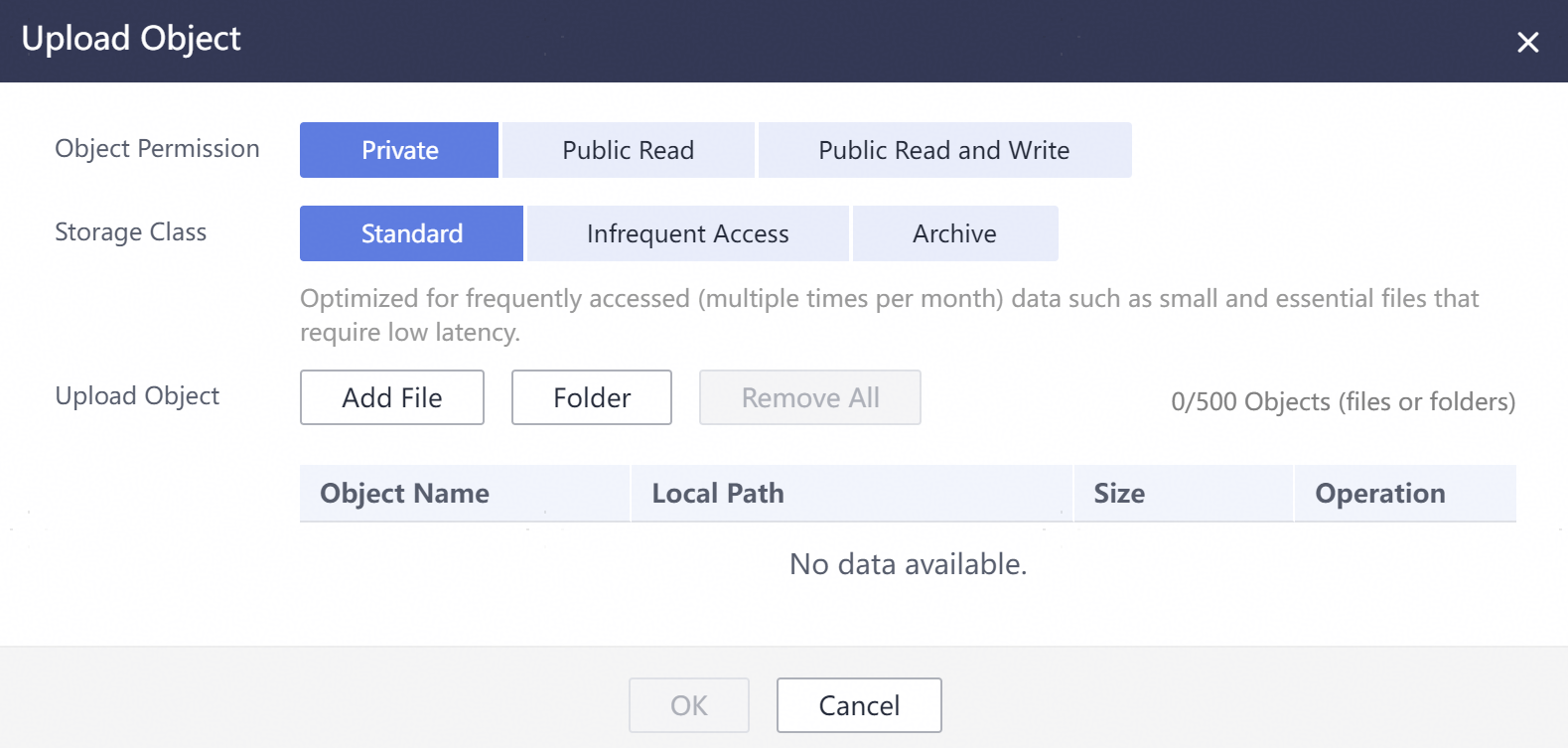
For better experience when using the Add File function, you are advised to upload a maximum of 100 files at a time. If you need to upload more, place all the files in a folder and upload them by adding a folder.

- If message "Service Unavailable" is displayed when files are being uploaded, try again later.
- If an access deny message is displayed when you are uploading a file or folder, possible causes are as follows:
- Access to the bucket is restricted by an ACL. For example, you do not have the write permission for the bucket.
- Access to the bucket is restricted by a bucket policy. For example, you do not have the write permission for the bucket, or write operations cannot be performed on the bucket during the current period.
If such a message is displayed, check the bucket's ACL and policy settings and resolve the problem accordingly.

You must have access to the file you want to upload, or the file upload will fail.
- In the displayed dialog box, select the file or folder you want to upload and click Open.
You can upload one folder or multiple files at a time. To upload multiple files, hold down Ctrl or Shift to select multiple files and batch upload them. You can also press Ctrl+A to select all files. The operations are consistent with those in Windows operating systems.
- Click OK.
Using the CLI Tool - obsutil
obsutil automatically uses resumable upload for objects larger than 50 MB in the background.
Command Line Structure
- Windows
- Uploading a file
obsutil cp file_url obs://bucket[/key] [-arcDir=xxx] [-dryRun] [-link] [-u] [-vlength] [-vmd5] [-p=1] [-threshold=52428800] [-acl=xxx] [-sc=xxx] [-meta=aaa:bbb#ccc:ddd] [-ps=auto] [-cpd=xxx] [-fr] [-o=xxx] [-config=xxx] [-e=xxx] [-i=xxx] [-k=xxx] [-t=xxx]
- Uploading a folder
obsutil cp folder_url obs://bucket[/key] -r [-arcDir=xxx] [-dryRun] [-link] [-f] [-flat] [-u] [-vlength] [-vmd5] [-j=1] [-p=1] [-threshold=52428800] [-acl=xxx] [-sc=xxx] [-meta=aaa:bbb#ccc:ddd] [-ps=auto] [-include=*.xxx] [-exclude=*.xxx] [-timeRange=time1-time2] [-mf] [-o=xxx] [-cpd=xxx] [-config=xxx] [-e=xxx] [-i=xxx] [-k=xxx] [-t=xxx]
- Uploading multiple files/folders
obsutil cp file1_url,folder1_url|filelist_url obs://bucket[/prefix] -msm=1 [-r] [-arcDir=xxx] [-dryRun] [-link] [-f] [-u] [-vlength] [-vmd5] [-flat] [-j=1] [-p=1] [-threshold=52428800] [-acl=xxx] [-sc=xxx] [-meta=aaa:bbb#ccc:ddd] [-ps=auto] [-include=*.xxx] [-exclude=*.xxx][-timeRange=time1-time2] [-at] [-mf] [-o=xxx] [-cpd=xxx] [-config=xxx] [-e=xxx] [-i=xxx] [-k=xxx] [-t=xxx]
- Uploading a file
- macOS or Linux
- Uploading a file
./obsutil cp file_url obs://bucket[/key] [-arcDir=xxx] [-dryRun] [-link] [-u] [-vlength] [-vmd5] [-p=1] [-threshold=52428800] [-acl=xxx] [-sc=xxx] [-meta=aaa:bbb#ccc:ddd] [-ps=auto] [-cpd=xxx] [-fr] [-o=xxx] [-config=xxx] [-e=xxx] [-i=xxx] [-k=xxx] [-t=xxx]
- Uploading a folder
./obsutil cp folder_url obs://bucket[/key] -r [-arcDir=xxx] [-dryRun] [-link] [-f] [-flat] [-u] [-vlength] [-vmd5] [-j=1] [-p=1] [-threshold=52428800] [-acl=xxx] [-sc=xxx] [-meta=aaa:bbb#ccc:ddd] [-ps=auto] [-include=*.xxx] [-exclude=*.xxx] [-timeRange=time1-time2] [-at] [-mf] [-o=xxx] [-cpd=xxx] [-config=xxx] [-e=xxx] [-i=xxx] [-k=xxx] [-t=xxx]
- Uploading multiple files/folders
./obsutil cp file1_url,folder1_url|filelist_url obs://bucket[/prefix] -msm=1 [-r] [-arcDir=xxx] [-dryRun] [-link] [-f] [-u] [-vlength] [-vmd5] [-flat] [-j=1] [-p=1] [-threshold=52428800] [-acl=xxx] [-sc=xxx] [-meta=aaa:bbb#ccc:ddd] [-ps=auto] [-include=*.xxx] [-exclude=*.xxx][-timeRange=time1-time2] [-mf] [-o=xxx] [-cpd=xxx] [-config=xxx] [-e=xxx] [-i=xxx] [-k=xxx] [-t=xxx]
- Uploading a file
Examples
- In Windows, run obsutil cp d:\temp\test.txt obs://bucket-test/key to upload the test.txt file from the temp directory on the D: drive to bucket bucket-test and rename the file to key.
obsutil cp d:\temp\test.txt obs://bucket-test/key
Start at 2024-09-30 08:11:41.6724827 +0000 UTC

Parallel:      5                   Jobs:          5
Threshold:     50.00MB             PartSize:      auto
VerifyLength:  false               VerifyMd5:     false
CheckpointDir: C:\Users\Administrator\.obsutil_checkpoint

[====================================================] 100.00% 1.68 MB/s 8.46MB/8.46MB 5s
Upload successfully, 8.46MB, n/a, d:\temp\test.txt --> obs://bucket-test/key, cost [5], status [200], request id [0000016979E1D2B2860BB5181229C72C]
- In Windows, run obsutil cp d:\temp obs://bucket-test -f -r to recursively upload all files and subfolders in the temp directory on the D: drive to the temp folder in bucket bucket-test.
obsutil cp d:\temp obs://bucket-test -f -r
Start at 2024-09-30 08:14:12.1406275 +0000 UTC

Parallel:      5                   Jobs:          5
Threshold:     50.00MB             PartSize:      auto
VerifyLength:  false               VerifyMd5:     false
CheckpointDir: C:\Users\Administrator\.obsutil_checkpoint

Task id: 104786c8-27c2-48fc-bc6a-5886596fb0ed
OutputDir: C:\Users\Administrator\.obsutil_output

[========================================================] 100.00% tps:35.71 2.02 KB/s 7.20MB/7.20MB 0s
Succeed count:   5         Failed count:    0
Succeed bytes:      xxx
Metrics [max cost:90 ms, min cost:45 ms, average cost:63.80 ms, average tps:35.71, transferred size: 7.20MB]

Task id: 104786c8-27c2-48fc-bc6a-5886596fb0ed
- For more examples, see Common Examples.
Parameter Description
| Parameter | Optional or Mandatory | Description |
|---|---|---|
| file_url | Optional for uploading multiple files/folders Mandatory for uploading a file | The local file path
|
| folder_url | Optional for uploading multiple files/folders Mandatory for uploading a folder | The local folder path
|
| filelist_url | Optional for uploading multiple files/folders | The path of the file that contains the list of files/folders to be uploaded. If this parameter is configured, msm must be set to 2. |
| bucket | Mandatory | The name of the bucket where you will upload the file or folder |
| key | Optional | The object name or object name prefix specified when uploading a file, or the object name prefix specified when uploading a folder When uploading a file or folder, the upload path and name change depending on the value of this parameter. The specific rules are as follows:
NOTE: For details about how to use this parameter, see Upload. |
| fr | Optional for uploading a file (additional parameter) | Generates an operation result file when uploading a file. |
| flat | Optional for uploading a folder or multiple files/folders (additional parameter) | Uploads all files in a folder but not the folder itself. |
| arcDir | Optional (additional parameter) | The path to which the uploaded files are archived |
| dryRun | Optional (additional parameter) | Conducts a dry run. |
| u | Optional (additional parameter) | Indicates incremental upload. When this parameter is set, each file is compared with the object at the corresponding path in the bucket. A file is uploaded only when the object does not exist, the object size differs from the file size, or the object was last modified earlier than the file. When you compare each local file with data in the bucket, a billable HEAD request is generated. For details, see Requests. NOTE: This parameter can be used together with -last-modify-only. For details, see the description of -last-modify-only. |
| -last-modify-only | Optional (additional parameter) | Only checks whether the target object exists and the object modification time, and performs the incremental operation on the last modified object. NOTE: This parameter is used together with -u and will not take effect if used independently. |
| vlength | Optional (additional parameter) | After the upload completes, checks whether the sizes of the objects in the bucket are the same as those of the local files. |
| vmd5 | Optional (additional parameter) | After the upload completes, checks whether the MD5 values of the objects in the bucket are the same as those of the local files.
|
| p | Optional (additional parameter) | The maximum number of concurrent uploads for a multipart upload The default value is the value of defaultParallels in the configuration file. |
| threshold | Optional (additional parameter) | The threshold for enabling multipart upload. If the size of the file or folder to be uploaded is smaller than the threshold, upload it directly. Otherwise, a multipart upload is required. The default value is the value of defaultBigfileThreshold in the configuration file. Unit: byte This parameter value can contain a unit, for example, 1MB (indicating 1,048,576 bytes). NOTE: If you upload a file or folder directly, no part record is generated, and resumable transmission is not supported. |
| acl | Optional (additional parameter) | The access control policies that can be specified for objects when uploading files. The value can be:
|
| sc | Optional (additional parameter) | The storage classes of objects that can be specified when uploading files The value can be:
|
| meta | Optional (additional parameter) | The standard or custom metadata that can be specified during file upload
|
| ps | Optional (additional parameter) | The size of each part in a multipart upload task
|
| cpd | Optional (additional parameter) | The folder where the part records reside. The default value is .obsutil_checkpoint, the subfolder in the home directory of the user who executes obsutil commands. A part record is generated during a multipart upload and saved to the upload subfolder. After the upload succeeds, its part record is deleted automatically. If the upload fails or is suspended, the system attempts to resume the task according to its part record when you perform the upload the next time. |
| r | Mandatory for uploading a folder (additional parameter) Optional for uploading multiple files/folders | Recursively uploads all files and subfolders within a folder. |
| f | Optional for uploading a folder or multiple files/folders (additional parameter) | Performs operations without asking for confirmation. |
| j | Optional for uploading a folder or multiple files/folders (additional parameter) | The maximum number of concurrent tasks for uploading a folder. The default value is the value of defaultJobs in the configuration file. NOTE: The tool ensures that this value is at least 1. |
| msm | Mandatory for uploading multiple files/folders (additional parameter) | Enables the mode for uploading multiple files/folders. Possible values are 1 and 2.
|
| exclude | Optional for uploading a folder or multiple files/folders (additional parameter) | The file matching patterns that are excluded. After this parameter is specified, if the name of the file to be uploaded matches the value of this parameter, the file is skipped. For example, if this parameter is set to *.txt, all files whose names end with .txt are skipped and not uploaded.
Restrictions: The matching pattern takes effect only for files in the folder. NOTE:
|
| include | Optional for uploading a folder or multiple files/folders (additional parameter) | The file matching patterns that are included. After this parameter is specified, if the name of the file to be uploaded matches the value of this parameter, the file is uploaded. For example, if this parameter is set to *.txt, all files whose names end with .txt are uploaded.
Restrictions:
Example: ./obsutil cp /localpath/ obs://test/ -include=/localpath/2022-12-09/* -f -r This command uploads files that are under localpath and start with /localpath/2022-12-09/ to bucket test. NOTE:
|
| at | Optional for uploading a folder or multiple files/folders (additional parameter) | Indicates that only the files whose latest access time is within the value of timeRange are uploaded. This parameter must be used together with timeRange. |
| disableDirObject | Optional for uploading multiple folders (additional parameter) | Indicates the folders themselves are not uploaded as an object. Configuring this parameter can avoid uploading empty folders to a bucket. If a folder contains files, the files will be uploaded and the original path format is retained. |
| timeRange | Optional for uploading a folder or multiple files/folders (additional parameter) | The time range matching pattern when uploading files. Only files whose latest modification time is within the configured time range are uploaded. This pattern has a lower priority than the file matching patterns (exclude/include). That is, the time range matching pattern is executed after the configured file matching patterns.
|
| mf | Optional (additional parameter) | Indicates that the name matching pattern (include or exclude) and the time matching pattern (timeRange) also take effect on folders. |
| o | Optional (additional parameter) | The folder that stores the result files. After the command is executed, result files (possibly success, failure, and warning files) will be created in the specified folder. The default value is .obsutil_output, a subfolder in the user's home directory where obsutil commands are executed.
|
| bucket-cname | Optional (additional parameter) | The user-defined domain name bound to the bucket NOTE: This parameter is only supported by obsutil 5.7.9 and later. |
| config | Optional (additional parameter) | The user-defined configuration file for executing the current command. For details about parameters that can be configured, see Configuration Parameters. |
| e | Optional (additional parameter) | The endpoint |
| i | Optional (additional parameter) | The user's AK |
| k | Optional (additional parameter) | The user's SK |
| t | Optional (additional parameter) | The user's security token |
Response
| Field | Description |
|---|---|
| Parallel | The parameter -p in the request |
| Jobs | The parameter -j in the request |
| Threshold | The parameter -threshold in the request |
| PartSize | The parameter -ps in the request |
| Exclude | The parameter -exclude in the request |
| Include | The parameter -include in the request |
| TimeRange | The parameter -timeRange in the request |
| VerifyLength | The parameter -vlength in the request |
| VerifyMd5 | The parameter -vmd5 in the request |
| CheckpointDir | The parameter -cpd in the request |
| OutputDir | The parameter -o in the request |
| ArcDir | The parameter -arcDir in the request |
| Succeed count | The number of successful tasks |
| Failed count | The number of failed tasks |
| Skip count | The number of tasks that are skipped during incremental upload, download, or copy, and synchronous upload, download, or copy. NOTE: Skipped tasks are recorded into successful tasks. |
| Warning count | The number of tasks that are executed successfully but contain warnings. NOTE:
|
| Succeed bytes | The number of bytes that are successfully uploaded |
| max cost | The maximum duration of all tasks, in ms |
| min cost | The minimum duration of all tasks, in ms |
| average cost | The average duration of all tasks, in ms |
| average tps | The average number of tasks completed per second |
| Task id | The unique ID of an operation, which is used to search for the result file generated for a batch task |
What is your overall rating for this page?
Thank you very much for your feedback. We will continue working to improve the documentation.See the reply and handling status in My Cloud VOC.
For any further questions, feel free to contact us through the chatbot.
Chatbot


