

Obtaining and Installing Python SDKs
Installing Python SDKs
This section provides instructions on how to install Python SDKs.
Obtaining DLI SDKs
On the displayed DLI SDK DOWNLOAD page, click the target link to obtain the desired SDK installation package.
You are advised to also download the .sha256 file from the SDK installation package, as it can be used to verify the integrity of the SDK package. For details about the verification method, see Verifying the Integrity of the SDK Package.
Obtain the dli-sdk-python-x.x.x.zip package and decompress it. The following table shows the directory structure of the package.
| Parameter | Description |
|---|---|
| dli | DLI SDK basic module in the Python environment |
| examples | Python sample code |
| pyDLI | Implementation interface of PyHive |
| setup.py | Python SDK installation script |
Verifying the Integrity of the SDK Package
When downloading the SDK installation package, you also need to download the .sha256 file to verify the integrity of the SDK package. This section outlines the steps to use the .sha256 file for verifying the integrity of the SDK package.
- Downloading the file
- Find the download link of the .sha256 file on the page for downloading the SDK installation package.
Typically, the name of the .sha256 file is associated with the name of the SDK installation package. For example, if the name of the SDK installation package is dli-sdk-java-x.x.x, the corresponding .sha256 file may be dli-sdk-java-x.x.x.sha256.
- Download the SDK installation package and the .sha256 file separately to the local host, ensuring both files are saved in the same folder.
- Find the download link of the .sha256 file on the page for downloading the SDK installation package.
- Querying the SHA-256 hash value of the SDK installation package
- On Windows
- Search for cmd in the Start menu to open the command window.
- Run cd to go to the directory where the SDK installation package is saved.
For example, if the SDK installation package is saved in the SDK folder on drive D, enter cd D:\SDK.
- Run the following command:
certutil -hashfile <SDK-installation-package-name> SHA256
Replace <SDK-installation-package-name> with the actual SDK installation package name, for example, certutil -hashfile sdk - package.zip SHA256.
- After the command is executed, the command prompt will display the SHA-256 hash value of the SDK installation package.
- On Linux
- Run cd to go to the directory where the SDK installation package is saved.
For example, if the SDK installation package is saved in the SDK folder in the user's home directory, enter cd ~/SDK.
- Enter the query command:
sha256sum <SDK-installation-package-name>
Replace <SDK-installation-package-name> with the actual SDK installation package name, for example, sha256sum sdk - package.zip.
- After the command is executed, the terminal will display the SHA-256 hash value of the SDK installation package.
- Run cd to go to the directory where the SDK installation package is saved.
- On Windows
- Comparing hash values
- Open the downloaded .sha256 file using the text editor.
- Find the SHA-256 hash value of the SDK installation package in the .sha256 file.
It is typically a long string, for example, a1b2c3d4e5f6g7h8i9j0k1l2m3n4o5p6xxxxxxxxxxxxxxxxxxxxxxxx.
- Compare the SHA-256 hash value of the SDK installation package obtained in Querying the SHA-256 hash value of the SDK installation package with the hash value in the .sha256 file.
- If the two hash values are identical, the SDK installation package was not altered during the download process and the file is intact.
- If the hash values are inconsistent, an error occurred during the download of the SDK installation package or that the file was maliciously modified.
In this case, you are advised to download the SDK installation package and its corresponding .sha256 file again and then verify the package.
Installing DLI Python SDKs
- Download and decompress the SDK installation package.
Decompress dli-sdk-python-<version>.zip to a local directory that can be adjusted.
- Install the SDK.
- On a PC running Windows, choose Start > Run, enter cmd, and press Enter.
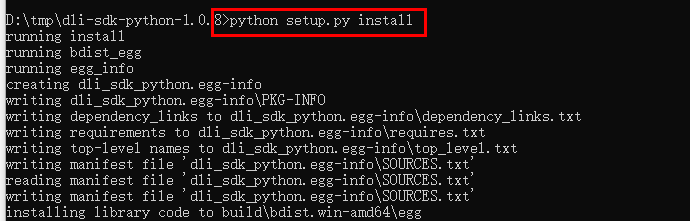
- In the command-line interface (CLI) window, access the windows directory in the directory where dli-sdk-python-<version>.zip is decompressed. For example, D:\tmp\dli-sdk-python-1.0.8.
- Run the following command to install DLI Python SDK (During the installation, the third-party dependencies are automatically downloaded):
Figure 1 shows the installation result.
What is your overall rating for this page?
Thank you very much for your feedback. We will continue working to improve the documentation.See the reply and handling status in My Cloud VOC.
For any further questions, feel free to contact us through the chatbot.
Chatbot


