

Help Center/ Relational Database Service_RDS for MySQL/ User Guide/ Log Management/ Configuring Log Reporting
Updated on 2026-11-17 GMT+08:00
Configuring Log Reporting
Scenarios
If you enable log reporting for your DB instance, new logs generated for the instance will be uploaded to Log Tank Service (LTS).
Prerequisites
- Ensure that there are available LTS log groups and log streams in the same region as your instance.
For details about how to create a log group and log stream, see Overview of Log Management.
- Check whether Continue to Collect Logs When the Free Quota Is Exceeded is enabled. If it is not enabled, log uploads will fail once 500 MB of logs have been sent to LTS. For more information, see Setting LTS Log Collection Quota and Usage Alarms.
Billing
You will be billed for enabling this function under LTS. For details, see LTS Pricing Details.
Constraints
- Error logs, slow query logs, and audit logs cannot share a given log stream.
- Once configured, there is a delay of approximately 10 minutes before the changes are applied.
- If a structured template (such as the MySQL slow query log, MySQL error log, or MySQL audit log template) has been bound to a log stream, the log stream can only be used for the corresponding log type. For example, if an error log template is bound to a log stream, the log stream cannot be configured for slow query logs.
For details about how to bind a system template to a log stream, see Log Structuring.
Configuring Log Reporting for Multiple Instances
- Log in to the RDS console.
- Click
 in the upper left corner and select a region.
- In the navigation pane, choose .
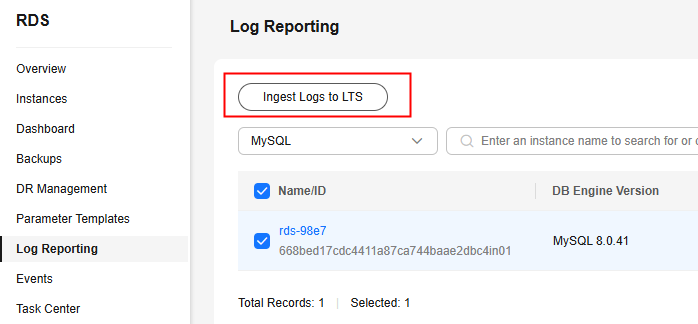
- Select at least one instance and click Ingest Logs to LTS. Figure 1 Configuring log reporting
- In the displayed dialog box, select Ingest Logs to LTS, select an LTS log group and log stream, and click OK. Figure 2 Configuring log ingestion to LTS

- To disable log ingestion to LTS, click Ingest Logs to LTS in the Operation column. Figure 3 Configuring log ingestion to LTS

- In the displayed pane, deselect the corresponding log types and click OK.
FAQ
What is your overall rating for this page?
0
1
2
3
4
5
6
7
8
9
10
Very dissatisfiedVery satisfied
Thank you very much for your feedback. We will continue working to improve the documentation.See the reply and handling status in My Cloud VOC.
The system is busy. Please try again later.
For any further questions, feel free to contact us through the chatbot.
Chatbot


