

UNI Cloud Terminal Service Process Introduction
Huawei Cloud KooPhone is a user-friendly and secure cloud service oriented for enterprises and Internet customers. It uses core technologies such as Arm server virtualization, audio/video codec, and real-time transmission, and has a rich app ecosystem of Huawei devices.
Figure 1 shows the process of using UNI Cloud Terminal.
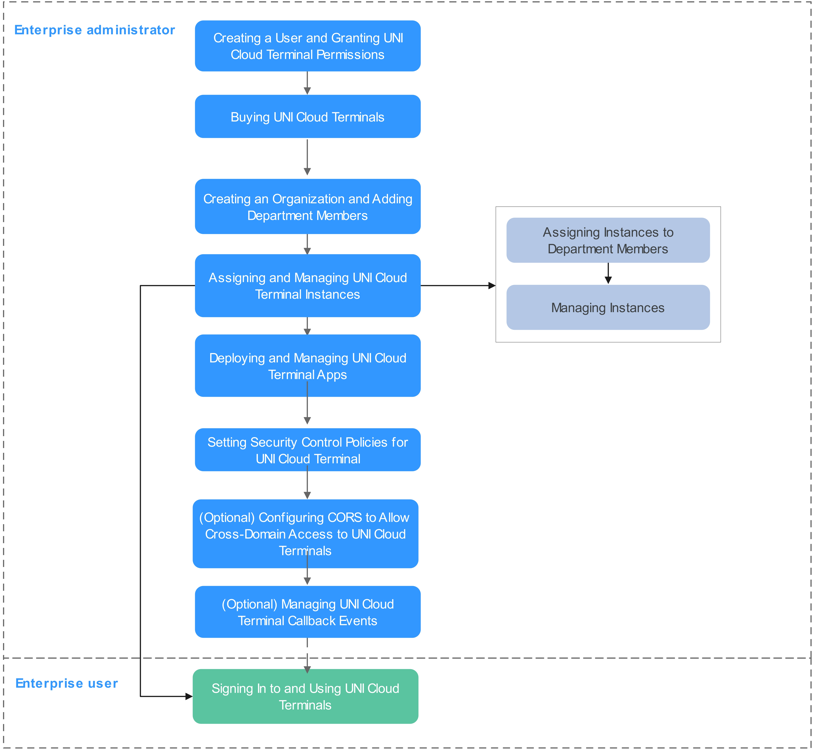
- Creating a User and Granting UNI Cloud Terminal Permissions
Create IAM users and grant them permissions to access and operate Huawei Cloud resources for fine-grained permissions control.
- Buying UNI Cloud Terminal
UNI Cloud Terminal is available in the professional edition. For details, see Instance Specifications.
- Creating an Organization and Adding Department Members
After purchasing UNI Cloud Terminal for the first time, the administrator needs to create an organization, departments, and members so that the UNI Cloud Terminal instances can be assigned to department members.
- Assigning and Managing UNI Cloud Terminal Instances
UNI Cloud Terminal instances can be bound to the organization members so that they can use them. You can restart, start, stop, renew, and delete the instances on the console.
- Deploying and Managing UNI Cloud Terminal Apps
After uploading an app to the app library on the console, you can select multiple UNI Cloud Terminal instances to install the app for centralized management and maintenance.
- Setting Security Control Policies for UNI Cloud Terminal
Administrators can set management and control policies for UNI Cloud Terminals, such as anti-screen capture, video watermark, app blacklist and whitelist, and data stream transmission, to improve mobile office security.
- Configuring CORS for Cross-Domain Access to UNI Cloud Terminal
An administrator can configure cross-origin resource sharing (CORS) rules for UNI Cloud Terminal to allow cross-domain requests.
- Managing UNI Cloud Terminal Callback Events
You can set the callback event type and address for receiving callback event notifications on the console.
- Signing In to and Using UNI Cloud Terminal
Enterprise users can visit the link in the email notification to download and install the client and use UNI Cloud Terminal after logging in to the client.
Feedback
Was this page helpful?
Provide feedbackThank you very much for your feedback. We will continue working to improve the documentation.See the reply and handling status in My Cloud VOC.
For any further questions, feel free to contact us through the chatbot.
Chatbot


