

Managing UNI Cloud Terminal Callback Events
You can set the callback event type and address for receiving callback event notifications on the console.
Obtaining a Key
- Log in to the KooPhone console. The KooPhone overview page is displayed.
- In the navigation pane, choose UNI Cloud Terminal > Callback Event Management.
- In the Callback authentication key area, click Obtain the key.
After obtaining a key, record it. The key can be viewed only once. If you forget the key, click Reset Key to generate a new key.
Adding and Configuring a Callback Event
- On the Callback Event Management page, click Add Configuration and set parameters by referring to Table 1.
Figure 1 Adding configurations
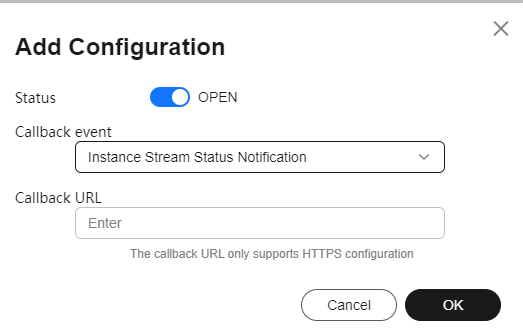
Table 1 Parameters for adding configurations Parameter
Description
Status
Select the status of the callback event.
 indicates the callback event is enabled.
  indicates the callback event is disabled.
Callback event
Select a callback event from the drop-down list box. An added callback event cannot be added again.
Callback URL
Enter the callback URL. Only HTTPS is supported, for example, https://***.
- After the settings, click OK.
Follow-Up Operations
After adding a callback event, you can perform the following operations.
|
Task |
Procedure |
|---|---|
|
Editing a callback event |
|
|
Deleting one or more callback events |
|
|
Changing the status of a callback event |
Locate the target callback event and click |


Feedback
Was this page helpful?
Provide feedbackThank you very much for your feedback. We will continue working to improve the documentation.See the reply and handling status in My Cloud VOC.
For any further questions, feel free to contact us through the chatbot.
Chatbot


