

Kubeflow
With the increasing volume of models and data, efficiently building, deploying, and managing complex machine learning workflows becomes increasingly challenging.
- There is no unified platform that can effectively manage complex machine learning tasks.
- It is difficult to track and manage dependencies and data flows between various components.
- Repeated execution of the same tasks wastes computing resources.
- Workflows cannot be easily migrated between different computing environments, which lacks flexibility.
To address these challenges, CCE standard and Turbo clusters offer the Kubeflow add-on based on Kubeflow. Kubeflow is an open-source machine learning platform designed for Kubernetes, simplifying the development, deployment, and management of machine learning workflows. It offers developers and data scientists a consistent, scalable framework for running machine learning tasks and applications on Kubernetes. Built on Kubeflow, this add-on offers the following features:
- Simplified machine learning workflow development and management: You can quickly define and manage complex machine learning workflows through an intuitive UI and Python SDKs.
- Improved resource utilization: Redundant computing is reduced through task parallelization and caching to enhance resource efficiency.
- Enhanced workflow portability: You can easily migrate workflows between different environments using platform-neutral IR YAML definitions.
- Enhanced management and visualization capabilities: This add-on provides robust tools for managing and visualizing workflows to help you track and optimize them more effectively.
Basic Concepts
| Concept | Description | Function |
|---|---|---|
| Pipeline | A sequence of machine learning steps, typically including data preprocessing, training, evaluation, and inference. The Kubeflow add-on uses pipelines to automate and manage the full machine learning lifecycle. | Workflows can be defined via GUI or YAML files, automating step execution and enabling efficient scheduling and execution of complex tasks on Kubernetes. |
| Run | An instance of pipeline execution, indicating the running of a specific workflow. Each run is an execution of the pipeline, recording its input parameters, execution status, and output results. | Runs execute machine learning tasks with varying inputs or datasets. They allow you to track execution progress and results, manage versions, and compare experiments. |
| Experiment | A logical group of multiple runs, usually with varied settings or hyperparameters for the same problem. You can use experiments to organize runs and compare results. | Experiments allow you to compare and track the execution results of different machine learning tasks. By organizing multiple runs, you can analyze the impact of various parameters and settings on model performance, enabling precise model and performance optimization. |
| Component | The smallest unit in a pipeline, representing a specific machine learning task or step, like data preprocessing, model training, or evaluation. Each component is a container holding the code and dependencies needed to execute the task. | Components enable independent definition and management of each pipeline step, which can be reused across different pipelines. This modular design simplifies pipeline building, debugging, and extension. |
| DAG | A graph that represents task dependencies in Kubeflow pipelines. It defines the execution sequence and component dependencies. | A DAG ensures tasks run in the correct order without cyclic dependencies. It enables Kubeflow pipelines to manage dependencies efficiently for optimal workflow execution. |
For more details, see Kubeflow Pipeline Concepts.
Prerequisites
- A CCE standard or Turbo cluster v1.29 or later is available. For details, see Buying a Standard/Turbo Cluster.
- Before installing the add-on, ensure that the cluster's pods can access the Internet to download required images. You can configure an SNAT rule for the cluster to ensure that pods can access the Internet. You will be billed for the SNAT rule. For details, see NAT Gateway Price Calculator.
- In the use case described in this section, a NodePort Service is required to access the Kubeflow web UI. Ensure an EIP is bound to any node in the cluster. The EIP will be billed. For details, see Elastic IP Price Calculator.
Constraints
- Kubeflow pipelines run only on x86 nodes.
- This add-on is in initial rollout. Check the console for supported regions.
- This add-on is in OBT. You can access the latest features, but stability is not fully verified and no CCE SLA applies.
Installing the Add-on
- Log in to the CCE console and click the cluster name to access the cluster console.
- In the navigation pane, choose Add-ons. On the displayed page, locate Kubeflow and click Install.
- On the Install Add-on page, configure the add-on specifications.
Table 2 Add-on settings Parameter
Description
Version
Select a version as needed.
Add-on Specifications
Only the default specifications are supported.
- In the Parameters area, properly configure the parameters below based on applications.
Parameter
Format
Description
minioAK
Length: at least 3 characters
The client identity used for MinIO storage authentication. Use minio or a custom account.
minioSK
Length: at least 8 characters
An important credential, which is used with the AK.
mysqlPassword
Complex, long password
MySQL root password. The password for the MySQL root user. Use a strong password.
mysqlUsername
root (default value)
Database user. Retain the default value.
- Click Install in the lower right corner. If the status is Running, the add-on has been installed.
Components
| Component | Description | Resource Type |
|---|---|---|
| cache-deployer | Set up cache-related configurations, including PVCs and ConfigMaps, and inject them into the cluster to enable caching for pipeline runs. | Deployment |
| cache-server | Provide caching to prevent repeated execution of completed pipeline steps, thereby improving running efficiency. | Deployment |
| metadata-envoy | Collect, process, and forward metadata to the specified metadata store during pipeline execution. | Deployment |
| ml_metadata_store_server | A metadata storage server that stores information related to pipeline execution, including inputs, outputs, and models. | Deployment |
| metadata-writer | Record pipeline execution metadata to the metadata store. | Deployment |
| minio | An object storage service used to store artifacts generated during pipeline execution, such as models and data. | Deployment |
| api-server | Provide REST and gRPC APIs to enable communication between the SDK, UI, and backend. | Deployment |
| persistenceagent | Store pipeline execution records in the database and restore running statuses. | Deployment |
| scheduledworkflow | Periodically trigger pipelines to automate workflow execution. | Deployment |
| ml-pipeline-ui | Provide a frontend web interface for you to view and manage pipelines and their execution records. | Deployment |
| viewer-crd-controller | Manage viewer Custom Resource Definitions (CRDs) and visualize artifacts such as images and tables on the UI. | Deployment |
| visualization-server | Used with the viewer to visualize data, including TensorBoard and ROC curves. | Deployment |
| mysql | The relational database used by Kubeflow Pipelines to store running records and user information. | Deployment |
| workflow-controller | The core component of Argo, which schedules and executes each task (step) in a pipeline. | Deployment |
- All preceding components are deployed in the kubeflow namespace.
- Components like Minio and MySQL provide dependencies for Kubeflow Pipelines and can be replaced as needed.

MySQL and Minio backend PVs are bound to emptyDir volumes. If pods are migrated or restarted, unexpected results may occur.
Use Case
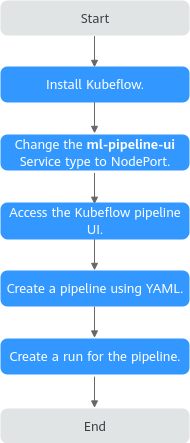
This case describes how to use the Kubeflow add-on to run a simple pipeline, as shown in Figure 1. The pipeline includes a whalesay task that runs an Alpine container executing echo "hello world" to stdout.
- Install kubectl on an existing ECS and use kubectl to access the target cluster. For details, see Accessing a Cluster Using kubectl.
- After the Kubeflow add-on is installed, CCE automatically creates the ml-pipeline-ui component to provide the frontend web interface. This component is automatically bound to a ClusterIP Service named ml-pipeline-ui. To access the UI, change the Service type of ml-pipeline-ui from ClusterIP to NodePort or LoadBalancer. The following uses a NodePort Service as an example. Run the following command to change the ClusterIP Service to a NodePort Service:
kubectl edit svc ml-pipeline-ui -n kubeflow
Set type to NodePort in the file and specify a node port that does not conflict with other services in the cluster. For details about NodePort Services, see NodePort.
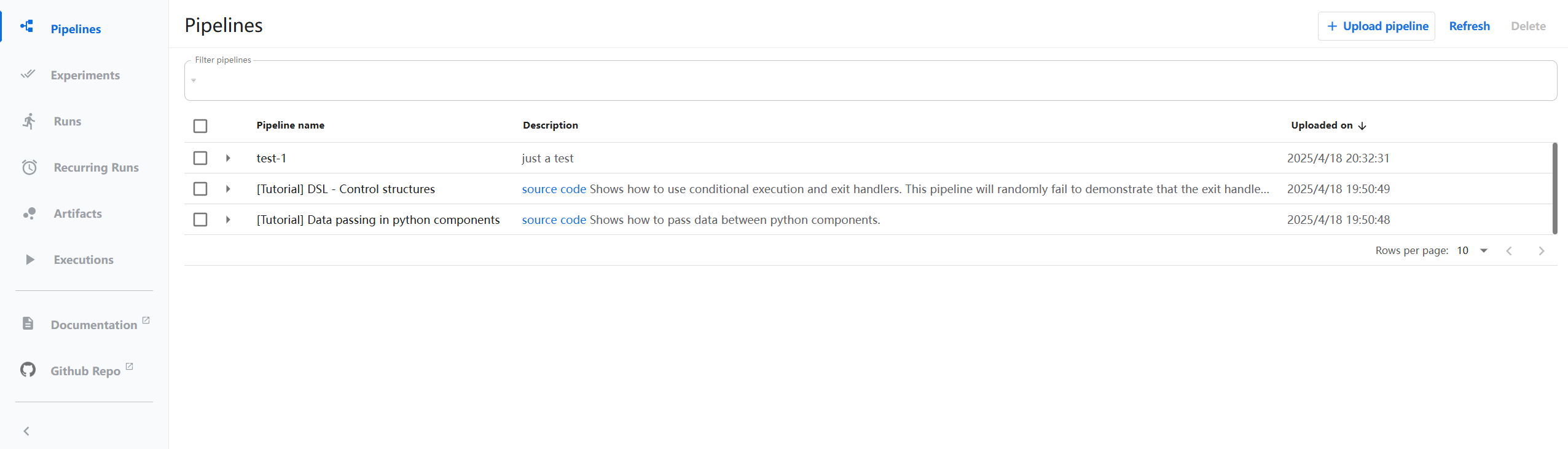
... spec: ports: - name: http protocol: TCP port: 80 targetPort: 3000 nodePort: 30083 # Node port number selector: app: ml-pipeline-ui application-crd-id: kubeflow-pipelines clusterIP: 10.247.101.116 clusterIPs: - 10.247.101.116 type: NodePort # Change ClusterIP to NodePort. sessionAffinity: None ... - Enter http://<EIP of the target node>:<Node port>/ in the address bar of a browser to access the Kubeflow UI. On the UI, you can create and manage machine learning pipelines, define complete workflows including data preprocessing, model training, evaluation, and deployment. You can also configure and launch runs, monitor task execution in real time, and view logs and visualizations. This enables the automatic orchestration and execution of machine learning workflows.
If the following page is displayed, the UI has been accessed.
Figure 2 Kubeflow add-on UI
- Create a pipeline.yaml file locally to configure a pipeline. This example deploys a pipeline that runs an Alpine container outputting "hello world" to verify your environment. For more information about pipelines, see Compile a Pipeline. pipeline.yaml file content:
apiVersion: argoproj.io/v1alpha1 kind: Workflow metadata: generateName: hello-world- spec: entrypoint: whalesay templates: - name: whalesay container: image: alpine command: [echo] args: ["hello world"] - Return to the UI and click Upload pipeline in the upper right corner to upload the pipeline.yaml file. After the configuration is complete, click Create in the lower part to create a pipeline. Figure 3 Uploading a pipeline file

- After the pipeline is created, the whalesay task is automatically displayed on the UI. Click Create run in the upper right corner to create a run. After the configuration is complete, click Start in the lower part to run the pipeline. Figure 4 Creating a run

- Click whalesay to view its status. Figure 5 Viewing the task status

Release History
| Add-on Version | Supported Cluster Version | New Feature |
|---|---|---|
| 1.1.11 |
| Fixed some issues. |
| 1.1.8 |
| ML workflows can be defined and deployed. |
| 1.1.6 |
| CCE standard and Turbo clusters support the Kubeflow add-on. NOTE: Only v1.27 and v1.28 can be used by existing clusters. |
What is your overall rating for this page?
Thank you very much for your feedback. We will continue working to improve the documentation.See the reply and handling status in My Cloud VOC.
For any further questions, feel free to contact us through the chatbot.
Chatbot


