

What Should I Do If the LoadBalancer Ingress Configuration Is Inconsistent with the Load Balancer Configuration on ELB During a CCE Cluster Upgrade?
ELB Resources
LoadBalancer ingresses are used to route external traffic to Services within a CCE cluster. The parameters defined in an ingress are applied to configure a load balancer for effective traffic management and distribution. Table 1 lists the mapping between load balancer configuration and ingress parameters.
| Load Balancer Configuration | Description | Mapping in a LoadBalancer Ingress | |
|---|---|---|---|
| Load balancer (elb) | - | Distribute incoming traffic across backend servers in one or more AZs. | kubernetes.io/elb.id in ingress annotations |
| Listener (listener) | - | Use the protocol and port you specify to handle client requests and route the requests to the associated backend servers based on the routing rules you define. | kubernetes.io/elb.port in ingress annotations, which defaults to 80/443 if not defined |
| Forwarding policy (l7policy) | Forwarding policy | Load balancer forwarding rules: domain names or paths | Domain name and path in the forwarding rule: spec.rules[].host and spec.rules[].http.paths[].path in the ingress parameters, respectively |
| Load balancer forwarding actions: forward to a backend server group | Backend server group: the backend service of the associated Service specified by spec.rules[].http.paths[].backend.service in the ingress | ||
| Advanced forwarding policy | Load balancer forwarding rules: domain names, paths, HTTP request methods, HTTP headers, query strings, or CIDR blocks | The annotations related to advanced forwarding policies such as kubernetes.io/elb.actions and kubernetes.io/elb.conditions in the ingress annotations For details, see the following section: | |
| Load balancer forwarding actions: forwarding to a backend server group, redirecting to another listener, returning a fixed response, URL rewriting, adding headers, removing headers, rate limiting, and redirecting to another URL | |||
| Backend server group (pool) | - | A backend server group is a logical collection of one or more backend servers that receive a massive number of requests concurrently. A backend server can be an ECS, supplementary network interface, or IP address. | spec.rules[].http.paths[].backend in the ingress parameters |
| Backend server (member) | - | Backend servers receive and process requests from the associated load balancer. For example, you can add an ECS as a backend server of a load balancer. The listener checks connection requests from clients using the configured protocol and port and forwards the requests to the backend servers in the backend server groups based on the load balancing algorithm you set. | Endpoint of the Service associated with the ingress |
Handling Inconsistencies Between the Ingress and ELB Configuration
During a pre-upgrade cluster check, multiple inconsistencies between the ingress and ELB configuration may be identified. For each inconsistency, CCE provides the expected configuration. The following shows an example.

Due to resource dependencies, you are advised to handle the inconsistencies in the sequence below.


You should run the check again after handling several key inconsistencies. In most cases, once the inconsistency of the parent resource is resolved, the inconsistencies of the child resources will disappear.
Each inconsistency can be handled using either method.
| Method | Solution | Application Scenario |
|---|---|---|
| Method 1: Modify the ingress. | Modify the ingress configuration to ensure that the configuration delivered by CCE is consistent with that on ELB. | The modification on ELB is intentional, and you want to keep it. |
| Method 2: Modify ELB. | Change the configuration on ELB back to the value expected by the ingress. | The modification on ELB is an accidental operation, and you want to cancel the modification. |
Listener Inconsistency
The Configuration on ELB Is Missing, and a Listener Needs to Be Added
The ELB configuration consistency check detects listener inconsistency. This occurs when the listener name or description is modified or when the listener is deleted on the ELB console.
In this case, you can use the port to check whether the listener is available on the ELB console and its name and description are the same as those of the listener associated with the ingress.
- Method 1: Modify the ingress.
If the listener is deleted intentionally (for example, it is no longer needed), delete the corresponding ingress from the CCE cluster.
- Method 2: Modify ELB.
On the ELB console, check whether the listener exists based on the port and the listener name and description are the same as those of the listener associated with the ingress. If they are different, modify the listener name and description.
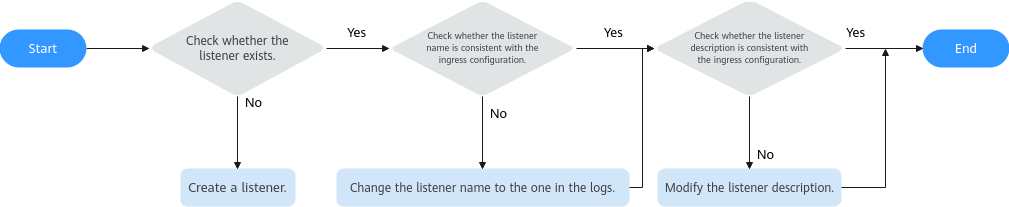
The description of the listener automatically added by CCE is in the following format, where the value of cluster_id is the ID of the cluster that is using the listener:
{"attention":"Auto-generated by CCE service, do not modify!","cluster_id":"5d4d44bd-0891-11f0-84d3-0255ac10003e"}
The Configuration on ELB Is Modified, and the Listener Needs to Be Updated
The ELB configuration consistency check detects listener inconsistency. This occurs when the listener configuration is modified on the ELB console but the new configuration is not synchronized with CCE.
You can view the listener configuration on the ELB console and compare it with the configuration on CCE. If they are inconsistent, manually modify the listener configuration to match the expected configuration on CCE, or modify the ingress.
Common inconsistent fields are as follows:
- client_timeout: timeout duration of the client
- keepalive_timeout: keepalive timeout duration
- http2_enable: HTTP/2 switch
- sni_container_refs: SNI certificate
Use either method:
- Method 1: Modify the ingress.
Modify the ingress annotations so that the values delivered by CCE are consistent with those on ELB.
For example, if the expected configuration of the listener is sni_container_refs: null, the SNI function is enabled for the listener on the ELB but not configured in the ingress. In this case, you need to add the SNI configuration to the ingress. For details about other configuration items, see LoadBalancer Ingress Annotations.

If multiple ingresses share the same listener on the same port, the configuration of the earliest ingress is used. Changes to other ingresses have no effect. For details, see Configuring Multiple Ingresses to Use the Same Load Balancer.
- Method 2: Modify ELB.
On the ELB console, check the listener configuration based on the port and change the value of the corresponding field to the expected value in the diagnosis report, which is the same as that in the ingress configuration.
The Forwarding Policy Priority Is Changed on ELB, and the Forwarding Rule Needs to Be Edited
- Both kubernetes.io/elb.ssl-redirect: 'true' (HTTP-to-HTTPS redirection) and kubernetes.io/elb.ingress-order (forwarding rule priorities) are configured for the ingress.
- On the ELB listener associated with the ingress, ingress-order has been configured for other forwarding policies.
Cause analysis: In the cluster of an earlier version, the ingress-order of the redirection forwarding policy generated by ssl-redirect has the highest priority by default. However, ingress-order is also configured for other ingresses on the same listener. As a result, the priorities of forwarding policies on the listener are inconsistent. After the upgrade to the new version, the ingress-order of the redirection forwarding policy generated by ssl-redirect takes effect based on the actual configuration. During the upgrade, CCE checks the priority consistency of all forwarding policies on the same listener. If the priority configuration of a forwarding policy in the listener is inconsistent with the actual configuration, the upgrade is intercepted.
Solution: Adjust the ingress-order values of all forwarding policies on the current listener to ensure that the priority of each forwarding policy is unique and valid.
- Method 1: Modify the ingress.
In the following example, both ssl-redirect and ingress-order are configured for an ingress:
kind: Ingress
apiVersion: networking.k8s.io/v1
metadata:
  name: ingress1
  namespace: default
  uid: 028e0585-a02f-417b-a96d-c1935******
  resourceVersion: '10858'
  generation: 1
  creationTimestamp: '2026-08-03T09:06:36Z'
  annotations:
    kubernetes.io/elb.autocreate: '{"type":"inner","available_zone":["cn-north-7b"],"elb_virsubnet_ids":["aa417f90-a14f-49f4-8e44-1218d5******"],"ipv6_vip_virsubnet_id":"aa417f90-a14f-49f4-8e44-1218d5******","l7_flavor_name":"L7_flavor.elb.pro.max","l4_flavor_name":"","vip_subnet_cidr_id":"c0c78227-827e-432f-8899-dd2687******"}'
    kubernetes.io/elb.class: performance
    kubernetes.io/elb.enterpriseID: '0'
    kubernetes.io/elb.id: fef427e4-6d2c-4c63-bf26-270daa******
    kubernetes.io/elb.ingress-order: '8'  ### Set the priority of the forwarding policy on the listener with a port of 80.
    kubernetes.io/elb.ip: 10.20.**.**
    kubernetes.io/elb.listen-ports: '[{"HTTP":80},{"HTTPS":443}]'
    kubernetes.io/elb.listener-master-ingress: default/ingress1
    kubernetes.io/elb.port: '80'
    kubernetes.io/elb.ssl-redirect: 'true'  ### Forward HTTP requests to an HTTPS listener.
Procedure
- Check the forwarding policies of all ingresses on the ELB listener (port 80) to determine which ingresses lack the ingress-order annotation.
- Add the kubernetes.io/elb.ingress-order annotation to each ingress that lacks this annotation and set a proper priority value (which ranges from 1 to 1,000. A smaller value indicates a higher priority).
- Ensure that the ingress-order value of each ingress associated with the same listener is unique.
- Upgrade the cluster again.
- Method 2: Modify ELB.
On the ELB console, check the listener configuration based on the port and change the forwarding policy priority to the expected value in the diagnosis report, which is the same as that in the ingress configuration.
Forwarding Policy Inconsistency
The Configuration on ELB Is Missing, and a Forwarding Policy Needs to Be Created
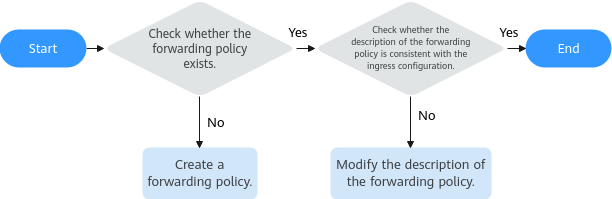
The ELB configuration consistency check detects forwarding policy inconsistency. This occurs when the description of the forwarding policy created by CCE is modified or the forwarding policy is deleted on the ELB console.
In this case, you can verify the policy exists on the ELB console by its name, check whether its description matches the expected configuration, and handle the problem by following the steps in the figure below.
- Method 1: Modify the ingress.
Delete the corresponding rule from the spec.rules of the ingress so that the value delivered by CCE is consistent with that on ELB.
- Method 2: Modify ELB.
Call the API to create a forwarding policy. The parameters must be the same as those configured in the ingress.
Common Issue: Why Is a Message Displayed Indicating that the Configuration Is Missing Even Though the Forwarding Policy Exists?
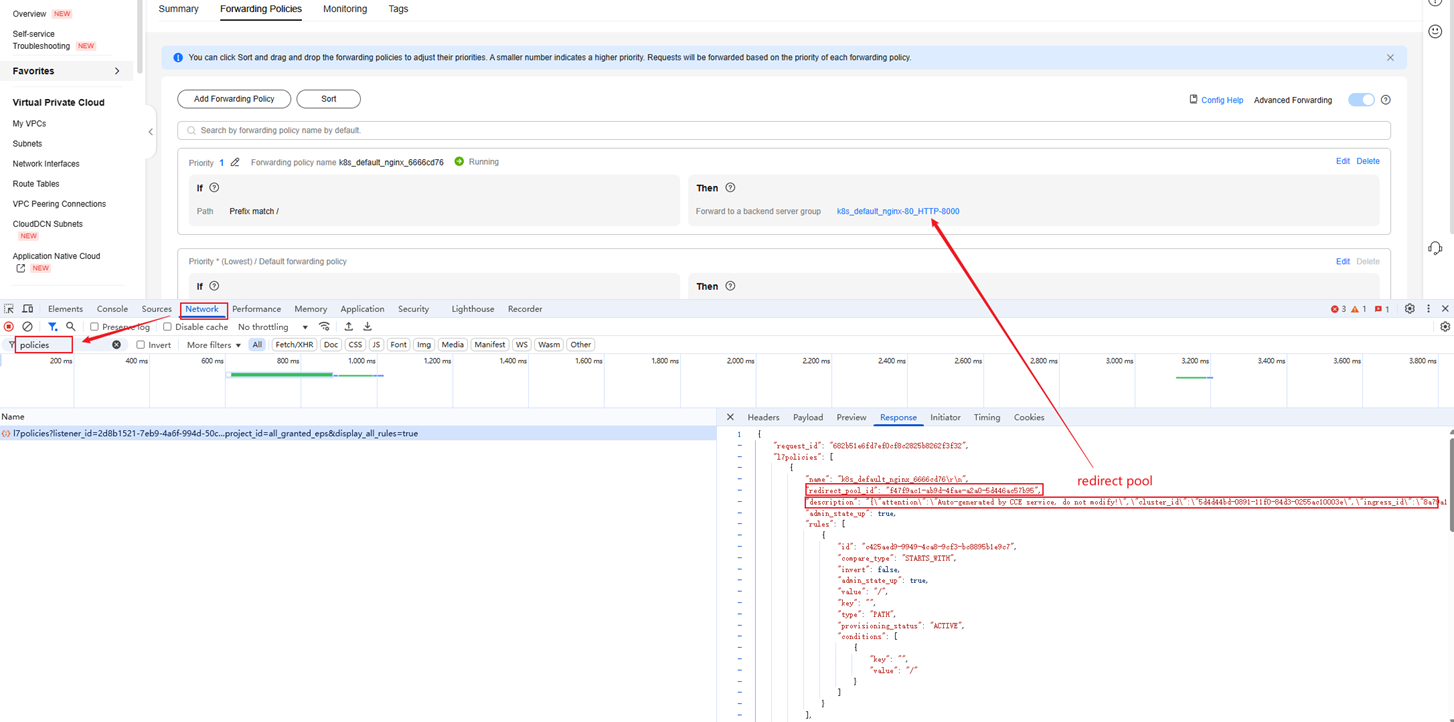
Similar to a listener, a forwarding policy must have a description. However, the description of the forwarding policy is not displayed on the ELB console. You can use a browser developer tool to view the API response or use API Explorer to query the description.
The following shows an example for the description of a forwarding policy. The value of cluster_id is the ID of the current cluster, and the value of ingress_id is the UID of the current ingress.
{"attention":"Auto-generated by CCE service, do not modify!","cluster_id":"5d4d44bd-0891-11f0-84d3-0255ac10003e","ingress_id":"8a79a17b-f9ab-4431-95f6-0e1125093aac"} You can view the created forwarding policy in the API response returned through the browser interface.
The Configuration on ELB Is Modified, and the Forwarding Policy Needs to Be Updated
The ELB configuration consistency check detects forwarding policy inconsistency. This problem usually occurs because the backend server group (redirect_pool_id) of the forwarding policy created by CCE is modified on the ELB console.
Use either method:
- Method 1: Modify the ingress.
Modify backend.service of the corresponding domain name in spec.rules of the ingress to ensure that the value delivered by CCE is the same as that on the ELB console.
- Method 2: Modify ELB.
On the ELB console, check the forwarding policy configuration based on the port and change the backend server group to the expected value in the diagnosis report, which is the same as that in the ingress configuration.
The Configuration on ELB Is Redundant, and the Forwarding Policy Needs to Be Deleted
The ELB configuration consistency check detects forwarding policy inconsistency. This occurs when a forwarding policy is added for the listener created by CCE through the ELB console. In this case, you can locate the forwarding policy based on its ID and then delete it.
- Method 1: Modify the ingress.
Add the rule of the corresponding domain name to spec.rules of the ingress to override the forwarding policy, so that the value delivered by CCE matches that on the ELB console.
- Method 2: Modify ELB.
You can call the API for viewing details of a forwarding policy to view the ELB listener the forwarding policy is configured for and then delete the forwarding policy.
Forwarding Rule Inconsistency
The Configuration on ELB Is Missing or Redundant, and a Forwarding Rule Needs to Be Created or Deleted
The ELB configuration consistency check detects forwarding rule inconsistency. This occurs when the forwarding rules of a forwarding policy created by CCE are modified on the ELB console. Generally, the forwarding rule type, matching mode, or path is modified. CCE handles forwarding rule updates by deleting and recreating them, which often leads to simultaneous creation and deletion issues.
Use either method:
- Method 1: Modify the ingress.
Modify the rule of the corresponding path in spec.rules of the ingress so that the value delivered by CCE is consistent with that on ELB.
- Method 2: Modify ELB.
On the ELB console, check the forwarding policy configuration based on the port and change the path or matching mode to the expected value in the diagnosis report, which is the same as that in the ingress configuration.

Backend Server Group Inconsistency
The Configuration on ELB Is Missing, and a Backend Server Group Needs to Be Created
The ELB configuration consistency check detects backend server group inconsistency. This occurs when the backend server group (redirect_pool_id) in the forwarding policy created by CCE is modified on the ELB console. Generally, this problem occurs alongside the forwarding policy inconsistency.
In this case, you can check if the backend server group exists by its name or listener. If the group exists, update the backend server group of the forwarding policy.
- Method 1: Modify the ingress.
Delete the rule for the Service associated with the ingress from spec.rules of the ingress so that the value delivered by CCE is consistent with that on ELB.
- Method 2: Modify ELB.
On the ELB console, create a backend server group, which is the same as that in the ingress.
Backend Server Inconsistency
The Configuration on ELB Is Missing, and a Backend Server Needs to Be Created
The ELB configuration consistency check detects backend server inconsistency. This occurs when a backend server in the backend server group created by CCE is modified on the ELB console.
- Method 1: Modify the ingress.
Check the endpoints of the Service associated with the ingress. If the pod is not needed, adjust the Service selector.
- Method 2: Modify ELB.
Add a member to the backend server group. Note that you cannot enter a backend server name on the ELB console, but you can call the API to add a backend server.
The Configuration on ELB Is Modified, and the Backend Server Needs to Be Updated
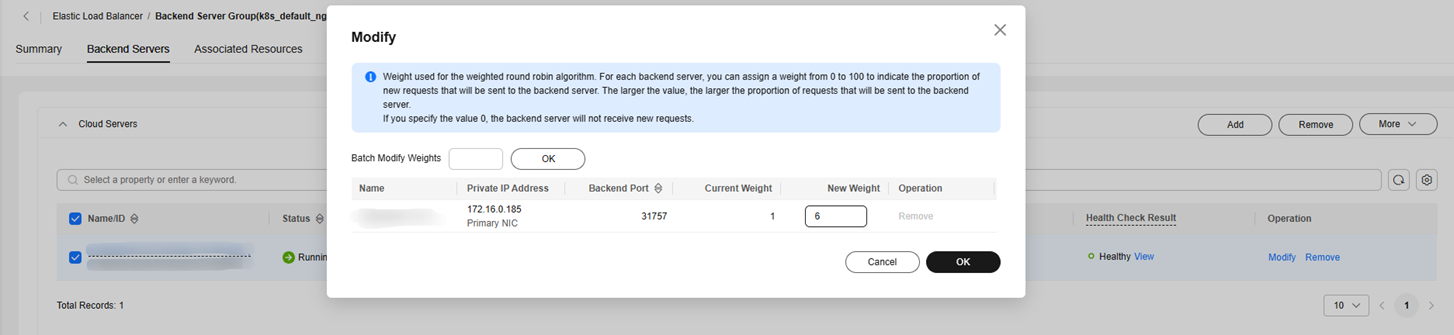
The ELB configuration consistency check detects backend server inconsistency. This occurs when the weight of the backend server in the backend server group created by CCE is changed on the ELB console.
- Method 1: Modify the ingress.
Check whether the ingress has an annotation to control the member weight. If yes, adjust the weight to be the same as that on the ELB console.
- Method 2: Modify ELB.
In the backend server group, edit the weight of the member to the expected value in the diagnosis report.
The Configuration on ELB Is Redundant, and the Backend Server Needs to Be Deleted
The ELB configuration consistency check detects backend server inconsistency. This occurs when the backend server in the backend server group created by CCE is modified on the ELB console.
Health Check Inconsistency
The Configuration on ELB Is Modified, and the Health Check Needs to Be Updated
The ELB configuration consistency check detects health check inconsistency. This occurs when the health check for the backend server group is modified on the ELB console.
- Method 1: Modify the ingress.
Modify the kubernetes.io/elb.health-check-flag and kubernetes.io/elb.health-check-option annotations of the ingress.
- Method 2: Modify ELB.
On the ELB console, view the backend server group and change the health check parameters to the expected values in the diagnosis report, which are the same as those configured in the ingress.

The Configuration on ELB Is Redundant, and the Health Check Needs to Be Deleted
The ELB configuration consistency check detects health check inconsistency. This occurs when the health check is enabled for the backend server group on the ELB console, but the health check is not configured in the ingress.
For example:
inconsistent: need delete healthMonitor(ef7ad2c3-bdda-4727-8a1c-de37eeb48b55) of pool(402dbff8-58b8-4a49-bb99-0dc5cf87c35b)
This indicates that the health check associated with the backend server group 402dbff8-58b8-4a49-bb99-0dc5cf87c35b needs to be removed. You can call the API to delete a health check. Alternatively, you can enable the health check for the ingress.
Certificate Inconsistency
Certificates are used for HTTPS encrypted communication. CCE manages certificates from two sources.
| Source | Ingress Configuration | Description |
|---|---|---|
| K8s Secret | spec.tls | CCE reads the certificate content (tls.crt/tls.key) from the secret and creates a certificate on ELB. |
| ELB certificate | kubernetes.io/elb.tls-certificate-ids | The ID of an existing certificate on ELB is directly referenced. |
Certificate inconsistency occurs only when the certificates are created based on the Kubernetes secrets. When an ELB certificate is used, only the certificate ID is referenced, and the certificate content is not created or updated.
The Configuration on ELB Is Missing, and a Certificate Needs to Be Created
The ELB configuration consistency check detects certificate inconsistency. This occurs when the ingress references the Kubernetes secret through spec.tls, but the corresponding certificate does not exist on ELB. Another cause is that the secret is newly created, and CCE has not completed the synchronization.
The Configuration on ELB Is Modified, and the Certificate Needs to Be Updated
The ELB configuration consistency check detects certificate inconsistency. This occurs when the public or private key of the certificate is modified on the ELB console (for example, the certificate file is replaced on the ELB console).
- Method 1: Modify the ingress.
Update the tls.crt and tls.key of the Kubernetes secret to ensure that the content is the same as that of the certificate on the ELB console. This method is suitable for the scenario where the certificate on the ELB console is replaced intentionally.
- Method 2: Modify ELB.
On the ELB console, edit the certificate content to be the same as that of the Kubernetes secret. This method is suitable for the scenario where the certificate is accidentally modified on the ELB console.
The secret field in the report displays the UID of the Kubernetes secret, and the domain field displays the certificate domain name. You can use the secret UID and domain name to locate the corresponding secret in the Kubernetes cluster and compare the tls.crt content with the certificate content on the ELB console.
Common Issues
- Why Is the Message Indicating Missing Configuration Displayed When the Resource Exists?
The description of the ELB listener or forwarding policy managed by CCE must be in a fixed format. If the description is modified, CCE cannot identify and manage the listener or forwarding policy. Refer to the prompt for details and follow the solution described in this section.
- Why Do Other Inconsistencies Disappear After Some Inconsistencies Are Handled?
This is normal because resources are dependent on each other. After the problems of the parent resource are handled, the inconsistency of the child resource may disappear. You should handle the inconsistencies in the recommended sequence and run the check again after they are handled.
- Why Does the Listener Configuration of the Ingress Not Take Effect After Being Modified?
If multiple ingresses share the same listener on the same port, the configuration of the earliest ingress is used. Changes to other ingresses have no effect. For details, see Configuring Multiple Ingresses to Use the Same Load Balancer.
What is your overall rating for this page?
Thank you very much for your feedback. We will continue working to improve the documentation.See the reply and handling status in My Cloud VOC.
For any further questions, feel free to contact us through the chatbot.
Chatbot


