

Overview
IAM Users
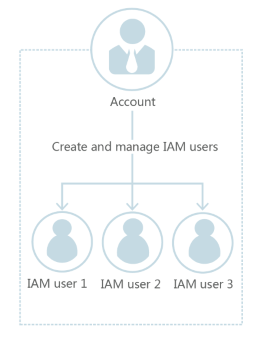
You can use your account to create IAM users and grant them permissions for specific resources. Each IAM user has their own identity credentials (password and access keys) and uses cloud resources based on the granted permissions. IAM users do not own resources.
IAM Users and Accounts
An account and its IAM users have a parent-child relationship. The account owns the resources and makes payments for the resources used by IAM users. It has full access permissions for these resources. IAM users are created by an account, and they only have the permissions granted by the account. The account can modify or revoke the IAM users' permissions at any time. Resources used by IAM users in your account are billed to your account. IAM users do not need to make payments themselves.
Identifying IAM Users
When you create an IAM user, IAM provides the following methods to identify that user:
- An IAM username, which is specified when you create the IAM user.
- A unique IAM user ID, which is generated when you create the IAM user.
IAM User Credentials and Access Methods
You can access Huawei Cloud in different ways, depending on the credentials of IAM users:
- Console password: IAM users can log in to Huawei Cloud using their passwords. For details, see Logging In to Huawei Cloud as an IAM User. If you do not set a console password when creating an IAM user, the user cannot log in using this credential.
- Access keys: You can create access keys for IAM users so that they can make programmatic calls to Huawei Cloud.
IAM Users and Permissions
By default, new IAM users have no permissions. You can assign permissions to them directly, or add them to user groups and grant permissions to these groups by referring to Assigning Permissions to a User Group, so that the users inherit the permissions of the groups. IAM users can also be granted permissions for themselves. Once an IAM user has been granted permissions, they can perform operations on cloud services based on those permissions.
- For details about how to create an IAM user and grant it initial permissions, see Creating an IAM User.
- For details about how to grant permissions to existing users, see Assigning Permissions to an IAM User.
- For details about how to manage the existing permissions of a user, see Managing IAM User Information.
What is your overall rating for this page?
Thank you very much for your feedback. We will continue working to improve the documentation.See the reply and handling status in My Cloud VOC.
For any further questions, feel free to contact us through the chatbot.
Chatbot


