


更新时间:2026-10-10 GMT+08:00
CodeInterpreter SDK
场景介绍
支持CodeInterpreter生命周期管理和Session生命周期管理。
原理优势
用户空间已存在代码解释器时,SDK支持快速拉起代码解释器会话
api_key = "your_actual_api_key" # your api key
with code_session("your_region", "your_code_interpreter_name", api_key=api_key) as code_client:
    response = code_client.invoke(
        operate_type="your_operate_type",
        api_key=api_key,
        arguments={your_arguments}
    )
前提条件
- 已开通AgentArts。
- 登录控制台获取AK/SK,和API_KEY信息,详情请参考如何获取华为云AK/SK和如何获取代码解释器的API_KEY。
- 已安装Python,且版本不低于3.10。查看Python版本的命令示例:python --version。
操作步骤
- 执行如下命令进行包安装。
# 安装agentarts-sdk包
pip install agentarts-sdk

# 安装langgraph包
pip install langgraph

# 安装langchain_openai包
pip install langchain-openai
- 配置环境变量:
配置环境变量。
# === 用于通过代码创建沙箱 ===
export HUAWEICLOUD_SDK_AK="您的华为云AK"
export HUAWEICLOUD_SDK_SK="您的华为云SK"
export AGENTARTS_CONTROL_ENDPOINT="https://agentarts.cn-southwest-2.myhuaweicloud.com"
export AGENTARTS_CODEINTERPRETER_DATA_ENDPOINT="http://您的沙箱域名"
export HUAWEICLOUD_SDK_CODE_INTERPRETER_API_KEY="您的沙箱 API Key"
获取AK/SK请参考如何获取华为云AK/SK。
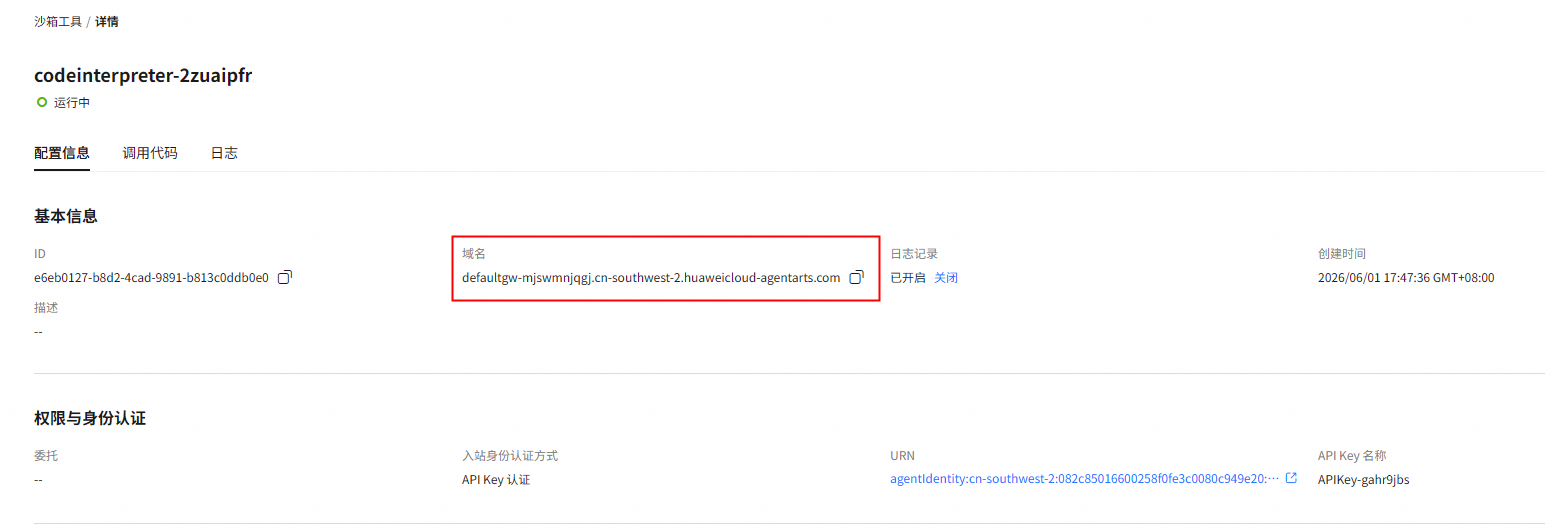
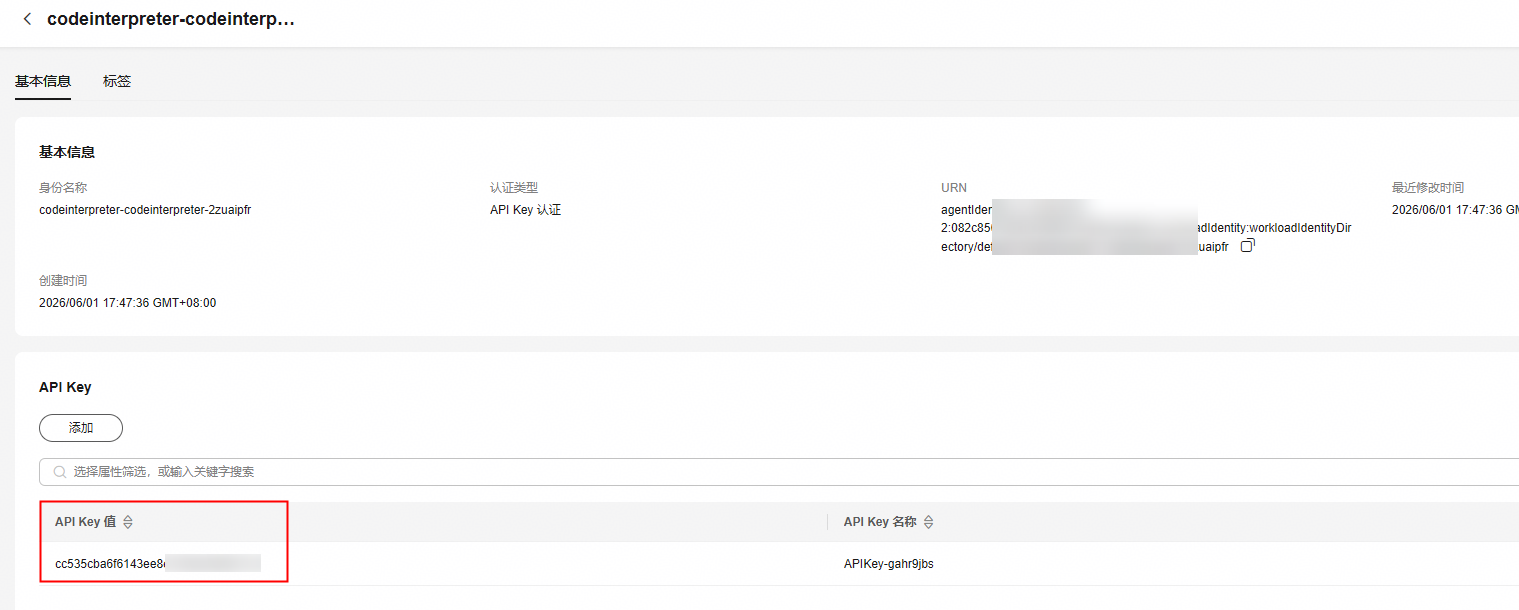
沙箱工具的域名、API Key获取方法如下:
- 单击沙箱工具名称。
- 进入“配置信息”页面后,获取域名。 图1 获取沙箱域名
- 单击“URN”链接,在弹出的窗口中获取沙箱的API Key。 图2 URN链接
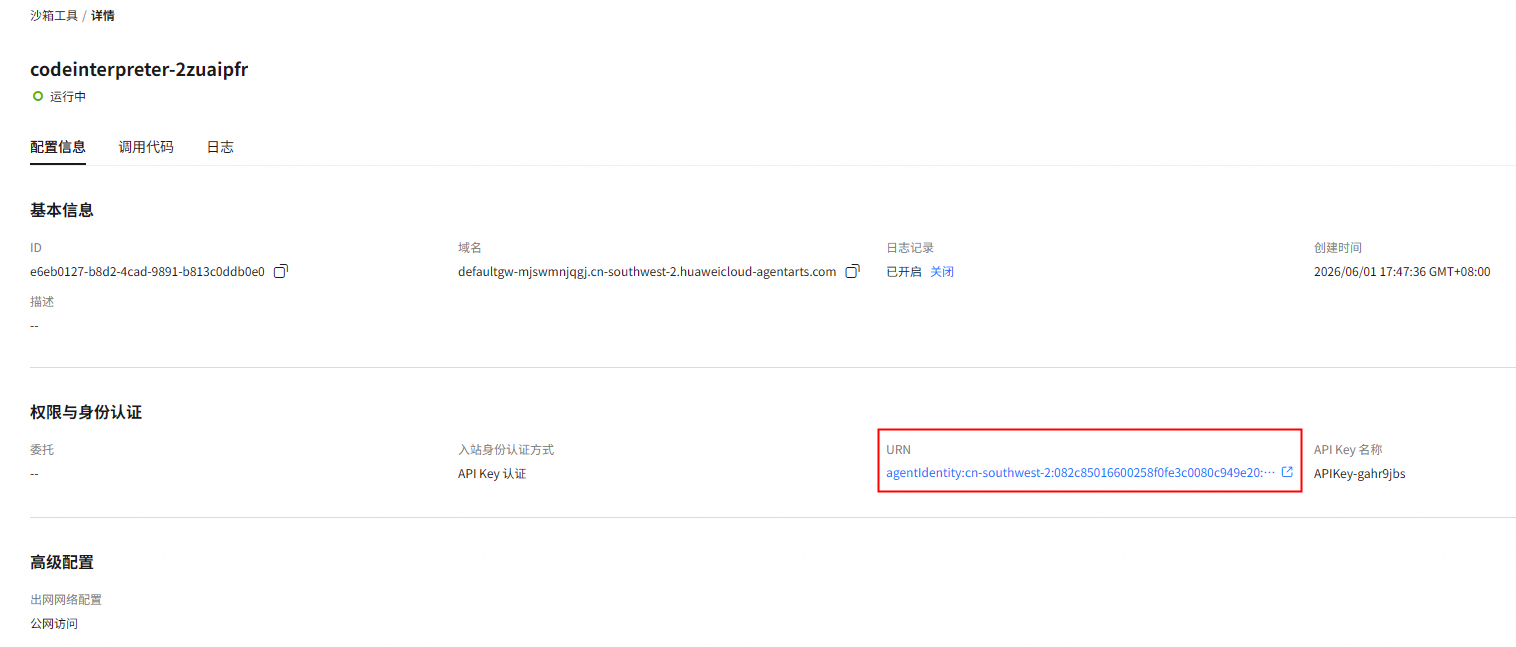 图3 获取沙箱API Key
- 创建代码解释器。
from agentarts.sdk.tools import CodeInterpreter # auth_type为API_KEY时创建示例 client = CodeInterpreter(region="your_region",auth_type="API_KEY") code_interpreter = client.create_code_interpreter( name="your_code_interpreter_name", api_key_name="your_api_key_name" ) # auth_type为IAM时创建示例 demo_client = CodeInterpreter(region="your_region", auth_type="IAM") code_interpreter = client.create_code_interpreter( name="your_code_interpreter_name", auth_type="IAM" ) - 配置工具,这里以代码执行工具为例。
- API_KEY的配置工具示例如下,用户自定义region信息和需要使用的代码解释器,代码解释器名称和API_KEY一一对应。
import json

from agentarts.sdk.tools import code_session
from langchain_core.tools import tool

@tool
def execute_python_tool(code: str, description: str = "") -> str | None:
    """Execute Python Code in the sandbox"""
    api_key = "your_actual_api_key" # your api key
    with code_session("cn-southwest-2", "your_code_interpreter_name", api_key=api_key) as code_client:
        response = code_client.invoke(
            operate_type="execute_code",
            api_key=api_key,
            arguments={
                "code": code,
                "language": "python",
                "clear_context": False
            }
        )

    return json.dumps(response["result"])
- IAM认证的配置工具示例:
import json

from agentarts.sdk.tools import code_session
from langchain_core.tools import tool

@tool
def execute_python_tool(code: str, description: str = "") -> str | None:
    """Execute Python Code in the sandbox"""
    with code_session("cn-southwest-2", "your_code_interpreter_name", auth_type="IAM") as code_client:
        response = code_client.invoke(
            operate_type="execute_code",
            arguments={
                "code": code,
                "language": "python",
                "clear_context": False
            }
        )

    return json.dumps(response["result"])
- API_KEY的配置工具示例如下,用户自定义region信息和需要使用的代码解释器,代码解释器名称和API_KEY一一对应。
- 集成4中配置的工具,以如下执行代码为例。
from langchain_openai import ChatOpenAI

# 创建Agent
llm = ChatOpenAI(
    model="deepseek-v4-flash",
    api_key=os.environ.get("MODEL_API_KEY", ""),
    base_url=os.environ.get("BASE_URL", ""),
    max_tokens=1000,
    temperature=0.7,
)
# 创建工具列表
tools = [execute_python_tool]
# 工具绑定Agent
llm = llm.bind_tools(tools)
通过SDK可调用的管理面方法请参考表1,详细使用指导请参考工具使用方法指引。
| 方法 | 说明 |
|---|---|
| create_code_interpreter | 创建代码解释器 |
| list_code_interpreters | 查询代码解释器列表 |
| update_code_interpreter | 更新代码解释器 |
| get_code_interpreter | 获取代码解释器详情 |
| delete_code_interpreter | 删除代码解释器 |
通过SDK可调用的数据面方法请参考表2,详细使用指导请参考工具使用方法指引。
| 方法 | 说明 |
|---|---|
| start_session | 启动代码解释器会话 |
| get_session | 获取代码解释器会话详情 |
| stop_session | 停止当前代码解释器会话 |
| invoke | 调用代码解释器会话 |
| execute_code | 在代码解释器中执行代码 |
| execute_command | 在代码解释器中执行命令 |
| upload_file | 上传文件到代码解释器 |
| upload_files | 上传多个文件到代码解释器 |
| download_file | 从代码解释器下载文件 |
| download_files | 从代码解释器下载多个文件 |
| install_packages | 在代码解释器中安装Python包 |
| clear_context | 清除代码解释器上下文 |
| code_session | 上下文管理器 |
父主题: AgentArts运行时SDK


