

ALTER SCHEMA
Function
ALTER SCHEMA changes the attributes of a schema.
Precautions
- Only the owner of a schema or users with the ALTER permission for the schema can run the ALTER SCHEMA statement. System administrators have this permission by default.
- To change the owner of a schema or its storage limit, a non-admin user must be directly or indirectly part of the new role and have CREATE permission on the database.
Syntax
- Rename a schema.
1
2
ALTER SCHEMA schema_name
    RENAME TO new_name;
- Changes the owner of a schema.
1
2
ALTER SCHEMA schema_name
    OWNER TO new_owner;
- Changes the storage space limit of the permanent table in the schema.
1
2
ALTER SCHEMA schema_name
    WITH PERM SPACE 'space_limit';
Parameter Description
| Parameter | Description | Value Range |
|---|---|---|
| schema_name | Specifies the name of the schema to be modified. | Name of an existing schema. |
| new_name | Specifies the new schema name. | A string compliant with the identifier naming rules. |
| new_owner | Specifies the new schema owner. | Name of an existing user or role. |
| WITH PERM SPACE 'space_limit' | The upper limit of the permanent table storage space of the schema. | A string consists of an integer and unit. The unit can be K/M/G/T/P. The parsed value is in kilobytes (K) and must stay within the 1 KB to 9,007,199,254,740,991 KB range. |
Examples
Create an example schema schema_test and a user user_a.
1 2 | CREATE SCHEMA schema_test; CREATE USER user_a PASSWORD '{Password}'; |
Rename schema_test to schema_test1.
1 | ALTER SCHEMA schema_test RENAME TO schema_test1; |
Change the owner of schema_test1 to user_a.
1 | ALTER SCHEMA schema_test1 OWNER TO user_a; |
Example: Creating a Schema and Setting its Permanent Storage
The following procedure shows how to create a schema named testsche and set the size of the permanent storage to 10 MB. When the data size exceeds 10 MB, the system reports an error.
Alternatively, you can set the permanent storage of a schema on the DWS console. For details, see Configuring the Schema Storage Space of the DWS Database.
- Create a schema named testsche and set its permanent storage to 10 MB.
1CREATE SCHEMA testsche WITH PERM SPACE '10M';
- Use the system catalog PG_NAMESPACE to query the table storage of the schema. permspace indicates the permanent storage limit, and usedspace indicates the used permanent storage.
1SELECT permspace,usedspace FROM PG_NAMESPACE WHERE nspname = 'testsche';

- Create a test table and import data to it.
1
2
3
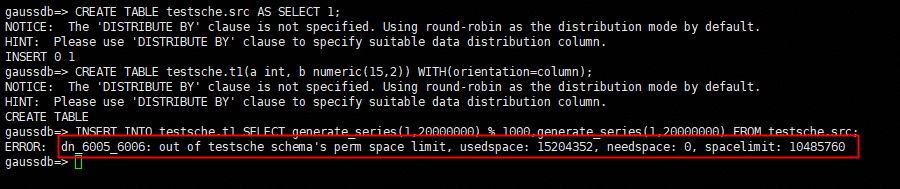
CREATE TABLE testsche.src AS SELECT 1;
CREATE TABLE testsche.t1(a int, b numeric(15,2)) WITH(orientation=column);
INSERT INTO testsche.t1 SELECT generate_series(1,20000000) % 1000,generate_series(1,20000000) FROM testsche.src;
An error message is displayed, indicating that the permanent storage of the schema exceeds the threshold.
- Increase the permanent storage of the schema to 10 GB and import the data again. The import is successful.
1
2
ALTER SCHEMA testsche WITH PERM SPACE '10G';
INSERT INTO testsche.t1 SELECT generate_series(1,20000000) % 1000,generate_series(1,20000000) FROM testsche.src;

- View the used storage.
1SELECT permspace,usedspace FROM PG_NAMESPACE WHERE nspname = 'testsche';



