

Help Center/ SecMaster/ Best Practices/ Log Access and Transfer Operation Guide/ Procedure/ Step 7: Install the Log Collection Component (Logstash)
Updated on 2026-01-27 GMT+08:00
Step 7: Install the Log Collection Component (Logstash)
This topic describes how to install the SecMaster log collection component (Logstash) and configure the log collection process.
Installing the Log Collection Component
- Log in to the SecMaster console.
- In the navigation pane on the left, choose Workspaces > Management. In the workspace list, click the name of the target workspace. Figure 1 Workspace management page

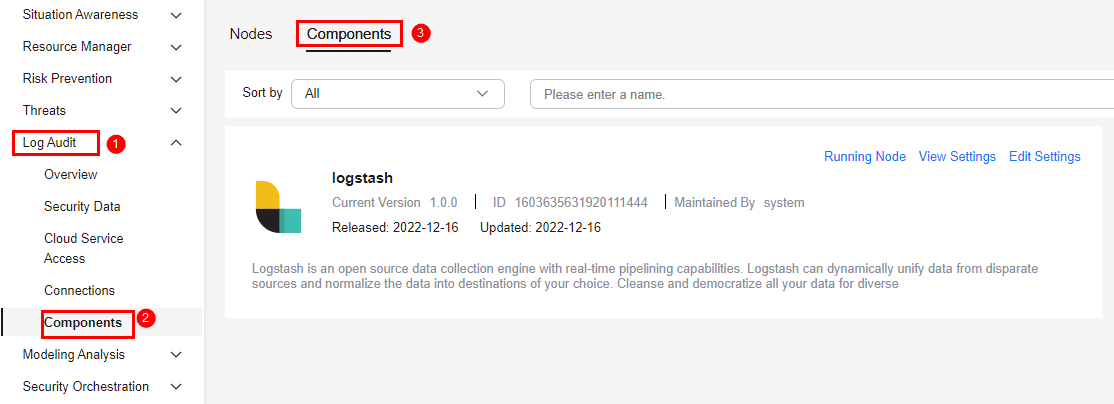
- In the navigation pane on the left, choose . Then, select the Components tab. Figure 2 Accessing the Components tab
- On the Components tab page, click Edit Settings in the upper right corner of the component to be viewed. The configuration management page of the component is displayed on the right.
- In the Node Configuration area, click Add in the upper left corner of the node list. In the Add Node dialog box displayed, select the node in (Optional) Step 1: Buy an ECS and click OK.
- On the Configuration Management page, click Save and Apply in the lower right corner.
Wait for a period of time. When the component status changes to Applied completed, the Logstash collector has been installed on the current node.
Parent topic: Procedure
What is your overall rating for this page?
0
1
2
3
4
5
6
7
8
9
10
Very dissatisfiedVery satisfied
Thank you very much for your feedback. We will continue working to improve the documentation.
The system is busy. Please try again later.


