

Properly Configuring CoreDNS
On the console, the CoreDNS add-on can only be configured with the preset specifications, which can satisfy most of the service requirements. In some scenarios where there are requirements on the CoreDNS resource usage, you may need to customize the add-on specifications.
CoreDNS official document: https://coredns.io/plugins/
Configuring CoreDNS Specifications
- Log in to the CCE console and click the cluster name to access the cluster console.
- In the navigation pane, choose Add-ons. Then, click Edit under CoreDNS.
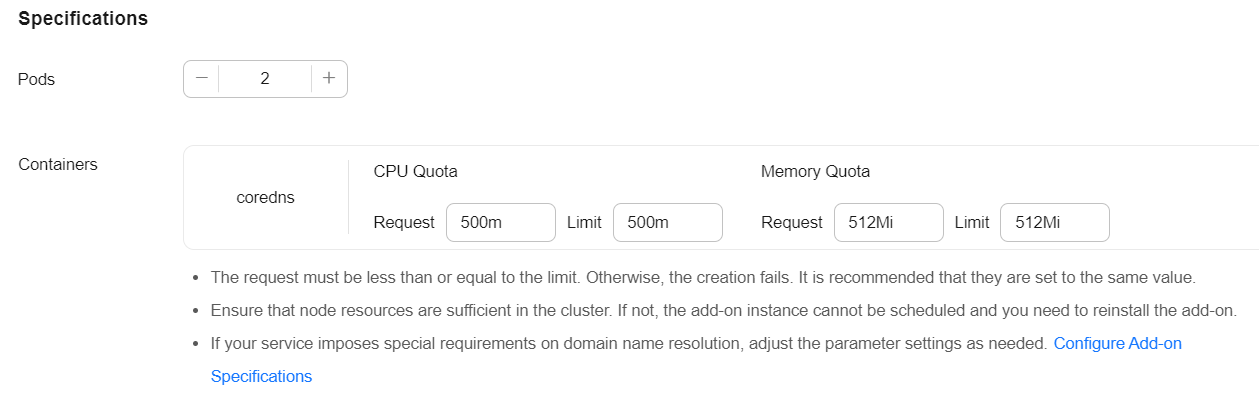
- In the Specifications area, configure CoreDNS specifications.
- Change the number of pods, CPU quotas, and memory quotas as needed to adjust the domain name resolution QPS provided by CoreDNS.
- Click OK.
Properly Configuring the Stub Domain for DNS
- Log in to the CCE console and click the cluster name to access the cluster console.
- In the navigation pane, choose Add-ons. Then, click Edit under CoreDNS.
- Add a stub domain in the Parameters area. The format is a key-value pair. The key is a DNS suffix domain name, and the value is a DNS IP address or a group of DNS IP addresses, for example, consul.local -- 10.150.0.1. Figure 1 Adding a stub domain
 Corefile:
.:5353 { bind {$POD_IP} cache 30 { servfail 5s } errors health {$POD_IP}:8080 kubernetes cluster.local in-addr.arpa ip6.arpa { pods insecure fallthrough in-addr.arpa ip6.arpa } loadbalance round_robin prometheus {$POD_IP}:9153 forward . /etc/resolv.conf { policy random } reload ready {$POD_IP}:8081 } consul.local:5353 { bind {$POD_IP} errors cache 30 forward . 10.150.0.1 } - Click OK.
- Choose ConfigMaps and Secrets in the navigation pane, select the kube-system namespace, and view the ConfigMap data of coredns to check whether the update is successful.
Properly Configuring the Host
To specify hosts for a specific domain name, you can use the hosts add-on. An example is as follows:
- Log in to the CCE console and click the cluster name to access the cluster console.
- In the navigation pane, choose Add-ons. Then, click Edit under CoreDNS.
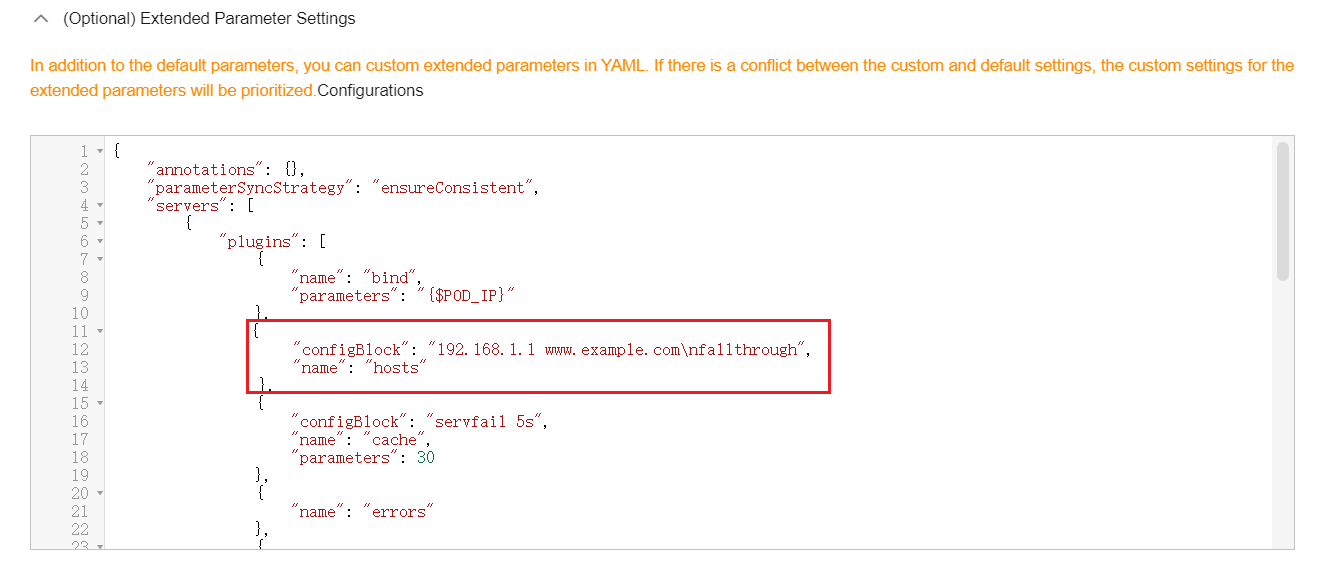
- Edit extended parameters in Parameters and add the following content to the plugins field:
{
  "configBlock": "192.168.1.1 www.example.com\nfallthrough",
  "name": "hosts"
}
The fallthrough field must be configured. fallthrough indicates that when the domain name to be resolved cannot be found in the hosts file, the resolution task is transferred to the next add-on of CoreDNS. If fallthrough is not specified, the task ends and the domain name resolution stops. As a result, the domain name resolution in the cluster fails.
For details about how to configure the hosts file, visit https://coredns.io/plugins/hosts/.
Figure 2 Modifying the CoreDNS hosts configuration
 Corefile:
.:5353 { bind {$POD_IP} hosts { 192.168.1.1 www.example.com fallthrough } cache 30 errors health {$POD_IP}:8080 kubernetes cluster.local in-addr.arpa ip6.arpa { pods insecure fallthrough in-addr.arpa ip6.arpa } loadbalance round_robin prometheus {$POD_IP}:9153 forward . /etc/resolv.conf { policy random } reload ready {$POD_IP}:8081 } - Click OK.
- Choose ConfigMaps and Secrets in the navigation pane, select the kube-system namespace, and view the ConfigMap data of coredns to check whether the update is successful.
Configuring the Default Protocol Between the forward Plugin and the Upstream DNS Service
- The NodeLocal DNSCache uses TCP to communicate with CoreDNS. CoreDNS communicates with the upstream DNS server based on the protocol used by the request source. By default, external domain name resolution requests from service containers pass through NodeLocal DNSCache and CoreDNS in sequence, and finally request the DNS server in the VPC using TCP.
- The DNS server in the VPC supports TCP only to a limited extent. To use NodeLocal DNSCache, modify the CoreDNS configuration so that UDP is more appropriate to communicate with the upstream DNS server, preventing resolution exceptions. You are advised to use the following method to modify the CoreDNS configuration file:
The forward plug-in is used to set the upstream nameservers. The following parameters are included:
prefer_udp: Even if a request is received through TCP, UDP should be used first.
If you want CoreDNS to preferentially use UDP to communicate with upstream systems, set the protocol in the forward plugin to prefer_udp. For details about the forward plugin, see https://coredns.io/plugins/forward/.
- Log in to the CCE console and click the cluster name to access the cluster console.
- In the navigation pane, choose Add-ons. Then, click Edit under CoreDNS.
- Edit extended parameters in Parameters and modify the following content in the plugins field:
{ "configBlock": "prefer_udp", "name": "forward", "parameters": ". /etc/resolv.conf" }Corefile:Corefile: |- .:5353 { bind {$POD_IP} cache 30 { servfail 5s } errors health {$POD_IP}:8080 kubernetes cluster.local in-addr.arpa ip6.arpa { pods insecure fallthrough in-addr.arpa ip6.arpa } loadbalance round_robin prometheus {$POD_IP}:9153 forward . /etc/resolv.conf { prefer_udp } reload ready {$POD_IP}:8081 }
Properly Configuring a Cache Policy
If you configure CoreDNS with an upstream DNS server, you can implement a cache policy that enables CoreDNS to use the expired local cache when it is unable to access the upstream DNS server.
- Log in to the CCE console and click the cluster name to access the cluster console.
- In the navigation pane, choose Add-ons. Then, click Edit under CoreDNS.
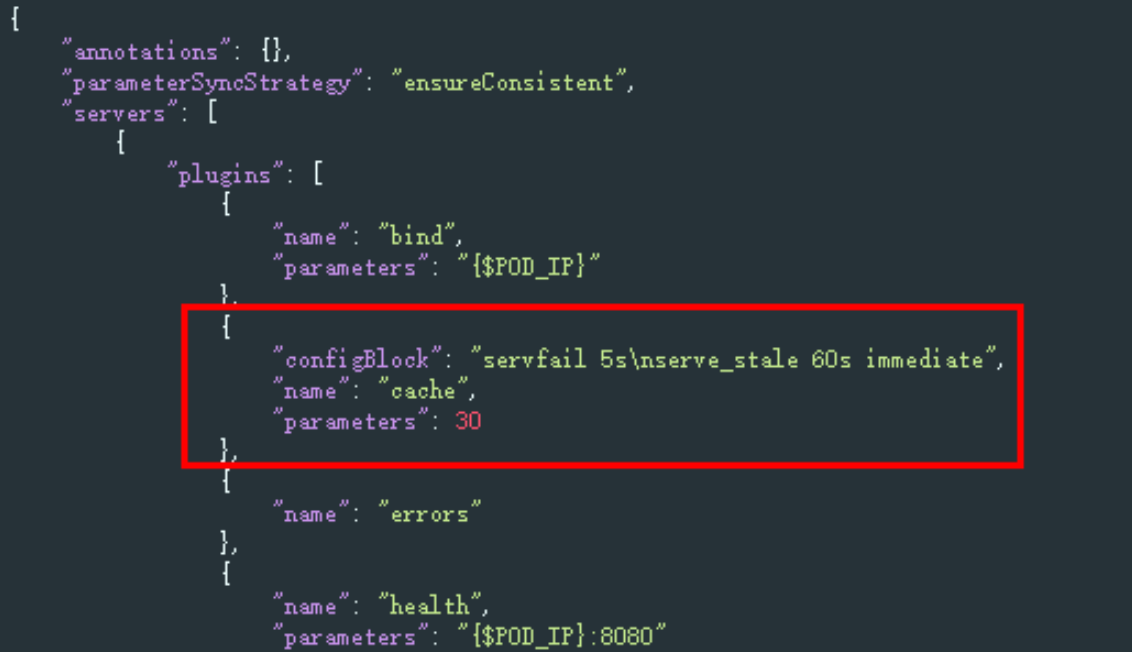
- Edit extended parameters in the Parameters area and modify the cache content in the plugins field. For details about how to configure the cache, see https://coredns.io/plugins/cache/.
{
    "configBlock": "servfail 5s\nserve_stale 60s immediate",
    "name": "cache",
    "parameters": 30
}
- Click OK.
- In the navigation pane, choose ConfigMaps and Secrets. Select the kube-system namespace, view the ConfigMap data of CoreDNS to check whether the update is successful.
Corefile:
.:5353 {
    bind {$POD_IP}
    cache 30 {
        servfail 5s
        serve_stale 60s immediate
    }
    errors
    health {$POD_IP}:8080
    kubernetes cluster.local in-addr.arpa ip6.arpa {
        pods insecure
        fallthrough in-addr.arpa ip6.arpa
    }
    loadbalance round_robin
    prometheus {$POD_IP}:9153
    forward . /etc/resolv.conf {
        policy random
    }
    reload
    ready {$POD_IP}:8081
}


