

Pulling an Image
Scenarios
To use an image stored in a repository, you need to pull it from the repository first. Then, you can use this image to deploy containerized applications in CCE or CCI. Pulling an image is actually downloading an image. Images are classified as public or private.
- Public images can be pulled by all users in any account. To improve image management security, SWR also supports permission control over the download of public images through related control policies.
- Private images are controlled by specific permission management. You can grant permissions to allow users to read, edit, or manage private images. For details, see Granting Permissions for a Specific Image.
You can use Docker or containerd to pull images from SWR.
Prerequisites
- Your network is normal.
- If you are an IAM user, you have obtained the read and edit permissions on images in the organization from the administrator. For details, see Granting Permissions.
- On the My Images page, Private Images list your own images in your organization and Shared Images list private images shared by other users in the organization.
Pulling My Image
You can use Docker or containerd to pull images from SWR.
Docker
- Log in to the server running the container engine as user root.
- Obtain a login command by referring to (Recommended) Pushing an Image Using a Container Engine Client and connect to SWR.
- Log in to the SWR console.
- In the navigation pane, choose My Images. Then click the name of the target image.
- On the Tags tab, locate the image tag you desire and click
 in the Image Pull Command column to copy the command.
Figure 1 Obtaining the image pull command
in the Image Pull Command column to copy the command.
Figure 1 Obtaining the image pull command
- On the server, run the command copied in 5.
Example: docker pull swr.cn-east-3.myhuaweicloud.com/group/nginx:v2.0.0
Run the docker images command to check whether the image is successfully pulled.
# docker images
REPOSITORY                                                              TAG       IMAGE ID       CREATED         SIZE
swr.*******.*******.com/group/nginx                             v2.0.0    22f2bf2e2b4f   5 hours ago     22.8MB
- (Optional) Save the image to an archive file.
docker save [image-name:tag-name] > [archive-file-name]
Example: docker save swr.cn-east-3.myhuaweicloud.com/group/nginx:v2.0.0 > nginx.tar
containerd
- Log in to the SWR console.
- In the navigation pane, choose My Images. Then click the name of the target image.
- On the Tags tab, click containerd Command in the Operation column to copy the image pull command. Alternatively, go to the Pull/Push tab to copy the image pull command.

The command is only valid for six hours after it is generated. To obtain a pull command that will remain valid for a long term, see Obtaining a Standard Long-Term Push/Pull Command for containerd.
- Log in to the VM running containerd as root.
- On the server, run the command copied in 3.
- If the command was copied from the Operation column, run it as follows.

- If the command was copied from the Pull/Push tab, run it as follows.
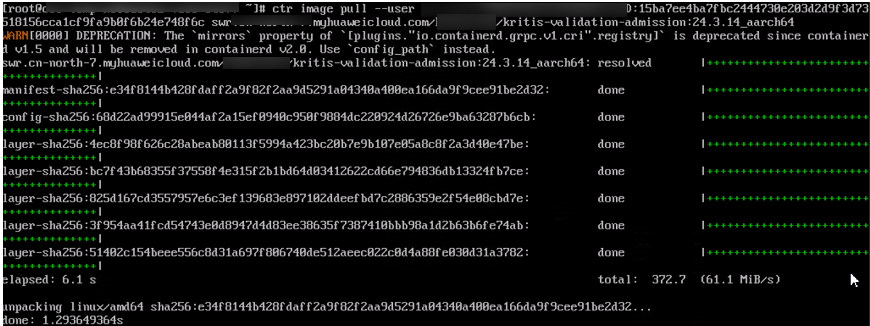
- If the command was copied from the Operation column, run it as follows.
- Check whether the image is pulled successfully.
- If the command was copied from the Operation column, run crictl images to check whether the pull is successful.

- If the command was copied from the Pull/Push tab, run ctr images list to check whether the pull is successful.

- If the command was copied from the Operation column, run crictl images to check whether the pull is successful.
Pulling an Image from the Image Center
You can pull an image from the Image Center without specifying a registry address. For example, you can connect the VM running the container engine to SWR and run the following command to pull the mongo image easily:
docker pull mongo:4.1

Feedback
Was this page helpful?
Provide feedbackThank you very much for your feedback. We will continue working to improve the documentation.See the reply and handling status in My Cloud VOC.
For any further questions, feel free to contact us through the chatbot.
Chatbot


