

Creating and Managing Groups
For build tasks targeted at different modules or scenarios in the same project, you can group the tasks for easy management in CodeArts Build. A group named Ungrouped is automatically created along with the first created group to store ungrouped build tasks.
Constraints
- You can create a maximum of 200 groups.
- A group can contain up to three directory levels.
Creating a Group
- Access the CodeArts Build homepage from the project page.
- Click Create one and set a group name.
- Only letters, digits, hyphens (-), and underscores (_) are allowed.
- 1 to 128 characters.
- Each group name must be unique within its project.
Figure 1 Assigning a name to the group
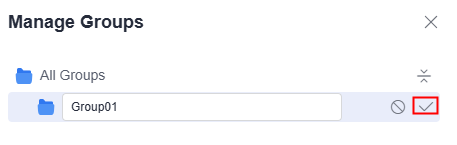
- Click any position to finish group creation.
Managing Groups
Place the cursor on the group's row.
Click  to modify the group name.
Click  to delete the group or adjust its order.
Click  to add a subgroup.

After a group is deleted, its tasks are automatically moved to Ungrouped.
Helpful Links
For details about APIs used for grouping build tasks, see Group Management.
What is your overall rating for this page?
Thank you very much for your feedback. We will continue working to improve the documentation.See the reply and handling status in My Cloud VOC.
For any further questions, feel free to contact us through the chatbot.
Chatbot


