

How Do I Log In to COC as an Uncommon IAM User?
You can log in to COC as a common IAM user, federated IAM user (including IAM user in SSO mode and virtual user in SSO mode), and IAM Identity Center user. If you log in to COC as an uncommon IAM user, follow the instructions in this section to ensure that you can use COC properly.
Logging In to COC as an IAM User
IAM Identity Center provides unified identity management and access control for multiple accounts based on organizations. For details, see What Is IAM Identity Center? After a user is created for this service, the user can use a specific username and password to log in to the unified portal and access resources of multiple accounts assigned to the user without multiple logins.
- Log in to Huawei Cloud through the IAM portal. If you use IAM for the first time, see Getting Started. Figure 1 IAM login
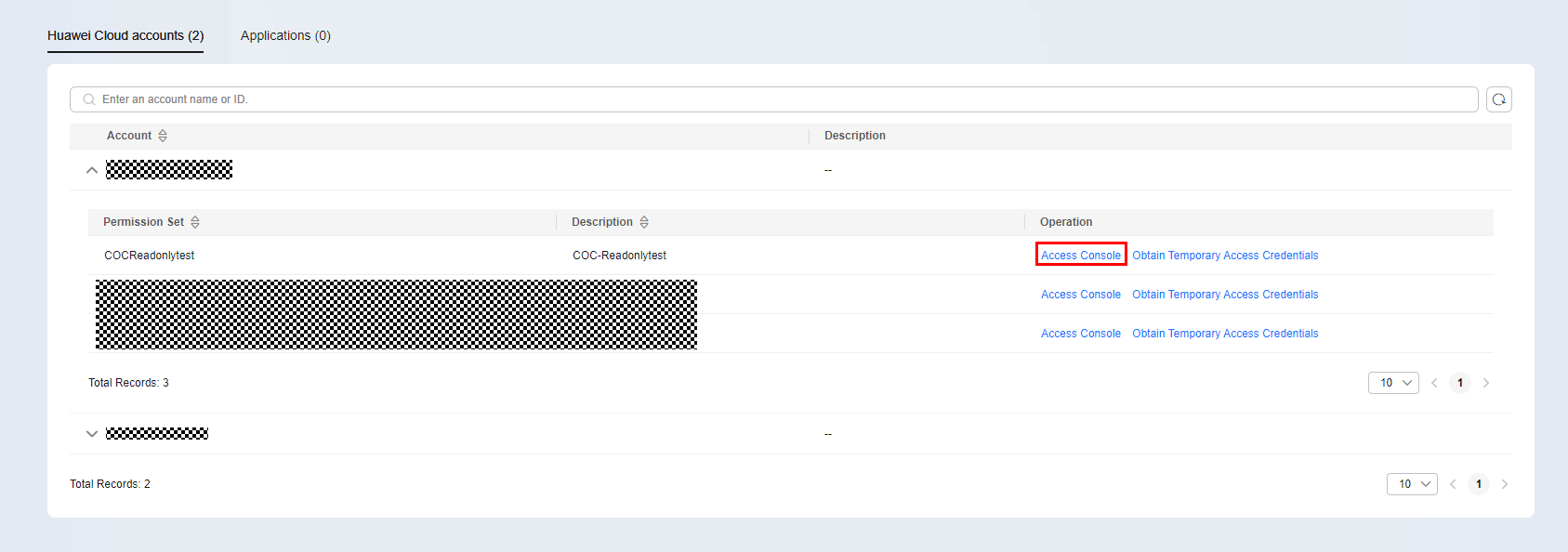
- Access COC through the console.
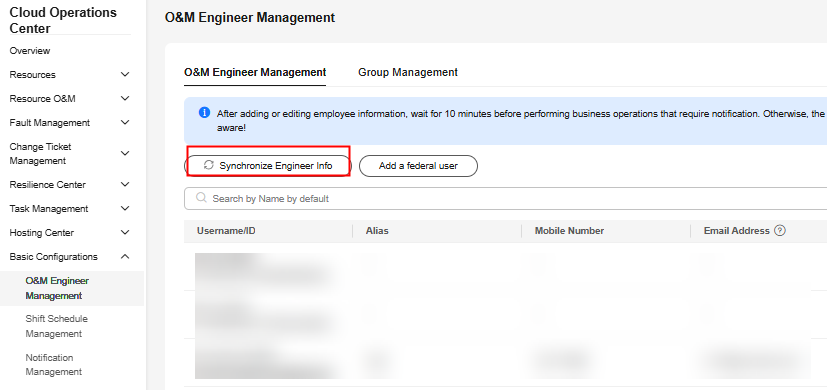
- In the navigation pane, choose Basic Configurations > Personnel Management.
- On the displayed page, click Synchronize Engineer Info. Figure 2 Synchronizing information about personnel
Logging In to COC as a Federated IAM User
If you have an enterprise management system and want to use cloud service resources of a Huawei Cloud account, you can use the IAM identity provider function to log in to Huawei Cloud using your enterprise management system account in SSO mode. This process is called federated identity authentication. Users who log in to Huawei Cloud through federated identity authentication are called federated users. Currently, federated users include virtual users in SSO mode and IAM users in SSO mode. For details about the differences and use cases of the two types of federated users, see Application Scenarios of Virtual User SSO and IAM User SSO.
If you log in to COC as an IAM user in SSO mode, refer to the process of using COC as a common IAM user.
If you log in to COC as a virtual user in SSO mode, perform the following operations.
- Log in to COC.
- In the navigation pane, choose Basic Configurations > Personnel Management.
- Click Add Federated User in the upper left corner.
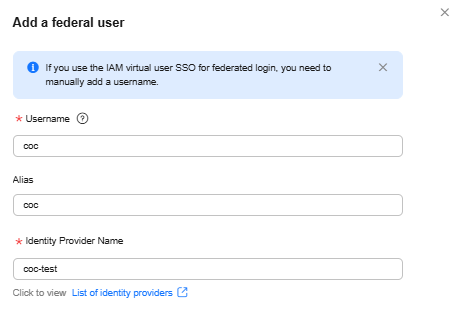
- Set the parameters in the Add Federated User dialog box.
- Username: username displayed on Huawei Cloud, which is configured in the IAM identity transition rule.
- Alias: Alias of the current user.
- Identity Provider Name: name of the user identity provider in IAM. Figure 3 Adding a federated user
- Click OK. The federated user is added.
What is your overall rating for this page?
Thank you very much for your feedback. We will continue working to improve the documentation.See the reply and handling status in My Cloud VOC.
For any further questions, feel free to contact us through the chatbot.
Chatbot


