

Updated on 2026-09-17 GMT+08:00
Deleting Resources
After the migration is complete, if incremental data synchronization is no longer needed, you can delete the cutover and synchronization snapshots generated during the process to stop further billing.

Once these snapshots are deleted, incremental data synchronization will no longer be possible. Confirm that no additional synchronizations are required before performing this action.
Deleting Resources
- Sign in to the SMS console.
- In the navigation pane, click Servers.
- Select a server whose task status is Completed and for which incremental synchronization is no longer required. Click Delete Resources in the Migration Stage/Status column. Figure 1 Deleting resources

- In the displayed Delete Resources dialog box, enter DELETE in the text box or click Auto Enter and then click OK. Figure 2 Confirm the deletion
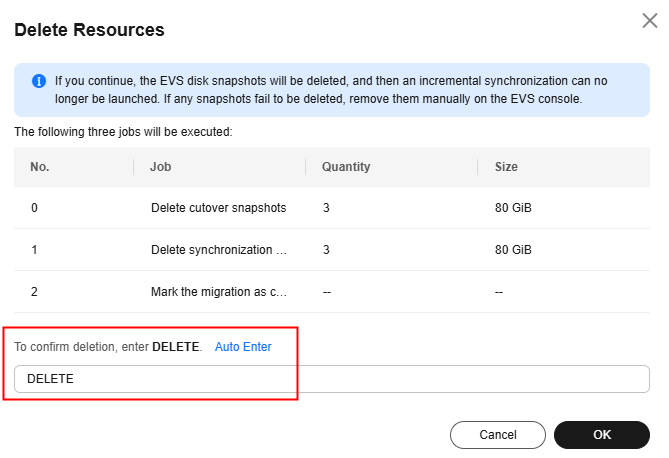
- After the deletion is complete, go to the EVS console to check the deletion results. If the EVS snapshots fail to be deleted, manually delete them on the EVS console.
What is your overall rating for this page?
0
1
2
3
4
5
6
7
8
9
10
Very dissatisfiedVery satisfied
Thank you very much for your feedback. We will continue working to improve the documentation.See the reply and handling status in My Cloud VOC.
The system is busy. Please try again later.
For any further questions, feel free to contact us through the chatbot.
Chatbot


