

Help Center/ Dedicated Enterprise Storage Service/ User Guide/ DESS Device Management/ Managing DESS Devices/ Modifying a DESS Device Name
Updated on 2022-02-22 GMT+08:00
Modifying a DESS Device Name
After you have created a DESS device, you can change its name.
Prerequisites
The DESS device is in the Available, Expired, or Expanding state.
Procedure
- Log in to the management console. For details, see Logging In to the Management Console.
- Click
 and select the wanted region.
 - Click
 and choose Dedicated Cloud > Dedicated Enterprise Storage to go to the DeC management console.
- On the navigation pane on the left, choose Dedicated Enterprise Storage > DESS Devices to go to the DESS device list page.
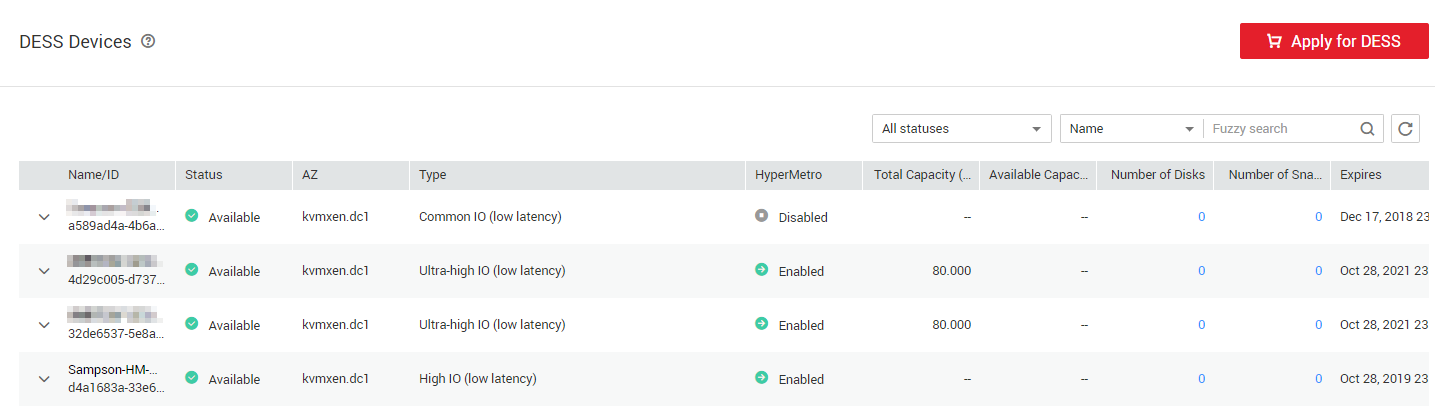
- Click
 next to the storage name to expand its details.
- Click
 next to the name.
 - Enter the new name.
Enter a maximum of 64 halfwidth characters, chosen from letters, digits, underscores (_), and hyphens (-). The value must start with a letter.
- Click
 to save the modification.
Parent topic: Managing DESS Devices
What is your overall rating for this page?
0
1
2
3
4
5
6
7
8
9
10
Very dissatisfiedVery satisfied
Thank you very much for your feedback. We will continue working to improve the documentation.See the reply and handling status in My Cloud VOC.
The system is busy. Please try again later.
For any further questions, feel free to contact us through the chatbot.
Chatbot


