

Adding or Deleting the Default Pod Subnet of a CCE Turbo Cluster
If the pod subnet configured during CCE Turbo cluster creation cannot meet service expansion requirements, you can add a pod subnet for the cluster.
Constraints
- This function is only available for CCE Turbo clusters of v1.19 or later.
- For CCE Turbo clusters of v1.27.16-r50, v1.28.15-r40, v1.29.15-r0, v1.30.14-r0, v1.31.10-r0, v1.32.6-r0, v1.33.1-r0, or later, you can define the priority of pod subnet allocation by selecting the pod subnets in a certain sequence. The pod subnet selected first is allocated first. In earlier versions, you cannot configure this default priority.
- You must manually update the Controller security group to allow traffic from the new pod subnet, so that pods in this subnet can access the cluster API server. For details, see How Do I Modify Cluster Security Group Rules?
Modifying the Default Pod Subnet on the Overview Page
- Log in to the CCE console and click the cluster name to access the cluster console.
- On the Overview page, locate the Networking Configuration area and click Edit. Figure 1 Adding a pod subnet
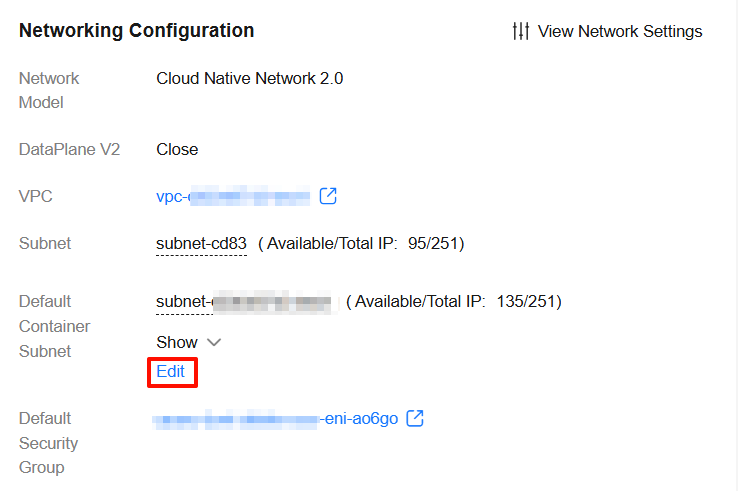
- Add or delete the default pod subnet. You can select one or more subnets in the same VPC. If no other pod subnet is available, go to the VPC console and create one.

- Pod subnets can be deleted from clusters of v1.23.17-r0, v1.25.12-r0, v1.27.9-r0, v1.28.7-r0, v1.29.3-r0, or later versions.
- To ensure that containers in a new CIDR block can access related services such as databases and middleware, allow the traffic from the new CIDR block on the required access ports in the security groups of related services.
Figure 2 Selecting a pod subnet
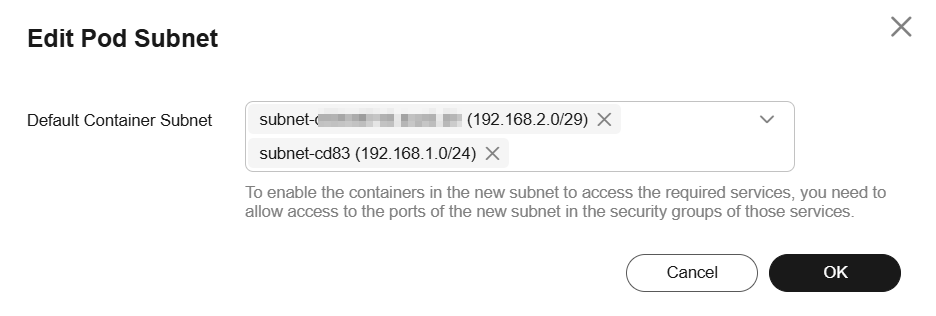
- Click OK.
Modifying the Default Pod Subnet on the Settings Page
- Log in to the CCE console and click the cluster name to access the cluster console.
- On the Settings page, click the Network tab.
- In the Container Network area, click Update in the Operation column of default-network (Default Container Subnet).
- In the Pod Subnet area, deselect the subnets to be deleted and click OK.

Precautions for Adding a Pod Subnet
After adding a pod subnet, check the network connectivity of all links. Ensure that intra-cluster communications are normal and verify the access to external services to avoid service interruptions.
- Bidirectional connectivity test of pods across CIDR blocks: Test the connectivity between pods on the same node and between pods on different nodes.
- Create two pods on the same node: one named pod-old using an IP address from the old CIDR block and the other named pod-new using an IP address from the new CIDR block. Check whether they can ping each other and verify port connectivity between them.
# Ping the IP address of pod-new from pod-old.
kubectl exec -it pod-old -- ping <pod-new-ip>
# Test the service port (for example, 8080).
kubectl exec -it pod-old -- curl <pod-new-ip>:8080
- Select two different nodes and create pods using IP addresses from the old and new CIDR blocks respectively. Repeat the ping and port tests to ensure that the cross-node pod communications are normal.
- Create two pods on the same node: one named pod-old using an IP address from the old CIDR block and the other named pod-new using an IP address from the new CIDR block. Check whether they can ping each other and verify port connectivity between them.
- Firewall, security group, and network policy checks: After a new CIDR block is added, the network policy, firewall, and security groups may deny traffic from the new CIDR block. As a result, the pods using IP addresses from the new CIDR block are denied.
- Firewall/Security group check: Check the security groups and network ACLs of the cluster to ensure that the inbound and outbound traffic of the new CIDR block (including the ports for communications between pods and the ports of the NodePort/ClusterIP Services) is allowed.
- Network policy check: Check whether the network rules contain the new CIDR block. The network policy check is required only for clusters with DataPlane V2 enabled.
kubectl get networkpolicy --all-namespaces
# Query details about the policy.
kubectl describe networkpolicy <policy-name> -n <namespace>
- Service discovery and Service connectivity check: Check whether the pods using IP addresses from the new CIDR block can access the cluster's Services and whether external services can access the pods through the Services.
- Security group/Access control policy verification and updates of external cloud services: By default, the security groups/whitelists of external cloud services allow only the traffic of the original container CIDR block. Requests sent by pods using IP addresses from the new container CIDR block are denied. This is easy to be ignored after a CIDR block is added.
The external cloud services include but are not limited to the database service (such as RDS), cache/middleware (such as Kafka), OBS, API Gateway, and VPC Peering/Direct Connect.
Precautions for Deleting a Pod Subnet
When deleting a pod subnet, pay attention to the following:
- CCE clusters v1.25.16-r30, v1.27.16-r30, v1.28.15-r20, v1.29.13-r0, v1.30.10-r0, v1.31.6-r0, v1.32.1-r0, or later support automatic cleanup of requested network interfaces after a subnet is deleted.
- Pre-allocated network interfaces are automatically reclaimed when the subnet is deleted.
- Network interfaces used by pods without a fixed IP address are automatically reclaimed when the pods are deleted.
- Network interfaces used by pods with a fixed IP address are automatically reclaimed after the pods are deleted and the fixed IP addresses expire.
- The eth1 network interface used by nodes is automatically reclaimed when the nodes are deleted or reset.
- In CCE clusters of v1.25.16-r30, v1.27.16-r30, v1.28.15-r20, v1.29.13-r0, v1.30.10-r0, v1.31.6-r0, v1.32.1-r0, or earlier, network interfaces that have been allocated are not automatically reclaimed when a subnet is deleted. Before deleting a subnet, ensure that no network interfaces in the current cluster are using the subnet, including those used by pods and pre-allocated network interfaces.
To find out if any network interfaces are being used by a cluster, copy the ID of the subnet that you plan to delete. Then, use this ID to filter the network interfaces and supplementary network interfaces associated with the VPC subnet on the Network Interfaces tab page. If the name or description of any of the filtered network interfaces contains a cluster ID, then those network interfaces are being used by the cluster.
- After a subnet is deleted, the security group of the cluster node will not automatically remove the rules associated with the subnet. Make sure that no network interfaces in the cluster are still using the subnet and manually clear these rules that are associated with it.
What is your overall rating for this page?
Thank you very much for your feedback. We will continue working to improve the documentation.See the reply and handling status in My Cloud VOC.
For any further questions, feel free to contact us through the chatbot.
Chatbot


