

Updated on 2025-12-18 GMT+08:00
Log Reporting
Scenarios
If you enable log reporting for your DB instance, new logs generated for the instance will be uploaded to Log Tank Service (LTS).
Prerequisites
- Ensure that there are available LTS log groups and log streams in the same region as your instance.
For details about how to create a log group and log stream, see Overview of Log Management.
Billing
You will be billed for enabling this function under LTS. For details, see LTS Pricing Details.
Constraints
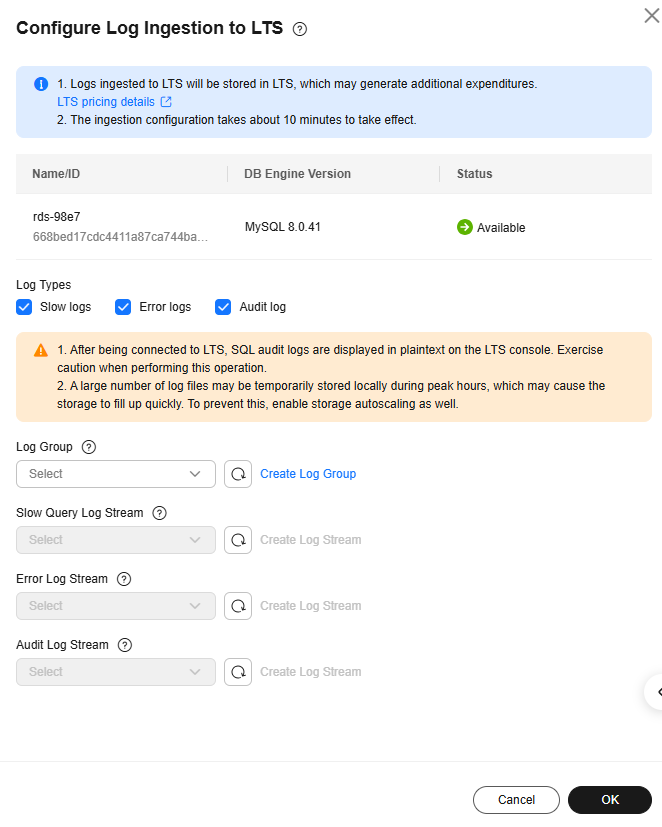
- Error logs, slow query logs, and audit logs cannot share a given log stream.
- Once configured, there is a delay of approximately 10 minutes before the changes are applied.
- If a structuring template (MySQL slow log template or MySQL error log template) has been bound to a log stream, ensure that the template type is the same as the log type when you select the log stream. For example, if an error log template has been bound to a log stream, the log stream cannot be selected for slow query logs.
For details about how to bind a system template to a log stream, see Log Structuring.
Enabling Log Reporting in Batches
- Click
 in the upper left corner and select a region.
 - Click
 in the upper left corner of the page and choose Databases > Relational Database Service.
 - In the navigation pane, choose .
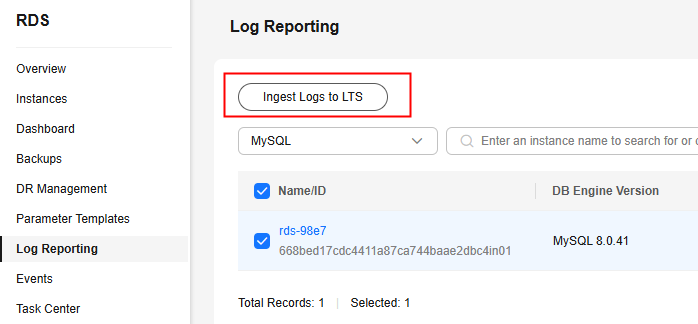
- Select at least one instance and click Ingest Logs to LTS.
Figure 1 Log reporting
- Select an LTS log group and log streams and click OK.
Figure 2 Configuring log ingestion to LTS
- To disable log ingestion to LTS, click Ingest Logs to LTS in the Operation column.
Figure 3 Configuring log ingestion to LTS

- In the displayed pane, deselect the required log types and click OK.
Feedback
Was this page helpful?
Provide feedbackThank you very much for your feedback. We will continue working to improve the documentation.See the reply and handling status in My Cloud VOC.
The system is busy. Please try again later.
For any further questions, feel free to contact us through the chatbot.
Chatbot


