

Creating an Application Using the Tomcat Application Deployment Template
You can deploy a WAR package to the Tomcat service on a host and start the service.
- In the template selection step, select this system template by referring to Creating an Application Using a System Template.
The related deployment actions are shown in the following figure. Check whether you have installed Tomcat on the target host. If yes, remove the Install Tomcat action from the template.
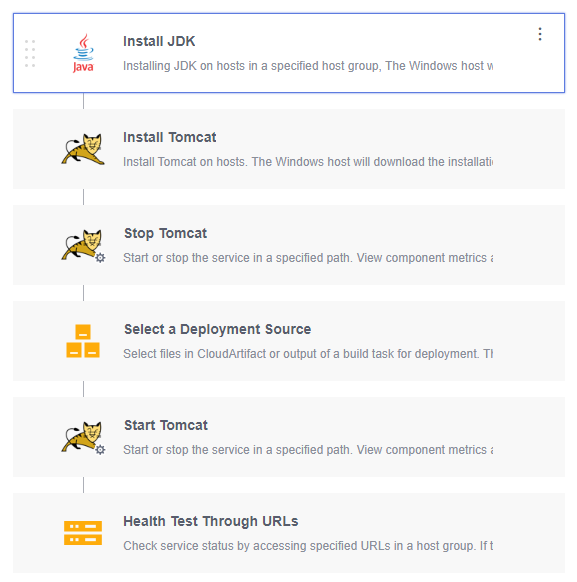
- On the Deployment Actions page, configure the following actions. For details about the parameters, see below.
- Table 1 describes the parameters in the template.
Table 1 Template parameters Parameter
Description
host_group
Target environment where the application is deployed.
package_url
Software package download link. To obtain it, go to the Artifact > Release Repos page.
service_port
Port number of a Tomcat application. The default value is 8080.
tomcat_home_path
Path of the Tomcat client. The default value is /usr/local/tomcat/apache-tomcat-8.5.38.
What is your overall rating for this page?
Thank you very much for your feedback. We will continue working to improve the documentation.See the reply and handling status in My Cloud VOC.
For any further questions, feel free to contact us through the chatbot.
Chatbot


