

Using IAM Roles or Policies to Grant Access to CloudPond
System-defined permissions in Role/Policy-based Authorization provided by Identity and Access Management (IAM) let you control access to CloudPond. With IAM, you can:
- Create IAM users for employees in your Huawei Cloud account based on your enterprise's organizational structure. Each IAM user will have their own security credentials for accessing CloudPond resources.
- Grant users only the permissions required to perform a given task based on their job responsibilities.
- Entrust a Huawei Cloud account or a cloud service to perform efficient O&M on your CloudPond resources.
If your Huawei Cloud account meets your permissions requirements, you can skip this section.
Figure 1 shows the process flow of role/policy-based authorization.
Prerequisites
Before granting permissions to user groups, learn about system-defined permissions in Role/Policy-based Authorization for CloudPond. To grant permissions for other services, learn about all system-defined permissions supported by IAM.
Process Flow
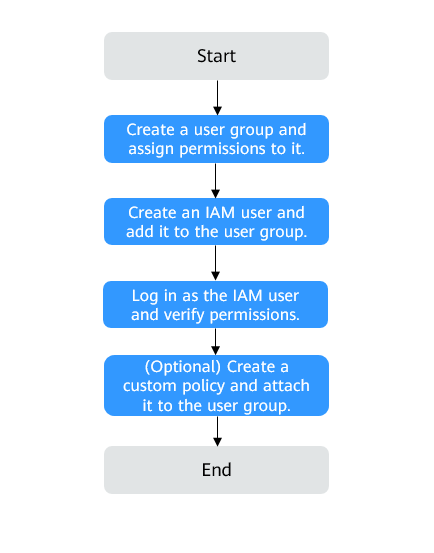
- On the IAM console, create a user group and grant it permissions (IES ReadOnlyAccess as an example).
Create a user group on the IAM console and assign the IES ReadOnlyAccess permissions to the group.
- Create an IAM user and add it to the created user group.
On the IAM console, create a user and add it to the user group created in 1.
- Log in as the IAM user and verify permissions.
In the authorized region, perform the following operations:
- Choose Service List > CloudPond. Then click Register Edge Site on the CloudPond console. If a message appears indicating that you have insufficient permissions to perform the operation, the IES ReadOnlyAccess policy is in effect.
- Choose another service from Service List. If a message appears indicating that you have insufficient permissions to access the service, the IES ReadOnlyAccess policy is in effect.
Example Custom Policies
You can create custom policies to supplement the system-defined policies of CloudPond. For details about actions supported in custom policies, see Actions Supported by Policy-based Authorization.
To create a custom policy, choose either visual editor or JSON.
- Visual editor: Select cloud services, actions, resources, and request conditions. This does not require knowledge of policy grammar.
- JSON: Create a JSON policy or edit an existing one.
For details, see Creating a Custom Policy. The following lists examples of common ECS custom policies.
- Example 1: Grant permission to register and query an edge site.
{ "Version": "1.1", "Statement": [ { "Effect": "Allow", "Action": [ " ies:edgeSite:create ies:edgeSite:list " ] } ] } - Example 2: Grant permission to deny edge site deletion.
A policy with only "Deny" permissions must be used together with other policies. If the permissions granted to an IAM user contain both "Allow" and "Deny", the "Deny" permissions take precedence over the "Allow" permissions.
Assume that you want to grant the permissions of the IES FullAccess policy to a user but want to prevent them from deleting ECSs. You can create a custom policy for denying ECS deletion, and attach this policy together with the IES FullAccess policy to the user. As an explicit deny in any policy overrides any allows, the user can perform all operations on CloudPond resources except deleting them. Example policy denying ECS deletion:
{ "Version": "1.1", "Statement": [ { "Action": [ "ies:edgeSite:delete" ], "Effect": "Deny" } ] } - Example 3: Create a custom policy containing multiple actions.
A custom policy can contain the actions of one or multiple services that are of the same type (global or project-level). Example policy containing multiple actions:
{
        "Version": "1.1",
        "Statement": [
                {
                        "Action": [
                                "ies:edgeSite:list",
                                "eps:enterpriseProjects:get"

                        ],
                        "Effect": "Allow"
                }
        ]
}
CloudPond Resources
A resource type indicates the resources that an identity policy applies to. If you specify a resource type for any action in Table 1, a resource URN must be specified in the identity policy statements using that action, and the identity policy applies only to the resource. If no resource type is specified, the Resource element is marked with an asterisk (*) and the identity policy applies to all resources. You can also set condition keys in an identity policy to define resource types.
The following table lists the resource types that you can define in identity policy statements for CloudPond.
Conditions
CloudPond does not support service-specific condition keys in identity policies. It can only use global condition keys applicable to all services. For details, see Global Condition Keys.
What is your overall rating for this page?
Thank you very much for your feedback. We will continue working to improve the documentation.See the reply and handling status in My Cloud VOC.
For any further questions, feel free to contact us through the chatbot.
Chatbot


