

Enabling Automatic Association of New Nodes with a Proxy Instance
Scenarios
After Associate New Nodes is enabled, new read replicas will be automatically associated with the proxy instance.
This section describes how to enable or disable Associate New Nodes for an existing proxy instance. To enable this function during the proxy instance creation, see Creating a Proxy Instance for Read/Write Splitting.
Procedure
- Log in to the TaurusDB console.
- Click
 in the upper left corner and select a region.
 - On the Instances page, click the instance name to go to the Basic Information page.
- In the navigation pane, choose Database Proxy and click the name of a proxy instance to go to the Basic Information page.
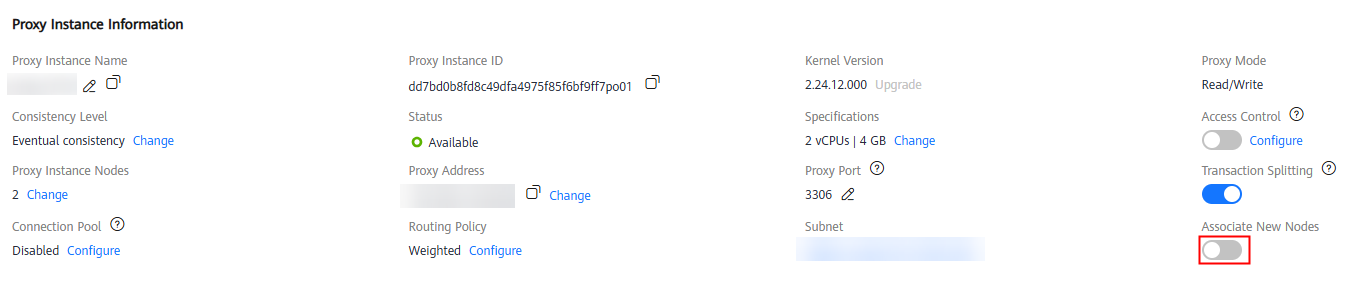
- In the Proxy Instance Information area, click
 under Associate New Nodes. Figure 1 Going to the Basic Information page
- In the displayed dialog box, enable Associate New Nodes. Figure 2 Enabling automatic association of new nodes with a proxy instance
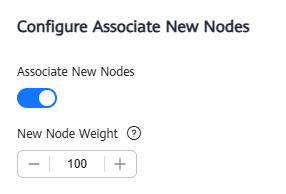
When the routing policy is set to Weighted, you need to configure weights for the new nodes as required. The default read weight of a new node is 100. Nodes with higher weights handle more read requests. You can also adjust the weights based on your business requirements.
- Click OK.
To disable the function of automatically associating new nodes with the proxy instance, click
 .
.
What is your overall rating for this page?
Thank you very much for your feedback. We will continue working to improve the documentation.See the reply and handling status in My Cloud VOC.
For any further questions, feel free to contact us through the chatbot.
Chatbot


