

Host Vulnerability Notification (Notification on host asset risk statistics)
Playbook Overview
The Notification on host asset risk statistics playbook queries the host assets with elastic IP addresses (EIPs) in SecMaster Resource Manager module and notifies you of the vulnerability statistics.
Trigger condition: The playbook takes effect immediately after the configuration is complete. It is executed once at 08:00 every day and runs continuously.
You need to enable this playbook for it to take effect.
Prerequisites
- Your SecMaster professional edition is available.
- SecMaster has managed cloud service assets. It means you have enabled asset subscription. For details, see Configuring the Asset Subscription.
- SecMaster has obtained the SMN FullAccess permission, which specifies all permissions of SMN.
Table 1 Description Permission
Description
Principal
Usage
SMN FullAccess
All permissions for SMN.
SecMaster_Agency
SecMaster uses SMN to send playbook execution notifications.
Perform the following steps to check whether SecMaster has obtained the SMN FullAccess permission: If the permission is not allocated, allocate it to SecMaster by referring to Authorizing SecMaster.
- Log in to the SecMaster console as an administrator.
- Click
 in the upper left corner of the page and choose Management & Governance > Identity and Access Management.
 - In the navigation pane on the left, choose Agencies. On the Agencies page, click SecMaster_Agency and then click the Permissions tab to view all authorization records of SecMaster_Agency.
Figure 1 Viewing Agency Authorization Records

Step 1: Create and Subscribe to a Topic
- Log in to the SecMaster console.
- In the upper left corner of the page, click
 and choose .
 - Create a topic.
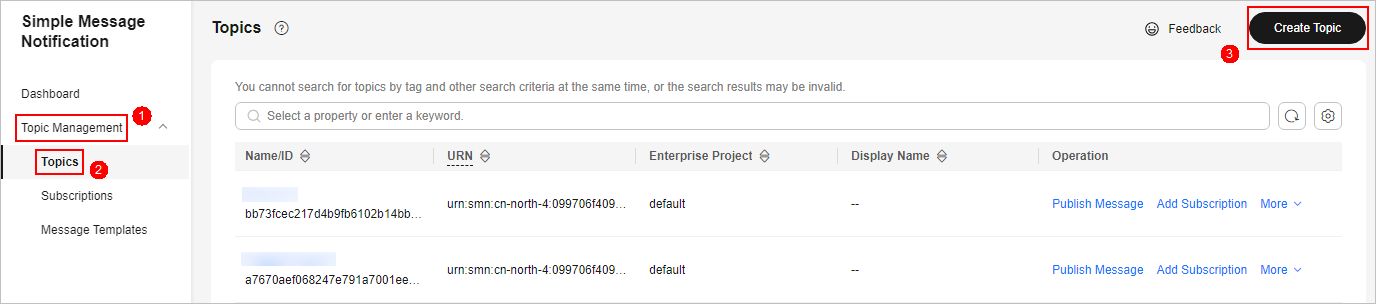
- In the navigation pane on the left, choose . In the upper right corner of the displayed page, click Create Topic. Figure 2 Create Topic
- In the Create Topic dialog box displayed, configure topic information and click OK.
- Topic Name: Set it to SecMaster-Notification.
- Display Name: SecMaster notification topic is recommended.
- Retain the default settings for other parameters.

Topic Name must be set to SecMaster-Notification, or playbooks may fail to be executed.
- In the navigation pane on the left, choose . In the upper right corner of the displayed page, click Create Topic.
- Add a subscription.
- On the Topics page, locate the row that contains the SecMaster-Notification topic and click Add Subscription in the Operation column.
- On the displayed Add Subscription slide-out panel, configure subscription information and click OK.
- Protocol: Select Email.
- Endpoint: Enter the email address of the subscription endpoint, for example, username@example.com.
- Confirm the subscription.
After a subscription is added, a confirmation email will be sent to the email address set in 4. Click the subscription confirmation link in the email. A page for a successful subscription will be displayed.
Step 2: Configure and Enable the Playbook
- Click
 in the upper left corner of the page and choose Security & Compliance > SecMaster.
 - In the navigation pane on the left, choose Workspaces > Management. In the workspace list, click the name of the target workspace. Figure 3 Workspace management page

- In the navigation pane on the left, choose Security Orchestration > Playbooks. Figure 4 Accessing the Playbooks tab

- On the Playbooks page, search for the Notification on host asset risk statistics playbook and click Enable in the Operation column of the Notification on host asset risk statistics playbook.
- In the dialog box displayed, select the initial playbook version v1 and click OK. If the Playbook Status of the Notification on host asset risk statistics playbook changes to Enabled, the playbook has been enabled successfully.
Implementation Effect
The Notification on host asset risk statistics playbook queries the host assets with elastic IP addresses (EIPs) in SecMaster Resource Manager module and notifies you of the vulnerability statistics.
Trigger condition: The playbook takes effect immediately after the configuration is complete. It is executed once at 08:00 every day and runs continuously.
After the playbook is executed, SecMaster notifies users who have subscribed to the SecMaster-Notification topic in SMN. The following is an example.

What is your overall rating for this page?
Thank you very much for your feedback. We will continue working to improve the documentation.See the reply and handling status in My Cloud VOC.
For any further questions, feel free to contact us through the chatbot.
Chatbot


