

Configuring Alarm Notifications by Severity
You can set up alarms using Cloud Eye's notification policies for tiered alerts. This feature will send alarm notifications by severity, channel, and time frame to different recipients.
Scenarios
When creating an alarm policy, you can notify contacts in contact groups or topic subscriptions of alarms by severity. This helps reduce repeated alarms and ensures important ones are not missed.
Prerequisites
You have added contacts for receiving alarms with different severities, channels, and time frames to different contact groups or topic subscriptions. For details about how to configure a contact group, see Creating a Contact/Contact Group. For details about how to configure a topic subscription, see Creating a Topic.
Creating a Notification Policy
- Log in to the Cloud Eye console.
- In the navigation pane, choose Alarm Management > Alarm Notifications.
- On the Notification Policies tab, click Create and set the parameters as prompted. For details, see Creating a Notification Policy.
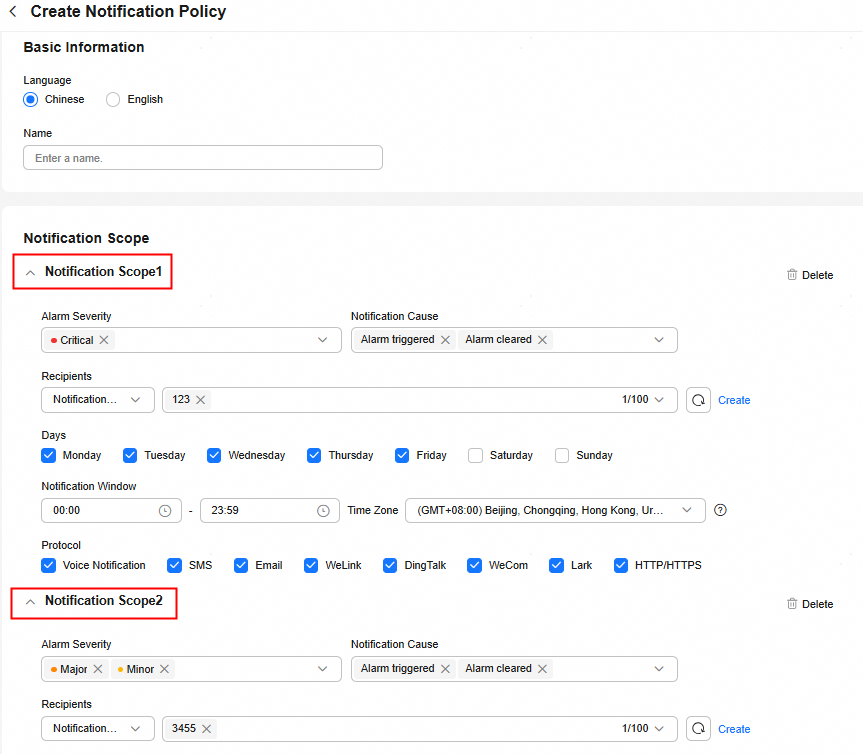
Click Add Scope and configure multiple notification scopes in a notification policy. For each scope, specify the alarm severities, notification channels, time frames, and choose either specific contact groups or subscription topics to receive alarms. This setup allows sending notifications based on severity, channel, timing, and contacts.
Figure 1 Creating a notification policy
- After the parameters are configured, click OK.
Creating an Alarm Rule
- Log in to the Cloud Eye console.
- In the navigation pane, choose Alarm Management > Rule Settings.

In some regions, the path is Alarm Management > Alarm Rules.
- Click Create Alarm Rule and set the parameters as prompted. For details, see Creating an Alarm Rule and Notifications.
After enabling Alarm Notifications, set Notified By to Notification policies and select the configured notification policy.
Figure 2 Configuring alarm notifications
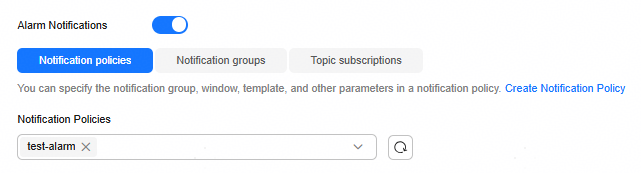
In this way, you can send different alarms to different recipients based on different severities, channels, and time frames.
What is your overall rating for this page?
Thank you very much for your feedback. We will continue working to improve the documentation.See the reply and handling status in My Cloud VOC.
For any further questions, feel free to contact us through the chatbot.
Chatbot


