

Help Center/ Log Tank Service/ User Guide/ Log Ingestion/ Using ICAgent to Collect Container Logs/ Overview
Updated on 2026-09-18 GMT+08:00
Overview
LTS uses ICAgent to collect logs from Cloud Container Engine (CCE) applications, ServiceStage containerized applications, and self-built Kubernetes (K8s) applications.
Figure 1 ICAgent workflow
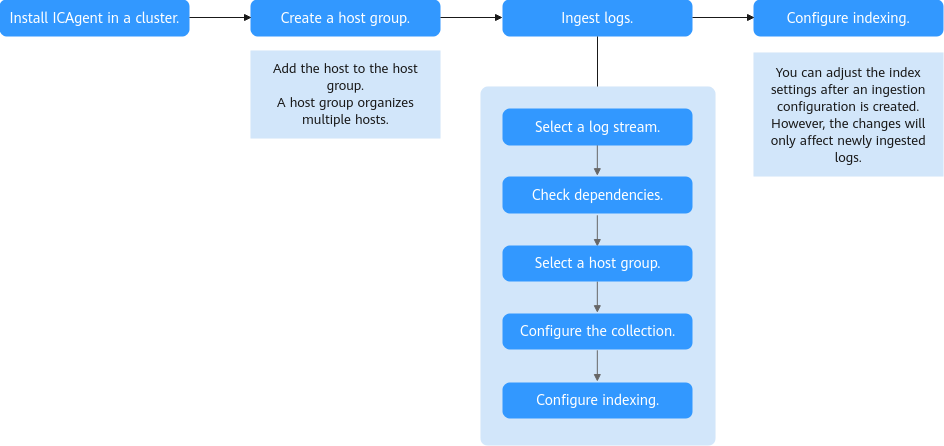
- Install ICAgent in a cluster. Choose an appropriate method based on your cluster type:
- For a CCE cluster, ICAgent is installed on its hosts by default during cluster creation. If ICAgent is not installed, install it by referring to Managing ICAgent in Container Scenarios.
- For a self-built Kubernetes cluster, see Ingesting Self-Built Kubernetes Application Logs to LTS.
- To collect logs from containerized applications hosted on ServiceStage, install ICAgent in the clusters where these containerized applications are deployed. If ICAgent is not installed, install it by referring to Managing ICAgent in Container Scenarios.
- Create a host group. Add the host with ICAgent installed to the host group. For details, see Managing Host Groups.
- Ingest logs. LTS delivers collection configurations to ICAgent by host group, enabling ICAgent to report logs from multiple hosts to LTS based on these configurations.
- Configure indexing. After logs are ingested, configure full-text or field indexing on the index configuration page. This enables searching and analyzing the collected log data. For details, see Configuring Log Indexing.
Collection Principle
LTS deploys ICAgent as a DaemonSet on each node in your cluster to collect logs from all containers on these nodes. For details about how the DaemonSet works, see Workload Overview.
Constraints
Do not use ECS commands to install ICAgent on CCE clusters or self-built Kubernetes clusters.
What is your overall rating for this page?
0
1
2
3
4
5
6
7
8
9
10
Very dissatisfiedVery satisfied
Thank you very much for your feedback. We will continue working to improve the documentation.See the reply and handling status in My Cloud VOC.
The system is busy. Please try again later.
For any further questions, feel free to contact us through the chatbot.
Chatbot


