

Security Situational Awareness
Overview
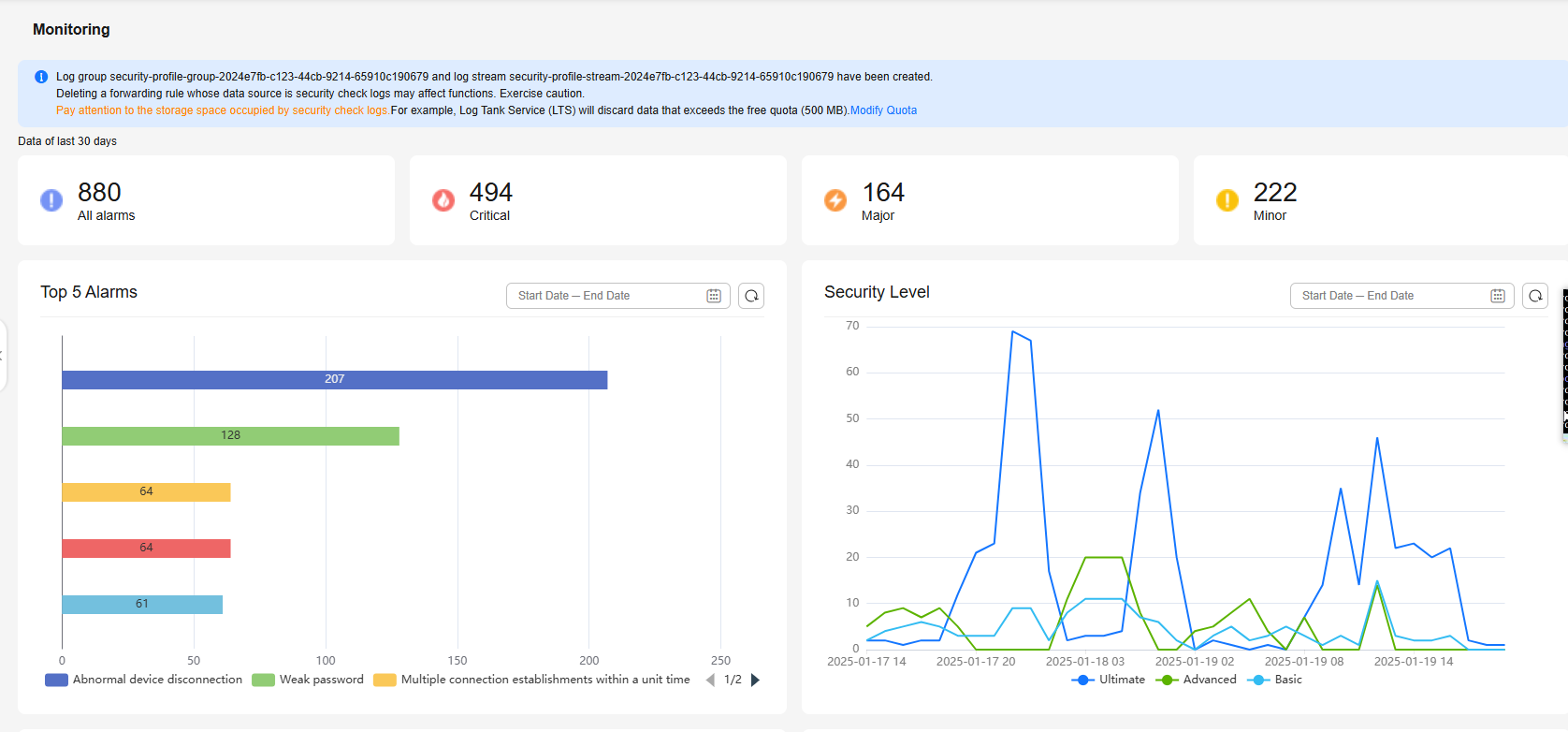
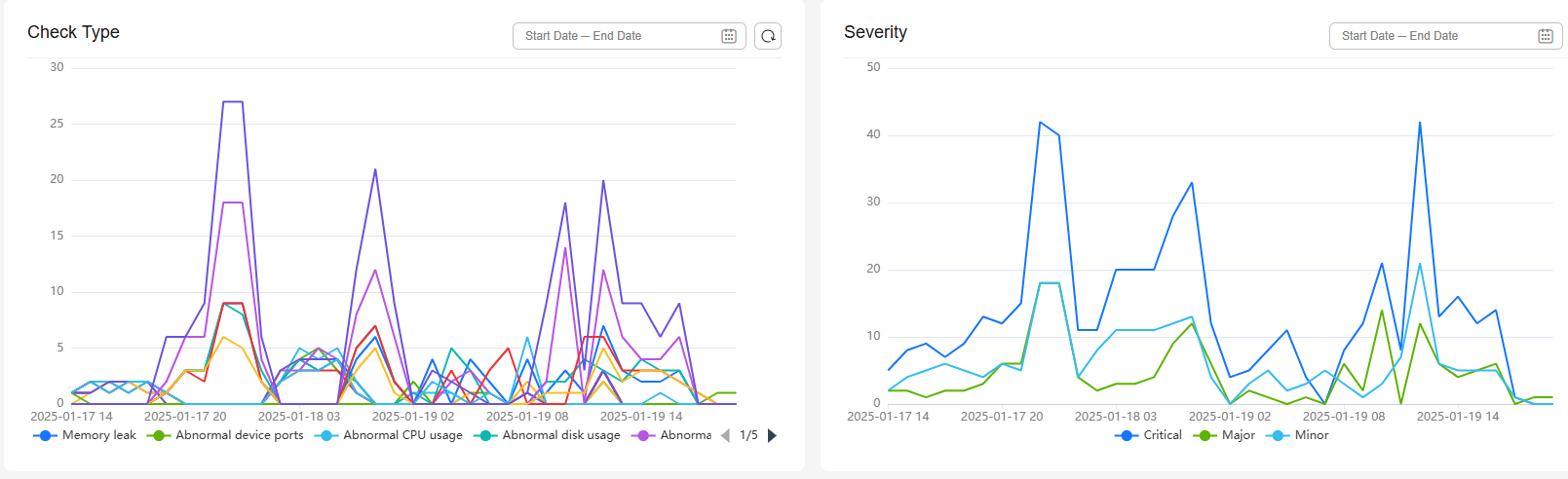
Security situational awareness is a unified risk monitoring and management system for IoTDA assets. It visualizes security management and collects statistics to improve governance efficiency.
Constraints
- Max. security items configured for an instance: 100.
- Alarm suppression time (min. period for triggering and reporting an alarm) of the same check item on the same device: 1 hour.
Check Items
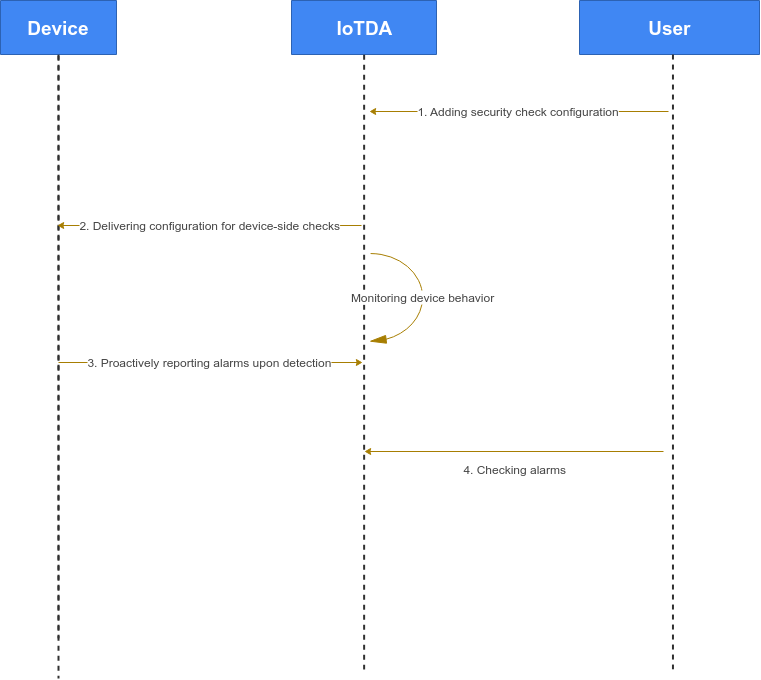
There are device-side and platform-side security checks. For device-side checks, you enable the function and set parameters on the platform. The configuration is then sent to the device for proactive alarm reporting. To save costs, it is recommended that you use the device SDK. For platform-side checks, the platform actively monitors the device and triggers alarms if necessary. The platform categorizes check items based on alarm severity (Critical, Major, and Minor) and security level (Ultimate, Advanced, and Basic). The table below lists the supported check items and their default severity levels.
| Item | Default Alarm Severity | Default Security Level | Side | Description |
|---|---|---|---|---|
| Memory leak | Critical | Advanced | Device | Checks whether the memory usage of the device exceeds the threshold. |
| Abnormal device ports | Critical | Advanced | Device | Checks whether the device uses a port that is not in the whitelist. |
| Abnormal CPU usage | Critical | Advanced | Device | Checks whether the CPU usage of the device exceeds the threshold. |
| Abnormal disk usage | Critical | Advanced | Device | Checks whether the disk usage of the device exceeds the threshold. |
| Abnormal battery level | Critical | Advanced | Device | Checks whether the battery level of the device is lower than the threshold. |
| Local device login | Minor | Basic | Device | Checks whether local login is performed on the device. |
| Brute-force login | Minor | Basic | Device | Checks whether brute-force attacks occur. |
| Malicious IP addresses | Minor | Basic | Device | Checks whether the device is connected to a malicious IP address. |
| Local file tampering | Minor | Basic | Device | Checks whether any file on the device is tampered with. |
| Use of TLS | Minor | Ultimate | Platform | Checks whether the device uses an insecure port for access. Encryption protocol is not used to establish secure connections between devices and IoTDA. This may cause man-in-the-middle and replay attacks and affect services. |
| Use of insecure TLS protocols | Critical | Ultimate | Platform | Checks whether the device uses an insecure TLS protocol version for access. Insecure TLS protocol versions (TLS v1.0 and v1.1) have security vulnerabilities, which may cause security risks such as device data leakage. |
| Use of insecure TLS cryptographic algorithm suites | Critical | Ultimate | Platform | Checks whether the device uses an insecure TLS cryptographic algorithm suite for access. Currently, IoTDA checks the following insecure cryptographic algorithm suites: TLS_ECDHE_PSK_WITH_AES_128_CBC_SHA, TLS_ECDHE_PSK_WITH_AES_256_CBC_SHA, TLS_PSK_WITH_AES_128_CBC_SHA, TLS_PSK_WITH_AES_256_CBC_SHA Insecure cryptographic algorithm suites have security vulnerabilities, which may cause security risks such as device data leakage. |
| Device authentication failure | Critical | Ultimate | Platform | Checks whether the device authentication fails. Incorrect device identity authentication information causes device connection failures. This may affect services. |
| Abnormal device disconnection | Critical | Ultimate | Platform | Checks whether the device disconnects unexpectedly. For details about the cause, see Table 2. |
| Multiple connection establishments within a unit time | Critical | Ultimate | Platform | Checks whether the device establishes connections multiple times within a unit time. If a device attempts to establish connections with IoTDA multiple times within 1 second, the device may be cracked with brute force. As a result, identity information may be leaked, normal devices may be forced to go offline, and service data may be stolen. |
| Weak password | Major | Ultimate | Platform | Checks whether the device uses a weak password. |
| Disconnection Cause | Description |
|---|---|
| Disconnection requested by device | The device sends an MQTT disconnect packet to IoTDA for disconnection. |
| Device heartbeat timed out | The device does not send an MQTT heartbeat packet to IoTDA within 1.5 times of the heartbeat interval. As a result, platform considers the device link invalid and disconnects the device. (Note: The heartbeat interval is specified when the device establishes a connection with IoTDA.) |
| Device-platform TCP connection cutoff | IoTDA receives a TCP disconnection packet from the device. As a result, the TCP connection between the device and IoTDA is cut off. |
| Device deleted | The device is deleted from IoTDA, and IoTDA cuts off the connection with the device. |
| Device frozen | The device is frozen on IoTDA, and IoTDA cuts off the connection with the device. |
| Connection cut off by IoTDA | IoTDA cuts off the connection with the device during upgrade. |
| Earlier connection cutoff | The device establishes connections with IoTDA repeatedly. IoTDA cuts off the old connection and retains the new connection. |
| Device secret reset | When the device secret is reset, and the connection is manually cut off, IoTDA disconnects the device. |
After the check items are configured on the device, the platform delivers the configuration to the device through the shadow. The service_id is $security_detection_config. The structure attributes are listed in the following table.
| Key | Value Type | Description |
|---|---|---|
| memoryCheck | Integer | Memory check status. Options: 0 (disable) and 1 (enable). |
| memoryThreshold | Integer | Memory usage alarm threshold. Range (%): 1 to 100. |
| memoryCheckReportPeriod | Integer | Memory check reporting period. Range: 1 to 24, in hours. |
| portCheck | Integer | Port check status. Options: 0 (disable) and 1 (enable). |
| portCheckReportPeriod | Integer | Port check report period. Range: 1 to 24, in hours. |
| cpuUsageCheck | Integer | CPU check status. Options: 0 (disable) and 1 (enable). |
| cpuUsageThreshold | Integer | CPU usage alarm threshold. Range (%): 1 to 100. |
| cpuUsageCheckReportPeriod | Integer | CPU check reporting period. Range: 1 to 24, in hours. |
| diskSpaceCheck | Integer | Disk check status. Options: 0 (disable) and 1 (enable). |
| diskSpaceThreshold | Integer | Disk usage alarm threshold. Range (%): 1 to 100. |
| diskSpaceCheckReportPeriod | Integer | Disk check reporting period. Range: 1 to 24, in hours. |
| batteryPercentageCheck | Integer | Battery check status. Options: 0 (disable) and 1 (enable). |
| batteryPercentageThreshold | Integer | Battery usage alarm threshold. Range (%): 1 to 100. |
| batteryPercentageCheckReportPeriod | Integer | Battery check reporting period. Range: 1 to 24, in hours. |
| loginLocalCheck | Integer | Local login check status. Options: 0 (disable) and 1 (enable). |
| loginBruteForceCheck | Integer | Brute-force login check status. Options: 0 (disable) and 1 (enable). |
| maliciousIPCheck | Integer | Malicious IP address check status. Options: 0 (disable) and 1 (enable). |
| maliciousIPCheckReportPeriod | Integer | Malicious IP address check report period. Range: 1 to 24, in hours. |
| fileTamperCheck | Integer | File tampering check status. Options: 0 (disable) and 1 (enable). |
For details about the format of the device-side check result reporting, see Device Reporting Security Situational Awareness Alarms.
Service Flow
Procedure
- Access the IoTDA service page and click Access Console. Click the target instance card.
- In the navigation pane, choose Security > Configuration.
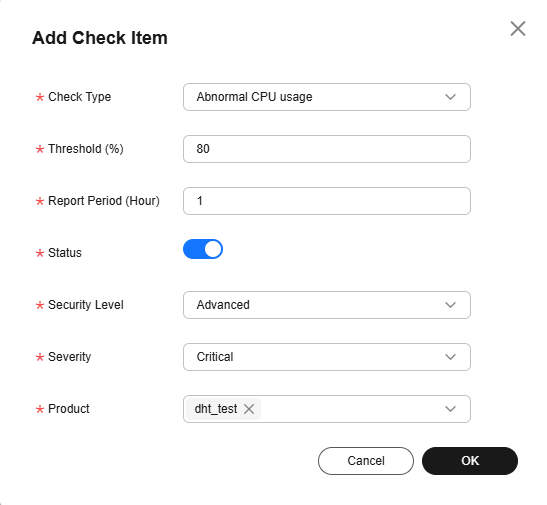
- Click Add Check Item. Figure 4 Security situational awareness - Adding security check items
- The device connects to the platform and obtains the security situational awareness configuration. For details, see Device Obtaining Security Situational Awareness Configuration. Figure 5 Security situational awareness - Checking security check configurations
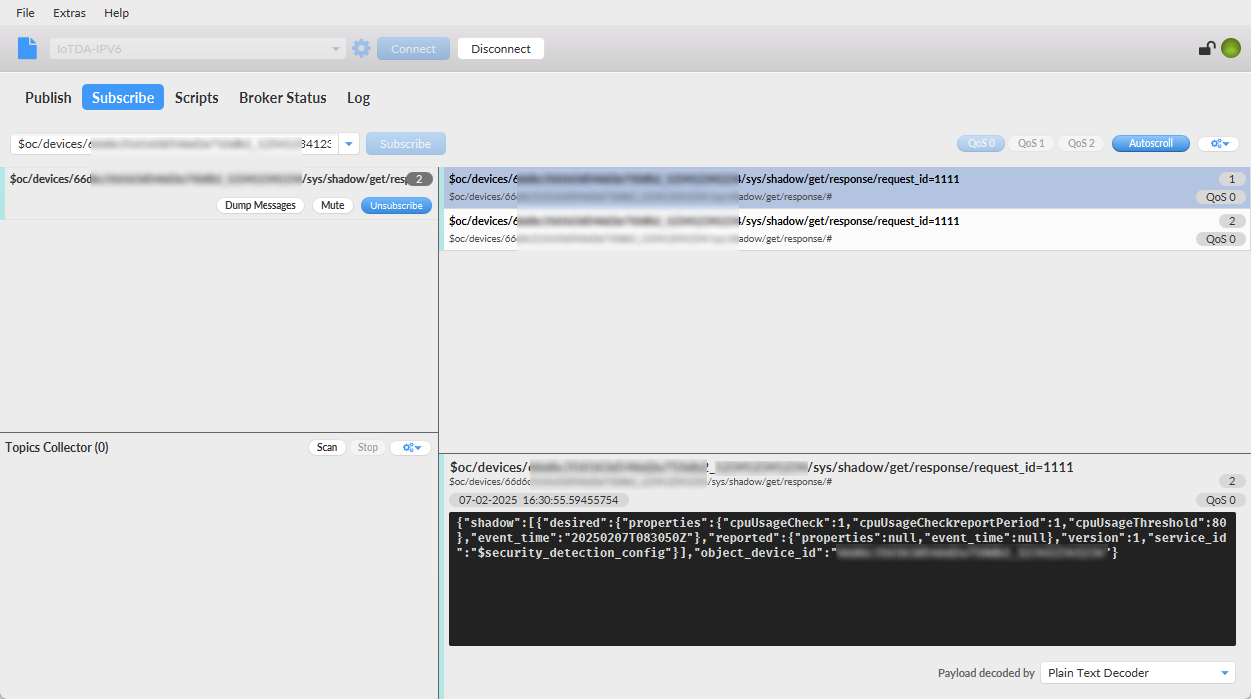
- The device reports alarm data. The upstream topic is $oc/devices/{device_id}/sys/events/up. The content body is as follows:
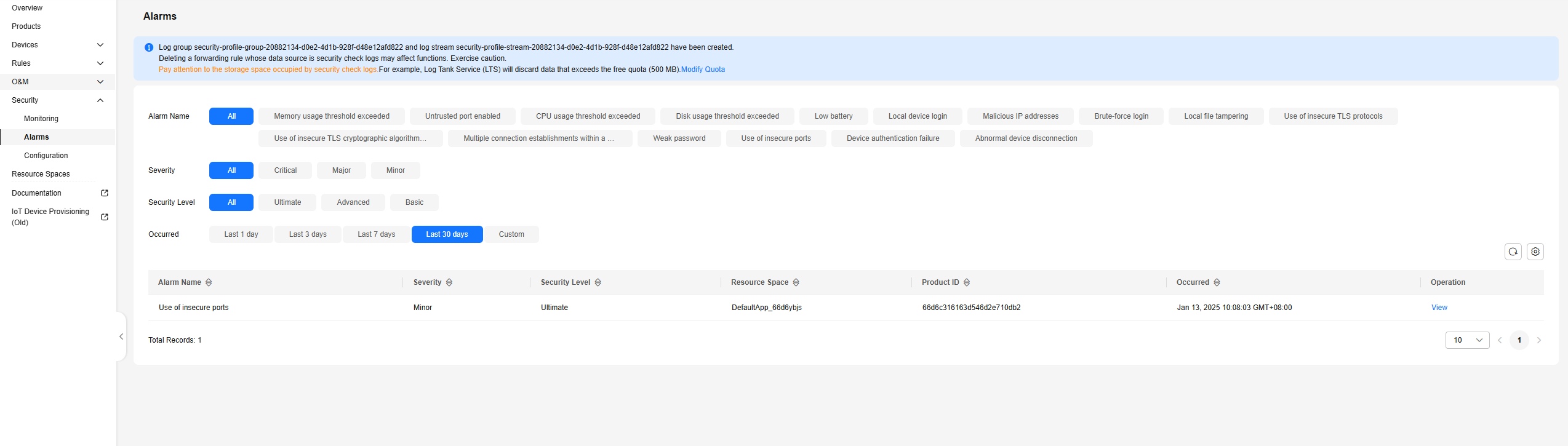
{ "services": [{ "service_id": "$log", "event_type": "security_log_report", "event_time": "20250207T164812Z", "paras": { "type": "CPU_USAGE_REPORT", "content": { "cpu_usage": 99, "cpu_usage_alarm": 1 } } }] } - In the navigation pane, choose Security > Alarms to check the alarm list. Figure 6 Security situational awareness - Checking security alarms
| Field | Description |
|---|---|
| deviceData | Device information. |
| metadata | Alarm metadata. |
| annotation | Alarm details. |
| recordTime | UTC time when the alarm is generated. The format is yyyy-MM-dd'T'HHmmssSSS'Z'. |
| Field | Description |
|---|---|
| deviceId | Device ID. |
| appId | Application ID. |
| productId | Product ID. |
| Field | Description |
|---|---|
| resourceId | Resource ID. |
| securityType | Security check type. |
| alarmLevel | Alarm severity. |
| securityLevel | Security risk level. |
| Field | Description |
|---|---|
| suggestion | Alarm handling suggestion. |
| probableCause | Possible cause of the alarm. |
| message | Alarm information. |
What is your overall rating for this page?
Thank you very much for your feedback. We will continue working to improve the documentation.See the reply and handling status in My Cloud VOC.
For any further questions, feel free to contact us through the chatbot.
Chatbot


