

Billing Overview
This document describes how you will be billed for using Object Storage Service (OBS), including the billing items and billing modes. For the pricing about the Parallel File System (PFS), see Product Pricing Details.
Billing Items
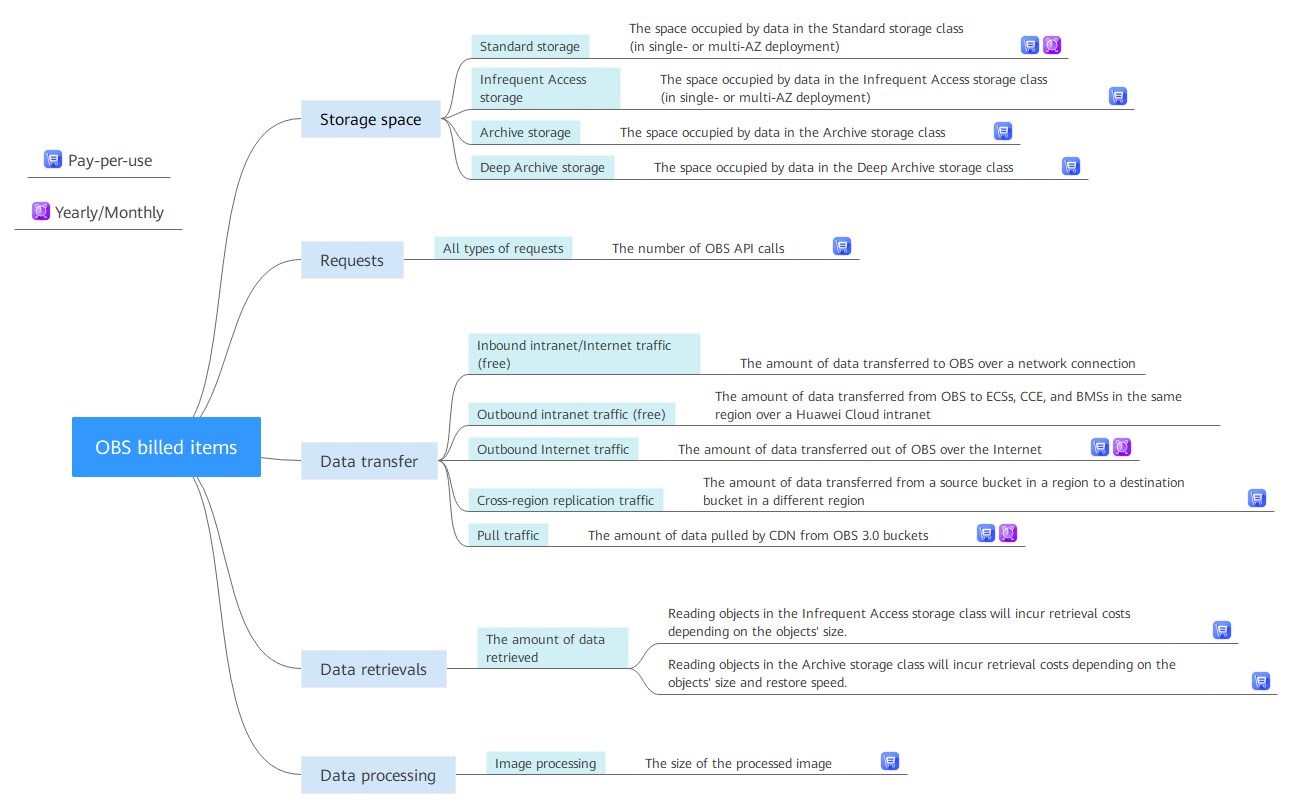
You will be billed for storage space, requests, data transfer, data retrievals, and data processing. For details, see Figure 1.
Billing Modes
OBS provides two billing modes: pay-per-use and resource packages.
- Pay-per-use
You are billed for using OBS on a pay-per-use basis by default. With this billing, you pay only for how long (hours) you actually use the resources. There is no minimum cost. For details, see Pay-per-Use Billing.

Deep Archive request charges are billed monthly (typically on the first day of each month) and settled monthly.
- Resource packages
You can purchase a resource package that has a quota and duration to save money. However, if your usage exceeds the package quota, the excess usage will be billed on a pay-per-use basis. For details, see Resource Package Overview.
Renewing Subscriptions
If you want to continue using an OBS resource package after it expires, you need to renew the subscription within the specified period. You can renew your subscription manually or automatically. For details, see Resource Package Renewals.
Viewing Bills
You can choose Billing & Costs > Bills to check the OBS transactions and bills. For details, see Bills.
Arrears
Your account is considered in arrears if the account balance is insufficient to cover the bill for cloud services. If the arrears are not settled in time, your data stored in OBS may be deleted after the grace period and retention period expire. To avoid data loss, top up your account promptly. For details, see Arrears.
Terminating Billing
If you no longer need to use your data stored in OBS, you can delete it to stop the billing. For details, see Billing Termination.
Billing Method
OBS is billed by the hour based on the usage. For details, see Table 1.
| Billing Item | Billed By | Description | Billing Mode | |
|---|---|---|---|---|
| Storage space | Standard storage | Hour | The system creates a bill for the usage generated in a previous hour in the next hour. | Usage is deducted from the resource package first. Excess usage is billed on a pay-per-use basis. |
| Infrequent Access storage | Pay-per-use | |||
| Archive storage | Usage is deducted from the resource package first. Excess usage is billed on a pay-per-use basis. | |||
| Deep Archive storage | Pay-per-use | |||
| Requests | All types of requests | Hour | The system creates a bill for the usage generated in a previous hour in the next hour. CAUTION: Deep Archive request charges are billed monthly (typically on the first day of each month) and settled monthly. | Pay-per-use |
| Data transfer | Inbound intranet/Internet traffic | Hour | The system creates a bill for the usage generated in a previous hour in the next hour. | Free |
| Outbound intranet traffic | Hour | The system creates a bill for the usage generated in a previous hour in the next hour. | Free | |
| Outbound Internet traffic | Hour | The system creates a bill for the usage generated in a previous hour in the next hour. | Usage is deducted from the resource package first. Excess usage is billed on a pay-per-use basis. | |
| Cross-region replication traffic | Hour | The system creates a bill for the usage generated in a previous hour in the next hour. | ||
| Pull traffic | Hour | The system creates a bill for the usage generated in a previous hour in the next hour. | ||
| Data retrievals | Traffic for retrieving Infrequent Access, Deep Archive, or Archive objects | Hour | The system creates a bill for the usage generated in a previous hour in the next hour. | Pay-per-use |
| Data processing | Image processing | Hour | The system creates a bill for the usage generated in a previous hour in the next hour. | Pay-per-use |
Pricing
For detailed prices, see Product Pricing Details.
What is your overall rating for this page?
Thank you very much for your feedback. We will continue working to improve the documentation.See the reply and handling status in My Cloud VOC.
For any further questions, feel free to contact us through the chatbot.
Chatbot


