

How Do I Unsubscribe from DBSS?
You can unsubscribe from a DBSS instance on the console. DBSS currently supports yearly and monthly subscription. Purchased DBSS instances cannot be deleted, and their specifications cannot be changed.
You can unsubscribe from database audit instances, security encryption instances, and security O&M instances.

- Security encryption instances and security O&M instances are visible only to users who have purchased them.
- To purchase an encryption or O&M instance, submit a service ticket.
Impact on the System
After you unsubscribe from an instance, its audit records and logs will be deleted. Audit logs that have been backed up to OBS buckets will not be deleted.
Prerequisites
- The account for logging in to the management console has been granted the DBSS System Administrator, ECS Administrator, VPC Administrator, and BSS Administrator roles.
- You have purchased a database audit instance, a security encryption instance, or a security O&M instance.
Procedure
- Log in to the DBSS console.
- Click
 in the upper left corner on the displayed page and select a region.
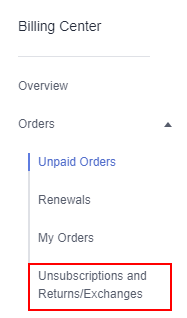
 - In the upper right part of the page, click Billing. The Billing Center page is displayed.
- In the navigation pane, choose Orders > Unsubscriptions.
For details about unsubscription, see Unsubscription Rules. To purchase the service again after unsubscription, follow the instructions provided in Purchasing Database Audit.
Figure 1 Unsubscriptions and Returns/Exchanges
What is your overall rating for this page?
Thank you very much for your feedback. We will continue working to improve the documentation.See the reply and handling status in My Cloud VOC.
For any further questions, feel free to contact us through the chatbot.
Chatbot


