

Overview
What Is Private DNS Resolution?
A private domain name is a domain name that is applied in a VPC. DNS allows you to map private domain names to private IP addresses and resolves domain names for other cloud services within VPCs.
Private domain names have the following features:
- You can create any private domain names without registering them.
- One private domain name can be associated with multiple VPCs and is valid only in VPCs. There is no limit on the number of associated VPCs.
To resolve private domain names, you need to create a private zone and associate it with VPCs as needed.
Private DNS resolution translates domain names like ecs.com and their subdomains used within one or more VPCs to private IP addresses (such as 192.168.1.1). With private DNS resolution, ECSs within a VPC can communicate with each other using private zones. These ECSs can also access cloud services, such as Object Storage Service (OBS) and Simple Message Notification (SMN), over a private network.
Resolution Process
Figure 1 shows the resolution process.
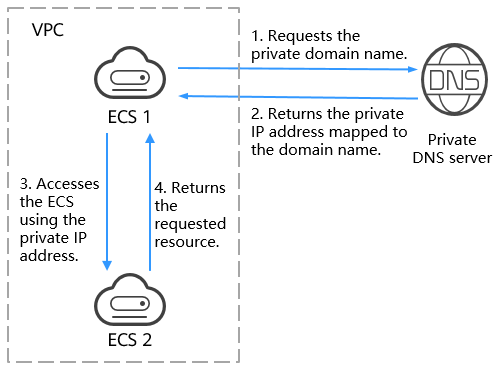
When an ECS in the VPC requests access to a private domain name, the private DNS server directly returns a private IP address mapped to the domain name.
Scenarios
Private DNS resolution is applicable to the scenarios below.
You can plan hostnames based on the locations, usages, and account information of ECSs, and map the hostnames to private IP addresses of ECSs. This helps you manage ECSs more easily.
For example, if you have deployed 20 ECSs in an AZ, 10 used for website A and 10 for website B, you can plan their hostnames and private zones as follows:
- ECSs for website A: weba01.region1.az1.com – weba10.region1.az1.com
- ECSs for website B: webb01.region1.az1.com – webb10.region1.az1.com
After planning, you can quickly identify the locations and purposes of ECSs during routine management and maintenance.
For details about how to create private zones and map the hostnames to the private IP addresses of ECSs, see Configuring a Private Zone for an ECS.
As Internet users are surging, a website application deployed only on one server may corrupt upon spiking concurrent requests. The common practice is to spread service load to multiple servers.
Multiple ECSs are deployed in the same VPC and communicate with each other using private IP addresses. The private IP addresses are coded into the internal APIs called among the ECSs. If one ECS is replaced in the system, the private IP address changes accordingly. In this case, you also need to change that IP address in the APIs and re-publish the website. This makes system maintenance inconvenient.
If you create a private zone for each ECS and configure record sets to map domain names to their private IP addresses, the ECSs will be able to communicate over private zones. When you replace one of the ECSs, you only need to change the IP address in record sets, instead of modifying the code.
Figure 2 shows a typical application scenario of private zones.
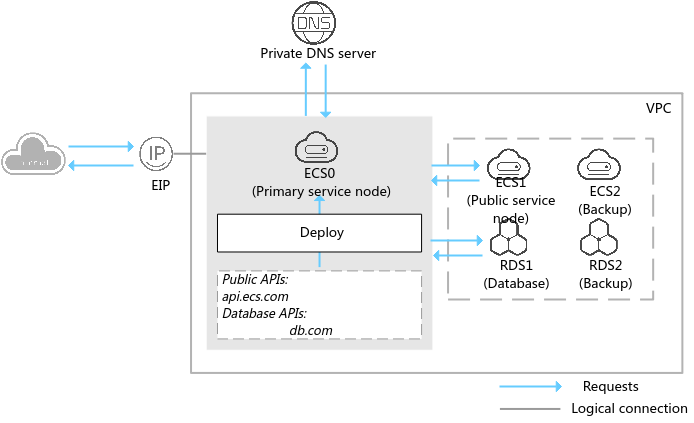
ECS and RDS are deployed in a VPC. ECS and RDS nodes are described as follows:
- ECS0: primary service node
- ECS1: public service node
- RDS1: database node
- ECS2 and RDS2: backup service node and backup database node
When ECS1 becomes faulty, ECS2 must take over. However, if no private zones are configured for the two ECSs, you need to change the private IP addresses in the code for ECS0. Such change will interrupt services, and you must publish the website again.
Now assume that you have configured private zones for the ECSs and have written these zones in the code. After ECS1 becomes faulty, you only need to change the DNS records to redirect services to ECS2, without interrupting services or re-publish the website.
For details about how to create private zones for ECSs and add record sets, see Configuring Private Domain Names for ECSs for Smooth ECS Switchover.
Configure private zones for ECSs so that they can access other cloud services, such as SMN and OBS, without connecting to the Internet.
When you create an ECS, note the following:
- If public DNS servers are configured for the VPC subnet where the ECS is running, requests to access cloud services will be routed over the Internet.
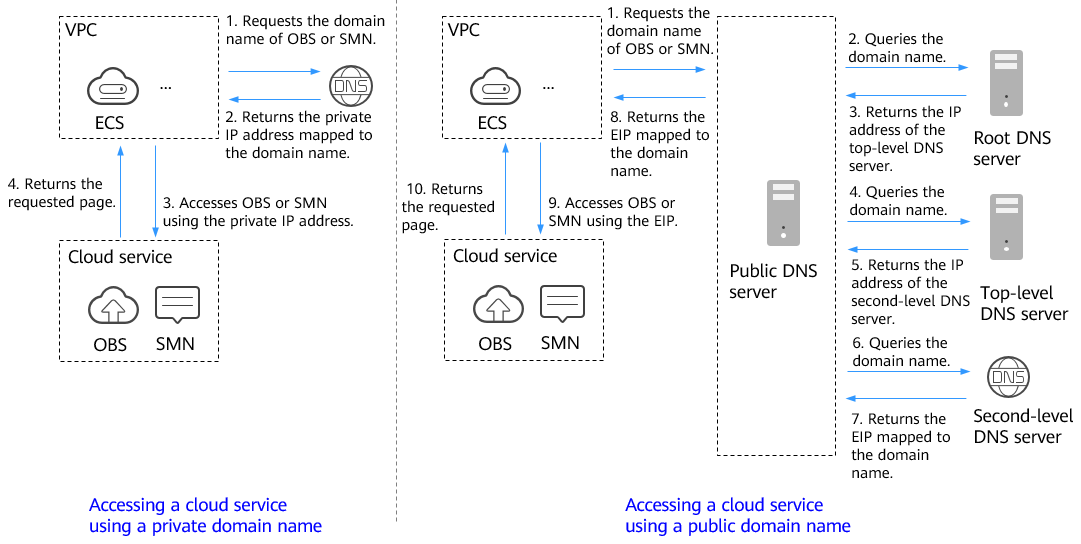
Figure 3 shows the process for resolving a domain name when an ECS accesses Huawei cloud services such as OBS and SMN.
The request redirected to the Internet has long access latency and poor experience.
- If a private DNS server is configured for the subnet, the private DNS server directly processes the requests to access cloud services.
When the ECS accesses the Huawei cloud services, the private DNS server returns their private IP addresses, instead of routing requests over the Internet. This reduces network latency and improves access speed. Steps 1 to 4 on the left of Figure 3 show the process.
To make your ECS accessible within the private network, change the default DNS servers of the ECS to private DNS servers, see How Do I Change Default DNS Servers of an ECS to Huawei Cloud Private DNS Servers?
Related Operations
| Category | Operation | Description |
|---|---|---|
| Private zones | Create a private zone for your domain name. | |
| Modify, delete, batch delete, and view private zones. Constraints
| ||
| Share a private zone across accounts. | ||
| Apply a private zone in multiple VPCs. Constraints
| ||
| Disassociate a private zone from a VPC. Constraints
| ||
| DNS rules | Learn about types, scenarios, and configuration rules of record sets supported by private zones. | |
| Learn about record set conflicts of private zones and how to handle the conflicts. | ||
| Record sets | Configure record sets for private zones. | |
| Set a recursive resolution proxy for subdomains in a private zone. | ||
| Modify a record set, delete a record set, batch delete record sets in a single zone, and view record set details. | ||
| Disable or enable record sets for a domain name. The system-generated SOA and NS record sets cannot be disabled. |
What is your overall rating for this page?
Thank you very much for your feedback. We will continue working to improve the documentation.See the reply and handling status in My Cloud VOC.
For any further questions, feel free to contact us through the chatbot.
Chatbot


