

Hierarchical Queues
In multi-tenant scenarios, queues are a core mechanism for fair scheduling, resource isolation, and job priority control. In real-world applications, different queues usually belong to different departments, and there are hierarchical relationships between departments, which lead to more refined requirements for resource allocation and preemption. However, traditional peer queues cannot meet such requirements. To address this issue, the Volcano scheduler introduces hierarchical queues to implement resource allocation, sharing, and preemption between queues at different levels. With hierarchical queues, you can manage resource quotas at a finer granularity and build a more efficient unified scheduling platform.
Introduction to Hierarchical Queues
Hierarchical queues are used to implement hierarchical resource allocation and isolation in a multi-tenant cluster environment. Queues are organized in a tree structure, with the following functions:
- The queue hierarchy can be configured. The parent attribute is added to QueueSpec of Volcano Scheduler. When creating a queue, you can use the parent attribute to specify the parent queue that a queue belongs to.
type QueueSpec struct {
    ...
   // Specify the parent queue that a queue belongs to.
    Parent string `json:"parent,omitempty" protobuf:"bytes,8,opt,name=parent"`
    ...
}
After Volcano Scheduler is started, a root queue is created by default. You can create a hierarchical queue tree based on the root queue.
- You can configure capability, the upper limit of a queue's resource capacity (pods that exceed this limit cannot be scheduled), deserved (if a queue's allocated resources exceed its configured deserved value, the excess may be reclaimed), and guarantee (resources reserved for a queue and cannot be shared with other queues) for each resource dimension.
- Resources can be shared and reclaimed across hierarchical queues. When no other queues are submitting tasks, queues in the cluster can use resources beyond their reserved amounts, allowing their workloads to exceed the configured deserved value. When multiple queues submit tasks and cluster resources become insufficient to schedule new pods, the system can reclaim shared resources from queues at other levels.
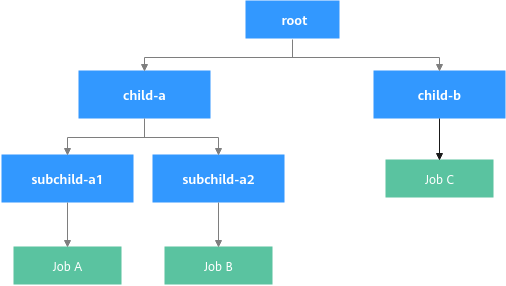
In Figure 1, Job A and Job C are submitted first, and both the allocated resources of the queues exceed the deserved value. If the cluster does not have enough resources to run Job B, the system attempts to reclaim resources from Job A and Job C to satisfy Job B's requirements.
Prerequisites
- A CCE standard or Turbo cluster or later is available. For details about how to buy a cluster, see Buying a Standard/Turbo Cluster.
- Volcano Scheduler or later has been installed. For details, see Volcano Scheduler.
Notes and Constraints
- Queue resource management and scheduling support only CPUs, memory, and native heterogeneous resources (such as nvidia.com/gpu), but not virtualized heterogeneous resources.
Configuring a Hierarchical Queue Policy
After configuring a hierarchical queue policy, you can specify the hierarchical relationships between queues for sharing and reclaiming resources across queues and managing resource quotas at a finer granularity.
- Log in to the CCE console and click the cluster name to access the cluster console.
- In the navigation pane, choose Settings. Then click the Scheduling tab.
- In the Volcano Scheduler configuration, hierarchical queues are disabled by default. You need to modify the parameters to enable this feature.
- In Default Cluster Scheduler > Expert mode, click Try Now. Figure 2 Expert mode > Try Now

- Ensure that capacity has been enabled and set enableHierarchy to true. The hierarchical queue capability relies on the capacity plug-in. You also need to enable the reclaim action for resource reclamation between queues. When queue resources are insufficient, resource reclamation is triggered. The system preferentially reclaims resources that exceed the deserved value of the queue and selects an appropriate reclamation object based on the queue/job priority.
To enable inter-queue sharing and reclamation of GPU resources, set enable_topology_aware_preemption to true to allow for the reclamation and preemption of GPU resources across cards.

The capacity and proportion plug-ins cannot be used together. When using capacity, make sure that all proportion plug-in settings have been removed. In addition, verify that capacity has been added to the tier referenced in the YAML example below.
Add the following parameters to the YAML file:... default_scheduler_conf: actions: allocate, backfill, preempt, reclaim # Enable the reclaim action. metrics: interval: 30s type: '' tiers: - plugins: - name: priority - enableJobStarving: false enablePreemptable: false enableReclaimable: false name: gang - name: conformance - name: capacity # Confirm whether to enable capacity. enableHierarchy: true # Confirm whether to enable hierarchical queues. - plugins: - enablePreemptable: false enableReclaimable: false name: drf - name: predicates - name: nodeorder - arguments: binpack.cpu: 1 binpack.memory: 1 binpack.resources: nvidia.com/gpu binpack.resources.nvidia.com/gpu: 2 binpack.weight: 10 name: binpack ... descheduler_enable: 'false' deschedulingInterval: 10m enable_scale_in_score: true enable_topology_aware_preemption: true # To share and reclaim GPU resources among queues, enable topology-aware preemption. enable_workload_balancer: false oversubscription_method: nodeResource ... - Click Save in the lower right corner.
- In Default Cluster Scheduler > Expert mode, click Try Now.
- Click Confirm Settings in the lower right corner. In the displayed dialog box, confirm the modification and click Save.
Use Case
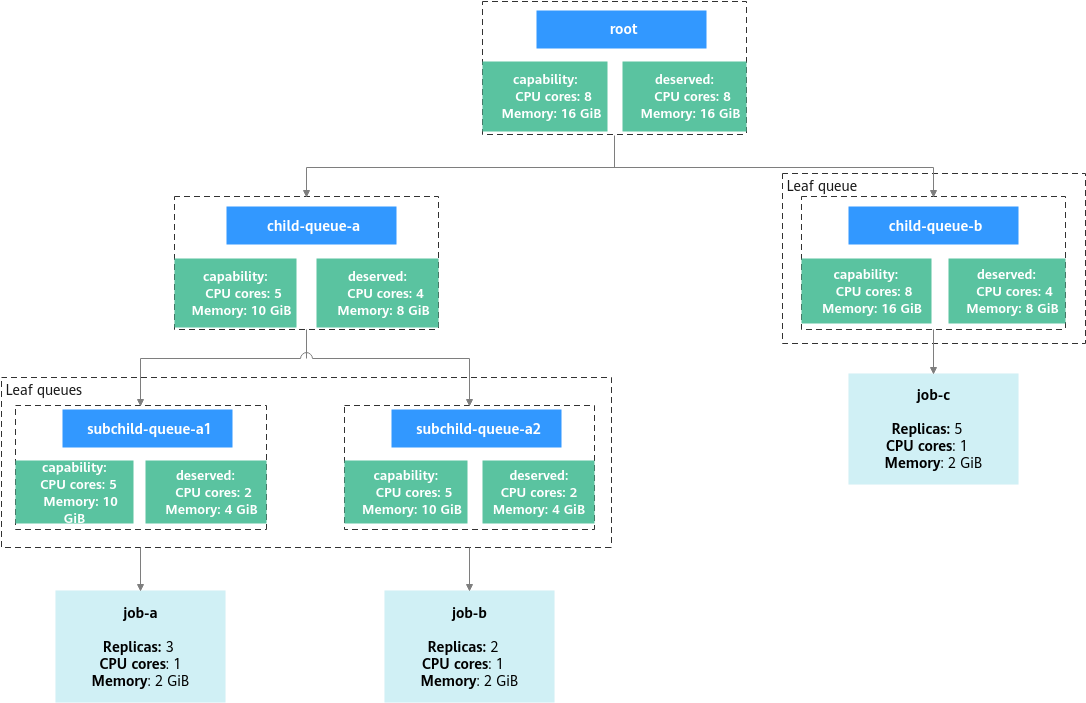
Assume that the cluster has 8 CPU cores and 16 GiB of memory remaining. First, create a hierarchical queue tree. Second, create two Volcano jobs (job-a and job-c) to exhaust cluster resources. Finally, create a Volcano job (job-b) and check the resource reclamation in hierarchical queues. Figure 3 shows the overall structure of this example.
- Create a YAML file for the hierarchical queue tree.
vim hierarchical_queue.yamlThe file content is as follows:
# The parent queue of child-queue-a is the root queue.
apiVersion: scheduling.volcano.sh/v1beta1
kind: Queue
metadata:
  name: child-queue-a
spec:
  reclaimable: true
  parent: root
  capability:
    cpu: "5"
    memory: "10Gi"
  deserved:
    cpu: "4"
    memory: "8Gi"
  guarantee:
    resource:
      cpu: "2"
      memory: "4Gi"
---
# The parent queue of child-queue-b is the root queue.
apiVersion: scheduling.volcano.sh/v1beta1
kind: Queue
metadata:
  name: child-queue-b
spec:
  reclaimable: true
  parent: root
  deserved:
    cpu: "2"
    memory: "4Gi"
---
# The parent queue of subchild-queue-a1 is child-queue-a.
apiVersion: scheduling.volcano.sh/v1beta1
kind: Queue
metadata:
  name: subchild-queue-a1
spec:
  reclaimable: true
  parent: child-queue-a
  # Set deserved as required. If the allocated resources of a queue exceed the value of deserved, resources used by the queue may be reclaimed.
  deserved:
    cpu: "2"
    memory: "4Gi"
---
# The parent queue of subchild-queue-a2 is child-queue-a.
apiVersion: scheduling.volcano.sh/v1beta1
kind: Queue
metadata:
  name: subchild-queue-a2
spec:
  reclaimable: true
  parent: child-queue-a
  # Set deserved as required. If the allocated resources of a queue exceed the value of deserved, resources used by the queue may be reclaimed.
  deserved:
    cpu: "2"
    memory: "4Gi"
The following uses the YAML file of child-queue-a as an example to describe the parameters of hierarchical queues. For more parameter information, see Queue.
Table 1 Hierarchical queue parameters Parameter
Example Value
Description
reclaimable
true
(Optional) Specifies whether to enable the resource reclamation policy.
- true (default): If the resource usage of a queue exceeds the value of deserved, other queues can reclaim the resources that are overused by the queue.
- false: Other queues cannot reclaim the resources that are overused by the queue.
parent
root
(Optional) Specifies the parent queue. The queues are hierarchical, and the total resources of a child queue are limited by the parent queue. If no parent queue is specified, the root queue is used by default.
capability
cpu: "5"
memory: "10Gi"
(Optional) Specifies the upper limit of resources for the queue. The value cannot exceed the capability value of the parent queue. Pods that exceed the upper limit cannot be scheduled.
If a queue does not specify a capability value for a particular resource dimension, it automatically inherits the value from its parent queue. If neither the parent queue nor any of its ancestor queues defines this value, the setting of the root queue is used. By default, the root queue's capability is infinite.
deserved
cpu: "4"
memory: "8Gi"
Specifies the deserved resources of the queue. Each value must be less than or equal to the corresponding capability. In a single-layer queue scenario, the total deserved values of all queues should ideally not exceed the total resources available in the cluster. In a multi-layer queue scenario, the total deserved values of all child queues must not exceed the deserved value configured for their parent queues.
If the resources already allocated to a queue exceed its deserved value, the queue is not allowed to reclaim resources from other queues. Instead, other queues may reclaim its resources, which can result in pod eviction. If the queue's allocated resources, after subtracting the resources requested by a pod being considered for eviction, fall below the queue's deserved value, the pod will not be evicted. This means that only the portion of resources exceeding the deserved value is reclaimable. If a queue does not define a deserved value, the default is 0, meaning all resources used by that queue may be reclaimed.
guarantee
cpu: "2"
memory: "4Gi"
(Optional) Specifies the reserved resources for the queue. The resources are reserved for this queue and cannot be borrowed by any other queue.
The total guarantee value of all child queues cannot exceed the guarantee value configured for their parent queues, and each queue's guarantee value must be less than or equal to its deserved value. If a queue does not specify a guarantee value, the default is 0.
- Create a hierarchical queue tree.
kubectl apply -f hierarchical_queue.yaml
Information similar to the following is displayed:
queue.scheduling.volcano.sh/child-queue-a created
queue.scheduling.volcano.sh/child-queue-b created
queue.scheduling.volcano.sh/subchild-queue-a1 created
queue.scheduling.volcano.sh/subchild-queue-a2 created
- Create YAML files for Volcano jobs (job-a and job-b). job-a is submitted to subchild-queue-a1, and job-b to child-queue-b.
vim vcjob.yamlThe file content is as follows:
# Submit job-a to the leaf queue subchild-queue-a1.
apiVersion: batch.volcano.sh/v1alpha1
kind: Job
metadata:
  name: job-a
spec:
  queue: subchild-queue-a1
  schedulerName: volcano
  minAvailable: 1
  tasks:
    - replicas: 3
      name: test
      template:
        spec:
          containers:
            - image: nginx
              imagePullPolicy: IfNotPresent
              name: nginx
              resources:
                requests:
                  cpu: "1"
                  memory: "2Gi"
---
# Submit job-c to the leaf queue child-queue-b.
apiVersion: batch.volcano.sh/v1alpha1
kind: Job
metadata:
  name: job-c
spec:
  queue: child-queue-b
  schedulerName: volcano
  minAvailable: 1
  tasks:
    - replicas: 5
      name: test
      template:
        spec:
          containers:
            - image: nginx
              imagePullPolicy: IfNotPresent
              name: nginx
              resources:
                requests:
                  cpu: "1"
                  memory: "2Gi"
- Create job-a and job-c.
kubectl apply -f vcjob.yaml
Information similar to the following is displayed:
job.batch.volcano.sh/job-a created
job.batch.volcano.sh/job-c created
- Check the pod statuses.
kubectl get pod
If the following information is displayed and the status of each pod is Running, the cluster CPU and memory are used up.
NAME           READY        STATUS        RESTARTS       AGE
job-a-test-0   1/1          Running       0              3h21m
job-a-test-1   1/1          Running       0              3h31m
job-a-test-2   1/1          Running       0              3h31m
job-c-test-0   1/1          Running       0              24m
job-c-test-1   1/1          Running       0              24m
job-c-test-2   1/1          Running       0              24m
job-c-test-3   1/1          Running       0              24m
job-c-test-4   1/1          Running       0              24m
- Create a YAML file for job-b.
vim vcjob1.yamlThe file content is as follows:
# Submit job-b to the leaf queue subchild-queue-a2.
apiVersion: batch.volcano.sh/v1alpha1
kind: Job
metadata:
  name: job-b
spec:
  queue: subchild-queue-a2
  schedulerName: volcano
  minAvailable: 1
  tasks:
    - replicas: 2
      name: test
      template:
        spec:
          containers:
            - image: nginx
              imagePullPolicy: IfNotPresent
              name: nginx
              resources:
                requests:
                  cpu: "1"
                  memory: "2Gi"
- Create job-b.
kubectl apply -f vcjob1.yaml
Information similar to the following is displayed:
job.batch.volcano.sh/job-b created
Resource reclamation is triggered because the cluster CPU and memory are used up.
- job-a is using 3 CPU cores and 6 GiB of memory in its sibling queue, which exceeds the deserved value of subchild-queue-a1 (2 CPU cores and 4 GiB of memory). The excess 1 CPU core and 2 GiB of memory can be reclaimed, but this amount is still insufficient to meet the resource requirements of job-b.
- Because the reclaimable resources within subchild-queue-a1 are not enough, job-b continues searching upward through the queue hierarchy and eventually identifies job-c in child-queue-b as a candidate for cross-queue resource reclamation.
- Check the pod statuses and verify that resources have been reclaimed.
kubectl get pod
If the following information is displayed, the system is reclaiming resources:NAME READY STATUS RESTARTS AGE job-a-test-0 1/1 Running 0 3h33m job-a-test-1 1/1 Running 0 3h33m job-a-test-2 1/1 Terminating 0 3h33m job-b-test-0 0/1 Pending 0 1m job-b-test-1 0/1 Pending 0 1m job-c-test-0 1/1 Running 0 26m job-c-test-1 1/1 Running 0 26m job-c-test-2 1/1 Running 0 26m job-c-test-3 1/1 Running 0 26m job-c-test-4 1/1 Terminating 0 26m
Wait for several minutes and run the preceding command again to check the pod statuses. If the following information is displayed, job-b has been executed.
NAME           READY        STATUS            RESTARTS       AGE
job-a-test-0   1/1          Running           0              3h35m
job-a-test-1   1/1          Running           0              3h35m
job-a-test-2   0/1          Pending           0              3h35m
job-b-test-0   1/1          Running           0              2m
job-b-test-1   1/1          Running           0              2m
job-c-test-0   1/1          Running           0              28m
job-c-test-1   1/1          Running           0              28m
job-c-test-2   1/1          Running           0              28m
job-c-test-3   1/1          Running           0              28m
job-c-test-4   0/1          Pending           0              28m
Helpful Links
- For more information about queues, see Queue Resource Management (capacity Plugin).
- For more information about Volcano scheduling, see Volcano Scheduling Overview.
What is your overall rating for this page?
Thank you very much for your feedback. We will continue working to improve the documentation.See the reply and handling status in My Cloud VOC.
For any further questions, feel free to contact us through the chatbot.
Chatbot


