

Event Scheduler Not Taking Effect After Being Created
Scenarios
The event scheduler did not take effect after being created.
Troubleshooting
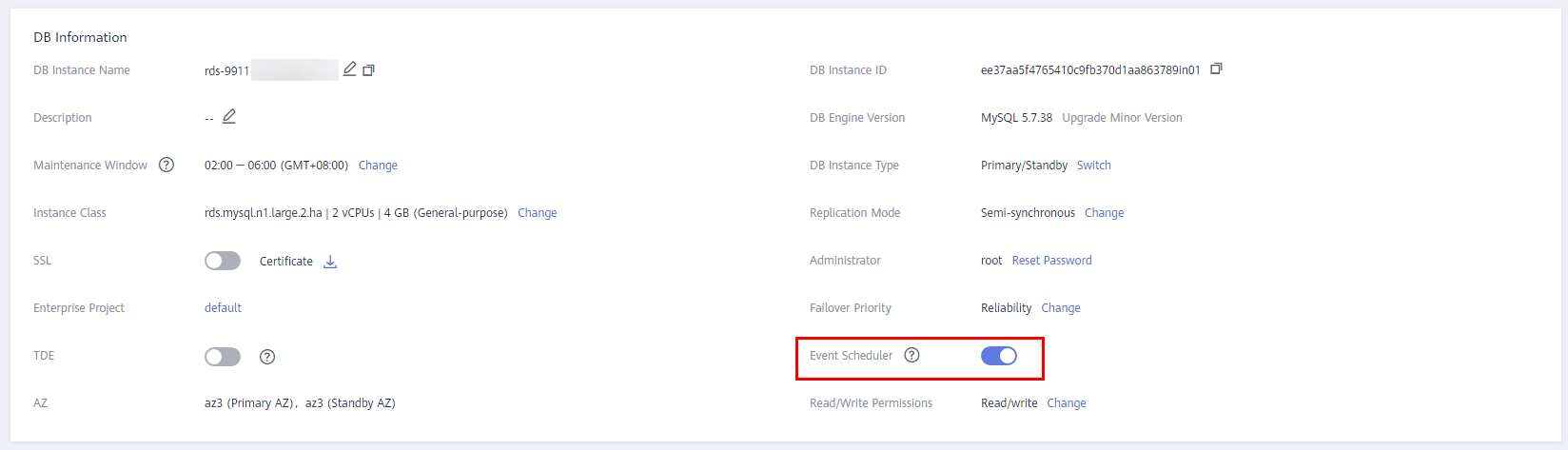
- On the Summary page of the DB instance, check whether Event Scheduler is enabled.
Figure 1 Summary page
- Check whether the event scheduler is in the ENABLED state.
show events;

If the DISABLE ON SLAVE clause is used in the command for creating an event scheduler, the scheduler status will be set to SLAVESIDE_DISABLED and it will not work on the primary instance. To ensure that an event scheduler in the SLAVESIDE_DISABLED state can work properly, use either of the following methods:
- (Recommended) Create another event scheduler without using the DISABLE ON SLAVE clause. When you turn on the Event Scheduler switch, RDS for MySQL automatically sets the event_scheduler parameter to on for the primary instance and to off for the standby instance to make sure that your event scheduler runs only on the primary instance. You do not need to add DISABLE ON SLAVE when creating an event scheduler.
- If the DISABLE ON SLAVE clause must be used, run the following command on the primary node to explicitly enable the event scheduler:
ALTER EVENT event_name ENABLE;
- Check the time zone configured for the instance.
show variables like "%time_zone%";
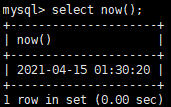
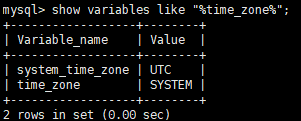
In the preceding figure, the instance uses UTC time, so the event scheduler, which was configured based on Beijing time, does not take effect immediately.
Solution
To make sure that the event scheduler runs properly, ensure that its status is ENABLED and the time zone is correct.
Feedback
Was this page helpful?
Provide feedbackThank you very much for your feedback. We will continue working to improve the documentation.See the reply and handling status in My Cloud VOC.
For any further questions, feel free to contact us through the chatbot.
Chatbot


