

Automatically Scaling Up Storage Space of a GeminiDB Influx Instance
You can enable autoscaling for GeminiDB Influx instances. When storage usage reaches the limit, autoscaling is triggered.
You can enable storage autoscaling when or after creating an instance. For details, see Buying a GeminiDB Influx Instance.
This section describes how to configure storage autoscaling after an instance is created.
Configuring Permissions
- Configure fine-grained permissions for IAM and least permissions for GeminiDB.
For details about how to configure IAM permissions, see Creating a Custom Policy.
{ "Version":"1.1", "Statement":[ { "Effect":"Allow", "Action":[ "iam:permissions:listRolesForAgencyOnProject", "iam:permissions:grantRoleToGroupOnProject", "iam:agencies:createAgency", "iam:agencies:listAgencies", "iam:roles:listRoles", "iam:roles:createRole" ] } ] } - Create a user group and assign permissions to it.
You can create a user group on the IAM console and grant it custom permissions created in 1 and the security administrator role.
- Add a user to a user group.
Log in to the IAM console using a Huawei Cloud account or an IAM account, locate the IAM user that the target instance belongs to, and add it to the user group created in 2. The IAM user will inherit permissions of the user group.
Usage Notes
- Auto Scale is available only when your account balance is sufficient.
- The instance is in the Available status.
- Once Auto Scale is enabled, an agency will be created and fees will be automatically deducted.
- Currently, only GeminiDB Influx instances in a performance-enhanced cluster support autoscaling.
- By default, when the storage is used up (the available storage space is less than or equal to 10% or the available storage is less than or equal to 10 GB), autoscaling is triggered.
- You do not need to restart the instance while scaling its storage. The change has no impact on existing data, services, or your databases.
Automatically Scaling Up Storage of a Single Instance
- Log in to the GeminiDB console.
- On the Instances page, click the target instance. The Basic Information page is displayed.
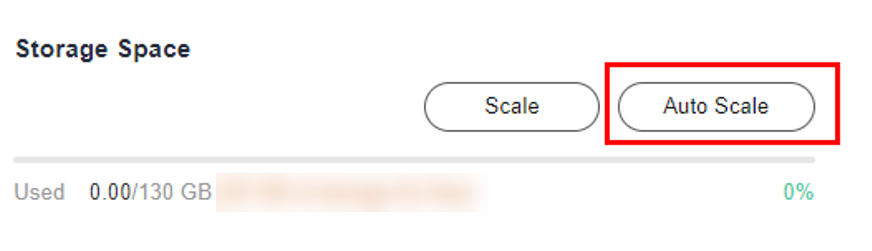
- In the Storage Space area, click Auto Scale.
Figure 1 Auto Scale
- Toggle on Auto Scale and specify the trigger condition and increment.
Figure 2 Configuring autoscaling parameters
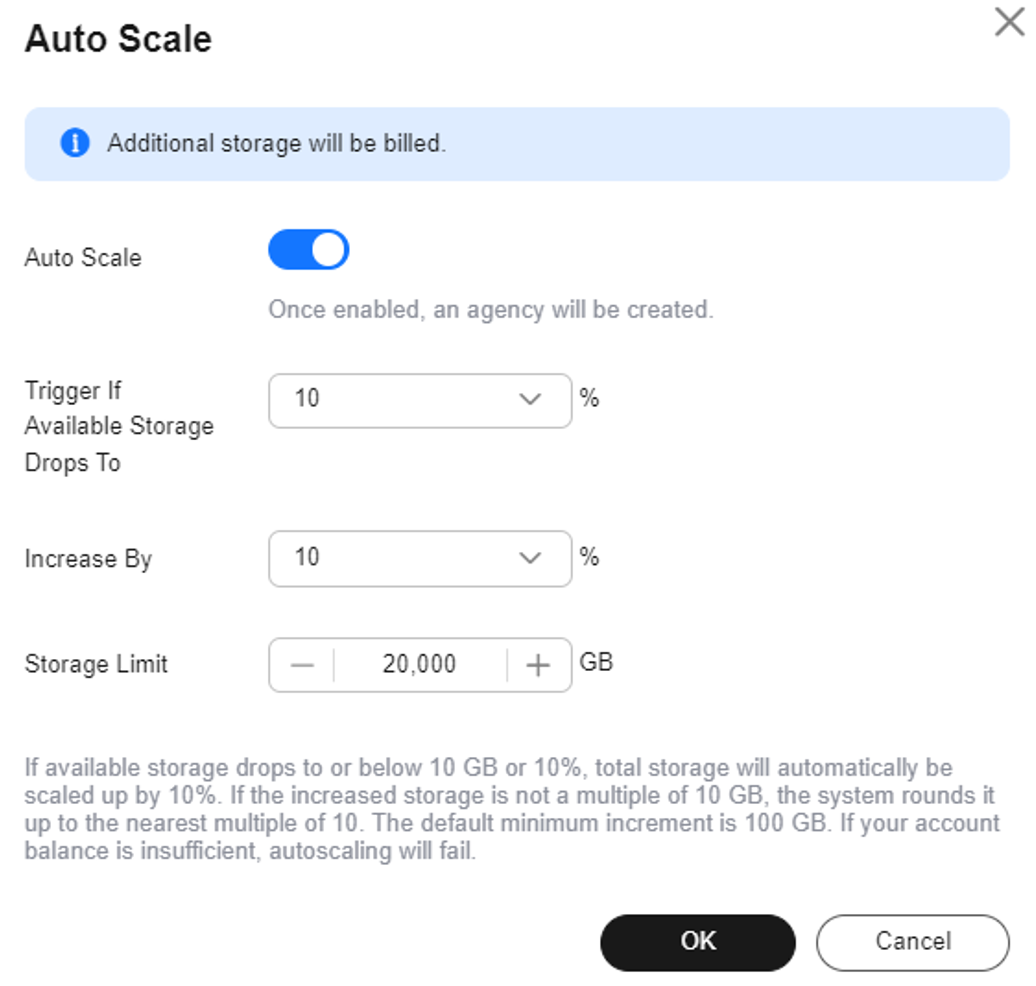
Table 1 Parameters Parameter
Description
Auto Scale
If you toggle on this switch, autoscaling is enabled.
Trigger If Available Storage Drops To
If the available storage usage drops to a specified threshold (10%, 15%, or 20%), autoscaling is triggered.
Increase By
Percentage of the current storage to be automatically scaled up at. The value can be 10%, 15%, or 20%. If the value is not a multiple of 10, it is rounded up. At least 100 GB is added each time.
Storage Limit
Limit of storage that can be automatically scaled up to
- Click OK.
Automatically Scaling Up Storage of Multiple Instances In Batches
- Log in to the GeminiDB console.
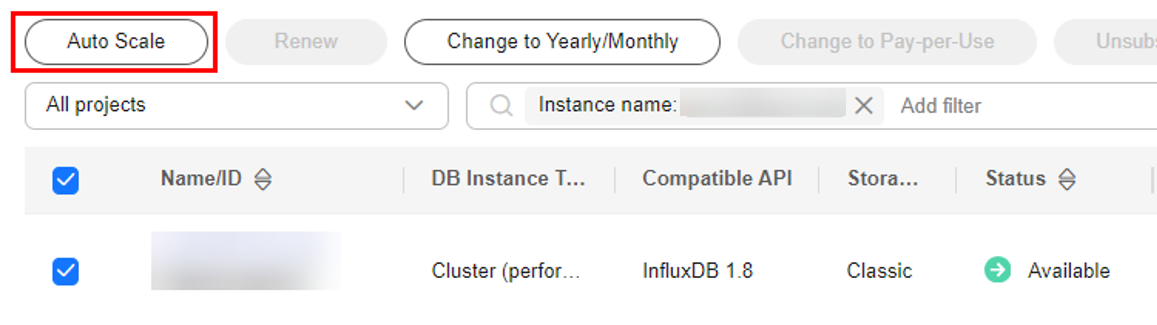
- In the instance list, select the target instances and click Auto Scale.
Figure 3 Auto Scale
- Toggle on Auto Scale and specify trigger conditions.
Figure 4 Configuring autoscaling parameters
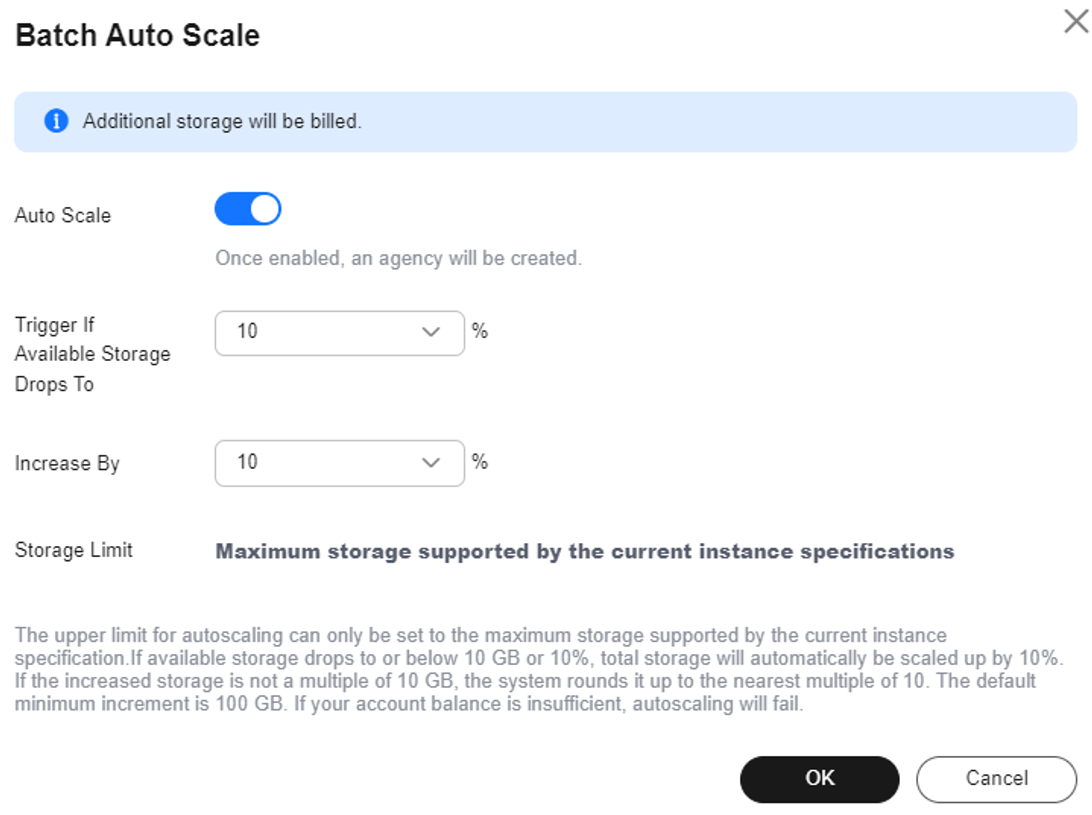
Table 2 Parameters Parameter
Description
Auto Scale
If you toggle on this switch, autoscaling is enabled.
Trigger If Available Storage Drops To
If the available storage usage drops to a specified threshold (10%, 15%, or 20%), autoscaling is triggered.
Increase By
Percentage of the current storage to be automatically scaled up at. The value can be 10%, 15%, or 20%. If the value is not a multiple of 10, it is rounded up. At least 100 GB is added each time.
Storage Limit
Limit of storage that can be automatically scaled up to
- Click OK.
Feedback
Was this page helpful?
Provide feedbackThank you very much for your feedback. We will continue working to improve the documentation.See the reply and handling status in My Cloud VOC.
For any further questions, feel free to contact us through the chatbot.
Chatbot


