

Function Development Overview
FunctionGraph supports the following Python runtimes:
- Python 2.7
- Python 3.6
- Python 3.9
- Python 3.10
- Python 3.12
Function Syntax
Use the following syntax when creating a handler function in Python:
def handler (event, context)
- handler: name of the function that FunctionGraph invokes to execute your code. The name must be consistent with that you define when creating a function.
- event: event parameter defined for the function. The parameter is in JSON format.
- Context: runtime information provided for executing the function. For details, see SDK APIs.
The Python function handler is in the format of [File name].[Function name]. You can configure the handler on the FunctionGraph console.
Python Initializer
For details about the initializer, see Initializer.
The initializer is in the format of [File name].[Initializer name].
For example, if the initializer is named main.my_initializer, FunctionGraph loads the my_initializer function defined in the main.py file.
To use Python to build initialization logic, define a Python function as the initializer. The following is a simple initializer (Python 3.12 is used as an example):
def my_initializer(context):
print('hello world!') - Function name
The function name my_initializer must be the initializer function name specified for a function. For example, if the initializer is named main.my_initializer, FunctionGraph loads the my_initializer function defined in the main.py file.
- context
The context parameter contains the runtime information about a function. For example, request ID, temporary AK, and function metadata.
Non-standard Libraries Integrated with the Python Runtime
Table 1 lists the non-standard libraries integrated with Python, which can be directly declared and used in Python function code.
SDK APIs
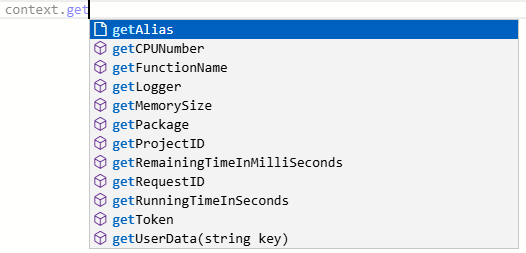
Table 2 describes the context methods provided by FunctionGraph.
| Method | Description |
|---|---|
| getRequestID() | Obtains a request ID. |
| getRemainingTimeInMilliSeconds () | Obtains the remaining running time of a function. |
| getAccessKey() | Obtains the AK (valid for 24 hours) with an agency. If you use this method, you need to configure an agency for the function. FunctionGraph has stopped maintaining the getAccessKey API in the Runtime SDK. You cannot use this API to obtain a temporary AK. |
| getSecretKey() | Obtains the SK (valid for 24 hours) with an agency. If you use this method, you need to configure an agency for the function. FunctionGraph has stopped maintaining the getSecretKey API in the Runtime SDK. You cannot use this API to obtain a temporary SK. |
| getSecurityAccessKey() | Obtains the SecurityAccessKey (valid for 24 hours) with an agency. The cache duration is 10 minutes. That is, the same content is returned within 10 minutes. To use this method, you need to configure an agency for the function. |
| getSecuritySecretKey() | Obtains the SecuritySecretKey (valid for 24 hours) with an agency. The cache duration is 10 minutes. That is, the same content is returned within 10 minutes. To use this method, you need to configure an agency for the function. |
| getSecurityToken() | Obtains the SecurityToken (valid for 24 hours) with an agency. The cache duration is 10 minutes. That is, the same content is returned within 10 minutes. To use this method, you need to configure an agency for the function. |
| getUserData(string key) | Uses keys to obtain the values passed by environment variables. |
| getFunctionName() | Obtains the name of a function. |
| getRunningTimeInSeconds () | Obtains the timeout of a function. |
| getVersion() | Obtains the version of a function. |
| getMemorySize() | Obtains the allocated memory. |
| getCPUNumber() | Obtains CPU usage of a function. |
| getPackage() | Obtains a function group. |
| getToken() | Obtains the token (valid for 24 hours) with an agency. If you use this method, you need to configure an agency for the function. |
| getLogger() | Obtains the logger method provided by the context and returns a log output class. Logs are output in the format of Time-Request ID-Content by using the info method. For example, use the info method to output logs: log = context.getLogger() log.info("test") |
| getAlias() | Obtains function alias. |
As shown in Figure 1, you can use the context class in the code editor on the FunctionGraph console.
Helpful Links
- For details about how to use Python to develop an event function, see Developing a Python Event Function.
- For details about how to create a dependency for a Python function, see Creating a Dependency for a Python Function.
- For more information about function development, such as the supported runtimes, trigger events, function project packaging specifications, and DLL referencing, see Function Development Overview.
What is your overall rating for this page?
Thank you very much for your feedback. We will continue working to improve the documentation.See the reply and handling status in My Cloud VOC.
For any further questions, feel free to contact us through the chatbot.
Chatbot


