

Updated on 2026-02-11 GMT+08:00
Selecting Build Actions
You can select desired build actions that suit your scenarios.
Build on GUI
Go to the Build Actions page, where you can see the default action combination of the selected template.
- You can click
 on a build action to add it to your build task. For details about how to configure each build action, see their "Build on GUI" instructions in Configuring Build Actions.
 If the tool version preset in the build action cannot meet your requirements, you can customize the build environment by referring to Building an Image and Pushing It to SWR.
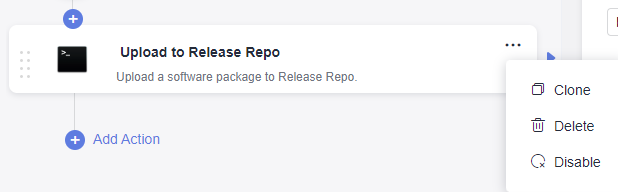
- To delete a build action, select it and choose
 > Delete.
 - To copy a build action, select it and choose
 > Clone.
 - To disable a build action that is reserved, select it and choose
 > Disable. To enable the action again, select it and choose
  > Enable.
Figure 1 Adding, cloning, deleting, and disabling a build action
Build with Code
- To set up the environment for running your code-based build task, set env of the YAML file by referring to the sample code in the "Build with Code" of Configuring the Build Environment.
- To set up the code download mode, set PRE_BUILD of the YAML file by referring to the sample code in the "Build with Code" of Configuring the Code Download.
- To set up the build actions, set BUILD of the YAML file by referring to the sample code in the "Build with Code" of each build action in Configuring Build Actions.
Parent topic: Configuring a Build Task
What is your overall rating for this page?
0
1
2
3
4
5
6
7
8
9
10
Very dissatisfiedVery satisfied
Thank you very much for your feedback. We will continue working to improve the documentation.See the reply and handling status in My Cloud VOC.
The system is busy. Please try again later.
For any further questions, feel free to contact us through the chatbot.
Chatbot


