

Before You Start
Media Processing Center (MPC) transcodes your media files online, inexpensively, efficiently, and at any scale. It converts your media files stored in Object Storage Service (OBS) into the formats you need for playback on devices like smartphones, PCs, and TVs. It also provides functions such as frame capture, watermarks, and video encryption to meet a wide range of requirements.
This document describes how to use application programming interfaces (APIs) to perform operations on MPC, such as creating transcoding templates, transcoding tasks, and snapshot tasks. For details about all supported operations, see API Overview.
Before calling MPC APIs, ensure that you are familiar with MPC concepts. For details, see Service Overview.
MPC provides Representational State Transfer (REST) APIs, allowing you to call APIs using HTTPS.
Additionally, MPC provides you with software development kits (SDKs) in multiple programming languages.
- MPC does not store media files. It processes media files stored in OBS buckets. Therefore, before calling the video transcoding, packaging, animated GIF, and frame capture APIs, you need to upload media files to an OBS bucket and authorize MPC to access the bucket. For details, see Uploading Media Files.
- To learn about the status of media files processed by MPC in real time, you can configure event notifications on the MPC console before calling APIs. For details, see Event Notifications.
Endpoints
An endpoint is the request address for calling an API. Obtain the service endpoint from Regions and Endpoints.
Constraints
- API request throttling is configured for MPC to prevent service interruption caused by repeated API calls in a short period.
Request limit for transcoding:
- A single tenant: 100 requests/minute
- Overall: 1,000 requests/minute
- IAM and MPC APIs must always be called within the same region.
- You cannot process media files across regions.
- For the integer data type in request parameters, enter decimals. Only the digits on the left of the decimal point will be used.
- For more constraints, see the description of each API.
Concepts
- Account
An account is created upon successful registration with the cloud platform. The account has full access permissions for all of its cloud services and resources. It can be used to reset user passwords and grant user permissions. An account is a payment entity. Accounts should not be used directly to perform routine management. For security purposes, create IAM users and grant them permissions for routine management.
- IAM user
An IAM user is created using an account to use cloud services. Each IAM user has its own identity credentials (password and access keys).
An IAM user can view the account ID and user ID on the My Credentials page of the console. The account, username, and password will be required for API authentication.
- Region
A region is a physical location where cloud resources are deployed. Availability zones (AZs) in the same region can communicate with each other over an intranet, but AZs in different regions cannot. Deploying cloud resources in different regions can better suit certain user requirements or comply with local laws or regulations.
- AZ
An AZ contains one or more physical data centers equipped with independent ventilation, fire, water, and electricity facilities. Compute, networking, storage, and other resources in an AZ are logically divided into multiple clusters. AZs within a region are interconnected using high-speed optical fibers to allow you to build cross-AZ, high-availability systems.
- Project
Projects group and isolate resources (including compute, storage, and networking resources) across physical regions. A default project is provided for each region, and subprojects can be created under each default project. Users can be granted permissions to access all resources in a specific project. For more refined access control, create subprojects under a project and purchase resources in the subprojects. Users can then be assigned permissions to access only specific resources in the subprojects.
Figure 1 Project isolating model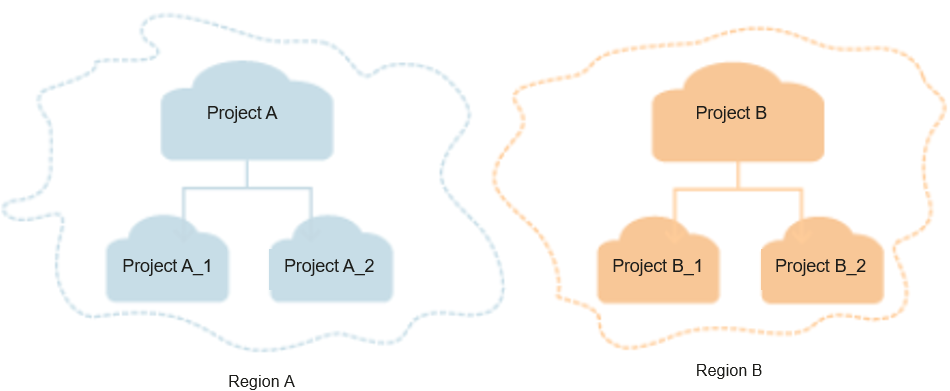
Feedback
Was this page helpful?
Provide feedbackThank you very much for your feedback. We will continue working to improve the documentation.See the reply and handling status in My Cloud VOC.
For any further questions, feel free to contact us through the chatbot.
Chatbot


